
Easytry123 Easytry2094
Návod k obsluze náhradního dálkového ovladače Easytry123
For Samsung HW-J450/ZA, PS-WJ651, PS-WJ470/ZA, HW-J6502, HW-J650 Audio Soundbar Systems
1. Úvod
This manual provides instructions for the Easytry123 replacement remote control, designed for use with various Samsung audio soundbar systems. This remote control offers basic functionality for compatible models. Please note that as a replacement unit, it may not support all advanced functions of the original remote control.
Kompatibilní modely:
- Samsung HW-J450/ZA
- Samsung PS-WJ651
- Samsung PS-WJ651/ZA
- Samsung PS-WJ470/ZA
- Samsung HW-J6502
- Samsung HW-J650
2. Nastavení
2.1 Instalace baterie
The remote control requires batteries for operation. Batteries are not included with the remote control and must be purchased separately. This remote typically uses standard Lithium batteries.
- Najděte přihrádku na baterie na zadní straně dálkového ovladače.
- Remove the battery compartment cover by sliding or gently prying it open.
- Insert the new batteries, ensuring the correct polarity (+ and -) as indicated inside the compartment.
- Nasaďte kryt přihrádky na baterie zpět, dokud bezpečně nezacvakne.

Figure 1: Remote control with battery compartment open.
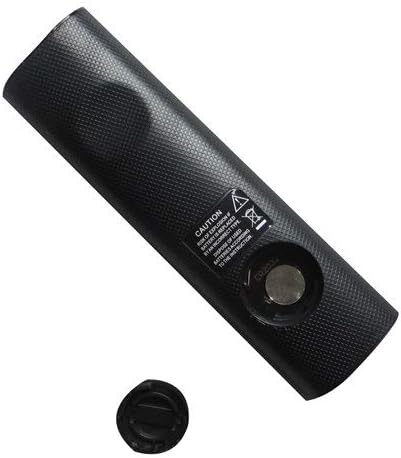
Figure 2: Remote control showing the battery cap detached.
2.2 První použití
This remote control utilizes infrared (IR) technology. No complex pairing or programming is typically required. Once batteries are installed, point the remote directly at your Samsung soundbar system and begin operation.
3. Návod k obsluze
The remote control features 15 buttons for various functions. While specific button labels may vary, common functions include:
- Moc: Zapíná nebo vypíná systém soundbaru.
- Zvýšení/Snížení hlasitosti: Nastavuje výstupní úroveň zvuku.
- Ztlumit: Ztiší zvukový výstup.
- Vstup/zdroj: Cycles through available audio input sources (e.g., HDMI, Optical, Bluetooth).
- Navigační tlačítka: Used for menu navigation (if supported by the soundbar and remote).
- Ovládání přehrávání: Play, Pause, Skip (if controlling a connected media device).
For optimal performance, ensure a clear line of sight between the remote control and the soundbar's IR receiver. The maximum effective range is approximately 10 meters (33 feet).
4. Údržba
4.1 Výměna baterie
Replace batteries when the remote control's response becomes inconsistent or stops working. Always replace all batteries at the same time with new ones of the same type. Do not mix old and new batteries, or different types of batteries.
4.2 Čištění
To clean the remote control, wipe it with a soft, dry cloth. Do not use liquid cleaners, abrasive pads, or chemical solvents, as these can damage the remote's surface or internal components.
4.3 Skladování
Dálkový ovladač skladujte na chladném a suchém místě mimo dosah přímého slunečního záření a extrémních teplot. Pokud dálkový ovladač nebudete delší dobu používat, doporučuje se vyjmout baterie, aby nedošlo k jejich vytečení.
5. Řešení problémů
- Dálkové ovládání nereaguje:
- Zkontrolujte, zda jsou baterie vloženy správně se správnou polaritou.
- Vyměňte baterie za nové.
- Ensure there is a clear line of sight between the remote and the soundbar's IR receiver. Remove any obstructions.
- Ujistěte se, že se nacházíte v efektivním provozním dosahu (přibližně 10 metrů).
- Některé funkce nefungují:
- As a replacement remote, it may not support all advanced or specific functions of the original equipment. This is normal for universal or replacement remotes.
- Verify that your soundbar model is listed as compatible in the Introduction section.
6. Specifikace
| Funkce | Specifikace |
|---|---|
| Značka | Easytry123 |
| Název modelu | Easytry2094 |
| Technologie připojení | Infračervený (IR) |
| Množství tlačítek | 15 |
| Typ ovladače | Ovládání tlačítkem |
| Maximální dosah | 10 metrů |
| Typ baterie | Lithium (není součástí balení) |
| Barva | Černý |
| Kompatibilní zařízení | Samsung Audio Soundbar Systems (specific models listed) |
7. Záruka a podpora
For warranty information and customer support, please refer to the seller or retailer from whom you purchased this product. Specific warranty terms and support channels are typically provided at the point of sale.
Ask a question about this manual
Ask about setup, troubleshooting, compatibility, parts, safety, or missing instructions. Manuals+ will review the question and use this page’s manual context to help answer it.