
1. Úvod
This manual provides detailed instructions for the safe and effective operation of your MICTUNING 18 LED UV Black Light. Please read this manual thoroughly before use and retain it for future reference.
2. Konec produktuview
The MICTUNING 18 LED UV Black Light is designed to produce an iridescent violet light source, enhancing various environments. It features multiple lighting modes and can be controlled via a remote or manual panel.
2.1 Komponenty
- 18 UV LED Black Light Unit
- RF Remote Control (battery not included)
- Nastavitelná montážní konzola
- Napájecí kabel
- Uživatelská příručka

Image: The MICTUNING 18 LED UV Black Light unit, its remote control, power cable, and mounting bracket.
2.2 Klíčové vlastnosti
- High-Quality UV LEDs: Equipped with 18 high-quality UV LEDs for efficient light output.
- Více režimů osvětlení: Includes Auto, Jump, Color Gradient, Flash, Pulse, and Sound-activated modes.
- Dálkové ovládání: Convenient RF remote control for mode selection and speed adjustment.
- Ovládání DMX-512: Standard DMX-512 compatibility for professional setups.
- Robustní konstrukce: Aluminum alloy housing with an integrated fan for heat dissipation.
- Nastavitelný úhel: Features an adjustable mounting bracket for flexible positioning.
3. Pokyny k nastavení
- Rozbalit: Opatrně vyjměte všechny součásti z obalu.
- Montáž:
- Attach the adjustable bracket to the light unit using the provided screws.
- The unit can be placed on a flat surface or mounted to a wall/ceiling using appropriate hardware (not included).
- Adjust the lighting angle as needed using the knobs on the side of the bracket.

Image: The adjustable bracket allows for 360-degree rotation to direct the light.
- Připojení napájení: Connect the power cable to the light unit and then plug it into a standard AC 100-240V power outlet.
- Baterie dálkového ovládání: Insert the required battery into the RF remote control (battery not included).
- DMX připojení (volitelné): For DMX control, connect a DMX cable from your DMX controller to the "DMX IN" port on the light unit. If chaining multiple units, connect from "DMX OUT" of the first unit to "DMX IN" of the next.
4. Návod k obsluze
The MICTUNING UV Black Light can be operated using the included RF remote control or the manual control panel on the back of the unit.
4.1 Ruční ovládací panel
The manual control panel features an LCD screen and buttons for mode selection and adjustment.

Image: The back panel of the light unit showing DMX IN/OUT, LCD display, and control buttons. The remote control layout is also shown.
- Use the buttons next to the LCD screen to navigate through modes and settings.
- The LCD screen will display the currently selected mode (e.g., "A 1.05" for Auto mode).
4.2 Obsluha dálkového ovladače
The RF remote control provides convenient access to all lighting modes and adjustments.
- Zapnutí/vypnutí: Stiskněte tlačítko červené tlačítko napájení pro zapnutí nebo vypnutí jednotky.
- Výběr režimu:
- AUTO: Automatic mode cycling through various effects.
- ZVUK: Light reacts to sound/music.
- STROBE: Flashing effect.
- VŠE NA: All LEDs are continuously lit.
- SLÁBNOUT: Gradual transition between effects.
- SKOK: Abrupt changes between effects.
- PULS: Pulsating light effect.
- BARVA +/-: Adjusts color-related settings or selects specific effects within certain modes.
- RYCHLOST +/-: Adjusts the speed of effects in modes like Auto, Jump, Fade, and Pulse.
5. Údržba
Regular maintenance ensures optimal performance and longevity of your UV Black Light.
- Čištění: Periodically clean the lens and housing with a soft, dry cloth. Do not use abrasive cleaners or solvents.
- Větrání: Ensure the integrated fan and ventilation openings are free from dust and obstructions to prevent overheating.
- Skladování: Pokud přístroj delší dobu nepoužíváte, skladujte jej na chladném a suchém místě, mimo dosah přímého slunečního záření a extrémních teplot.
- Odpojení napájení: Always disconnect the power before cleaning or performing any maintenance.
6. Řešení problémů
| Problém | Možná příčina | Řešení |
|---|---|---|
| Světlo se nerozsvítí. | No power supply; faulty power cable; unit off. | Check power connection and outlet. Ensure power button is pressed. Try a different power cable if available. |
| Dálkové ovládání nefunguje. | Battery depleted or incorrectly inserted; remote out of range; obstruction. | Replace remote battery. Ensure battery is inserted correctly. Operate remote within close range and without obstructions. |
| Light effects are not changing. | Stuck in a single mode; DMX conflict. | Try selecting a different mode using the remote or manual panel. If using DMX, ensure DMX settings are correct and no conflicts exist. |
| Jednotka se přehřívá. | Poor ventilation; fan obstruction. | Ensure adequate airflow around the unit. Clean any dust or debris from the fan and vents. |
7. Specifikace
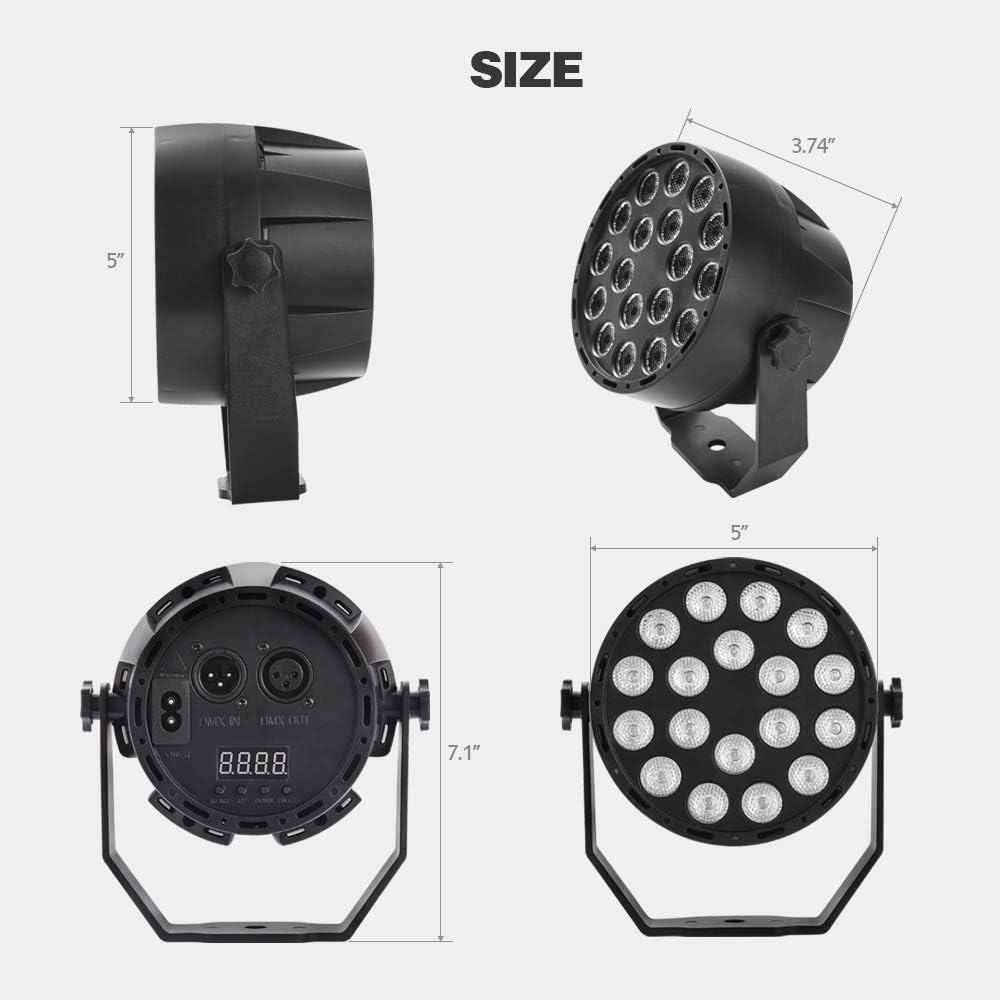
Image: Dimensions of the MICTUNING 18 LED UV Black Light.
| Funkce | Detail |
|---|---|
| Značka | MIKTUNOVÁNÍ |
| Číslo modelu | MIC-UBL-207D |
| Rozměry produktu (D x Š x V) | 9.5 x 9.5 x 12.7 cm (3.74 x 3.74 x 5 palce) |
| Hmotnost | 490 gramů (1.08 lb) |
| Materiál | Hliníková slitina |
| Moc | 18 wattů |
| svtage | AC 100-240 voltů |
| Režimy ovládání | Auto, Jump, Color Gradient, Flash, Pulse, Sound, DMX-512 |
| Dálkové ovládání | RF Remote (battery not included) |
8. Bezpečnostní informace
- Do not look directly into the UV light source. Prolonged exposure can be harmful to eyes.
- Ensure the unit is securely mounted or placed on a stable surface to prevent falling.
- Uchovávejte jednotku mimo dosah vody nebo jiných kapalin.
- Do not operate the unit if the power cable is damaged.
- Tento výrobek je určen pouze pro vnitřní použití.
- Uchovávejte mimo dosah dětí.
9. Záruka a podpora
For warranty information or technical support, please contact MICTUNING customer service. Details regarding spare parts availability are not provided in this manual.
Please refer to the product packaging or the official MICTUNING webweb, kde najdete nejaktuálnější kontaktní informace podpory.