
1. Úvod
This user manual provides detailed instructions for the installation, configuration, and operation of the Tenda TEG1124P-24-250W Unmanaged Gigabit PoE Ethernet Switch. Please read this manual thoroughly before using the device to ensure proper setup and optimal performance. Keep this manual for future reference.
2. Konec produktuview
2.1 Klíčové vlastnosti
- 24 gigabitových ethernetových portů (10/100/1000 Mbps)
- Power over Ethernet (PoE) support on all 24 ports
- Unmanaged switch for plug-and-play simplicity
- Total PoE power budget of 250 Watts
- Odolný kovový casing for robust performance
- Compatible with various PoE-powered devices such as IP cameras
2.2 Obsah balení
- Tenda TEG1124P-24-250W Unmanaged Gigabit PoE Ethernet Switch
- Rack Mount Kit
- 4 podložky na nohy
- Napájecí kabel
- Průvodce rychlou instalací
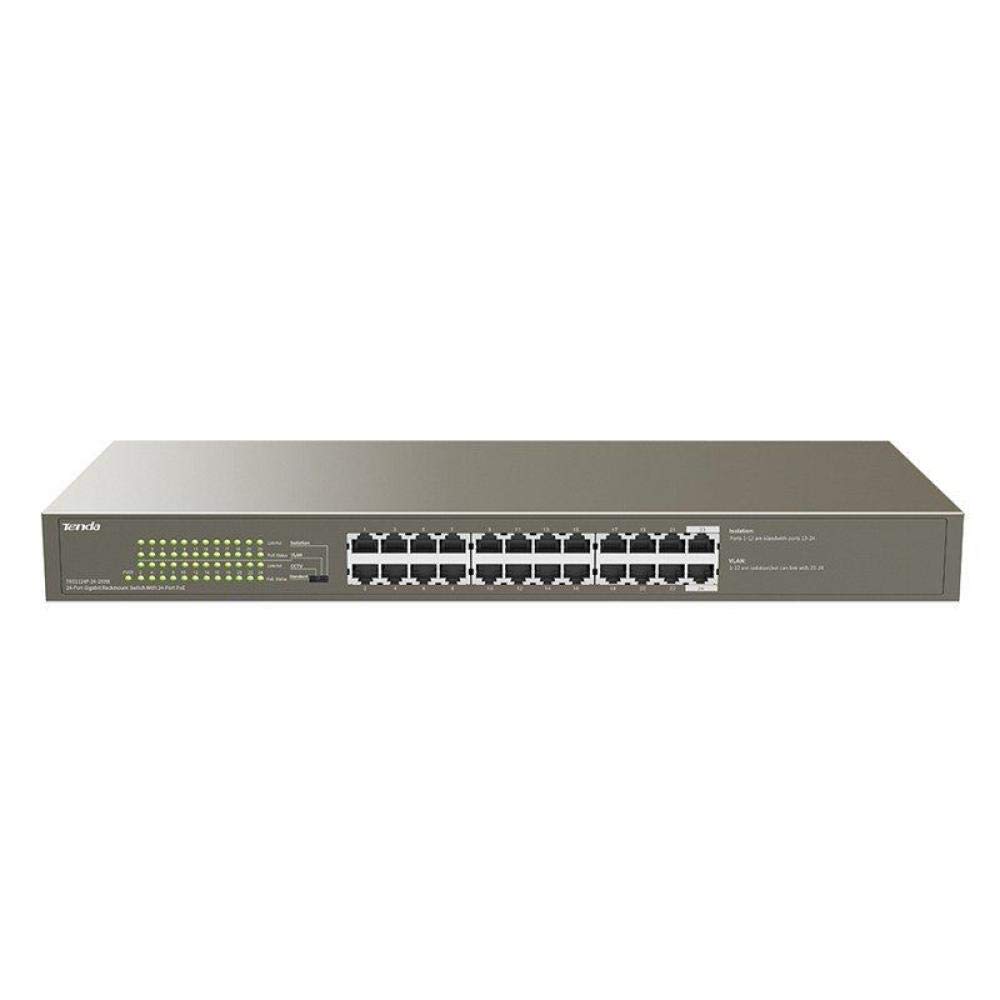
Obrázek 1: Přední strana view of the Tenda TEG1124P-24-250W Unmanaged Gigabit PoE Ethernet Switch, showing 24 RJ45 ports and LED indicators.
3. Nastavení
3.1 Fyzická instalace
The Tenda TEG1124P-24-250W switch can be installed on a desktop or mounted in a standard 19-inch equipment rack.
- Umístění na počítači: Attach the included rubber foot pads to the bottom of the switch. Place the switch on a flat, stable surface with adequate ventilation.
- Montáž do racku: Use the provided rack mount brackets and screws to secure the switch into a standard 19-inch equipment rack. Ensure proper airflow around the device.

Figure 2: Diagram illustrating the dimensions of the Tenda TEG1124P-24-250W switch: approximately 24.64 cm length, 16.51 cm width, and 2.79 cm height.
3.2 Připojení zařízení
- Připojení napájení: Connect the provided power cord to the power inlet on the rear panel of the switch and then to a suitable power outlet.
- Síťová zařízení: Connect your network devices (e.g., computers, servers, NVRs) to any of the 24 RJ45 ports using standard Ethernet cables.
- PoE zařízení: For Power over Ethernet (PoE) compatible devices (e.g., IP cameras, VoIP phones, wireless access points), connect them to any of the 24 RJ45 ports. The switch will automatically detect and provide power to these devices if they are PoE compliant and within the switch's power budget.
4. Návod k obsluze
4.1 Zapnutí
After connecting the power cord, the switch will automatically power on. The Power LED indicator on the front panel should illuminate, indicating that the device is receiving power.
4.2 LED indikátory
The front panel of the switch features LED indicators to provide status information:
- LED napájení: Svítí, když je spínač zapnutý.
- LED diody Link/Act (na port):
- Svítí zelená: A stable network link is established.
- Blikající zelená: Data jsou přenášena nebo přijímána přes port.
- Vypnuto: No network link is detected.
- PoE Status LEDs (per port):
- Plně žlutá: Do připojeného zařízení je dodáváno napájení PoE.
- Blikající žlutá: PoE power fault or overload detected.
- Vypnuto: No PoE device connected or no power being supplied.
4.3 PoE Functionality
The TEG1124P-24-250W switch automatically detects and supplies power to IEEE 802.3af/at compliant Powered Devices (PDs) connected to its ports. It is an unmanaged switch, meaning no configuration is required for basic network and PoE operation. The total power budget for PoE is 250W. Ensure that the total power consumption of all connected PoE devices does not exceed this limit.
5. Údržba
To ensure the longevity and reliable operation of your Tenda switch, follow these maintenance guidelines:
- Čištění: Pravidelně čistěte vnější povrch spínače měkkým, suchým hadříkem. Nepoužívejte tekuté ani aerosolové čisticí prostředky. Ujistěte se, že ventilační otvory jsou bez prachu a ucpané.
- Větrání: Ujistěte se, že je spínač umístěn v dobře větraném prostoru, aby nedošlo k jeho přehřátí. Neblokujte větrací otvory.
- Podmínky prostředí: Operate the switch within the recommended temperature and humidity ranges specified in the product specifications.
- Správa kabelů: Udržujte síťové kabely uspořádané a řádně zajištěné, abyste zabránili jejich náhodnému odpojení nebo poškození.
6. Řešení problémů
If you encounter issues with your Tenda TEG1124P-24-250W switch, refer to the following common problems and solutions:
- Bez napájení:
- Ujistěte se, že je napájecí kabel bezpečně připojen k přepínači a k funkční zásuvce.
- Ověřte funkčnost elektrické zásuvky zapojením jiného zařízení.
- Check the Power LED on the front panel. If it is off, contact technical support.
- Bez síťového připojení:
- Check the Link/Act LED for the connected port. If it is off, ensure the Ethernet cable is properly connected at both ends.
- Zkuste jiný ethernetový kabel nebo port.
- Verify that the connected device (e.g., computer, router) is powered on and functioning correctly.
- Zařízení PoE se nezapíná:
- Check the PoE Status LED for the connected port. If it is off, ensure the device is PoE compliant (IEEE 802.3af/at).
- If the PoE LED is flashing yellow, there might be a power fault or overload. Disconnect other PoE devices to reduce the total power load.
- Ensure the connected PoE device is not drawing more power than the switch can provide per port or exceeding the total 250W budget.
- Try connecting the PoE device to a different port.
7. Specifikace
| Funkce | Popis |
|---|---|
| Název značky | Tenda |
| Číslo modelu | TEG1124P-24-250W |
| Název typu produktu | Síťový přepínač |
| Počet portů | 24 |
| Typ přepínače | Unmanaged PoE |
| Rychlost přenosu dat | 1000 Mbps (gigabit) |
| Uživatelské rozhraní | RJ45, PoE |
| Maximální výkon PoE | 250 wattů |
| Typ materiálu pouzdra | Kov |
| Barva | Šedá |
| Kompatibilní zařízení | Fotoaparát |
| Rozměry produktu (D x Š x V) | 24.6 cm x 16.5 cm x 2.8 cm |
| Hmotnost položky | 3434 gramů |
8. Záruka a podpora
For warranty information and technical support, please refer to the warranty card included with your product or visit the official Tenda website. You may also contact your local distributor or reseller for assistance.