
smartgen HGM6110N
SmartGen HGM6110N Generator Controller User Manual
Komplexní průvodce instalací, provozem a údržbou.
1. Konec produktuview
The SmartGen HGM6100N series automatic controller is an advanced unit designed for the automatic control and monitoring of gensets. It integrates digital, intelligent, and network techniques to provide comprehensive functionality including automatic start/stop, data measurement, alarm protection, and three remote functions: remote control, remote measurement, and remote communication.
This controller features an LCD display with multiple language options and user-friendly push-button operation. Its robust design, including an acrylic screen and silica-gel panel, ensures durability and adaptability to various temperatures. The HGM6100N series is suitable for a wide range of automatic control systems due to its compact structure, simple connections, and high reliability.
2. Klíčové vlastnosti
- Automatic Start Module: Controls generator start/stop via remote signals.
- Mains/Generator Automatic Switching Control (AMF): Available in HGM6120N variants, suitable for systems with mains and genset.
- LCD Display: 132x64 pixel LCD with backlight, offering optional language interfaces (Chinese, English, Spanish, Russian, Portuguese, Turkish, Polish, French).
- Durable Construction: Features an acrylic screen for improved wear and scratch resistance, and a silica-gel panel and keys for temperature adaptability.
- Komunikační porty:
- RS485 Port: Enables "three remote" functions (remote control, measure, communication) via MODBUS protocol (HGM6110NC/6120NC models).
- CANBUS Port: Connects to electronic injection systems with J1939 (HGM6110CAN/6120CAN models).
- Parameter Configuration: All parameters can be configured from the front panel or via PC using a USB interface (or RS485 interface).
3. Varianty produktu
The HGM6100N series includes several variants, each offering specific functionalities:
- HGM6110N / HGM6110NC / HGM6110CAN: These are Automatic Start Modules. They control the generator to start and stop based on a remote start signal.
- HGM6120N / HGM6120NC / HGM6120CAN: Building upon the HGM6110N variants, these models add mains AC monitoring and automatic mains/generator switching control (AMF). They are particularly suited for automation systems involving both mains power and a genset.
Poznámka: HGM6110NC/6120NC models include an RS485 port. HGM6110CAN/6120CAN models feature a CAN port. HGM6110N/6120N models do not include these specific communication ports.
4. Nastavení a instalace
Proper installation is crucial for the optimal performance and safety of your HGM6110N controller. While specific wiring diagrams are typically provided with the product, this section outlines general considerations.
4.1 Montáž
Mount the controller in a secure, dry location, away from excessive vibration, heat, and direct sunlight. Ensure adequate ventilation around the unit. The compact design allows for panel mounting.
4.2 Zapojení kabeláže
Refer to the detailed wiring diagram supplied with your specific HGM6110N model for precise connections. Key connections typically include:
- DC Power Supply (12V/24V)
- Engine Start/Stop Outputs
- Generator Voltage a proudové vstupy
- Síť Voltage Inputs (for HGM6120N variants)
- Sensor Inputs (Oil Pressure, Water Temperature, Fuel Level, etc.)
- Výstupy alarmu
- Communication Ports (RS485, CANBUS, USB - depending on model)
Ensure all connections are secure and correctly polarized. Use appropriate wire gauges for all circuits.
4.3 Počáteční zapnutí
Before applying power, double-check all wiring. Once confirmed, apply DC power to the controller. The LCD display should illuminate, and the controller will perform a self-test. Follow the on-screen prompts for initial setup, including language selection and basic parameter configuration.
5. Návod k obsluze
This section details the operation of the HGM6110N controller, including its display and control buttons.
5.1 Uspořádání ovladače
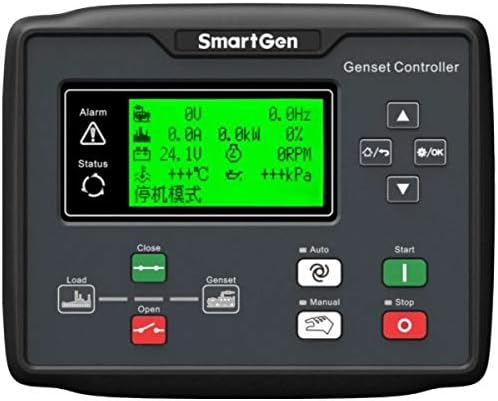
Figure 5.1: Front panel of the SmartGen HGM6110N Genset Controller. It features a central LCD screen displaying various parameters like voltage, current, power, frequency, temperature, and pressure. To the left of the screen are 'Alarm' and 'Status' indicators. Below the screen are controls for 'Load' (Open/Close) and 'Genset'. On the right, there are navigation buttons (Up, Down, Left/Right, OK) and mode selection buttons ('Auto', 'Manual') along with 'Start' (green) and 'Stop' (red) buttons.
5.2 Zobrazení informací
The LCD display provides real-time operational data and status indicators. Common parameters displayed include:
- Generator Voltage (V)
- Generator Current (A)
- Generator Power (kW)
- Frekvence (Hz)
- Otáčky motoru
- Baterie Voltage (V)
- Engine Temperature (°C)
- Tlak oleje (kPa)
- Operating Mode (e.g., "停机模式" - Shutdown Mode)
- Alarm and Status indicators
5.3 Ovládací tlačítka
The controller features intuitive push-buttons for navigation and operation:
- Navigation Buttons (Up, Down, Left/Right, OK): Used to navigate through menus, adjust parameters, and confirm selections.
- Tlačítko automatického režimu: Puts the controller into automatic operation mode, allowing the genset to start/stop based on configured signals (e.g., remote start, mains failure for HGM6120N).
- Tlačítko manuálního režimu: Allows for manual control of the genset.
- Tlačítko Start (zelené): Initiates the genset start sequence in Manual mode.
- Tlačítko Stop (červené): Initiates the genset stop sequence.
- Load Control (Close/Open): Buttons to control the load switch, connecting or disconnecting the generator from the load.
5.4 Provozní režimy
The HGM6110N controller supports different operating modes:
- Manuální režim: In this mode, the user manually starts and stops the generator using the front panel buttons. This mode is typically used for testing or specific operational requirements.
- Automatický režim: This is the primary operational mode for unattended operation. The controller monitors predefined conditions (e.g., remote start signal, mains power status for AMF models) and automatically starts or stops the generator as required.
- Režim zastavení: The generator is stopped, and the controller is in a standby state, ready for a start command.
To switch between modes, press the corresponding mode button on the front panel.
6. Údržba
Regular maintenance ensures the longevity and reliable operation of your SmartGen HGM6110N controller. Always disconnect power before performing any maintenance.
- Čištění: Periodically clean the controller's exterior with a soft, dry cloth. Do not use abrasive cleaners or solvents. Ensure the display and buttons are free from dust and debris.
- Spojení: Routinely check all wiring connections for tightness and signs of corrosion. Loose connections can lead to intermittent operation or damage.
- Aktualizace firmwaru: Zkontrolujte výrobce website for any available firmware updates. Updates can improve performance, add features, or resolve known issues. Follow the provided instructions carefully for any update procedures.
- Kontrola prostředí: Ensure the operating environment remains within the specified temperature and humidity ranges. Protect the controller from excessive moisture and direct sunlight.
7. Řešení problémů
This section provides general guidance for common issues. For complex problems, consult a qualified technician or SmartGen support.
| Problém | Možná příčina | Řešení |
|---|---|---|
| Displej ovladače je prázdný. | No power supply; Loose power connection; Blown fuse. | Check DC power input; Verify power connections; Inspect and replace fuse if necessary. |
| Generátor se v automatickém režimu nespustí. | Remote start signal not active; Low battery voltage; Engine fault (e.g., low oil pressure, high temperature). | Verify remote start signal; Check genset battery; Inspect engine for fault codes on controller display. |
| Inaccurate readings on display. | Sensor malfunction; Incorrect parameter calibration; Loose sensor wiring. | Check sensor connections; Verify sensor functionality; Recalibrate parameters if needed (refer to advanced settings). |
| Communication issues (RS485/CAN). | Incorrect wiring; Wrong communication settings; Device incompatibility. | Verify communication wiring (A/B, termination resistors); Check baud rate and protocol settings; Ensure connected devices are compatible. |
Always refer to the specific alarm codes displayed on the controller for more precise troubleshooting steps.
8. Specifikace
| Atribut | Detail |
|---|---|
| Výrobce | SMARTGEN |
| Číslo dílu | HGM6110N |
| Číslo modelu položky | HGM6110N |
| Hmotnost položky | 11.3 unce (cca 320 gramů) |
| Rozměry produktu | 8.23 x 6.54 x 1.73 palců (přibližně 20.9 x 16.6 x 4.4 cm) |
| Barva | LCD (referring to the display type) |
| Styl | Automatický |
| Položka Množství v balení | 1 |
| Speciální funkce | Ergonomický design |
| Kompatibilní zařízení | Generátor |
| Technologie připojení | USB (pro konfiguraci PC) |
9. Záruka a podpora
Specific warranty terms and conditions for the SmartGen HGM6110N controller are typically provided with the product packaging or can be obtained from the point of purchase or the official SmartGen webstránky. Uschovejte si prosím doklad o koupi pro případ reklamace.
For technical support, troubleshooting assistance beyond this manual, or spare parts inquiries, please contact SmartGen customer service or an authorized service center. Contact information can usually be found on the manufacturer's webdokumentaci k webu nebo produktu.
Ask a question about this manual
Ask about setup, troubleshooting, compatibility, parts, safety, or missing instructions. Manuals+ will review the question and use this page’s manual context to help answer it.