
Zavedení
Děkuji za nákupasing the Altec Lansing LifeJacket H2O 4 Waterproof Bluetooth Speaker. This manual provides essential information for setting up, operating, maintaining, and troubleshooting your speaker to ensure optimal performance and longevity.

Image: The Altec Lansing LifeJacket H2O 4 speaker, black in color, surrounded by water splashes, highlighting its waterproof capabilities.
Co je v krabici
- Altec Lansing LifeJacket H2O 4 Portable Bluetooth Speaker
- USB nabíjecí kabel
- Rychlý průvodce
Klíčové vlastnosti
- Everything Proof: Certified IP67 rating ensures the speaker is waterproof, shockproof, snowproof, and dustproof.
- Prodloužená životnost baterie: Užijte si až 10 hodin nepřetržitého přehrávání hudby na jedno nabití.
- Impressive Bluetooth Range: Connect and play music from up to 100 feet away with Bluetooth 4.2 technology.
- Integrace hlasového asistenta: Seamlessly use Siri or Google Assistant through the speakerphone.
- Odolný design: Rugged construction built to withstand various outdoor and indoor environments.
- Čistý zvuk: Delivers breathtaking stereo sound with deep bass and exceptional clarity.
Nastavení
1. Nabíjení reproduktoru
Before first use, fully charge your LifeJacket H2O 4 speaker.
- Locate the charging port on the speaker, usually protected by a rubber flap.
- Open the rubber flap and insert the small end of the provided USB charging cable into the speaker's charging port.
- Připojte větší konec kabelu USB k napájecímu adaptéru USB (není součástí balení) nebo k portu USB počítače.
- The charging indicator light will illuminate. Once fully charged, the light will change or turn off (refer to specific light behavior in the Quick Start Guide).
2. Zapnutí/vypnutí
- To power on, press and hold the Power button until you hear an audible prompt and the indicator light turns on.
- To power off, press and hold the Power button again until you hear an audible prompt and the indicator light turns off.
Ovládání reproduktoru
1. Párování Bluetooth
Pair your speaker with a Bluetooth-enabled device (smartphone, tablet, laptop) to stream audio wirelessly.
- Ujistěte se, že je reproduktor zapnutý a nachází se do 100 metrů od vašeho zařízení.
- The speaker will automatically enter pairing mode when powered on for the first time, or if no device is connected. The Bluetooth indicator light will flash.
- Na svém zařízení přejděte do nastavení Bluetooth a vyhledejte dostupná zařízení.
- Select "LifeJacket H2O 4" from the list.
- Once paired, the Bluetooth indicator light on the speaker will become solid, and you will hear a confirmation tone.
- Pokud budete vyzváni k zadání hesla, zadejte „0000“.

Image: The Altec Lansing LifeJacket H2O 4 speaker resting on a wooden bench, demonstrating its portability and suitability for outdoor use.
2. Ovládání hlasitosti
- Stiskněte tlačítko + tlačítko pro zvýšení hlasitosti.
- Stiskněte tlačítko - tlačítko pro snížení hlasitosti.
3. Ovládání přehrávání
- Press the Play/Pause button to play or pause audio.
- Dvojitým stisknutím tlačítka Přehrát/Pozastavit přeskočíte na další skladbu.
- Triple-press the Play/Pause button to go to the previous track.
4. Hlasový asistent
Activate your device's voice assistant (Siri or Google Assistant) through the speaker.
- Press the Voice Assistant button (often indicated by a microphone icon) to activate Siri or Google Assistant on your paired device.
- Řekněte svůj příkaz jasně do mikrofonu reproduktoru.
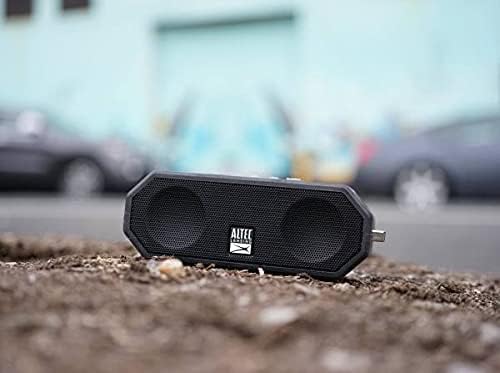
Image: The Altec Lansing LifeJacket H2O 4 speaker placed on rough ground, showcasing its durable and rugged design suitable for various environments.
Údržba
- Čištění: Použijte měkký, damp cloth to clean the speaker. Avoid harsh chemicals or abrasive cleaners.
- Vystavení vodě: While waterproof, ensure the charging port cover is securely closed before exposing the speaker to water. After water exposure, dry the speaker thoroughly, especially the charging port, before charging.
- Skladování: Pokud reproduktor nepoužíváte, skladujte jej na chladném a suchém místě. Nevystavujte jej extrémním teplotám.
- Péče o baterie: Chcete-li prodloužit životnost baterie, vyvarujte se častého úplného vybíjení. Reproduktor pravidelně nabíjejte, i když jej nepoužíváte neustále.
Odstraňování problémů
| Problém | Řešení |
|---|---|
| Reproduktor se nezapne. | Ujistěte se, že je baterie nabitá. Připojte reproduktor ke zdroji napájení pomocí kabelu USB. |
| Nelze spárovat se zařízením Bluetooth. |
|
| Žádný zvuk nebo nízká hlasitost. |
|
| Audio cutting out or distorted. |
|
Specifikace
| Funkce | Detail |
|---|---|
| Název modelu | Jacket H2O 4 Rugged Floating Ultra Portable Bluetooth |
| Číslo modelu | IMW449-BLKC |
| Typ reproduktoru | Venkovní, Přenosné |
| Konektivita | Bluetooth 4.2 |
| Dosah Bluetooth | Až 100 stop (30 metrů) |
| Voděodolnost | IP67 (Waterproof, Shockproof, Snowproof, Dustproof) |
| Životnost baterie | Až 10 hodin |
| Výkon | 10 wattů |
| Rozměry (D x Š x V) | 7.1" x 2.9" x 4.2" (18.03 cm x 7.37 cm x 10.67 cm) |
| Hmotnost | 1.3 libry (0.59 kg) |
| Kompatibilní hlasoví asistenti | Siri, Google Assistant |

Image: The Altec Lansing LifeJacket H2O 4 speaker shown with its approximate dimensions: 7.1 inches in length, 2.9 inches in width, and 4.2 inches in height.
Záruka a podpora
Your Altec Lansing LifeJacket H2O 4 speaker comes with a limited warranty. For detailed warranty information, product registration, and technical support, please visit the official Altec Lansing webnebo kontaktujte jejich zákaznický servis.
Oficiální Webmísto: www.alteclansing.com