
Zavedení
This manual provides detailed instructions for the setup, operation, maintenance, and troubleshooting of your SAMSUNG AKG Y500 On-Ear Wireless Bluetooth Headphones. Please read this manual thoroughly to ensure proper use and to maximize your listening experience.

Figure 1: AKG Y500 On-Ear Wireless Bluetooth Headphones
Co je v krabici
Carefully unpack your new AKG Y500 headphones and ensure all items listed below are present:
- AKG Y500 On-Ear Wireless Bluetooth Headphones
- USB nabíjecí kabel
- 3.5mm Audio Cable with 1-Button Remote and Microphone
- Ochranné pouzdro na přenášení

Figure 2: Included accessories with the AKG Y500 headphones
Nastavení
1. Počáteční nabíjení
Before first use, fully charge your headphones. A full charge provides up to 33 hours of playback. A quick 5-minute charge can provide an additional hour of listening time.
- Connect the micro-USB end of the charging cable to the charging port on the headphone earcup.
- Connect the USB-A end of the charging cable to a compatible USB power source (e.g., computer USB port, USB wall adapter).
- The LED indicator on the headphone will show charging status. It will typically turn off or change color when fully charged.
2. Párování Bluetooth
Pair your AKG Y500 headphones with your Bluetooth-enabled device to enjoy wireless audio.
- Ujistěte se, že jsou sluchátka vypnutá.
- Press and hold the Power button on the headphone until the LED indicator flashes blue and red, indicating pairing mode.
- Na svém zařízení povolte Bluetooth a vyhledejte dostupná zařízení.
- Select "AKG Y500" from the list of available devices.
- Once connected, the LED indicator will turn solid blue or flash blue periodically.

Figure 3: Headphone controls and ports
Návod k obsluze
1. Zapnutí/vypnutí
- Zapnutí: Stiskněte a podržte tlačítko napájení, dokud se nerozsvítí indikátor LED.
- Vypnutí: Stiskněte a podržte tlačítko napájení, dokud nezhasne LED indikátor.
2. Přehrávání hudby
Use the on-ear controls for managing your audio playback:
- Přehrát/pozastavit: Stiskněte jednou multifunkční tlačítko.
- Zvýšení/Snížení hlasitosti: Use the volume rocker switch.
- Další skladba: Dvakrát stiskněte multifunkční tlačítko.
- Předchozí skladba: Třikrát stiskněte multifunkční tlačítko.

Figure 4: On-ear control buttons
3. Správa hovorů
Manage phone calls using the on-ear controls:
- Přijmout/ukončit hovor: Stiskněte jednou multifunkční tlačítko.
- Odmítnout hovor: Stiskněte a podržte multifunkční tlačítko.
4. Vícebodové připojení
The AKG Y500 headphones support multi-point connectivity, allowing you to pair with two Bluetooth devices simultaneously. The headphones will intuitively switch between devices, ensuring you never miss a call while listening to music on another device.
5. Auto Play/Pause Automation
Your headphones feature an intelligent auto play/pause function. Music will automatically pause when you take the headphones off your ears and resume playing when you place them back on.
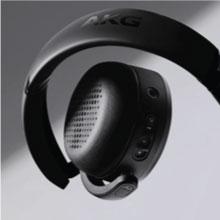
Figure 5: Headphones with auto play/pause functionality
6. Technologie reagující na okolní prostředí
Activate Ambient Aware technology to stay connected to your surroundings without removing your headphones. This feature allows you to hear ambient sounds while still enjoying your audio.
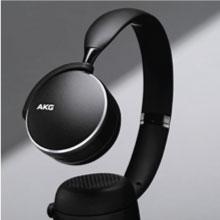
Figure 6: Ambient Aware feature in use
7. Oficiální video produktu
Video 1: This video demonstrates the key benefits and features of the AKG Y500 Wireless Headphones, including controls, auto play/pause, and multi-point connectivity.
Údržba
1. Čištění
Pro udržení stavu a výkonu vašich sluchátek:
- Otřete náušníky a hlavový most měkkým, suchým hadříkem.
- Nepoužívejte tekuté čisticí prostředky ani aerosoly přímo na sluchátka.
- Avoid moisture in the charging port or audio jack.
2. Skladování
When not in use, store your headphones in the provided protective carrying pouch to prevent scratches and damage. Keep them in a cool, dry place away from extreme temperatures.
Odstraňování problémů
If you encounter any issues with your AKG Y500 headphones, refer to the table below for common problems and solutions.
| Problém | Řešení |
|---|---|
| Sluchátka se nezapínají | Ensure the battery is charged. Connect the headphones to a power source using the USB charging cable. |
| Nelze spárovat se zařízením Bluetooth | Ensure headphones are in pairing mode (LED flashing blue/red). Verify Bluetooth is enabled on your device and it is within 10 meters range. Forget previous pairings on your device and try again. |
| Žádný zvuk nebo nízká hlasitost | Check the volume levels on both the headphones and your connected device. Ensure the headphones are properly connected via Bluetooth or the 3.5mm audio cable. |
| Špatná kvalita zvuku nebo přerušované připojení | Move your device closer to the headphones to reduce interference. Avoid obstacles between the headphones and the device. Ensure no other devices are interfering with the Bluetooth signal. |
| Auto Play/Pause not working | Ensure the headphones are worn correctly on your ears. Check for any obstructions on the sensors. |
Specifikace
Key technical specifications for the AKG Y500 On-Ear Wireless Bluetooth Headphones:
| Funkce | Detail |
|---|---|
| Číslo modelu | GP-Y500HAHHCAC |
| Konektivita | Bluetooth 4.2, 3.5mm audio konektor |
| Dosah Bluetooth | Až 10 metrů (33 stop) |
| Životnost baterie | Až 33 hodin |
| Doba nabíjení | 5 minutes for 1 hour playback (Speed Charge) |
| Kontrola hluku | Adaptivní potlačení hluku |
| Form Factor | Na uši, Skládací |
| Hmotnost položky | 8.1 unce (230 gramů) |
| Rozměry produktu | 7.2 x 2.87 x 8.66 palce |
| Výrobce | Samsung |
Záruka a podpora
Your SAMSUNG AKG Y500 headphones are covered by a manufacturer's warranty. For specific warranty terms and conditions, please refer to the warranty card included in your product packaging or visit the official Samsung support webmísto.
For technical assistance, troubleshooting, or to inquire about additional support options, please contact Samsung Customer Service or visit their official support portal. Extended protection plans may also be available for purchase.