
Zavedení
This manual provides essential instructions for the safe and effective use of your Andoer Portable 1080P Digital Camera D11773S. Please read this manual thoroughly before operating the device and retain it for future reference. This digital camera is designed for capturing high-resolution photos and videos, featuring a 48MP image sensor, 1080P video recording, 8X digital zoom, and a 2.7-inch LCD screen.
Bezpečnostní informace
- Nevystavujte fotoaparát vodě nebo vlhkosti.
- Zabraňte pádu fotoaparátu na zem nebo jeho vystavení silným nárazům.
- Uchovávejte fotoaparát mimo dosah silných magnetických polí.
- Do not attempt to disassemble or modify the camera. Repairs should only be performed by qualified personnel.
- Používejte pouze specifikovaný typ baterie a nabíjecí kabel.
- Pokud fotoaparát nepoužíváte, uchovávejte jej na chladném a suchém místě.
- Uchovávejte mimo dosah malých dětí.
Obsah balení
Ověřte, zda jsou v balení přítomny všechny položky:
- Andoer Portable Digital Camera (Model D11773S)
- Lithium Battery (3.7V 550mAh)
- Nabíjecí kabel typu C
- Řemínek na zápěstí
- Carry Bag
- Uživatelská příručka

Image: Contents of the camera package, showing the camera, battery, USB-C cable, wrist strap, carry bag, and user manual.
Fotoaparát skončilview
Seznamte se s hlavními součástmi fotoaparátu.
Přední View

Obrázek: Přední strana view of the Andoer D11773S camera. Key features visible include the digital lens, built-in flash, and the 2.7" TFT display and 48 Mega pixels indicators.
- Čočka: Zachycuje obrázky a videa.
- Blikat: Poskytuje osvětlení za zhoršených světelných podmínek.
- Mikrofon: Zaznamenává zvuk během nahrávání videa.
Zadní View

Obrázek: Zadní view of the Andoer D11773S camera, displaying the 2.7-inch LCD screen and various control buttons for navigation and settings.
- LCD Screen (2.7 Inch): Zobrazuje se živě view, nabídky a přehrávání.
- Ovládací tlačítka: For menu navigation, mode selection, zoom, and playback.
- Reproduktor: Pro přehrávání zvuku.
Strana View a Rozměry

Image: Diagram illustrating the dimensions of the Andoer D11773S camera: 9.2cm length, 6.1cm width, and 1.4cm thickness.
- USB port (typu C): Pro nabíjení a přenos dat.
- Slot pro paměťovou kartu: For inserting a Micro SD card.
- Přihrádka na baterie: Obsahuje dobíjecí lithiovou baterii.
Nastavení
1. Nabíjení baterie
- Insert the provided lithium battery into the camera's battery compartment.
- Connect the camera to a power source (e.g., computer USB port or USB wall adapter) using the supplied Type-C charge cable.
- Rozsvítí se kontrolka nabíjení. Po úplném nabití může kontrolka změnit barvu nebo zhasnout.
2. Vložení paměťové karty
The camera requires a Class-10 external Micro SD memory card (not included) with a maximum capacity of 128GB.
- Najděte slot pro paměťovou kartu na boční straně fotoaparátu.
- Insert the Micro SD card with the metal contacts facing the front of the camera until it clicks into place.
- Chcete-li kartu vyjmout, jemně ji zatlačte dovnitř, dokud nevyskočí.
Návod k obsluze
Zapnutí/vypnutí
- Pro zapnutí stiskněte a podržte tlačítko Napájení.
- Chcete-li zařízení vypnout, znovu stiskněte a podržte tlačítko napájení.
Fotografování
The camera supports picture resolutions up to 48MP.
- Zapněte fotoaparát.
- Komponujte snímek pomocí 2.7palcového LCD displeje.
- Press the Shutter button halfway to focus (if applicable), then fully press to capture the photo.

Image: Visual representation of the camera's capabilities, showing a 48MP photo example and a 1080P video example.
Nahrávání videí
The camera supports video resolution up to 1920x1080 (1080P).
- Switch the camera to video recording mode (refer to on-screen icons or mode button).
- Stisknutím tlačítka Záznam zahájíte nahrávání.
- Opětovným stisknutím tlačítka Nahrávání nahrávání zastavíte.
Funkce zvětšení
The camera features 8X digital zoom.
- Use the zoom buttons (often marked 'W' for Wide and 'T' for Telephoto) to adjust the zoom level.
Nastavení Flash
The built-in flash can be used in dark conditions.
- Access the flash settings through the camera's menu to select modes like Auto Flash, Fill-in Flash, Red-eye Reduction, or Flash Off.
Special Features: Anti-Shake, Face Detect, Smile Capture, Self-Timer
These features enhance your photography experience.
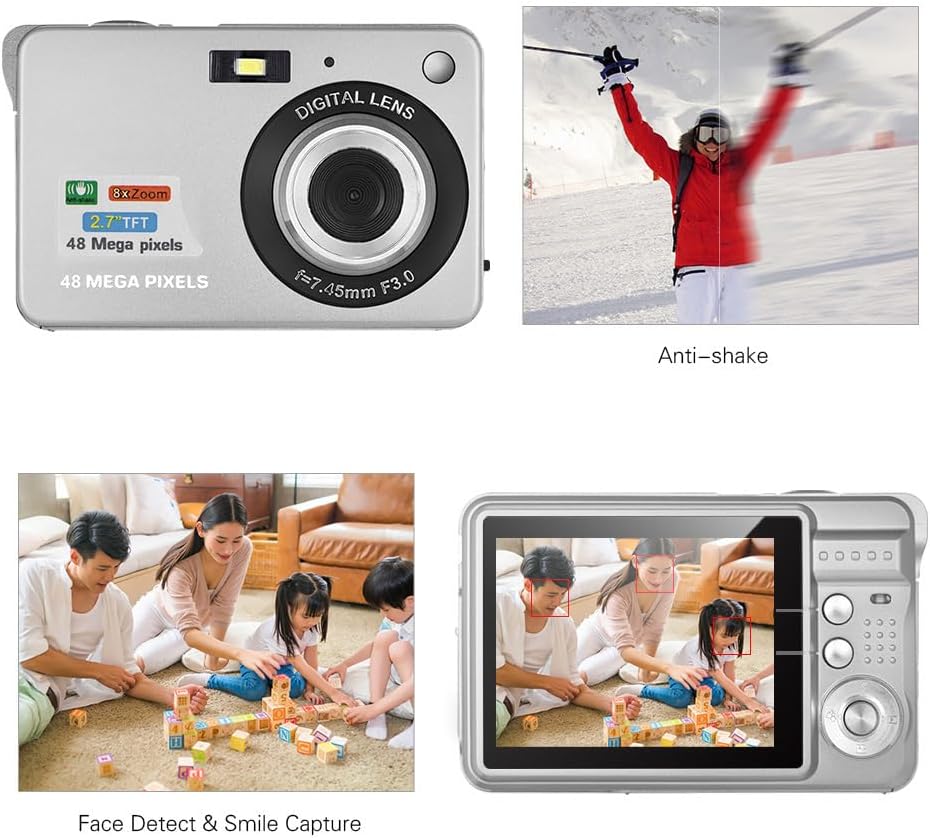
Image: Demonstrations of the camera's Anti-shake function (reducing blur from movement) and Face Detect & Smile Capture (identifying faces and automatically taking a photo when a smile is detected).
- Anti-Shake: Helps reduce blur caused by camera movement. This feature is typically enabled by default or can be toggled in settings.
- Face Detect & Smile Capture: The camera can detect faces and automatically capture a photo when a smile is detected. Enable these options in the camera's menu.
- Samospoušť: Set a delay (2, 5, or 10 seconds) before the photo is taken, allowing you to be in the shot.
Režim makro
Pro detailní fotografování malých objektů.

Image: A close-up photograph of an ant, demonstrating the camera's Macro Mode capability for detailed shots of small subjects.
- Activate Macro Mode through the camera's menu or a dedicated button for close-up shots.
Režim přehrávání
- Stiskněte tlačítko Přehrávání pro opětovnéview pořízené fotografie a videa na LCD displeji.
- Pro procházení médií použijte navigační tlačítka.
Připojení k počítači
You can transfer photos and videos to a computer using the supplied Type-C USB cable.
- Ujistěte se, že je kamera zapnutá.
- Connect one end of the Type-C USB cable to the camera's USB port and the other end to an available USB port on your computer.
- The camera should appear as a removable disk or media device on your computer.
- Open the camera's folder to access and transfer your files.
- Před odpojením kabelu bezpečně vyjměte zařízení z počítače.
Údržba
- Čištění: Use a soft, dry cloth to clean the camera body. For the lens and LCD screen, use a specialized lens cleaning cloth and solution. Do not use abrasive cleaners.
- Skladování: When not in use for extended periods, remove the battery and store the camera in a cool, dry place, preferably in its carry bag.
- Péče o baterie: Recharge the battery periodically even if not in use to maintain its lifespan.
Odstraňování problémů
| Problém | Možné řešení |
|---|---|
| Fotoaparát se nezapne. | Ujistěte se, že je baterie plně nabitá a správně vložená. |
| Nelze fotografovat/nahrávat videa. | Check if a memory card is inserted and has sufficient free space. Ensure the camera is in the correct mode. |
| Obrázky jsou rozmazané. | Ensure the lens is clean. Hold the camera steady during capture. Check lighting conditions and use flash if necessary. |
| Počítač nerozpoznál fotoaparát. | Ensure the USB cable is securely connected. Try a different USB port or restart the computer. |
| Baterie se rychle vybíjí. | Reduce LCD brightness. Limit flash usage. Ensure the camera is powered off when not in use. |
Specifikace
| Funkce | Detail |
|---|---|
| Obrazový snímač | CMOS snímač |
| Zobrazit | 2.7palcový LCD |
| File Formát | JPEG (Photo), AVI (Video) |
| Rozlišení obrázku | Až 48 milionů (8000x6000) |
| Rozlišení videa | 1920x1080 (1080P), 1280x720 |
| Digitální zoom | 8X |
| Kompenzace expozice | EV-3 to EV+3 |
| Samospoušť | Vypnuto / 2 s / 5 s / 10 s |
| Speciální funkce | Anti-Shake, Face Detect, Smile Capture |
| Napájení | 1 * Lithium battery (3.7V 550mAh) |
| Podporovaná paměťová karta | Class-10 Micro SD, max. 128GB (not included) |
| Rozhraní | Typ C USB |
| Rozměry (D*Š*V) | 9.2 * 6.1 * 1.4 cm / 3.6 * 2.4 * 0.5 inch |
| Hmotnost | 99 g / 3.5 oz |
| Podporovaný systém | Windows XP, VISTA, WIN7, MAC |
Záruka a podpora
This product comes with a standard manufacturer's warranty. Please refer to the warranty card included in your package for specific terms and conditions. For technical support, troubleshooting assistance, or further inquiries, please visit the official Andoer webnebo se obraťte na jejich zákaznický servis. Uschovejte si účtenku jako doklad o koupi pro případ reklamace.
Online podpora: Visit the Andoer Store on Amazon