
Canyon CND-GPW5
Uživatelská příručka k bezdrátovému hernímu ovladači Canyon CND-GPW5 s touchpadem
Model: CND-GPW5
Zavedení
This manual provides comprehensive instructions for the Canyon Gaming Gamepad CND-GPW5, a wireless controller designed for PlayStation 4 with an integrated touchpad. Please read this manual carefully before using the product to ensure proper operation and to maximize your gaming experience.

Obrázek: Přední strana view of the Canyon Gaming Gamepad CND-GPW5, showcasing its ergonomic design, dual analog sticks, directional pad, action buttons, and central touchpad.
Obsah balení
- Canyon Gaming Gamepad CND-GPW5
- USB nabíjecí kabel
- Uživatelská příručka (tento dokument)

Image: The Canyon Gaming Gamepad CND-GPW5 displayed within its retail packaging, highlighting key features like wireless connectivity, touchpad, and vibration feedback.
Nastavení
1. Nabíjení gamepadu
- Connect the small end of the USB charging cable to the charging port on the gamepad.
- Connect the larger end of the USB charging cable to a USB port on your PlayStation 4 console or a compatible USB wall adapter.
- The indicator light on the gamepad will illuminate to show it is charging. It will turn off or change color when fully charged.
2. Pairing with PlayStation 4
- Ujistěte se, že je vaše konzole PlayStation 4 zapnutá.
- For initial pairing, connect the gamepad to the PS4 console using the USB charging cable.
- Stiskněte tlačítko Tlačítko PS (located in the center of the gamepad). The gamepad will power on and automatically pair with the console.
- Po spárování můžete odpojit kabel USB pro bezdrátové přehrávání.
- To pair wirelessly after initial setup, simply press the Tlačítko PS on the gamepad. It will attempt to connect to the last paired console.
Návod k obsluze
Rozložení a funkce gamepadu

Obrázek: Zadní view of the Canyon Gaming Gamepad CND-GPW5, showing the M1, M2, M3, and M4 programmable buttons, along with regulatory information.
- Analogové páčky: Used for precise movement and camera control.
- Směrový ovladač (D-Pad): For menu navigation and specific in-game actions.
- Akční tlačítka (trojúhelník, kruh, kříž, čtverec): Perform various in-game actions.
- Shoulder Buttons (L1, R1) and Triggers (L2, R2): For aiming, firing, and other contextual actions.
- Tlačítko PS: Powers on the gamepad, accesses the PS4 home menu, and switches users.
- Tlačítko SDÍLET: Shares screenshots and video clips.
- Tlačítko MOŽNOSTI: Zpřístupňuje herní menu a možnosti.
- Touchpad: Functions as a clickable surface for navigation and specific game interactions.
- Tlačítka M1, M2, M3, M4: These are additional programmable buttons located on the rear of the gamepad. Refer to your game's settings or the PS4 system settings for customization options.
Zpětná vazba od vibrací
The gamepad features vibration feedback to enhance immersion during gameplay. This function is automatically enabled when supported by the game.
Údržba
Čištění
- Wipe the gamepad with a soft, dry cloth.
- Do not use liquid cleaners, solvents, or abrasive materials, as these can damage the surface and internal components.
Skladování
- Gamepad skladujte na chladném a suchém místě mimo dosah přímého slunečního záření a extrémních teplot.
- Avoid placing heavy objects on the gamepad.
Péče o baterie
- To prolong battery life, avoid fully discharging the gamepad frequently.
- If storing for an extended period, charge the gamepad to approximately 50% before storage.
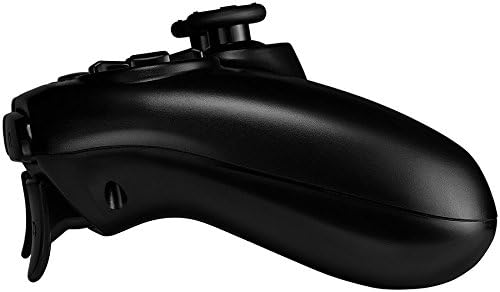
Obrázek: Side profile of the Canyon Gaming Gamepad CND-GPW5, illustrating its contoured grip and trigger button placement.
Odstraňování problémů
- Gamepad se nepřipojuje:
- Ujistěte se, že je gamepad nabitý.
- Connect the gamepad to the PS4 console with the USB cable and press the PS button to re-establish connection.
- Zkontrolujte, zda nedochází k rušení jinými bezdrátovými zařízeními.
- Buttons or analog sticks unresponsive:
- Restart the gamepad by holding the PS button for 10 seconds, then press it again to power on.
- Ensure the gamepad's firmware is up to date (check Canyon's official website for updates if available).
- Problémy s nabíjením:
- Try a different USB cable or USB port on the console/adapter.
- Ensure the charging port on the gamepad is clean and free of debris.
If problems persist, please refer to the support section or contact Canyon customer service.
Specifikace
| Funkce | Detail |
|---|---|
| Číslo modelu | CND-GPW5 (Item Model Number: 9598241) |
| Konektivita | Bezdrátový |
| Kompatibilita | PlayStation 4 |
| Vlastnosti | Touchpad, Vibration Feedback |
| Baterie | 1 lithium-iontová baterie (vyžadováno) |
| Rozměry produktu (D x Š x V) | 50 x 50 x 28 cm |
| Hmotnost | 224 gramů |
| ASIN | B07G37JCMC |
| Datum vydání | 1. července 2020 |
Záruka a podpora
For information regarding warranty coverage, please refer to the warranty card included with your product or visit the official Canyon website. For technical support or further assistance, please contact Canyon customer service through their official support channels.
Official Canyon Webmísto: https://canyon.eu/
Ask a question about this manual
Ask about setup, troubleshooting, compatibility, parts, safety, or missing instructions. Manuals+ will review the question and use this page’s manual context to help answer it.