
Zavedení
This manual provides essential information for the safe and effective use of your Walfront A4 LED Tracing Light Pad. Please read these instructions carefully before operation and retain them for future reference.

Image: The Walfront A4 LED Tracing Light Pad displayed on a desk, ready for use with various art supplies.
Bezpečnostní informace
- Nevystavujte zařízení vodě ani nadměrné vlhkosti.
- Zabraňte pádu zařízení nebo jeho vystavení silným nárazům.
- Pro napájení používejte pouze dodaný kabel USB.
- Nepokoušejte se zařízení rozebírat ani opravovat sami. V případě problémů kontaktujte zákaznickou podporu.
- Uchovávejte mimo dosah dětí.
Obsah balení
Ověřte, zda jsou v balení přítomny všechny položky:
- 1 x Walfront A4 LED Tracing Light Pad
- 1 x Micro USB kabel
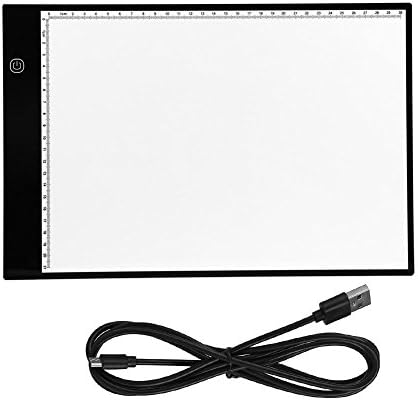
Image: The Walfront A4 LED Tracing Light Pad and its accompanying Micro USB cable.
Konec produktuview
The Walfront A4 LED Tracing Light Pad is a portable and versatile tool designed for artists, animators, and hobbyists. It features a slim design, adjustable brightness, and eye-protected LED lighting.
Klíčové vlastnosti:
- Ultratenký design: With a thickness of only 0.2 inches (5mm) and a weight of 1.5 pounds (685g), it is highly portable.
- A4 Size with Scale: Standard A4 paper size with integrated measurement scales for convenience.
- Napájení přes USB: Easily powered via any USB port (computer, power bank, wall adapter).
- Nastavitelný jas: 3-level adjustable brightness with a simple touch control.
- Eye-Protected LED: Designed to provide stable, uniform light, reducing eye strain during extended use.
- Nízká spotřeba energie: Operates at 5V with 2.2W power consumption, emitting minimal heat.

Image: Visual representation of the light pad's features, including eyesight protection, ultra-thin profile, low power consumption, and touch control.
Nastavení
- Rozbalit: Carefully remove the light pad and USB cable from its packaging.
- Připojte napájení: Insert the micro USB end of the cable into the light pad's micro USB port.
- Zdroj napájení: Connect the standard USB end of the cable to a compatible 5V USB power source, such as a computer, power bank, or a USB wall adapter.

Image: Illustration demonstrating the various USB power source options for the light pad, including laptops, computers, power banks, and wall chargers.
Návod k obsluze
- Zapnutí/vypnutí: Once connected to a power source, touch the power button icon on the light pad to turn it on. Touch it again to turn it off.
- Upravit jas: With the light pad on, touch and hold the power button icon to cycle through the three brightness levels (low, medium, high). Release your finger when the desired brightness is reached.
- Sledování: Place your original image or design on the light pad. Then, place a blank sheet of paper over the original. The illuminated surface will allow you to see through both layers, enabling easy tracing.
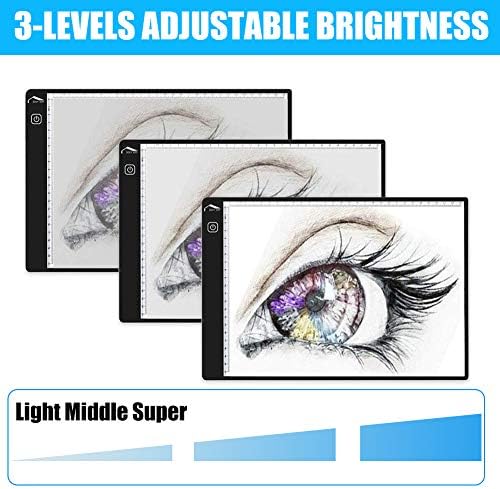
Image: Depiction of the three adjustable brightness levels (Light, Middle, Super) available on the tracing pad.
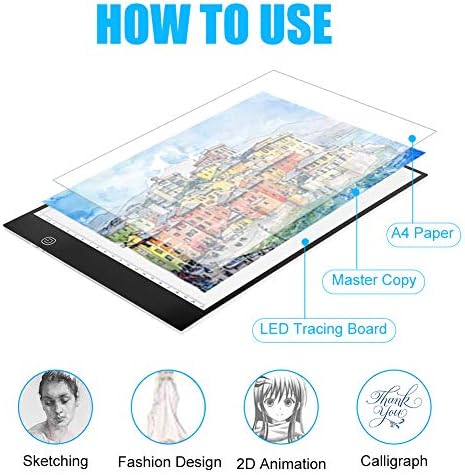
Image: Step-by-step visual guide on how to layer paper for tracing, illustrating its application in various creative fields.
Údržba
- Čištění: Use a soft, dry cloth to wipe the surface of the light pad. For stubborn marks, slightly damphadřík vodou. Nepoužívejte abrazivní čisticí prostředky ani rozpouštědla.
- Skladování: Store the light pad in a dry, dust-free environment when not in use. Avoid placing heavy objects on it.
- Péče o kabely: Handle the USB cable gently. Do not bend or crimp it excessively.
Odstraňování problémů
| Problém | Možná příčina | Řešení |
|---|---|---|
| Light pad does not turn on. | No power, loose connection, faulty cable/power source. |
|
| Nefunguje nastavení jasu. | Incorrect operation, touch sensor issue. |
|
| Světlo bliká nebo je nestabilní. | Unstable power supply, faulty cable. |
|
Specifikace
| Název modelu | A4 LED Tracing Light Pad |
| Značka | Walfront |
| Materiál | Akryl |
| Barva | Bílý |
| Typ světelného zdroje | Světelná dioda (LED) |
| Zdroj napájení | Elektrický kabel (USB 5V) |
| Rozměry produktu (D x Š x V) | 13.78" x 9.25" x 0.16" (35 cm x 23.5 cm x 0.4 cm) |
| Tloušťka položky | 0.2 palců (5 mm) |
| Hmotnost položky | 1.5 liber (685 g) |
| UPC | 700890033088 |
| ASIN | B07G25WT4T |
Záruka a podpora
For warranty information or technical support, please contact Walfront customer service through the retailer where the product was purchased or visit the official Walfront store page on Amazon: Walfront Store.
Please have your product model number (A4 LED Tracing Light Pad) and ASIN (B07G25WT4T) ready when contacting support.