
1. Úvod
Thank you for choosing the Decdeal WiFi Electric Heating Thermostat. This programmable thermostat is designed to control electric heating systems, offering convenience through its dual sensor capabilities, white backlight display, and voice control compatibility. This manual provides detailed instructions for installation, operation, and maintenance to ensure optimal performance and longevity of your device.
2. Konec produktuview
The Decdeal WiFi Electric Heating Thermostat features a clear LCD display and intuitive buttons for easy control. It integrates with your home WiFi network for remote management via a smartphone application and supports voice commands through compatible smart home assistants like Amazon Alexa.
Klíčové vlastnosti:
- WiFi Connectivity for remote control
- Programmable scheduling for energy efficiency
- Dual sensor (internal air sensor and external floor sensor)
- White backlight for clear visibility
- Voice control compatible with Amazon Alexa
- Rozhraní dotykového tlačítka
Thermostat Components and Display:

This image illustrates the front panel of the thermostat, highlighting its display elements and control buttons. The display shows the current time, set temperature, and room temperature. The buttons include Turn ON/OFF, Set Key, Confirm Key, Increase Key, and Decrease Key.

This image shows the Decdeal thermostat mounted on a wall, with a smartphone displaying its control application. This demonstrates the WiFi connectivity and remote control capabilities of the device.
3. Nastavení a instalace
Důležité bezpečnostní informace: Installation should only be performed by a qualified electrician. Ensure the main power supply is turned off before beginning any wiring work to prevent electric shock.
Obsah balení:
- Decdeal WiFi Electric Heating Thermostat
- External NTC Sensor (if included with your model)
- Montážní šrouby
- Uživatelská příručka

This image displays the thermostat alongside its external NTC sensor and mounting screws, representing the typical contents of the product package.
Pokyny pro zapojení:
Refer to the wiring diagram on the back of the thermostat for correct connections. Ensure all connections are secure.
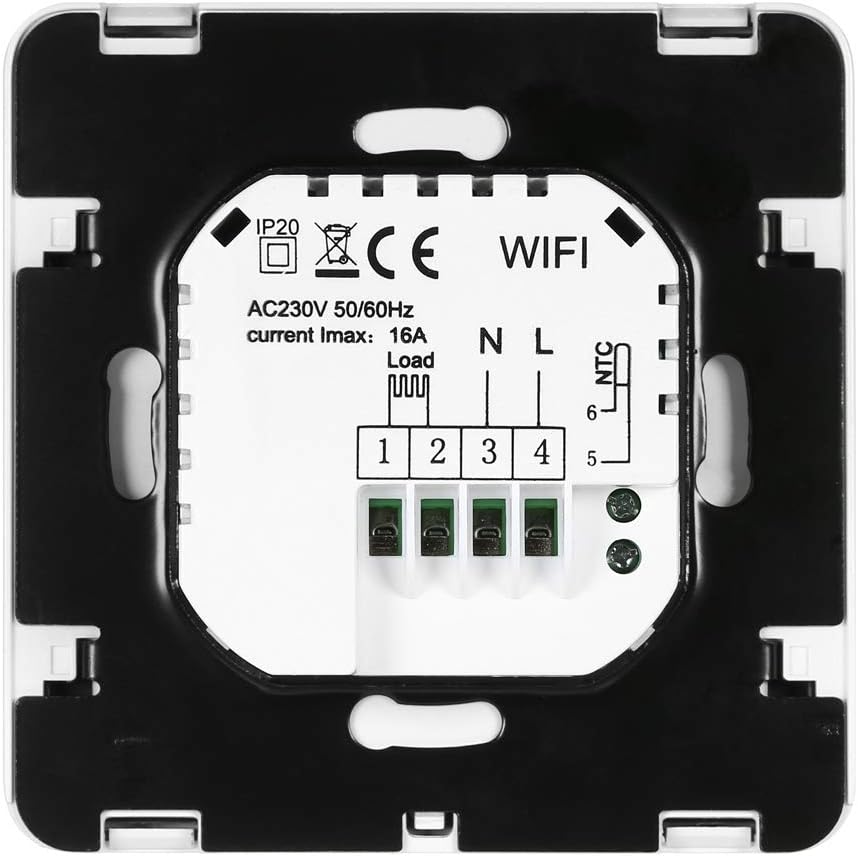
Tento obrázek ukazuje zadní část view of the thermostat, detailing the wiring terminals. Terminals 1 and 2 are for the load (heating element), 3 and 4 for the neutral (N) and live (L) power supply, and 5 and 6 for the NTC external sensor.
- Odpojte napájení topného okruhu hlavním jističem.
- Namontujte základnu termostatu do standardní elektrické krabice pomocí dodaných šroubů.
- Connect the heating load wires to terminals 1 and 2.
- Connect the live (L) and neutral (N) power supply wires to terminals 3 and 4 respectively.
- Pokud používáte externí podlahové čidlo, připojte jeho vodiče ke svorkám 5 a 6.
- Carefully attach the thermostat front panel to the base.
Initial Power-On and WiFi Setup:
After installation, restore power. The thermostat display will light up. To connect to WiFi:
- Download the compatible smartphone application (refer to the user manual included in the box for QR code or app name).
- Follow the in-app instructions to add your device. This typically involves putting the thermostat into pairing mode (often by holding a specific button combination) and connecting to its temporary WiFi hotspot or allowing the app to discover it on your home network.
- Ensure your WiFi network is 2.4GHz, as 5GHz networks are generally not supported by this device.
4. Provoz
The thermostat can be operated manually via its buttons or remotely through the smartphone application and voice commands.
Ruční ovládání:
- Zapnutí/vypnutí: Press the power button (⏻) to turn the thermostat on or off.
- Nastavit teplotu: Press the 'SET' button to enter temperature setting mode. Use the '▲' (Increase) and '▼' (Decrease) buttons to adjust the desired temperature. Press 'OK' to confirm.
- Výběr režimu: The thermostat supports manual mode and programmable mode. Use the 'SET' button to cycle through modes or access advanced settings.
Programovatelné plánování:
The thermostat allows you to set a weekly schedule with different temperature settings for various times of the day. Refer to the detailed instructions in the included paper manual or the smartphone application for setting up your personalized heating schedule.
Ovládání přes Wi-Fi a aplikaci:
Once connected to WiFi, you can control your thermostat from anywhere using the dedicated smartphone application. This includes:
- Nastavení teploty
- Změna provozních režimů
- Setting and modifying schedules
- Monitoring current room and set temperatures
Hlasové ovládání:
The thermostat is compatible with Amazon Alexa. To enable voice control:
- Ensure your thermostat is successfully connected to the smartphone app.
- Open the Amazon Alexa app and enable the skill for your thermostat (e.g., search for 'Smart Life' or the specific app name).
- Link your thermostat account with Alexa.
- Discover devices in the Alexa app. You can then use voice commands such as, "Alexa, set the thermostat to 22 degrees."
5. Údržba
The Decdeal WiFi Electric Heating Thermostat requires minimal maintenance.
- Čištění: Otřete displej a casing with a soft, dry cloth. Do not use abrasive cleaners or solvents, as these can damage the surface.
- Péče o senzor: Pro přesné měření teploty se ujistěte, že vnitřní i vnější senzory nejsou zaprášené ani překážejí.
- Aktualizace softwaru: Periodically check the smartphone application for any available firmware updates for your thermostat to ensure optimal performance and security.
6. Řešení problémů
Pokud narazíte na problémy s termostatem, podívejte se na následující běžné problémy a jejich řešení:
| Problém | Možná příčina | Řešení |
|---|---|---|
| Termostat se nezapíná | No power supply; incorrect wiring; tripped circuit breaker. | Check circuit breaker. Verify wiring connections (consult an electrician if unsure). Ensure main power is on. |
| Nelze se připojit k WiFi | Incorrect WiFi password; 5GHz network used; thermostat not in pairing mode; weak WiFi signal. | Ensure correct 2.4GHz WiFi password. Put thermostat into pairing mode. Move thermostat closer to router or improve signal. Restart router. |
| Topení se nezapíná/nevypíná | Temperature settings incorrect; thermostat in OFF mode; wiring issue; heating system fault. | Check set temperature and current room temperature. Ensure thermostat is ON. Verify heating system is functional. Check wiring. |
| Nepřesný údaj o teplotě | Sensor obstructed or faulty; thermostat placed near heat source/draft. | Ensure sensors are clean and unobstructed. Relocate thermostat if exposed to direct heat/cold sources. |
| Hlasové ovládání nefunguje | Alexa skill not enabled; account not linked; incorrect commands. | Verify Alexa skill is enabled and linked. Use correct voice commands. Ensure thermostat is online. |
Pokud problém přetrvává i po vyzkoušení těchto řešení, kontaktujte zákaznickou podporu.
7. Specifikace
Detailed technical specifications for the Decdeal WiFi Electric Heating Thermostat:
| Funkce | Detail |
|---|---|
| Značka | Dedecdeal |
| Číslo modelu | XOY6858830357994NM |
| svtage | 230 V, 250 V |
| Aktuální zatížení | Max 16A |
| Zdroj napájení | Elektrický kabel |
| Protokol připojení | Wi-Fi (2.4 GHz) |
| Typ ovladače | Kompatibilní s Amazon Alexa |
| Podsvícení | Ano |
| Hmotnost položky | 180 g |
| Rozměry balíku | 11.2 x 10.4 x 5.8 cm |
| Rozsah regulace teploty | Typically 5℃ to 35℃ (may vary by model settings) |
| Přesnost teploty | +/- 0.5℃ |
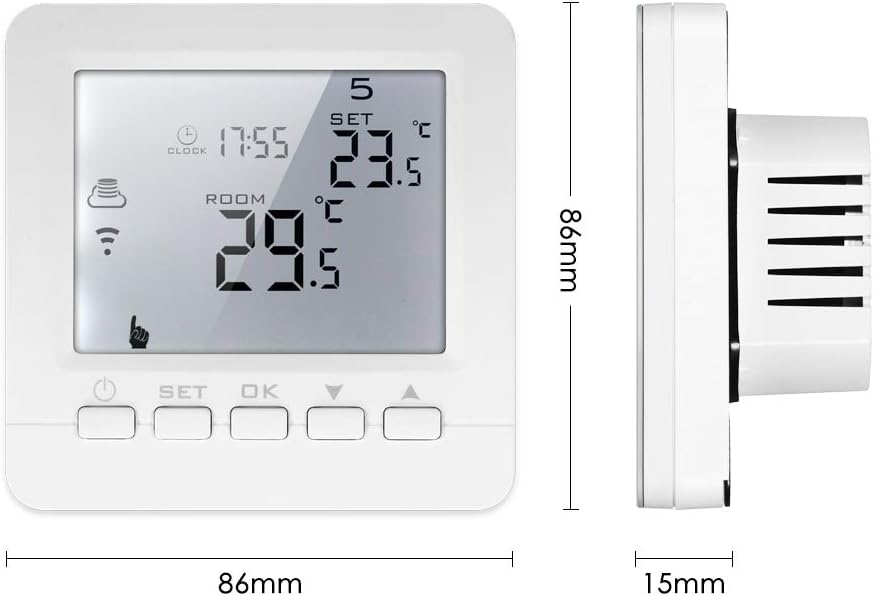
This image provides the physical dimensions of the thermostat, showing a width of 86mm and a height of 86mm, with a depth of 15mm from the wall surface.
8. Záruka a podpora
For warranty information and technical support, please refer to the documentation included with your product or contact Decdeal customer service through their official website or the retailer where the product was purchased. Please have your model number (XOY6858830357994NM) and purchase date available when seeking support.