
Fanvil Fanvil X5S
Fanvil X5S IP Phone
Uživatelská příručka
Zavedení
This manual provides comprehensive instructions for the setup, operation, maintenance, and troubleshooting of your Fanvil X5S IP Phone. The Fanvil X5S is an enterprise-grade IP phone designed for professional communication, featuring intelligent DSS Key-Mapping LCDs, HD voice capabilities, and Power over Ethernet (PoE) support.
Nastavení
1. Vybalení a kontrola součástí
Opatrně vybalte všechny součásti z krabice. Ujistěte se, že jsou přítomny následující položky:
- Fanvil X5S IP Phone Unit
- Sluchátko
- Kabel sluchátka
- Ethernetový kabel
- Stojan na telefon
- (Optional) Power Adapter (Note: PoE enabled, power adapter may not be included)
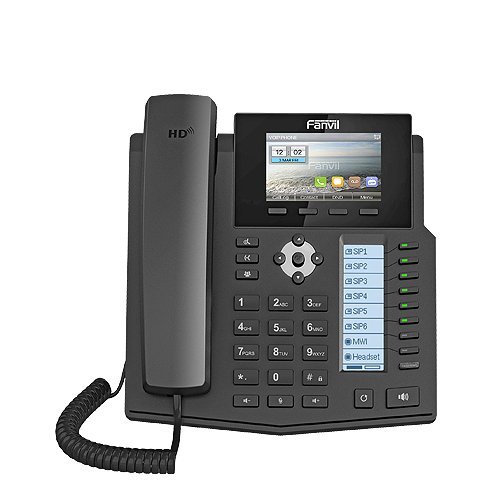
Obrázek 1: Přední strana view of the Fanvil X5S IP Phone, showing the main LCD, DSS keys, and keypad.
2. Fyzická připojení
- Připevnění stojanu na telefon: Align the stand with the slots on the back of the phone unit and push firmly until it clicks into place.
- Připojení sluchátka: Plug one end of the coiled handset cord into the handset and the other end into the handset port on the phone unit (usually marked with a handset icon).
- Připojit k síti:
- Pokud používáte napájení přes Ethernet (PoE): Připojte jeden konec ethernetového kabelu k portu LAN na telefonu (označenému ikonou sítě) a druhý konec k síťovému přepínači nebo routeru s podporou PoE.
- If not using PoE: Connect one end of the Ethernet cable to the LAN port on the phone and the other end to your network switch/router. Then, connect the optional power adapter (if supplied) to the power port on the phone and a power outlet.
- Připojení k počítači (volitelné): If you wish to connect a computer through the phone, connect an Ethernet cable from your PC to the PC port on the phone.
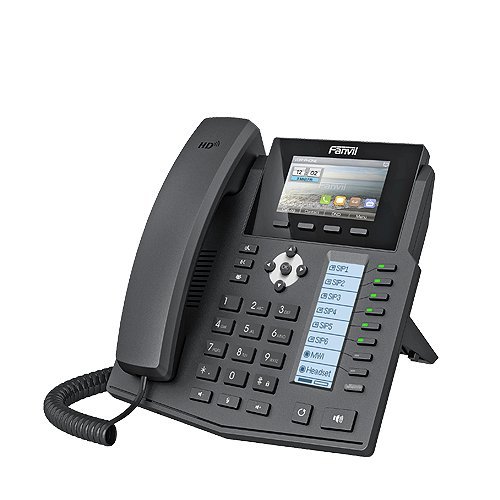
Obrázek 2: Strana view of the Fanvil X5S IP Phone, illustrating the phone stand and general profile.
3. Počáteční spuštění
Once connected, the phone will automatically power on and begin its boot sequence. The main LCD will display the Fanvil logo and then proceed to load the operating system. This process may take a few moments. Upon successful boot-up, the phone will attempt to obtain an IP address and register with your SIP server.
Návod k obsluze
1 Základní funkce volání
- Uskutečnění hovoru:
- Pick up the handset or press the Speakerphone button.
- Vytočte požadované číslo pomocí klávesnice.
- Stiskněte tlačítko Vytáčení funkční tlačítko nebo počkejte na časový limit automatického vytáčení.
- Přijetí hovoru: Když telefon zvoní, zvedněte sluchátko nebo stiskněte Hlasitý telefon tlačítko.
- Ukončení hovoru: Zavěste sluchátko nebo stiskněte Ukončit hovor kontextové tlačítko.
2. DSS Key-Mapping LCD
The Fanvil X5S features a dedicated DSS Key-Mapping LCD (64x92 dot-matrix) alongside the main LCD (128x64 dot-matrix). The DSS keys are programmable buttons that can be configured for various functions such as speed dial, busy lamp field (BLF), intercom, or line appearances. Refer to your system administrator for specific configurations of these keys.
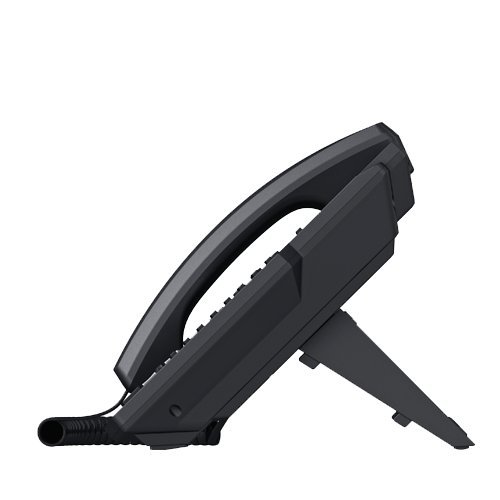
Obrázek 3: Boční profíkfile of the Fanvil X5S IP Phone, highlighting its ergonomic design.
3. SIP Accounts and Features
The phone supports up to 6 SIP lines, allowing for multiple active calls or registrations. Key features include:
- HD Voice: Utilizes HD Codec, HD Speaker, and HD Handset for superior audio quality.
- SIP2.0 (RFC3261) & Correlative RFCs: Ensures broad compatibility with various SIP platforms.
- Bluetooth Support: Connect a Bluetooth USB dongle (sold separately) for wireless headset connectivity.
- Two Network Interfaces: Equipped with 10M/100M/1000M Ethernet ports for high-speed network connectivity.
Údržba
To ensure the longevity and optimal performance of your Fanvil X5S IP Phone, follow these maintenance guidelines:
- Čištění: K čištění povrchu telefonu použijte měkký, suchý hadřík, který nepouští vlákna. V případě odolných skvrn lehceamphadřík vodou. Nepoužívejte agresivní chemikálie, abrazivní čisticí prostředky ani rozpouštědla, protože by mohly poškodit povrchovou úpravu telefonu a vnitřní součásti.
- Podmínky prostředí: Keep the phone away from direct sunlight, excessive heat sources, and high humidity. Ensure proper ventilation around the device.
- Správa kabelů: Periodically check all connected cables (handset, Ethernet, power) to ensure they are securely plugged in and free from damage.
Odstraňování problémů
If you encounter issues with your Fanvil X5S IP Phone, try the following basic troubleshooting steps:
| Problém | Možná příčina | Řešení |
|---|---|---|
| Telefon se nezapne. | No power supply; PoE not active or power adapter not connected. | Ensure Ethernet cable is connected to a PoE-enabled port, or verify power adapter is securely plugged into phone and outlet. |
| Žádný oznamovací tón. | Účet SIP není zaregistrován; problém s připojením k síti. | Check network cable connection. Verify SIP account registration status on the phone's display. Contact your IT administrator if registration fails. |
| Neslyším volajícího / Volající neslyší mě. | Handset/speaker volume too low; faulty handset cord; network audio issues. | Adjust volume during a call. Re-seat or replace handset cord. Check network quality. |
| Displej je prázdný nebo zamrzlý. | Chyba softwaru; problém s napájením. | Odpojte napájecí/ethernetový kabel, počkejte 10 sekund a poté jej znovu zapojte, abyste telefon restartovali. |
If these steps do not resolve the issue, please contact your system administrator or Fanvil technical support.
Specifikace
| Značka | Fanvil |
| Model | Fanvil X5S |
| Rozměry produktu | 28.5 x 27 x 6.5 cm |
| Hmotnost položky | 950 g |
| Typ zobrazení | LCD (Main: 128x64 Dot Matrix, DSS: 64x92 Dot Matrix) |
| Zdroj napájení | Kabelové napájení / napájení přes Ethernet (PoE) |
| Síťová rozhraní | Two (10M/100M/1000M) |
| SIP linky | 6 linek SIP |
| HD Voice | HD Codec, HD Speaker, HD Handset |
| Podpora Bluetooth | Yes (with USB Dongle) |
| Barva | Černý |
| Typ telefonu | Kabelové |
| Typ vytáčení | Jedna klávesnice |
Informace o záruce
The Fanvil X5S IP Phone comes with a 1 rok záruka from the date of purchase. This warranty covers manufacturing defects and malfunctions under normal use. Please retain your proof of purchase for warranty claims. For detailed terms and conditions, refer to the warranty card included with your product or contact Fanvil customer service.
Podpora
For technical assistance, product inquiries, or further support, please contact your vendor, system integrator, or visit the official Fanvil website. Ensure you have your product model number (Fanvil X5S) and any relevant purchase details ready when seeking support.
Ask a question about this manual
Ask about setup, troubleshooting, compatibility, parts, safety, or missing instructions. Manuals+ will review the question and use this page’s manual context to help answer it.