
1. Úvod
Děkuji za nákupasing the Edifier R501BT 5.1 Channel Wireless Bluetooth Multimedia Speaker System. This manual provides detailed instructions for the proper installation, operation, and maintenance of your speaker system. Please read this manual thoroughly before use to ensure optimal performance and longevity of your product.
2. Důležité bezpečnostní pokyny
- Přečtěte si pozorně tyto pokyny.
- Uschovejte si tyto pokyny pro budoucí použití.
- Dbejte všech varování.
- Dodržujte všechny pokyny.
- Nepoužívejte toto zařízení v blízkosti vody.
- Čistěte pouze suchým hadříkem.
- Nezakrývejte žádné větrací otvory. Nainstalujte v souladu s pokyny výrobce.
- Neinstalujte v blízkosti zdrojů tepla, jako jsou radiátory, tepelné regulátory, kamna nebo jiná zařízení (včetně amplifikátory), které produkují teplo.
- Chraňte napájecí kabel před šlapáním nebo přiskřípnutím, zejména u zástrček, zásuvek a v místě, kde vychází z přístroje.
- Používejte pouze nástavce/příslušenství určené výrobcem.
- Odpojte toto zařízení během bouřky s blesky nebo když se delší dobu nepoužívá.
- Veškeré opravy svěřte kvalifikovanému servisnímu personálu. Servis je nutný, pokud bylo zařízení jakýmkoli způsobem poškozeno, například je poškozen napájecí kabel nebo zástrčka, pokud do zařízení vnikla tekutina nebo do něj spadly předměty, zařízení bylo vystaveno dešti nebo vlhkosti, nefunguje normálně. , nebo byla vypuštěna.
3. Obsah balení
Ujistěte se prosím, že máte v balení všechny níže uvedené položky:
- 1x Subwoofer Unit (main unit)
- 1x Center Satellite Speaker
- 4x Satellite Speakers (Front Left, Front Right, Surround Left, Surround Right)
- 1x Dálkové ovládání
- Audio Connection Cables (e.g., 3.5mm to RCA, RCA to RCA)
- Uživatelská příručka (tento dokument)

Image: Complete Edifier R501BT 5.1 speaker system, showcasing the subwoofer, five satellite speakers, and the included remote control.
4. Konec produktuview
4.1 Subwoofer Unit
The subwoofer unit houses the main amplifier, power supply, and control interface for the entire system. It features an 8-inch (210mm) woofer for deep bass reproduction.

Obrázek: Přední strana view of the Edifier R501BT subwoofer, highlighting its design and front-facing port.

Obrázek: Shora dolů view of the Edifier R501BT subwoofer, showing the internal structure and the downward-firing woofer.

Image: The base of the Edifier R501BT subwoofer, illustrating its elevated design for enhanced bass resonance.
4.2 satelitní reproduktory
The system includes one center channel speaker and four satellite speakers (front left, front right, surround left, surround right), each featuring a 3-inch driver for clear mid-range and treble audio.

Image: The Edifier R501BT center channel speaker, designed for clear dialogue.
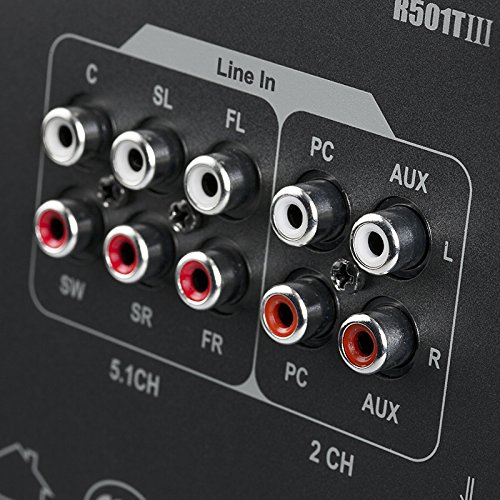
Image: A single Edifier R501BT satellite speaker, representative of the four surround speakers.
4.3 Ovládací panel a dálkové ovládání
The subwoofer features an integrated control panel for direct adjustments, complemented by a full-function remote control for convenient operation from a distance.

Image: Close-up of the subwoofer's control panel, displaying the digital screen and control buttons.
4.4 Připojení zadního panelu
The rear panel of the subwoofer provides various input and output options for connecting to different audio sources and the satellite speakers.

Obrázek: Podrobný view of the Edifier R501BT subwoofer's rear panel, showing 5.1 channel outputs, Line In, PC, and AUX inputs.
5. Nastavení
5.1 Umístění reproduktorů
Optimal speaker placement is crucial for achieving the best 5.1 surround sound experience:
- subwoofer: Place the subwoofer on the floor, preferably in a corner or near a wall, to enhance bass response.
- Středový reproduktor: Position the center speaker directly above or below your display (TV/monitor), facing the listening area.
- Front Speakers (FL/FR): Place the front left and front right speakers equidistant from your listening position, forming an equilateral triangle with the listener. They should be at ear level.
- Surround Speakers (SL/SR): Position the surround left and surround right speakers to the sides or slightly behind your listening position, also at ear level or slightly higher.
5.2 Připojení reproduktorů
- Ensure the main power switch on the subwoofer is in the OFF position before making any connections.
- Connect the satellite speakers to the corresponding output ports on the rear panel of the subwoofer. Match the color-coded cables and ports:
- FL (vlevo vpředu)
- FR (vpředu vpravo)
- C (střed)
- SL (levý prostorový)
- SR (pravý prostorový)
- Connect your audio source (e.g., TV, PC, DVD player) to the appropriate input ports on the subwoofer's rear panel.
- 5.1 CH Input: For devices with dedicated 5.1 channel analog outputs. Connect the corresponding FL, FR, C, SL, SR, and SW (subwoofer) outputs from your source to the speaker system.
- PC vstup: For connecting to a computer's audio output.
- Vstup AUX: For general stereo audio devices (e.g., smartphones, tablets, MP3 players) using a 3.5mm to RCA cable.
- Linkový vstup: Another stereo input option.
- Zapojte napájecí kabel do zásuvky ve zdi.
6. Návod k obsluze
6.1 Zapnutí/vypnutí
To power on the system, flip the main power switch on the rear of the subwoofer to the ON position. The display on the front panel will illuminate. To power off, flip the switch to OFF.
6.2 Výběr vstupu
Press the "Input" button on the subwoofer's control panel or the remote control to cycle through available input modes: Bluetooth, AUX, PC, 5.1 CH, USB, SD Card.
6.3 Ovládání hlasitosti
Adjust the master volume using the volume knob on the subwoofer or the Volume +/- buttons on the remote control.
6.4 Párování Bluetooth
- Select "Bluetooth" as the input mode on the speaker system. The display will show "BT" and blink, indicating it's in pairing mode.
- Na zařízení s podporou Bluetooth (např. chytrý telefon, tablet) vyhledejte dostupná zařízení Bluetooth.
- Select "EDIFIER R501BT" from the list. Once paired, the "BT" indicator on the speaker system will stop blinking and remain solid.
- If pairing fails, try restarting the speaker system and your device, then repeat the steps.
6.5 Přehrávání z USB/SD karty
Insert a USB drive or SD card containing MP3/WMA audio files into the corresponding slot on the subwoofer. The system will automatically switch to USB or SD mode and begin playback. Use the remote control to navigate tracks (Previous/Next), Play/Pause, and adjust volume.
6.6 Funkce dálkového ovládání
Dálkové ovládání umožňuje pohodlný přístup k různým funkcím:
- Moc: Pohotovostní režim/Zapnuto
- Vstup: Cycle through input modes (Bluetooth, AUX, PC, 5.1 CH, USB, SD)
- Hlasitost +/-: Nastavení hlavní hlasitosti
- Ztlumit: Ztlumit/zapnout zvuk
- Baskytara +/-: Adjust subwoofer bass level
- Výšky +/-: Upravte úroveň výšek
- Předchozí další: Skip tracks (USB/SD/Bluetooth modes)
- Přehrát/pozastavit: Play or pause audio (USB/SD/Bluetooth modes)
- 5.1/2.1: Switch between 5.1 and 2.1 channel output modes (virtual 5.1 for stereo sources).
7. Údržba
- Čištění: Use a soft, dry cloth to clean the surfaces of the speakers. Do not use liquid cleaners or aerosol sprays.
- Větrání: Ensure that the ventilation openings on the subwoofer are not blocked to prevent overheating.
- Skladování: Pokud systém skladujete delší dobu, odpojte jej ze zásuvky a uložte jej na chladném a suchém místě.
- Vyhněte se vlhkosti: Keep the speakers away from water, rain, and excessive humidity.
8. Řešení problémů
| Problém | Možná příčina | Řešení |
|---|---|---|
| Žádný zvuk |
|
|
| Párování Bluetooth se nezdařilo |
|
|
| Zkreslený zvuk |
|
|
| Dálkové ovládání nefunguje |
|
|
9. Specifikace
| Funkce | Detail |
|---|---|
| Model | R501BT |
| Celkový výkon | 93 W (RMS) |
| Ovladač subwooferu | 8 palců (210 mm) |
| Satellite Speaker Drivers | 3 palců (78 mm) |
| Frekvenční odezva | 150 Hz (General, specific subwoofer range not provided) |
| Konektivita | Bluetooth, RCA (Line In, PC, AUX, 5.1 CH) |
| Speciální funkce | SD Card, USB Playback, Class D amplifier with Digital Signal Processing (DSP) |
| Rozměry subwooferu (H x Š x V) | 23H x 17.8Š x 28.8V centimetrů |
| Hmotnost položky | 13.7 kg |
| Bezdrátové Dosah | Až 10 metrů (Bluetooth) |

Image: Diagram illustrating the dimensions of the Edifier R501BT subwoofer unit.
10. Záruka a podpora
10.1 Informace o záruce
This Edifier R501BT speaker system comes with a 1 rok záruka from the date of purchase. Please retain your proof of purchase for warranty claims. The warranty covers manufacturing defects and workmanship under normal use. It does not cover damage caused by misuse, accidents, unauthorized modifications, or natural disasters.
10.2 Zákaznická podpora
For technical assistance, troubleshooting, or warranty inquiries, please contact your local Edifier distributor or authorized service center. In India, support is provided by:
Nikita Distributors
Green Terrace Building, Lane Number 5,
South Koregaon Park, Pune 411001, MH, India
For the most up-to-date support information, please visit the official Edifier webnebo kontaktujte svého prodejce.