
Altec Lansing IMW478s
Uživatelská příručka k Bluetooth reproduktoru Altec Lansing IMW478s Mini LifeJacket-3
Model: IMW478s | Brand: Altec Lansing
Zavedení
This manual provides essential information for the safe and effective operation of your Altec Lansing IMW478s Mini LifeJacket-3 Bluetooth Speaker. The Mini LifeJacket-3 is a rugged, compact, and waterproof portable speaker designed for various environments. It features Bluetooth wireless connectivity, True Wireless Stereo Plus pairing, an onboard microphone for hands-free communication, and a built-in power bank.
Please read this manual thoroughly before using the speaker and retain it for future reference.
Obsah balení
- Altec Lansing IMW478s Mini LifeJacket-3 Bluetooth Speaker
- USB nabíjecí kabel
- Pomocný (AUX) kabel
- Montážní konzola
- Stručný průvodce (není součástí této příručky)
Konec produktuview
Rozložení reproduktoru

Obrázek 1: Přední strana view of the Altec Lansing IMW478s Mini LifeJacket-3 Bluetooth Speaker, showcasing its rugged design and speaker grilles.
Ovládací prvky a indikátory

Obrázek 2: Nahoře view of the speaker, illustrating the control buttons. These typically include Power, Bluetooth Pairing, Volume Up/Next Track, Volume Down/Previous Track, and Play/Pause/Call Answer buttons.
- Vypínač: Press and hold to turn the speaker On or Off.
- Tlačítko Bluetooth: Stisknutím vstoupíte do režimu párování Bluetooth.
- Volume Up (+)/Next Track Button: Press to increase volume; press and hold to skip to the next track.
- Volume Down (-)/Previous Track Button: Press to decrease volume; press and hold to go to the previous track.
- Tlačítko Přehrát/Pozastavit/Volat: Press to play or pause audio; press to answer or end a call.
- LED indikátor: Zobrazuje stav napájení, stav nabíjení a stav párování Bluetooth.
Porty
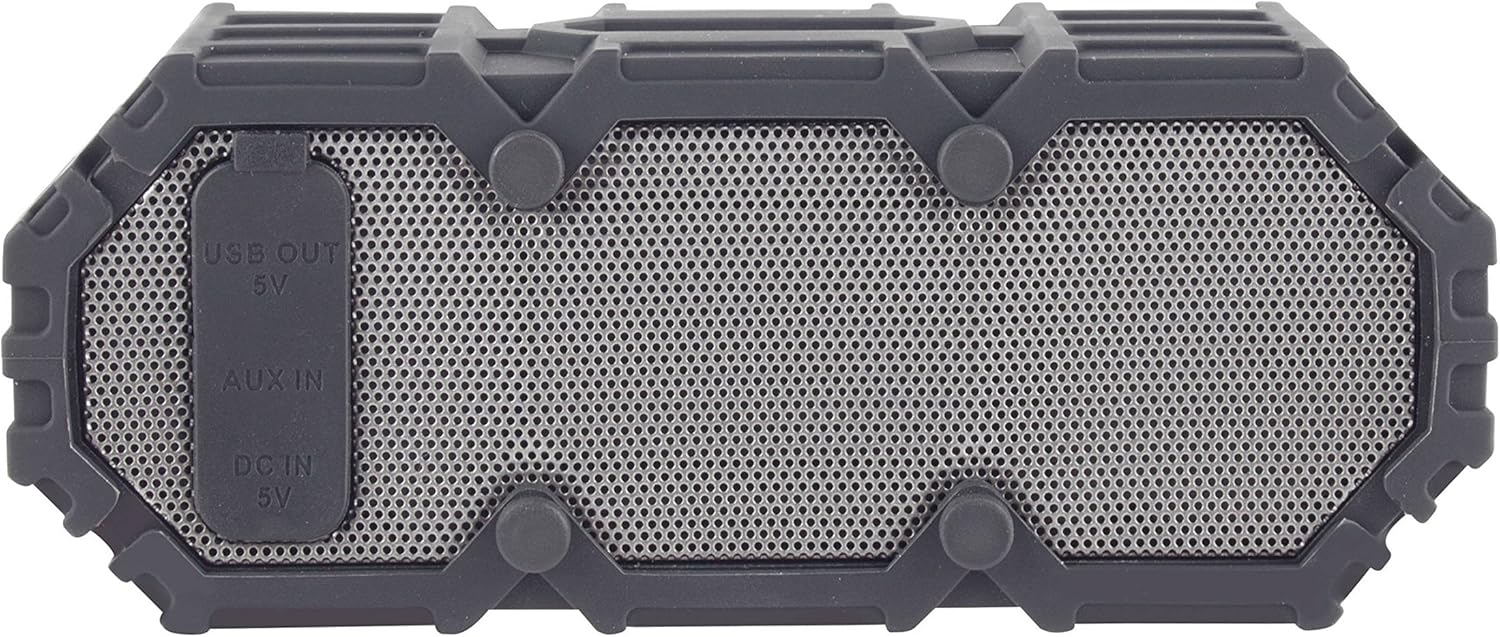
Obrázek 3: Strana view of the speaker revealing the protective flap covering the USB OUT (5V), AUX IN, and DC IN (5V) ports.
- DC IN (5V) Port: Pro nabíjení reproduktoru pomocí dodaného USB kabelu.
- Vstupní port AUX: For connecting external audio devices via a 3.5mm auxiliary cable.
- USB OUT (5V) Port: Functions as a power bank to charge other portable devices.
Nastavení
Počáteční nabíjení
- Před prvním použitím reproduktor plně nabijte.
- Open the protective flap on the side of the speaker.
- Connect the small end of the USB charging cable to the DC IN (5V) port on the speaker.
- Připojte větší konec kabelu USB k napájecímu adaptéru USB (není součástí balení) nebo k portu USB počítače.
- The LED indicator will show charging status (e.g., solid red while charging, off when fully charged). Charging typically takes a few hours.
- Once fully charged, disconnect the cable and securely close the protective flap to maintain waterproofing.
Zapnutí/vypnutí
- Zapnutí: Stiskněte a podržte tlačítko napájení, dokud se nerozsvítí indikátor LED a neuslyšíte zvukový signál.
- To power off: Press and hold the Power button until the LED indicator turns off and you hear an audible prompt.
Návod k obsluze
Párování pomocí Bluetooth
- Ujistěte se, že je reproduktor zapnutý a nachází se do 10 metrů od vašeho zařízení Bluetooth.
- The speaker will automatically enter Bluetooth pairing mode when powered on for the first time, or if no device is connected. The LED indicator will flash blue. If already connected, press the Bluetooth button to enter pairing mode.
- Povolte ve svém zařízení Bluetooth (smartphone, tablet, počítač).
- Hledat "Mini LifeJacket 3" in your device's Bluetooth settings.
- Select "Mini LifeJacket 3" to connect. Once paired, the LED indicator will turn solid blue, and you will hear a confirmation tone.
- Pokud se párování nezdaří, vypněte reproduktor a Bluetooth zařízení a poté kroky zopakujte.
Přehrávání zvuku
- Přehrát/pozastavit: Stiskněte tlačítko Přehrát/Pozastavit.
- Ovládání hlasitosti: Stiskněte tlačítko pro zvýšení hlasitosti (+) nebo snížení hlasitosti (-).
- Další skladba: Stiskněte a podržte tlačítko pro zvýšení hlasitosti (+).
- Předchozí skladba: Stiskněte a podržte tlačítko pro snížení hlasitosti (-).
Správa hovorů
- Přijmout/ukončit hovor: Press the Play/Pause/Call button.
- Odmítnout hovor: Stiskněte a podržte tlačítko Přehrát/Pozastavit/Volat.
True Wireless Stereo Plus Pairing (TWS)
The Mini LifeJacket-3 supports TWS pairing, allowing you to connect two Mini LifeJacket-3 speakers for a stereo audio experience.
- Ensure both Mini LifeJacket-3 speakers are powered on and not connected to any Bluetooth device.
- On one speaker (this will be the primary speaker), press and hold the Bluetooth button for 3 seconds until you hear a tone indicating TWS pairing mode.
- Hlavní reproduktor automaticky vyhledá druhého reproduktoru.
- Once connected, you will hear a confirmation tone, and the LED indicators on both speakers will show a solid blue light.
- Nyní připojte zařízení Bluetooth k primárnímu reproduktoru, jak je popsáno v části „Párování Bluetooth“. Zvuk se bude přehrávat stereofonně z obou reproduktorů.
Pomocný vstup (AUX)
Přehrávání zvuku ze zařízení bez funkce Bluetooth:
- Open the protective flap on the side of the speaker.
- Connect one end of the 3.5mm auxiliary cable to the AUX IN port on the speaker.
- Připojte druhý konec kabelu ke konektoru sluchátek nebo zvukovému výstupu vašeho zařízení.
- Reproduktor se automaticky přepne do režimu AUX.
- Ovládejte přehrávání a hlasitost z připojeného zařízení.
- Remember to close the protective flap when not in use.
Funkce powerbanky
The Mini LifeJacket-3 can be used to charge other USB-powered devices.
- Open the protective flap on the side of the speaker.
- Connect your device's USB charging cable to the USB OUT (5V) port on the speaker.
- The speaker's internal battery will begin charging your device.
- Note that using the power bank function will deplete the speaker's battery.
- Remember to close the protective flap when not in use.
Nabíjení reproduktoru
The Mini LifeJacket-3 provides up to 16 hours of battery life on a full charge. When the battery is low, the LED indicator may flash, or you may hear an audible low battery warning.
To charge the speaker, follow the steps outlined in the "Initial Charging" section under Setup. Ensure the protective flap is securely closed after charging to maintain the speaker's waterproof integrity.
Hydroizolace a péče
The Altec Lansing IMW478s Mini LifeJacket-3 is rated IP67 Waterproof, Dustproof, and Shockproof, and it floats. This means it can be submerged in water up to 1 meter (3.3 feet) for up to 30 minutes.

Figure 4: The Mini LifeJacket-3 speaker floating on the surface of water, demonstrating its waterproof and buoyant design.
Important Waterproofing Notes:
- Always ensure the protective flap covering the charging and AUX ports is securely closed before exposing the speaker to water or dust.
- Do not submerge the speaker in water deeper than 1 meter or for longer than 30 minutes.
- Rinse the speaker with fresh water after exposure to saltwater or chlorinated water, then dry thoroughly.
- Nevystavujte reproduktor extrémním teplotám.
Údržba
- Čištění: Použijte měkký, damp hadříkem k čištění reproduktoru. Nepoužívejte agresivní chemikálie ani abrazivní čisticí prostředky.
- Skladování: Reproduktor skladujte na chladném a suchém místě mimo dosah přímého slunečního záření a extrémních teplot. Pokud jej skladujete delší dobu, pravidelně nabíjejte baterii, aby se zachovala její životnost.
- Péče o přístav: Ensure the charging and AUX ports are free of debris before connecting cables. Always close the protective flap when not in use.
Odstraňování problémů
| Problém | Možná příčina | Řešení |
|---|---|---|
| Reproduktor se nezapne. | Baterie je vybitá. | Plně nabijte reproduktor. |
| Nelze spárovat se zařízením Bluetooth. | Reproduktor není v režimu párování; Bluetooth zařízení je vypnuté; reproduktor je příliš daleko od zařízení. | Ensure speaker is in pairing mode (flashing blue LED). Turn Bluetooth on your device. Move speaker closer to device (within 30 ft/10m). Forget "Mini LifeJacket 3" on your device and try pairing again. |
| Z reproduktoru není slyšet žádný zvuk. | Hlasitost je příliš nízká; reproduktor není připojen; nesprávný vstupní režim. | Increase volume on both speaker and connected device. Ensure speaker is successfully paired or AUX cable is properly connected. Check if speaker is in the correct mode (Bluetooth or AUX). |
| Zvuk je zkreslený. | Volume is too high; low battery; interference. | Decrease volume. Charge the speaker. Move speaker away from other electronic devices. |
| Cannot charge external device using power bank. | Speaker battery is too low; cable issue. | Ensure speaker has sufficient charge. Try a different USB cable. |
Specifikace
| Funkce | Detail |
|---|---|
| Značka | Altec Lansing |
| Model | IMW478s (Mini LifeJacket-3) |
| Technologie připojení | Bluetooth |
| Bezdrátové Dosah | Až 30 stop (10 metrů) |
| Životnost baterie | Až 16 hodin |
| Hodnocení voděodolnosti | IP67 (Waterproof, Dustproof, Shockproof, Floats) |
| Režim zvukového výstupu | Stereo (s párováním TWS) |
| Zdroj napájení | Napájení z baterie |
| Rozměry produktu (D x Š x V) | 2.76" x 7.87" x 1.57" (7.01 cm x 19.99 cm x 3.99 cm) |
| Hmotnost položky | 15.8 unce (447.9 gramů) |
| Speciální funkce | Built-in Microphone, Power Bank (USB OUT 5V), True Wireless Stereo Plus Pairing |

Figure 5: The Mini LifeJacket-3 speaker mounted on an ATV handlebar, demonstrating its versatility and the use of the included mounting bracket.
Záruka a podpora
The Altec Lansing IMW478s Mini LifeJacket-3 Bluetooth Speaker comes with a Limited Warranty. For specific warranty terms and conditions, please refer to the warranty card included with your product or visit the official Altec Lansing webmísto.
For technical support, troubleshooting assistance, or to inquire about replacement parts, please contact Altec Lansing customer service or visit their official support page. Contact information can typically be found on the product packaging or the manufacturer's webmísto.
Oficiální Webmísto: https://alteclansing.com/
Ask a question about this manual
Ask about setup, troubleshooting, compatibility, parts, safety, or missing instructions. Manuals+ will review the question and use this page’s manual context to help answer it.