
1. Úvod
The AKASO V1-US Dash Cam is designed to provide reliable video recording for your vehicle, enhancing safety and providing evidence in case of incidents. This manual will guide you through the setup, operation, and maintenance of your dash cam.
2. Co je v krabici
Zkontrolujte prosím obsah balení, abyste se ujistili, že jsou přítomny všechny položky:
- AKASO V1-US Dash Cam
- Stručná referenční příručka
- Nabíječka do auta
- USB kabel
- Adhesive Mounts
- Py Tool

Image: Package contents of the AKASO V1-US Dash Cam.
3. Vlastnosti produktu
- WiFi with App: The AKASO V1-US dash cam features built-in WiFi, allowing connection to your smartphone via a dedicated app. This enables live viewing, configuration adjustments, video download, and sharing to social platforms. The app also synchronizes the phone's time, eliminating manual time setting.

Image: Dash Cam displaying WiFi and GPS functionality with app integration.
- GPS trasa: Integrated GPS accurately records driving tracks, including speed, longitude, latitude, and location data for every journey. Review driving routes and tracks on Google Maps through the phone app or the AKASO player on a computer.

Image: GPS tracking data displayed on a map via the AKASO player.
- Super noční vidění: Equipped with a SONY SENSOR, the dash cam captures Full HD 1296P images, offering improved imaging performance in both daytime and nighttime conditions. Wide Dynamic Range (WDR) automatically balances light and dark areas in the video.

Image: Dash Cam screen showing enhanced night vision recording.
- G-Sensor and Parking Monitor: Loop recording is standard. The built-in G-sensor locks recording clips to ensure data integrity during collisions. Parking mode activates the dash camera to record for 30 seconds if an impact is detected while parked, then turns off.
- Další vlastnosti: The AKASO V1-US dash cam includes a 16GB microSD Card, supporting up to 128GB (Class 10 or above). It features a 170-degree wide viewing angle to cover multiple traffic lanes. Its discreet design allows for unobtrusive placement in your vehicle.
4. Pokyny k nastavení
4.1 Vložení karty MicroSD
Before first use, insert a Class 10 or higher MicroSD card (up to 128GB) into the card slot on the dash cam. Ensure the card is inserted correctly until it clicks into place.
4.2 Montáž palubní kamery
Choose a suitable location on your windshield that does not obstruct your view. Clean the area thoroughly. Attach the adhesive mount to the dash cam, then firmly press the mount onto the chosen area of the windshield. Adjust the camera angle as needed.
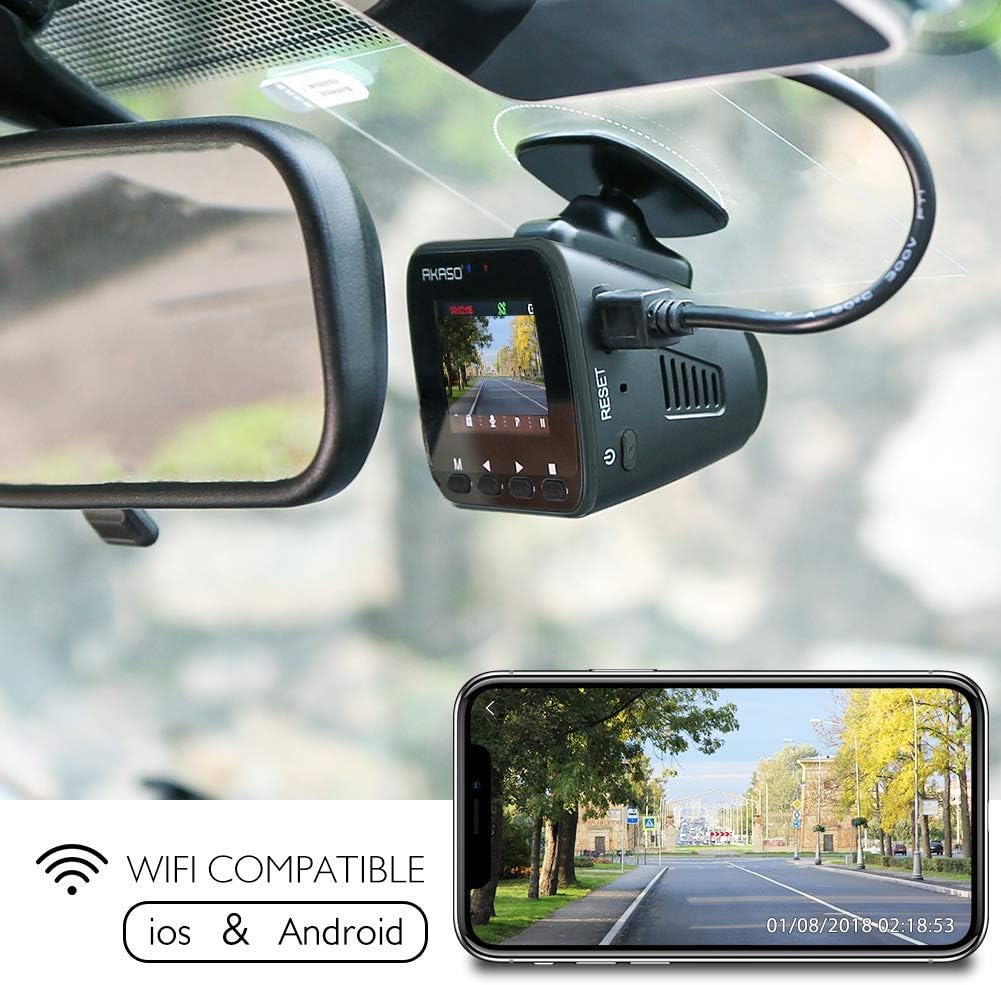
Image: Dash Cam mounted on a car windshield.
4.3 Připojení napájení
Connect the car charger to your vehicle's cigarette lighter socket and the other end to the dash cam's USB power port. The dash cam will automatically power on and begin recording when the vehicle starts.

Image: Diagram illustrating the USB power port and other components of the dash cam.
4.4 Počáteční nastavení
Upon first power-on, you may need to set the date, time, and preferred language. Use the buttons on the dash cam to navigate the menu and confirm your selections.
4.5 Connecting to the Phone App (WiFi)
Download the official AKASO Dash Cam app from your smartphone's app store. Enable WiFi on your dash cam and connect your phone to the dash cam's WiFi network. Follow the in-app instructions to pair your device and access features like live view a správu videa.
Video: Official video demonstrating the process of connecting the AKASO V1-US Dash Cam to a mobile device via WiFi.
5. Návod k obsluze
5.1 Zapnutí/vypnutí
The dash cam automatically powers on and begins recording when connected to a power source and the vehicle ignition is turned on. It powers off automatically when the ignition is turned off.
5.2 Režimy nahrávání
- Nahrávání ve smyčce: The dash cam continuously records video in segments. When the memory card is full, the oldest unlocked video files are overwritten by new recordings. You can typically set segment lengths (e.g., 1, 3, or 5 minutes) in the settings.
- G-senzor: In the event of a sudden impact or collision, the built-in G-sensor detects the event and automatically locks the current video segment, preventing it from being overwritten by loop recording.
- Parkovací monitor: When enabled, this feature allows the dash cam to detect impacts while the vehicle is parked and the engine is off. If an impact is detected, the camera will automatically power on, record for a short duration (e.g., 30 seconds), and then power off again.
Image: Dash Cam screen illustrating loop recording functionality.
5.3 Přístup k Footage
Recorded videos can be accessed in several ways:
- Via Phone App: Connect your smartphone to the dash cam's WiFi. Use the app to browse, download, and manage recorded videos directly on your phone.
- Přes počítač: Remove the MicroSD card from the dash cam and insert it into a computer's card reader. You can then view and transfer video files. For GPS data, use the dedicated AKASO player software.
Video: Oficiální video s produktemasing the key features and general operation of the AKASO V1-US Dash Cam, including WiFi connectivity, GPS, and video quality.
6. Údržba
- Běžné formátování: It is recommended to format the MicroSD card regularly (e.g., once a month) to ensure optimal performance and prevent data corruption. This can usually be done through the dash cam's settings menu.
- Čištění: Keep the camera lens and screen clean using a soft, dry cloth. Avoid using abrasive cleaners or solvents.
- Teplota: Avoid exposing the dash cam to extreme temperatures for extended periods, as this can affect battery life and performance.
7. Řešení problémů
- Palubní kamera se nezapíná: Ensure the car charger is properly connected and the vehicle's cigarette lighter socket is functioning. Check the USB cable for damage.
- Problémy s nahráváním: Verify that a MicroSD card is inserted and is Class 10 or higher. Format the card if issues persist. Check if the card is full or corrupted.
- Problémy s připojením k Wi-Fi: Ensure WiFi is enabled on the dash cam and your phone. Try restarting both devices. Confirm you are connecting to the correct WiFi network broadcast by the dash cam.
- GPS nefunguje: Ujistěte se, že palubní kamera má volný view of the sky for GPS signal acquisition. It may take a few minutes for the GPS to lock on.
- Video Playback Lag: This can be due to a slow MicroSD card. Use a high-speed Class 10 or U3 card.
8. Specifikace
| Funkce | Specifikace |
|---|---|
| Značka | AKASO |
| Název modelu | V1-US |
| Technologie připojení | Wi-Fi |
| Speciální funkce | Built-In GPS, Built-In WiFi |
| Rozlišení záznamu videa | 1296p (higher than 1080p) |
| Zahrnuté komponenty | Dash Cam |
| Typ montáže | Adhezivní držák |
| Pole View | 170 stupňů |
| Kontrolní metoda | App |
| Velikost obrazovky | 1.5 palce |
| Typ paměti Flash | MicroSD |
| Jsou součástí balení | Ano |
| Typ zobrazení | LCD |
| Typ baterie | Lithium Polymer |
| Snímková frekvence | 30 FPS |
| Maximální podporovaná velikost paměti Flash | 128 GB |
| Hmotnost položky | 2.08 unce |
9. Záruka a podpora
The AKASO V1-US Dash Cam comes with a warranty that covers manufacturing defects. For specific warranty details, please refer to the documentation included with your product or contact AKASO customer support.
For technical assistance, troubleshooting, or further inquiries, please visit the official AKASO webnebo kontaktujte jejich tým zákaznických služeb.