
Andoer HDV-Z82
Andoer HDV-Z82 Digital Video Camera Camcorder User Manual
Model: HDV-Z82
1. Úvod
This manual provides comprehensive instructions for the operation and maintenance of your Andoer HDV-Z82 Digital Video Camera Camcorder. The HDV-Z82 is a versatile device capable of capturing 1080P Full HD video and 24MP still images, featuring a 0.45X wide-angle lens, 3-inch LCD touchscreen, and support for external accessories.

The Andoer HDV-Z82 camcorder, shown with its included remote control, highlighting its compact design and primary lens.

The Andoer HDV-Z82 camcorder is designed to capture vivid and bright moments with its 24MP High Definition CMOS Sensor.
2. Obsah balení
Ověřte prosím, zda jsou ve vašem balení obsaženy všechny níže uvedené položky:
- 1 x Andoer HDV-Z82 Digital Camera with Battery (NP-40B 3.7V 1250mAh)
- 1 x Remote Control with Battery (CR2025 3V)
- 1 x 0.45X Wide Angle Lens with 2 Covers
- 1x klip na objektiv
- 1 x Lens Bag
- 1 x USB kabel
- Kabel 1 x HD
- 1 x krytka objektivu
- 1 x Camera Bag with Shoulder Strap
- 1 x Lens User Manual (English)
- 1 x Camera User Manual (English/Chinese)
3. Identifikace dílů
Familiarize yourself with the various parts of your camcorder:
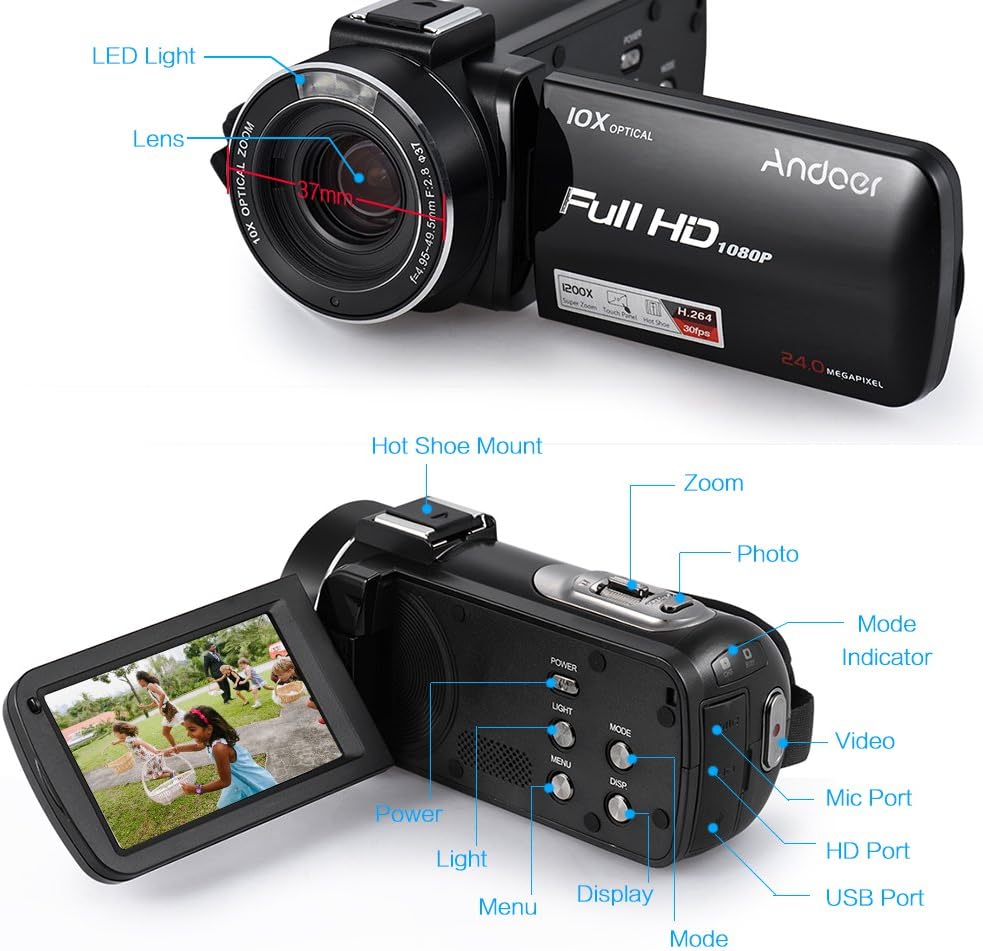
This diagram illustrates the various components of the HDV-Z82 camcorder, including the LED Light, Lens, Hot Shoe Mount, Zoom control, Photo button, Mode selector, Video button, Mic Port, HD Port, USB Port, Power button, Light button, Menu button, Display button, and Mode indicator.
- LED světlo: Provides supplementary illumination in low-light conditions.
- Čočka: Hlavní optická součástka pro zachycení snímků a videa.
- Uchycení sáněk blesku: For attaching external accessories like microphones or additional LED lights.
- Ovládání zoomu: Adjusts the optical and digital zoom levels.
- Tlačítko fotografie: Press to capture still images.
- Volič režimů: Switches between video, photo, and playback modes.
- Tlačítko videa: Spouští a zastavuje nahrávání videa.
- Port mikrofonu: Pro připojení externího mikrofonu.
- HD port: For connecting the camcorder to an HD display.
- USB port: For connecting to a computer for data transfer or charging.
- Vypínač: Turns the camcorder on or off.
- Světelné tlačítko: Aktivuje nebo deaktivuje vestavěné LED světlo.
- Tlačítko nabídky: Accesses the camcorder's settings menu.
- Tlačítko zobrazení: Toggles display information on the LCD screen.
- Indikátor režimu: Shows the current operating mode.
4. Nastavení
4.1. Instalace baterie
- Otevřete kryt bateriového prostoru.
- Insert the NP-40B battery, ensuring the correct polarity.
- Bezpečně zavřete kryt bateriového prostoru.
- Poznámka: The camera and remote control batteries are insulated for secure delivery. Please remove the insulation paste before first use.
4.2. Vložení paměťové karty
The camcorder supports up to a 64GB memory card (not included). A Class 10 or above memory card is highly recommended for optimal performance.
- Najděte slot pro paměťovou kartu.
- Insert the SD/SDHC memory card with the metal contacts facing the correct direction until it clicks into place.
- Chcete-li kartu vyjmout, jemně na ni zatlačte, dokud nevyskočí.
4.3. Attaching the Wide Angle Lens
The included 0.45X wide-angle lens can be attached to expand your field of view.

This image demonstrates the expanded field of view achieved with the 0.39X Wide Angle + Macro Lens compared to a standard 27mm lens, allowing for capture of wider scenery.

This diagram illustrates the assembly of the Macro Lens and the 0.39X Wide Angle Lens, which can be combined for super wide vision or used separately for macro photography.
- Remove the lens cap from the camcorder's main lens.
- Screw the wide-angle lens onto the camcorder's lens thread until secure.
- Ensure the lens is firmly attached to prevent accidental detachment.
4.4. Baterie dálkového ovládání
The remote control uses one CR2025 3V battery, which is included. Remove the insulation tab before first use.
5. Návod k obsluze
5.1. Zapnutí/vypnutí
Stiskněte tlačítko MOC button to turn the camcorder on or off. The LCD screen will illuminate upon power-on.
5.2. Výběr režimu
Použijte MODE button to switch between Video Recording Mode, Photo Shooting Mode, and Playback Mode.
5.3. Nahrávání videa
- Přepněte do režimu nahrávání videa.
- Stiskněte tlačítko VIDEO button to start recording. A red indicator will typically appear on the screen.
- Stiskněte tlačítko VIDEO dalším tlačítkem nahrávání zastavíte.
5.4. Fotografování
- Switch to Photo Shooting Mode.
- Kompozice snímku se provede pomocí LCD displeje.
- Stiskněte tlačítko FOTOGRAFIE tlačítko pro pořízení statického snímku.
5.5. Funkce zoomu
Použijte ZOOM controls (T for Telephoto, W for Wide) to adjust the 10X optical zoom and up to 120X digital zoom.
5.6. Using the 3-inch LCD Touchscreen
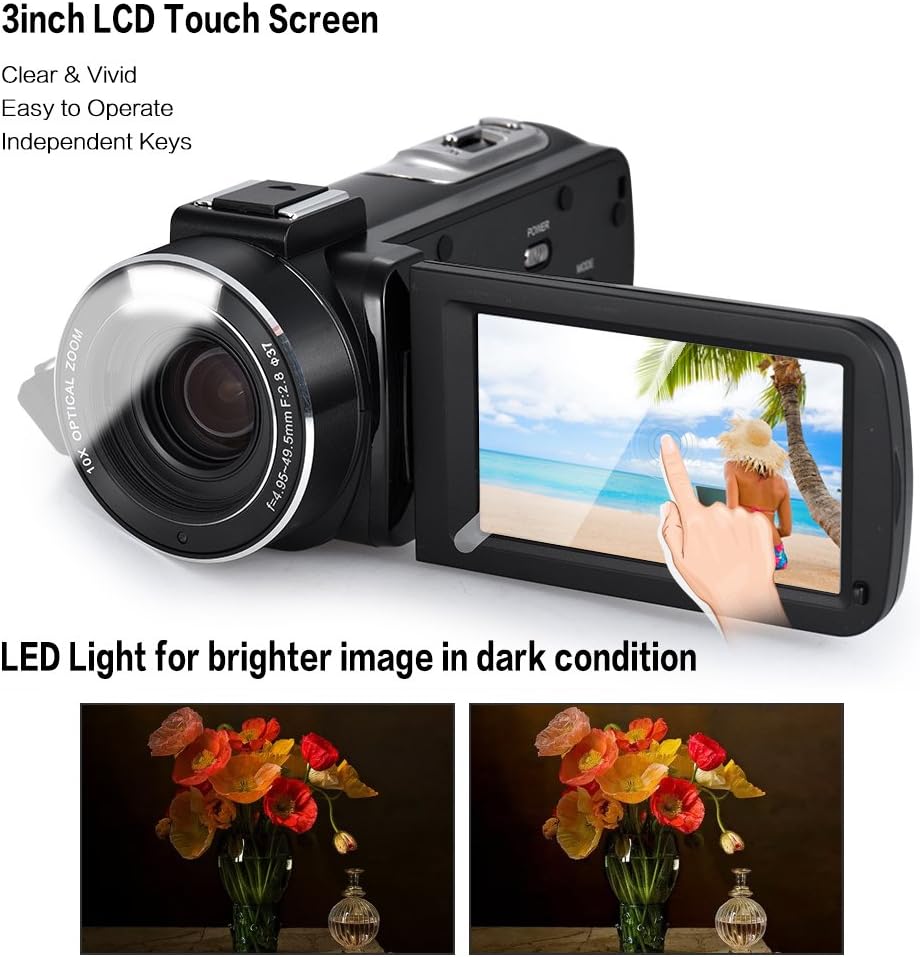
The camcorder features a 3-inch rotary LCD touchscreen for clear and vivid viewing. The built-in LED light enhances image brightness in low-light conditions, as shown in the comparison.
The rotary LCD touchscreen allows for easy navigation of menus and settings. Simply touch the desired option on the screen to select it.
5.7. Pokročilé funkce
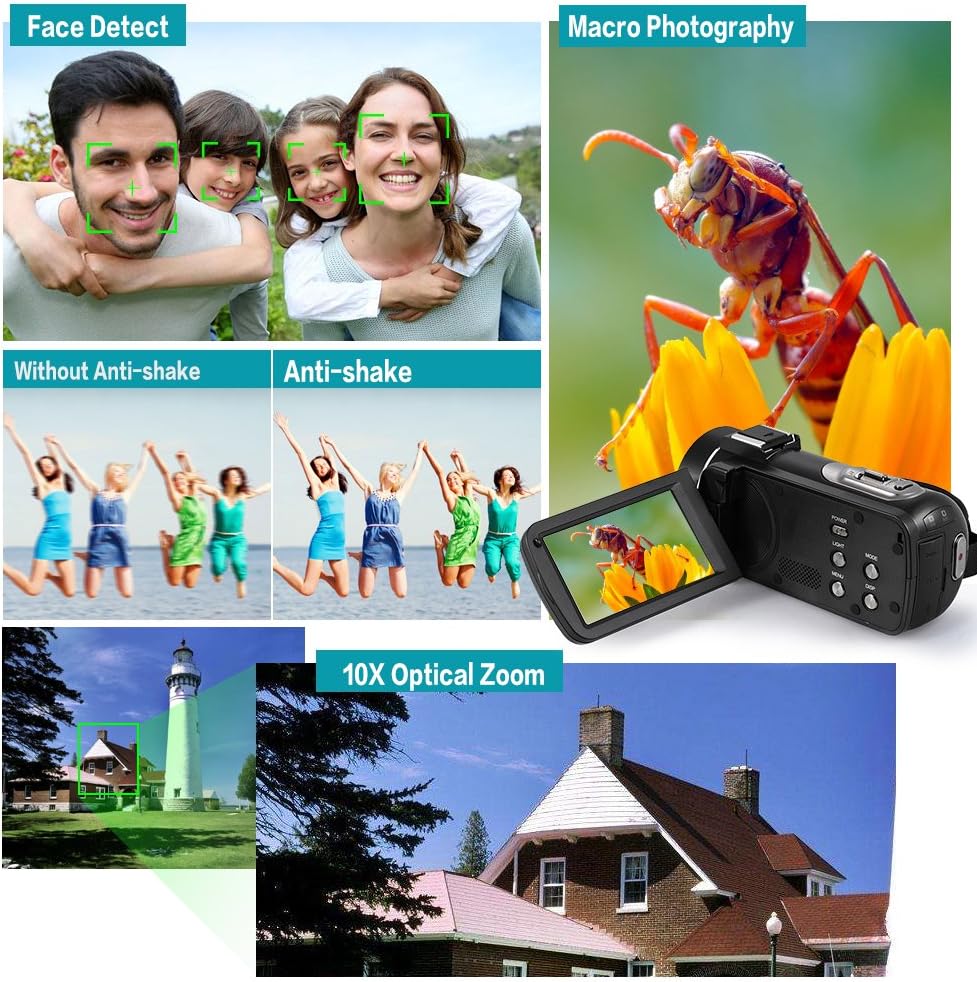
This composite image showcases key functionalities: Face Detect for automatic facial recognition, Anti-shake technology for stable footage, Macro Photography for detailed close-ups, and the powerful 10X Optical Zoom for distant subjects.
- Face Detect: Automaticky detekuje a optimalizuje zaostření a expozici pro obličeje v záběru.
- Anti-shake: Reduces blur caused by camera movement, ensuring clearer footage.
- Makrofotografie: Allows for close-up shots of small subjects with fine detail.
- Pokračovat v záběru: Enables continuous shooting for a series of rapid photos.
- Samospoušť: Set a delay (2/5/10s) before a photo is taken.
- Ztlumit: Zapíná/vypíná nahrávání zvuku.
- Automatické vypnutí: Configures the camcorder to automatically power off after a period of inactivity.
- Čas svamp: Adds date and time information to your recordings/photos.
5.8. Using the Hot Shoe Mount

The unique hot shoe mount on the camcorder allows for the attachment of external accessories such as microphones and LED lights, enhancing audio quality and illumination for various shooting scenarios.
The hot shoe mount allows you to attach compatible external accessories like microphones for improved audio or additional LED lights for enhanced illumination. Simply slide the accessory onto the mount until it locks into place.
5.9. Connecting to TV/Computer
Use the provided HD Cable to connect the camcorder to an HD television for playback. Use the USB Cable to connect to a computer (Windows XP/Vista/7/8 or above) for transferring files.
6. Údržba
- Čištění objektivu: Používejte měkký hadřík bez žmolků, speciálně určený pro objektivy fotoaparátů. Nepoužívejte agresivní chemikálie.
- Čištění těla: Wipe the camcorder body with a soft, dry cloth. Avoid using water or cleaning solutions directly on the device.
- Skladování: Videokameru skladujte na chladném a suchém místě mimo dosah přímého slunečního záření a extrémních teplot. Pokud ji skladujete delší dobu, vyjměte baterii.
- Péče o baterie: Pravidelně dobíjejte baterii, i když ji nepoužíváte, abyste zachovali její životnost.
7. Řešení problémů
| Problém | Možná příčina | Řešení |
|---|---|---|
| Videokamera se nezapne. | Battery is dead or not inserted correctly. Insulation tab not removed. | Charge the battery. Reinsert the battery correctly. Remove the insulation tab from the battery. |
| Nelze nahrávat video/fotit. | Memory card is full, not inserted, or incompatible. Incorrect mode selected. | Insert a compatible memory card. Delete unnecessary files or use a new card. Switch to the correct mode (Video/Photo). |
| Images/videos are blurry. | Lens is dirty. Anti-shake feature off. Insufficient lighting. | Clean the lens. Ensure Anti-shake is enabled in settings. Use the LED light or shoot in brighter conditions. |
| Dálkové ovládání nefunguje. | Battery is dead or insulation tab not removed. Obstruction between remote and camcorder. | Replace the CR2025 battery. Remove the insulation tab. Ensure clear line of sight to the camcorder's IR receiver. |
8. Specifikace
| Model | HDV-Z82 |
| Rozlišení videa | 1080P 30fps, 720P 60/30fps, VGA 30fps |
| Rozlišení fotografie | 24M (5600 * 4200), 20M, 16M, 12M, 10M, 7MHD, 5M, 3M, 2MHD, VGA |
| Optický zoom | 10x |
| Digitální zoom | 120x |
| Velikost obrazovky | 3 Inches (Rotary LCD Touchscreen) |
| Technologie fotosenzoru | CMOS |
| Paměťová média | Supports up to 64GB Memory Card (Class 10 or above recommended) |
| Baterie | NP-40B 3.7V 1250mAh (Camera), CR2025 3V (Remote Control) |
| Rozhraní | HD Out, USB 2.0 |
| Podpora operačního systému | Windows XP/Vista/7/8 or above |
| Speciální funkce | Face Detect, Anti-shake, Macro Photography, Continue Shot, Self-timer, Mute, Auto OFF, Time Stamp, Built-in LED Light, Hot Shoe Mount |
| Rozměry | 19.5 x 16.2 x 10 cm |
| Hmotnost | 801 g |
9. Záruka a podpora
For product support, technical assistance, or warranty inquiries, please contact Andoer customer service through the retailer where the product was purchased or visit the official Andoer webstránky pro kontaktní informace.
Uschovejte si prosím doklad o koupi pro případné reklamace.
Ask a question about this manual
Ask about setup, troubleshooting, compatibility, parts, safety, or missing instructions. Manuals+ will review the question and use this page’s manual context to help answer it.