
Zavedení
The Teesa Hypercare T300 rotary shaver (model TSA0520) is designed for efficient and comfortable facial hair removal. Its three flexible blades adapt to facial contours, and the integrated pop-up trimmer allows for precise styling of sideburns and moustaches. This manual provides essential information for safe operation, maintenance, and optimal performance of your device.
Bezpečnostní informace
Please read these safety instructions carefully before using the appliance and keep them for future reference.
- Tento spotřebič je určen pouze pro použití v domácnosti.
- Do not immerse the shaver in water or other liquids. Keep it dry.
- Spotřebič nepoužívejte, pokud je poškozen napájecí kabel nebo zástrčka.
- Always disconnect the shaver from the power supply before cleaning.
- Udržujte spotřebič mimo dosah dětí.
- Use only the power cable supplied with the device.
- Do not use the shaver if the shaving heads are damaged, as this may cause injury.
Obsah balení
Zkontrolujte prosím obsah balení. Pokud některé položky chybí nebo jsou poškozené, obraťte se na prodejce.
- Teesa Hypercare T300 Rotary Shaver
- Napájecí kabel
- Ochranná čepice
- Čisticí kartáč
- Mazací olej
- Návod k použití
Konec produktuview
Familiarize yourself with the components of your Teesa Hypercare T300 Rotary Shaver.
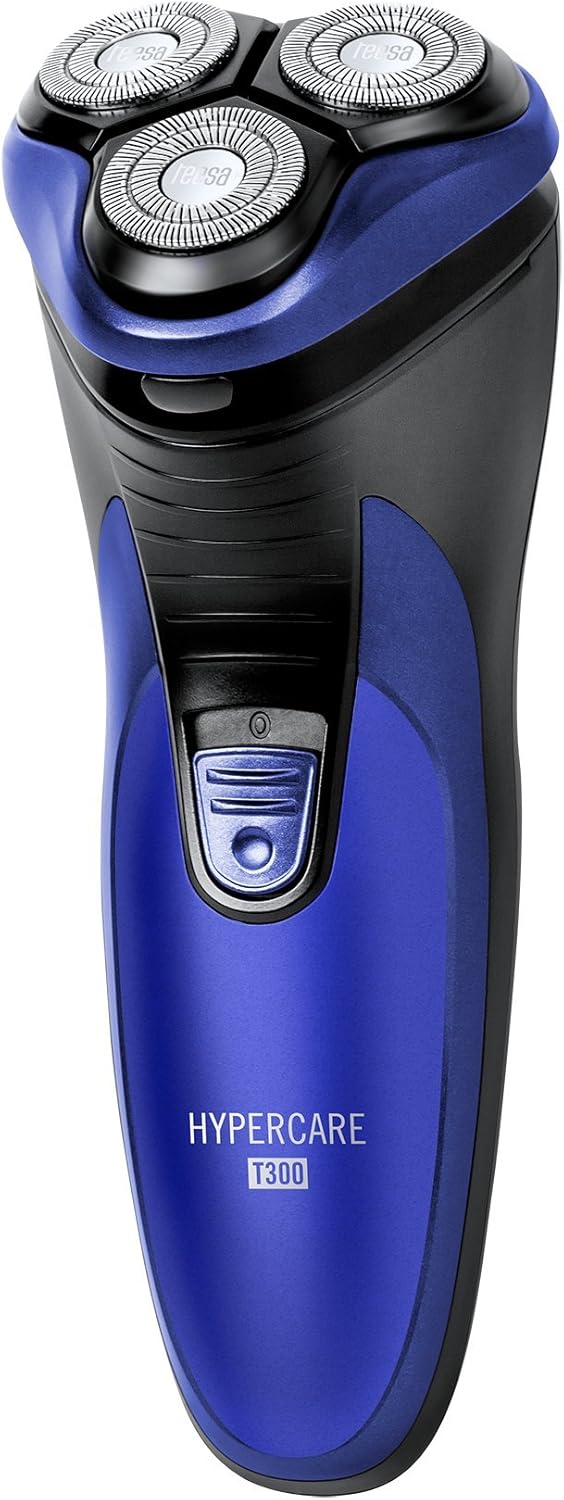


Nastavení
Nabíjení holicího strojku
- Před nabíjením se ujistěte, že je holicí strojek vypnutý.
- Connect the power cable to the charging port on the shaver.
- Plug the other end of the power cable into a standard electrical outlet (220-240V; 50/60Hz).
- Rozsvítí se kontrolka nabíjení, což znamená, že se holicí strojek nabíjí.

A full charge takes approximately 8 hours and provides up to 45 minutes of cordless operation. Do not leave the shaver connected to the charger for extended periods after it is fully charged.
Provozní
Holení
- Ujistěte se, že je holicí strojek plně nabitý.
- Stisknutím tlačítka napájení zapněte holicí strojek.
- Držte holicí strojek v pravém úhlu k pokožce.
- Move the shaver in small, circular motions over your face and neck. For optimal results, shave against the direction of hair growth.
- The flexible shaving heads will adapt to the contours of your face for a close shave.
- Po holení stiskněte tlačítko napájení, abyste holicí strojek vypnuli.
Používání vysouvacího zastřihovače
- Zapněte holicí strojek.
- Locate the pop-up trimmer release button on the side of the shaver.
- Slide the release button upwards to extend the pop-up trimmer.

- Use the trimmer to precisely shape sideburns, moustaches, or beard lines.
- After use, push the trimmer back down until it clicks into its closed position.
Údržba
Čištění holicího strojku
Pravidelné čištění zajišťuje optimální výkon a hygienu.
- Vypněte holicí strojek a odpojte jej od zdroje napájení.
- Press the release button on the front of the shaver to open the shaving head unit.
- Use the provided cleaning brush to remove any accumulated hair clippings from the shaving heads and the hair chamber.
- For a more thorough cleaning, you may rinse the shaving heads under running water. Ensure the main body of the shaver does not get wet.
- Allow all parts to air dry completely before reassembling the shaving head unit.
- Periodically apply a small drop of the provided lubricating oil to the shaving foils and cutters to maintain smooth operation and prolong blade life.
- Always replace the protective cap over the shaving heads after each use to prevent damage.
Odstraňování problémů
If you encounter any issues with your shaver, refer to the following common problems and solutions:
- Holicí strojek se nezapíná:
- Ujistěte se, že je holicí strojek plně nabitý.
- Pevně stiskněte tlačítko napájení.
- Špatný výkon při holení:
- The blades may be clogged with hair. Clean the shaver thoroughly as described in the Maintenance section.
- Ensure the shaver is fully charged. Performance may decrease with low battery.
- Blades may be dull. Consider replacing the shaving heads after extended use (replacement parts sold separately).
- Holicí strojek se nenabíjí:
- Check that the power cable is securely connected to both the shaver and the electrical outlet.
- Ověřte, zda elektrická zásuvka funguje správně.
- Ensure the charging indicator light illuminates when connected.
Pokud problém přetrvává i po vyzkoušení těchto řešení, kontaktujte zákaznickou podporu.
Specifikace
| Funkce | Specifikace |
|---|---|
| Číslo modelu | TSA0520 |
| Moc | 3 W |
| Rychlost otáčení | 6000 ot./min |
| Doba běhu | Až 45 minut |
| Doba nabíjení | Až 8 hodin |
| Baterie | 2.4 V; 2/3 AA 600 mAh x2 (Rechargeable) |
| Napájení | 220 – 240 V; 50/60 Hz |
| Hmotnost | 165 g |
| Rozměry (D x Š x V) | 58.2 x 46.8 x 150.9 mm |
| Materiál čepele | Legovaná ocel |
| Počet čepelí | 3 (Rotary Type) |
| Speciální funkce | Ergonomický design |
Záruka a podpora
For warranty information, technical assistance, or to inquire about replacement parts, please refer to the documentation included with your purchase or visit the official Teesa webUschovejte si doklad o koupi pro případ reklamace.