
1. Úvod
This manual provides instructions for the Easytry123 replacement infrared remote control, model Easytry0400. This remote is designed to function as a direct replacement for the original remote controls of Dynex DX-LCD37-09-02 and DX-LCD37-09-2 LCD LED HDTV television models. Please ensure your television model is listed for proper compatibility. This remote operates using infrared technology and requires 2 AAA batteries (not included).
2. Nastavení: Instalace baterie
To begin using your Easytry123 replacement remote control, you must first install the batteries.
- Najděte přihrádku na baterie na zadní straně dálkového ovladače.
- Posuňte kryt přihrádky na baterie dolů nebo ven, abyste jej otevřeli.
- Insert two (2) AAA batteries, ensuring the positive (+) and negative (-) terminals align correctly with the markings inside the compartment. Incorrect battery orientation can prevent the remote from functioning.
- Zasuňte kryt přihrádky na baterie zpět na místo, dokud bezpečně nezacvakne.
Obrázek 1: Zadní view of the Easytry123 remote control with the battery compartment open, illustrating where to insert the two AAA batteries.
3. Návod k obsluze
Point the remote control directly towards the infrared receiver on your Dynex television. Ensure there are no obstructions between the remote and the TV.

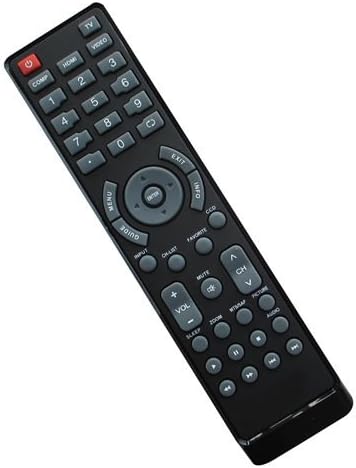
Obrázek 2: Přední view of the Easytry123 remote control, displaying its button layout.
Funkce tlačítek:
- POWER (Red button): Zapíná nebo vypíná televizi.
- COMP, HDMI, VIDEO, 1-9, 0: Number buttons for direct channel selection and input source selection.
- JÍDELNÍ LÍSTEK: Přístup k hlavní nabídce televizoru.
- PRŮVODCE: Displays the electronic program guide (if supported by your TV and service).
- ARROW buttons (Up, Down, Left, Right): Prochází nabídkami a možnostmi.
- ZADEJTE: Potvrzuje výběry v nabídkách.
- VÝSTUP: Ukončí aktuální menu nebo obrazovku.
- INFO: Zobrazuje informace o aktuálním programu nebo vstupu.
- DCC: Likely for Closed Captioning display.
- VSTUP: Cycles through available input sources (HDMI, Video, etc.).
- SEZNAM CH: Zobrazí seznam kanálů.
- ZTLUMIT: Ztlumí nebo zruší ztlumení zvuku televizoru.
- VOL +/-: Nastavuje úroveň hlasitosti.
- CH ^/v: Přepíná televizní kanál nahoru nebo dolů.
- MTMAP, PICTURE, AUDIO: Likely dedicated buttons for picture modes, audio settings, or other TV features.
- ZOOM: Upraví úroveň přiblížení obrazovky.
- SPÁT: Nastaví časovač vypnutí pro televizi.
- Playback Controls (Rewind, Play/Pause, Fast Forward, Stop, Record): For controlling connected media devices or TV's built-in media player.
Note: Some advanced functions or specific buttons may require your television to support those features. Refer to your television's original user manual for detailed information on its capabilities.
4. Údržba
Správná péče a údržba prodlouží životnost vašeho dálkového ovladače.
- Čištění: Use a soft, dry cloth to clean the remote control. For stubborn dirt, lightly dampen the cloth with water or a mild cleaning solution, then wipe dry immediately. Do not use abrasive cleaners or immerse the remote in liquids.
- Výměna baterie: Vyměňte baterie, když dálkový ovladač reaguje pomalu nebo přestane fungovat. Vždy vyměňujte obě baterie současně za nové baterie AAA. Nekombinujte staré a nové baterie ani různé typy baterií.
- Skladování: Pokud dálkový ovladač nebudete delší dobu používat, vyjměte baterie, abyste zabránili jejich vytečení a poškození.
5. Řešení problémů
Pokud máte problémy s dálkovým ovladačem, zkuste následující kroky pro řešení potíží:
- Dálkové ovládání nereaguje:
- Ujistěte se, že dálkový ovladač míří přímo na infračervený senzor televizoru.
- Check if there are any obstructions between the remote and the TV.
- Vyměňte baterie za nové AAA baterie.
- Ověřte, zda je televizor zapnutý.
- Některá tlačítka nefungují:
- This replacement remote is designed to replicate the original remote's functions. However, some specific or advanced features of your TV might not be fully supported if they differ significantly from the original remote's design.
- Ensure your TV model is indeed one of the compatible models (Dynex DX-LCD37-09-02 or DX-LCD37-09-2).
- Rušení:
- Strong light sources, especially fluorescent lights or direct sunlight, can interfere with infrared signals. Try operating the remote in different lighting conditions.
Pokud problém přetrvává i po vyzkoušení těchto kroků, kontaktujte prosím zákaznickou podporu.
6. Specifikace
| Číslo modelu: | Easytry0400 |
| Značka: | Easytry123 |
| Technologie připojení: | Infračervený (IR) |
| Typ ovladače: | Ovládání tlačítkem |
| Kompatibilní zařízení: | Dynex DX-LCD37-09-02, Dynex DX-LCD37-09-2 LCD LED HDTVs |
| Potřebné baterie: | 2 x AAA (nejsou součástí balení) |
| Speciální funkce: | Ergonomic replacement design |
7. Zákaznická podpora
For any questions, concerns, or troubleshooting assistance not covered in this manual, please contact the seller or Easytry123 customer support through the platform where the product was purchased. Please have your product model number (Easytry0400) and purchase details ready when contacting support.