
1. Úvod
The EPEVER 20A MPPT Solar Charge Controller, model Tracer2210AN, is an advanced Maximum Power Point Tracking (MPPT) device designed for 12V/24V automatic work solar systems. It efficiently manages power flow from solar panels to batteries, ensuring optimal charging and extending battery life. This controller features high conversion efficiency, supports various battery types, and offers comprehensive protection functions. This manual provides essential information for the safe installation, operation, and maintenance of your solar charge controller.

Image 1.1: EPEVER 20A MPPT Solar Charge Controller (Tracer2210AN). This image shows the front view of the solar charge controller with its LCD display and control buttons.
2. Bezpečnostní pokyny
- Vždy připojte baterii k regulátoru nabíjení první, then the solar panel, and finally the load. Disconnect in the reverse order: load, then solar panel, then battery.
- Zajistěte dostatečné větrání kolem regulátoru, aby nedošlo k jeho přehřátí.
- Use appropriate wire gauges for all connections to prevent voltage drop and overheating. Refer to the specifications section for recommended cable sizes.
- Avoid short circuits at all terminals.
- Install the controller in a dry, well-ventilated area, away from direct sunlight and moisture.
- Nepokoušejte se o opravu ani úpravu ovladače sami. Servis svěřte kvalifikovanému personálu.
- Během instalace používejte vhodné osobní ochranné prostředky (OOP), včetně ochrany očí a izolačních rukavic.
3. Konec produktuview
The Tracer2210AN controller incorporates advanced features for efficient solar power management:
- Pokročilá MPPT technologie: Ensures maximum power extraction from solar panels with tracking efficiency not less than 99.5% and a maximum conversion efficiency of 98%.
- Vysoce kvalitní komponenty: Utilizes international famous brands of ST and IR components for reliability and durability.
- Kompatibilita baterie: Supports various battery types including lead-acid (sealed, gel, flooded) and lithium-ion (LiFePO4, Li(NiCoMn)O2), with user-defined settings.
- Teplotní kompenzace: Includes battery temperature compensation function for lead-acid batteries.
- Monitorování v reálném čase: Provides real-time energy statistics and supports communication via RS-485 bus with Modbus protocol for monitoring and parameter setting via mobile APP or PC software (requires optional accessories like MT50, WiFi, or BLE adapters).
- Ochranné funkce: Features multiple safety protections including overheating power reduction.
3.1 Součásti řídicí jednotky

Obrázek 3.1: Přední strana view of the EPEVER Tracer2210AN controller with labeled components. Key components include the LCD display, SELECT and ENTER buttons, remote temperature sensor port, solar panel terminals, battery terminals, load terminals, and an RJ45 communication port.

Obrázek 3.2: Nahoře a dole views of the EPEVER Tracer2210AN controller. The top view shows the model information and certifications, while the bottom view displays the terminal connections and communication port.
4. Nastavení
4.1 Montáž regulátoru
Mount the controller vertically on a wall or a stable surface. Ensure there is sufficient space around the controller for proper air circulation to dissipate heat. The dimensions of the controller are 220mm x 154mm x 52mm.

Image 4.1: EPEVER MPPT 20A Solar Charge Controller with its physical dimensions indicated. The controller measures 220mm in length, 154mm in width, and 52mm in height.
4.2 Zapojení kabeláže
Follow the connection order carefully to avoid damage to the controller or other components. Always connect the battery first, then the solar panel, and finally the load. Disconnect in the reverse order.
- Připojte baterii: Connect the positive and negative terminals of the battery to the corresponding battery terminals on the controller. Ensure correct polarity.
- Připojte solární panel: Connect the positive and negative terminals of the solar panel to the corresponding PV terminals on the controller. Ensure correct polarity.
- Připojení zátěže: Connect the positive and negative terminals of the DC load to the corresponding load terminals on the controller. Ensure correct polarity.
- Připojení vzdáleného teplotního senzoru (volitelné): If using, connect the RTS300R47K3.81A temperature sensor to the designated port on the controller and attach the sensor to the battery for accurate temperature compensation.

Image 4.2: Connection diagram illustrating the proper wiring sequence for the EPEVER solar charge controller. It shows connections from the solar panel, battery (with fuse), and DC load, as well as an optional inverter for AC loads.
5. Návod k obsluze
5.1 LCD displej a tlačítka
The controller features an LCD display that shows system status, charging parameters, and error codes. The 'SELECT' and 'ENTER' buttons are used to navigate through menus and adjust settings.
5.2 Nastavení typu baterie
The controller supports various battery types. It is crucial to select the correct battery type for optimal charging and battery longevity. The default setting is 'Sealed' for lead-acid batteries.
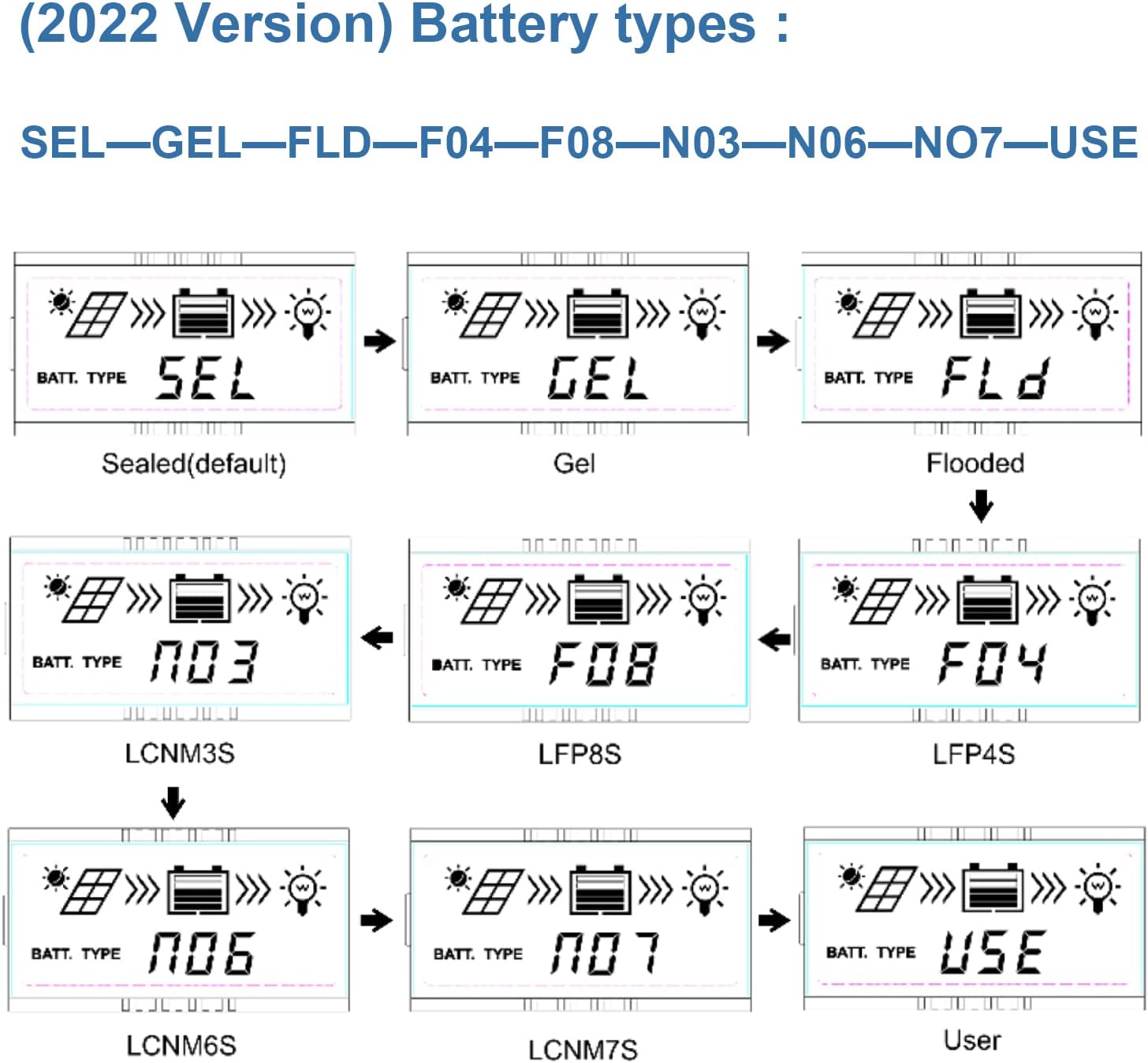
Image 5.1: LCD display showing various battery type selections. Options include Sealed (SEL), Gel (GEL), Flooded (FLD), LiFePO4 (LFP4S, LFP8S), Li(NiCoMn)O2 (LCNM3S, LCNM6S, LCNM7S), and User-defined (USE).
Chcete -li změnit typ baterie:
- Press the 'SELECT' button to cycle through the main display screens until you reach the battery type setting.
- Press and hold the 'ENTER' button to enter the setting modification mode.
- Use the 'SELECT' button to choose the desired battery type (e.g., GEL, FLD, LFP4S, USE).
- Press 'ENTER' again to confirm and save the selection.
5.3 Monitoring and Communication
The Tracer2210AN controller can be monitored and configured remotely using optional accessories:
- Dálkový měřič MT50: Connects via RJ45 cable to display real-time data and modify parameters.
- WiFi/BLE Adapters (eBox-WIFI-01, eBox-BLE-01): Connects to the RS-485 port to enable wireless monitoring and control via a mobile application.
- PC Communication Cable (CC-RS485-USB-150U): Connects to a PC for monitoring and parameter setting using EPEVER PC software.
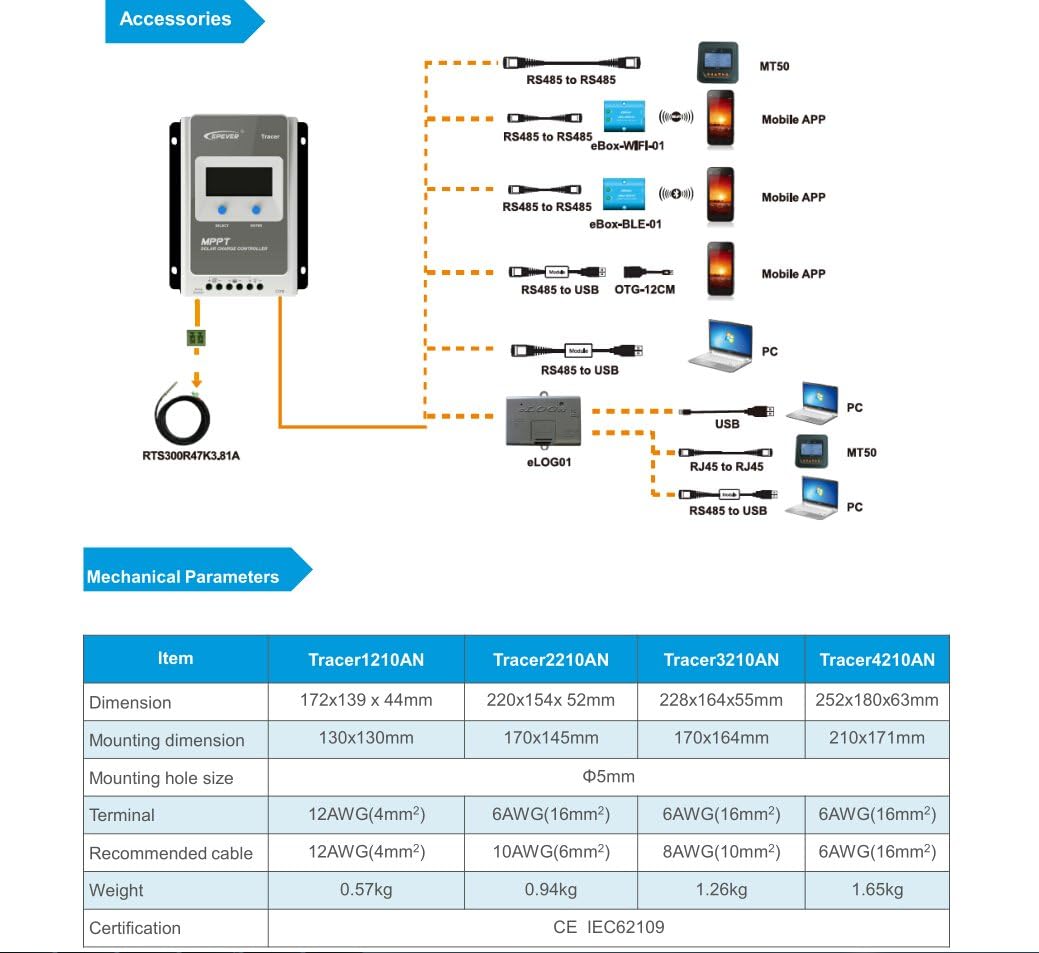
Image 5.2: Diagram showing the EPEVER solar charge controller and its compatible accessories. These include the RTS300R47K3.81A temperature sensor, MT50 remote meter, eBox-WIFI-01, eBox-BLE-01, OTG-12CM, and eLOG01 for various monitoring and communication options.

Image 5.3: The EPEVER Tracer2210AN solar charge controller connected to an MT50 remote meter, displaying system information. This setup allows for convenient monitoring and control.
6. Údržba
Regular maintenance ensures the longevity and optimal performance of your EPEVER solar charge controller:
- Zkontrolujte připojení: Pravidelně kontrolujte veškeré kabelové spoje, zda nejsou pevně utažené a zda nejsou zkorodované. Volné spoje mohou způsobit výbuch.tagkapky a přehřívání.
- Vyčistěte ovladač: Udržujte ovladač čistý a bez prachu a nečistot. K otření povrchu používejte suchý hadřík. Ujistěte se, že ventilační otvory nejsou zablokované.
- Kontrola poškození: Check for any physical damage to the controller, cables, or terminals.
- Kontrola baterie: For lead-acid batteries, check electrolyte levels (if applicable) and terminal condition. Ensure lithium batteries are within their recommended operating parameters.
- Podmínky prostředí: Zajistěte, aby instalační prostředí zůstalo v rámci specifikovaných provozních teplot a vlhkostí.
7. Řešení problémů
Pokud narazíte na problémy se solárním regulátorem nabíjení, postupujte podle následujících běžných kroků pro řešení problémů:
- Bez displeje/napájení:
- Zkontrolujte připojení baterie a ujistěte se, že je baterie dostatečně nabitá.tage je v provozním rozsahu regulátoru.
- Verify that the battery fuse (if installed) is intact.
- Žádné nabíjení ze solárního panelu:
- Ensure solar panel connections are secure and correct polarity is observed.
- Check the solar panel's open-circuit voltage (Voc) and short-circuit current (Isc) to ensure it is producing power.
- Verify that the solar panel voltage is within the controller's input voltage rozsah.
- Zkontrolujte zastínění solárních panelů.
- Načtení nefunguje:
- Zkontrolujte připojení zátěže a ujistěte se o správné polaritě.
- Verify that the battery has sufficient charge. The controller may disconnect the load if the battery voltage je příliš nízké.
- Check load settings on the controller to ensure the load output is enabled.
- Přehřívání:
- Ensure the controller is installed in a well-ventilated area and its heat sinks are not obstructed.
- Reduce the load or solar input if operating in extreme temperatures.
For more detailed troubleshooting or specific error codes, please refer to the comprehensive manual provided by EPEVER or contact their customer support.
8. Specifikace
The following table outlines the key electrical and mechanical parameters for the Tracer2210AN MPPT Solar Charge Controller:

Image 8.1: Table detailing the electrical parameters for Tracer series controllers, including the Tracer2210AN. This table provides specific values for system voltage, currents, power, and environmental conditions.
| Parametr | Hodnota (Tracer2210AN) |
|---|---|
| System Nominal Voltage | 12V/24V Automatické práce |
| Jmenovitý nabíjecí proud | 20A |
| Jmenovitý vybíjecí proud | 20A |
| Max. FV vstupní výkon | 260W (12V Battery System) 520W (24V Battery System) |
| Max. PV Open Circuit Voltage | 100V (at min. operating temp) 92V (at 25℃ ambient temp) |
| Baterie Voltage Dosah | 8-32V |
| MPP svtage Dosah | V(BAT+2V) ~ 72V |
| Základy | Společné Negativní |
| Efektivita sledování | ≥99.5 % |
| Max. Účinnost konverze | 98 % |
| Teplota pracovního prostředí | -25 ℃ ~ +50 ℃ |
| Rozsah skladovacích teplot | -20 ℃ ~ +70 ℃ |
| Relativní vlhkost | ≤95 %, NC |
| Příloha | IP30 |
| Rozměry (D x Š x V) | 220 x 154 x 52 mm |
| Hmotnost | 0.94 kg |
| Velikost terminálu | #6 AWG (16 mm²) |
| Doporučený kabel | #10 AWG (6 mm²) |
9. Záruka a podpora
For warranty information, please refer to the documentation provided with your purchase or contact your authorized EPEVER dealer. EPEVER products typically come with a manufacturer's warranty covering defects in materials and workmanship.
For technical support, product inquiries, or service, please visit the official EPEVER website or contact an authorized EPEVER service center. Ensure you have your product model (Tracer2210AN) and serial number available when seeking support.