
1. Konec produktuview
The Zerone Multi-Language Translator Bluetooth Earphone is a portable wireless device designed for real-time language translation and audio playback. It features Bluetooth 4.1 connectivity, high-fidelity audio output, and a compact in-ear design for comfortable use during various activities.

Obrázek 1.1: Hlavní view of the Zerone Multi-Language Translator Bluetooth Earphone.
2. Obsah balení
Ověřte prosím, zda jsou ve vašem balení obsaženy všechny níže uvedené položky:
- Zerone Multi-Language Translator Bluetooth Earphone
- USB nabíjecí kabel
- Další ušní nástavce (různé velikosti)
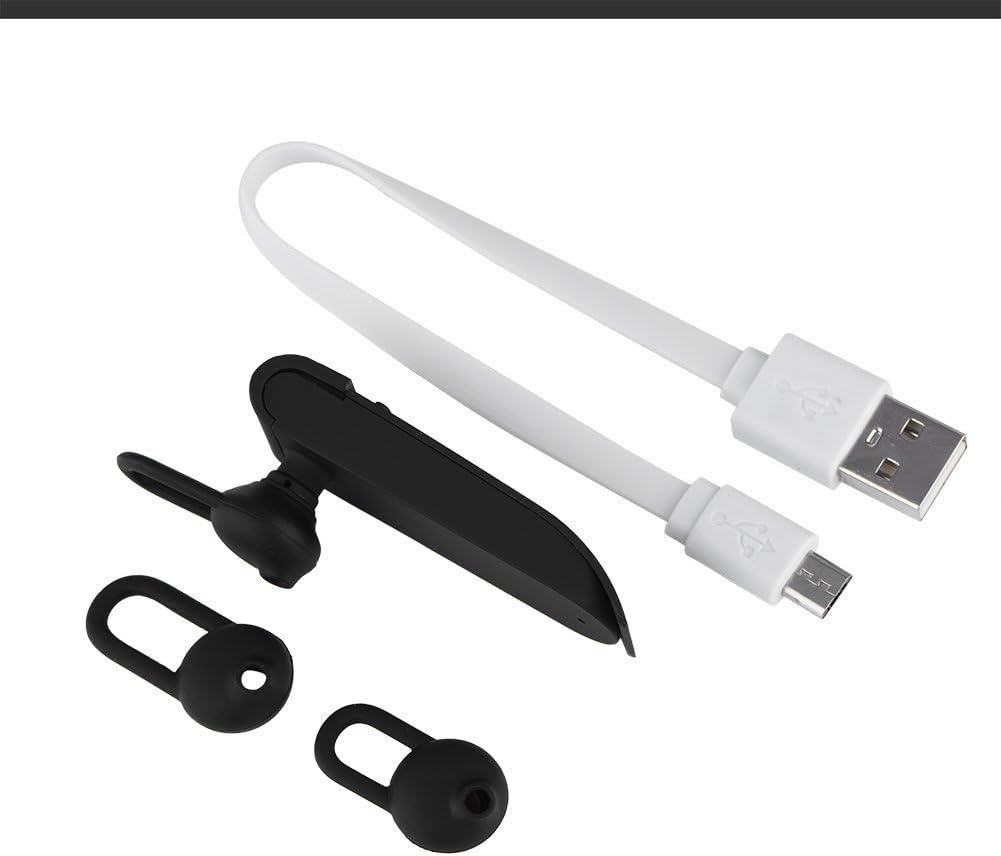
Image 2.1: The earphone with its charging cable and two additional ear tips.
3. Vlastnosti produktu
- Multi-Language Translation: Supports up to 16 languages for real-time translation. Speak into the earphone, and it will translate into the desired language.
- High Fidelity Audio Output: Equipped with an 8mm moving coil speaker for clear, smooth audio and enhanced bass.
- True Wireless In-Ear Design: Mini and compact, offering a stable and comfortable fit without tangled wires, suitable for various activities.
- Připojení Bluetooth 4.1: Optimized Bluetooth 4.1 version ensures a stable and fast wireless connection with a range of up to 10 meters.
- Prodloužená životnost baterie: Built-in 90mAh rechargeable lithium battery provides approximately 5-8 hours of playback time and up to 13 hours of talk time.

Image 3.1: Visual representation of the 16 languages translation feature.

Image 3.2: Illustration of the high fidelity audio output with an 8mm moving coil speaker.

Image 3.3: Visual representation of the Bluetooth true wireless connection with a 10-meter transmission range.

Image 3.4: Details on the earphone's 90mAh rechargeable lithium battery and extended usage times.
4. Nastavení
4.1 Nabíjení sluchátek
Before initial use, fully charge the earphone. Connect the provided USB charging cable to the earphone's charging port and the other end to a USB power source (e.g., computer, wall adapter). The charging time is approximately 2 hours.
4.2 Párování Bluetooth
- Ensure the earphone is fully charged and powered off.
- Press and hold the multi-function button on the earphone until the indicator light flashes red and blue alternately, indicating pairing mode.
- Na smartphonu nebo zařízení s podporou Bluetooth přejděte do nastavení Bluetooth.
- Hledat available devices and select "Zerone Translator Earphone" (or similar name) from the list.
- Po připojení bude kontrolka obvykle svítit modře nebo pomalu modře blikat.
4.3 Companion Application (for Translation)
To utilize the multi-language translation feature, you will need to download and install a compatible companion application on your smartphone. Refer to the packaging or product documentation for the specific app name and download instructions. Ensure your phone is connected to the internet for translation services.
5. Návod k obsluze
5.1 Zapnutí/vypnutí
- Zapnutí: Press and hold the multi-function button for approximately 3 seconds until the indicator light turns blue.
- Vypnout: Press and hold the multi-function button for approximately 5 seconds until the indicator light turns red.
5.2 Přehrávání hudby
- Přehrát/pozastavit: Krátce stiskněte multifunkční tlačítko.
- Další skladba: Dvakrát stiskněte multifunkční tlačítko.
- Předchozí skladba: Třikrát stiskněte multifunkční tlačítko.
5.3 Správa hovorů
- Přijmout/ukončit hovor: Krátce stiskněte multifunkční tlačítko.
- Odmítnout hovor: Stiskněte a podržte multifunkční tlačítko po dobu 2 sekund.
5.4 Using the Translation Function
After successfully pairing the earphone with your device and setting up the companion application:
- Open the translation application on your smartphone.
- Select the source and target languages within the app.
- Activate the translation mode as instructed by the application (this may involve pressing a button on the earphone or within the app).
- Speak clearly into the earphone's microphone. Your speech will be translated and played back through the earphone or your phone's speaker, depending on the app's settings.

Image 5.1: A conceptual image demonstrating the earphone's translation capability between two languages.
6. Údržba
- Čištění: Use a soft, dry cloth to clean the earphone. Do not use abrasive cleaners or immerse the device in water.
- Skladování: Sluchátka skladujte na chladném a suchém místě mimo dosah přímého slunečního záření a extrémních teplot.
- Péče o baterie: Chcete-li prodloužit životnost baterie, vyvarujte se častého úplného vybíjení sluchátek. Pravidelně je nabíjejte, i když je delší dobu nepoužíváte.
7. Řešení problémů
| Problém | Možná příčina | Řešení |
|---|---|---|
| Earphone does not power on | Slabá baterie | Charge the earphone for at least 30 minutes. |
| Nelze spárovat se zařízením | Earphone not in pairing mode; Bluetooth off on device; device too far | Ensure earphone is in pairing mode (flashing red/blue). Turn on Bluetooth on your device. Move device closer to earphone (within 10m). |
| No sound during playback/calls | Volume too low; earphone not connected; media output not selected | Increase volume on both earphone and connected device. Re-pair the earphone. Check device's audio output settings. |
| Translation function not working | Companion app not open/configured; no internet connection; microphone blocked | Ensure the companion app is open and correctly configured. Verify internet connectivity. Check if the earphone's microphone is clear. |
8. Specifikace
| Funkce | Detail |
|---|---|
| Číslo modelu | 4351510494 |
| Technologie připojení | Bezdrátové (Bluetooth) |
| Verze Bluetooth | 4.1 |
| Dosah Bluetooth | Až 10 metrů |
| Kapacita baterie | Lithiová baterie 90mAh |
| Doba přehrávání | 5-8 hodin |
| Doba hovoru | Až 13 hodin |
| Doba nabíjení | Přibližně 2 hodiny |
| Jack pro sluchátka | USB (pro nabíjení) |
| Materiál | Plast |
| Umístění uší | V uchu |
| Form Factor | V uchu |
| Typ ovládání | Ovládání médií, dotykové ovládání |
| Kontrola hluku | Aktivní potlačení hluku |
| Hmotnost položky | 2.39 unce |
9. Záruka a podpora
For warranty information and technical support, please refer to the documentation included with your purchase or visit the official Zerone webUschovejte si doklad o koupi pro případ reklamace.