
myTouchSmart 39845
myTouchSmart 39845 WiFi Smart Outdoor Plug-in Light Switch User Manual
Comprehensive guide for setting up, operating, and maintaining your myTouchSmart 39845 WiFi Smart Outdoor Plug-in Light Switch, compatible with Amazon Alexa and Google Assistant.
Zavedení
The myTouchSmart 39845 WiFi Smart Outdoor Plug-in Light Switch provides convenient control over your outdoor lighting and other devices. This weather-resistant smart plug integrates with your existing 2.4GHz Wi-Fi network, allowing for remote operation, scheduling, and voice control through compatible smart home assistants like Amazon Alexa and Google Assistant. This manual will guide you through the installation, operation, and maintenance of your device.
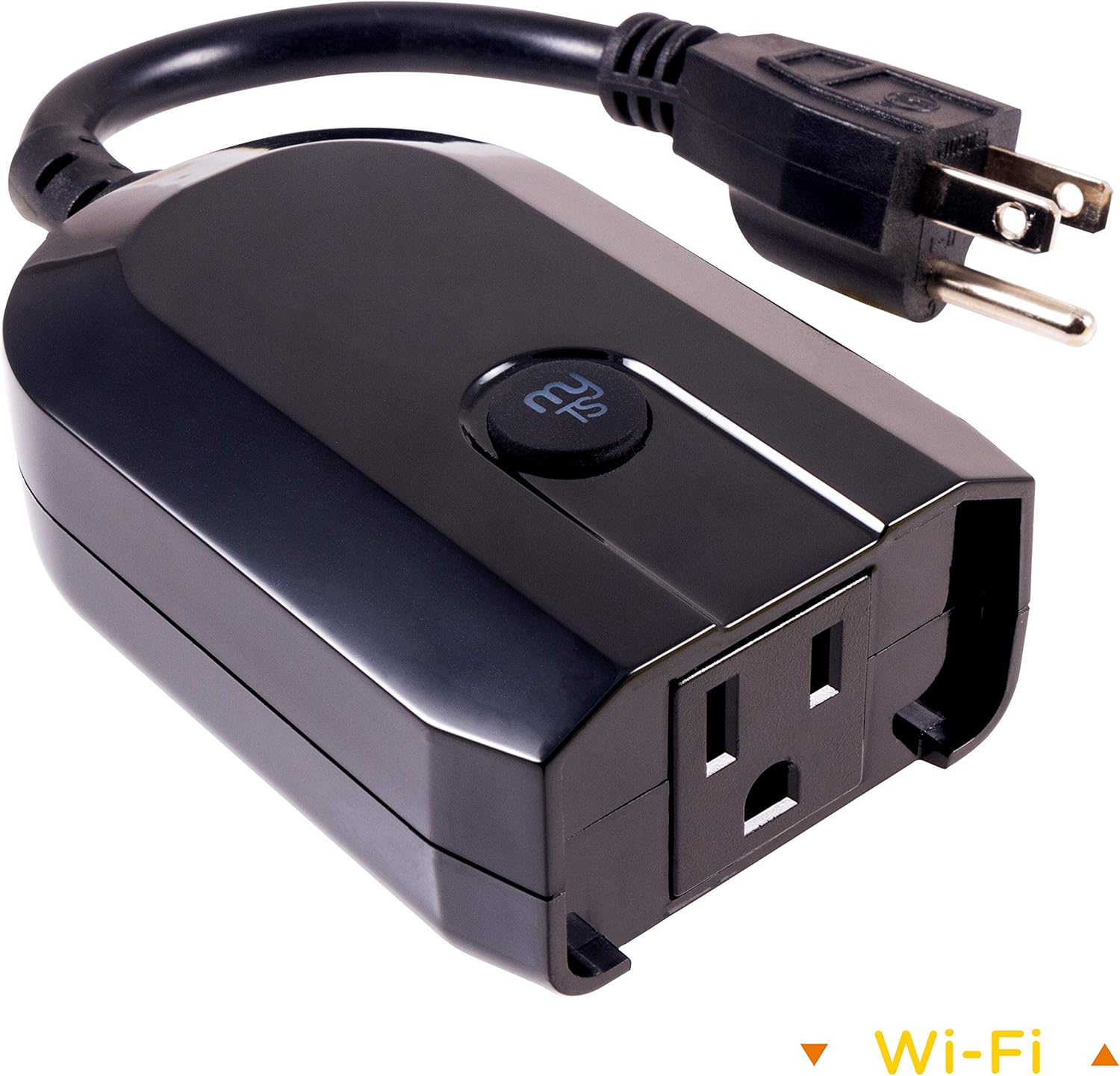
Image: The myTouchSmart 39845 WiFi Smart Outdoor Plug-in Light Switch, a black, weather-resistant device with a grounded plug and a single outlet, designed for outdoor use.
Vlastnosti produktu
- Hlasové příkazy: Compatible with Amazon Alexa and Google Assistant for hands-free control without a hub.
- Universal Wi-Fi: Utilizes your 2.4GHz Wi-Fi network for scheduling and ON/OFF operation from any location with internet access.
- Uživatelsky přívětivá aplikace: The myTouchSmart app, available on Apple App Store and Google Play, enables remote operation of lights and landscape features.
- Snadné nastavení: Features one-touch presets, personalized ON/OFF times, and custom countdown options for flexible programming.
- Instalace bez nářadí: Plugs into any outdoor or indoor grounded outlet, requiring no wiring.
- Design odolný vůči povětrnostním vlivům: Suitable for outdoor use, protecting against elements.

Image: A collage showing the myTouchSmart Wi-Fi Smart Plug in various outdoor settings, including seasonal lighting, decks and patios, and landscape lighting, highlighting its versatility.
Obsah balení
The myTouchSmart 39845 WiFi Smart Outdoor Plug-in Light Switch package typically includes:
- 1 x myTouchSmart 39845 WiFi Smart Outdoor Plug-in Light Switch
- Uživatelská příručka (tento dokument)
Please check the packaging for any additional components or accessories.
Bezpečnostní informace
Before using your myTouchSmart 39845, please read and understand all safety instructions. Failure to follow these instructions may result in electric shock, fire, or serious injury.
- Do not immerse the device in water or expose it to extreme weather conditions beyond its weather-resistant rating.
- Ensure the device is plugged into a grounded outlet.
- Do not exceed the maximum electrical ratings of the device (15 Amps, 120 Volts AC).
- Udržujte děti v dostatečné vzdálenosti od zařízení a elektrických zásuvek.
- Odpojte zařízení ze zásuvky, pokud jej nepoužíváte, nebo před čištěním.
- Nepokoušejte se zařízení rozebírat ani upravovat. Uvnitř nejsou žádné součásti, které by mohl uživatel opravit.
- Operate the device within the specified temperature range (32°F to 102°F).
Nastavení
1. Download the myTouchSmart App
To control your smart plug, you need to download the myTouchSmart app. Hledat "myTouchSmart" in the Apple App Store (for iOS devices) or Google Play Store (for Android devices).
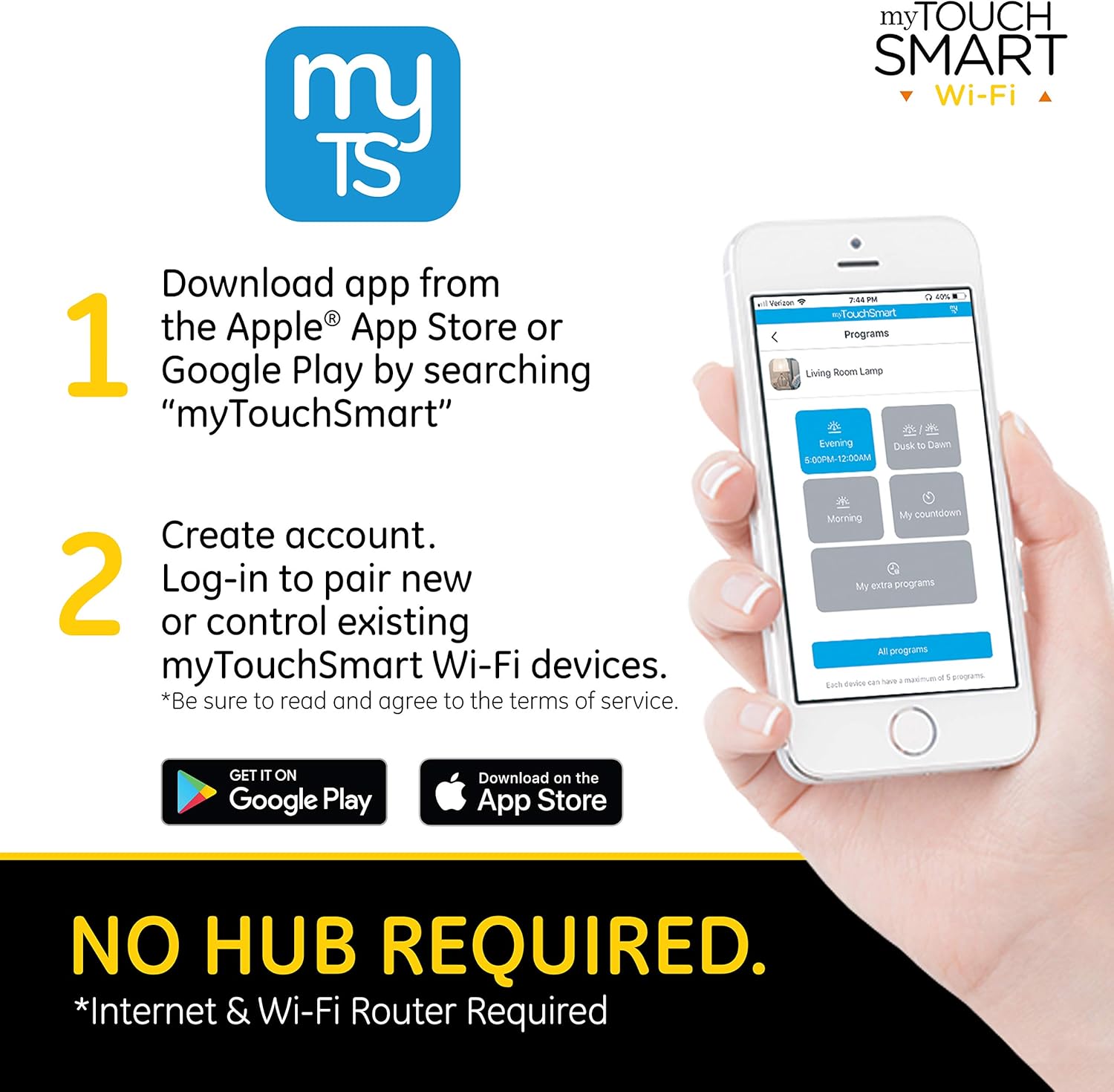
Image: A smartphone displaying the myTouchSmart app download instructions, indicating availability on Apple App Store and Google Play.
2. Vytvořte si účet
Open the myTouchSmart app after installation. You will be prompted to create a new account or log in if you already have one. Follow the on-screen instructions to complete the account creation process. Ensure you read and agree to the terms of service.
3. Pairing Steps
Once logged in, follow these steps to pair your myTouchSmart Outdoor Plug-in Light Switch:
- Find New Device: In the myTouchSmart app, tap "Find New Device" to initiate the connection process for your new Wi-Fi device.
- Wi-Fi připojení: Select your 2.4GHz Wi-Fi network from the list and enter your Wi-Fi password. The device requires a 2.4GHz network for connection.
- Plug in Device: Plug the myTouchSmart Wi-Fi Smart Plug into your desired outdoor or indoor grounded outlet. The blue LED on the device will flash rapidly, indicating it's in pairing mode. If the LED is not flashing rapidly, press and hold the "myTS" button on the device for 10 seconds to reset it.

Image: Visual representation of the three pairing steps: finding a new device in the app, entering Wi-Fi credentials, and plugging in the device while observing the flashing LED.
Konec produktuview Video
Video: Úředník u konceview of myTouchSmart Wi-Fi Smart Controls, demonstrating how to schedule and control home lighting and devices from anywhere using the myTouchSmart app, highlighting features like manual ON/OFF, custom presets, personalized settings, and countdown features. It also shows the app interface for device control and grouping.
Návod k obsluze
Ovládání aplikací
Once paired, you can control your myTouchSmart plug directly from the app. The app allows you to:
- Manuální ZAP/VYP: Toggle the power of the connected device directly from the app interface.
- Customizable Names and Images: Assign unique names and images to each device for easy identification.
- Seskupení: Group multiple myTouchSmart devices to control them simultaneously with a single command.

Image: A screenshot of the myTouchSmart app showing program settings, including options for Evening/Morning schedules, Dusk to Dawn, Countdown, and Extra Programs, demonstrating the flexibility of scheduling.
Hlasové ovládání
The myTouchSmart 39845 is compatible with Amazon Alexa and Google Assistant, enabling voice-activated control. To set up voice control:
- Ensure your myTouchSmart device is successfully paired with the app and connected to your Wi-Fi network.
- Open the Amazon Alexa app or Google Home app on your smartphone or tablet.
- Follow the instructions within the Alexa or Google Home app to link your myTouchSmart account.
- Once linked, you can use voice commands such as "Alexa, turn on the patio lights" or "Hey Google, turn off the landscape lights."

Image: The myTouchSmart Smart Plug shown with icons for Amazon Alexa and Google Assistant, illustrating its voice control capabilities. A text bubble indicates a voice command: "Turn landscape lights ON."
Scheduling and Programs
The myTouchSmart app allows you to create various programs to automate your devices:
- Evening/Morning: Schedule specific ON/OFF times to match your daily routine.
- Od soumraku do úsvitu: Automatically adjust ON/OFF times based on local sunset/sunrise times.
- Odpočítávání: Set the device to turn off after a custom countdown, up to 24 hours.
- Extra Program: Add additional ON/OFF times to further customize your schedule.
Each device can have a maximum of 5 programs assigned.
Údržba
To ensure the longevity and proper functioning of your myTouchSmart 39845 WiFi Smart Outdoor Plug-in Light Switch, follow these maintenance guidelines:
- Čištění: Disconnect the device from power before cleaning. Use a soft, dry cloth to wipe the exterior. Do not use harsh chemicals or abrasive cleaners.
- Ochrana životního prostředí: While weather-resistant, avoid prolonged exposure to extreme conditions such as heavy snow, ice, or direct water submersion. Ensure the outlet is protected from direct rain or splashing.
- Skladování: Pokud zařízení skladujete delší dobu, odpojte jej ze zásuvky a uložte jej na chladném a suchém místě.
- Pravidelné kontroly: Periodically inspect the plug and cord for any signs of damage or wear. Do not use if damaged.
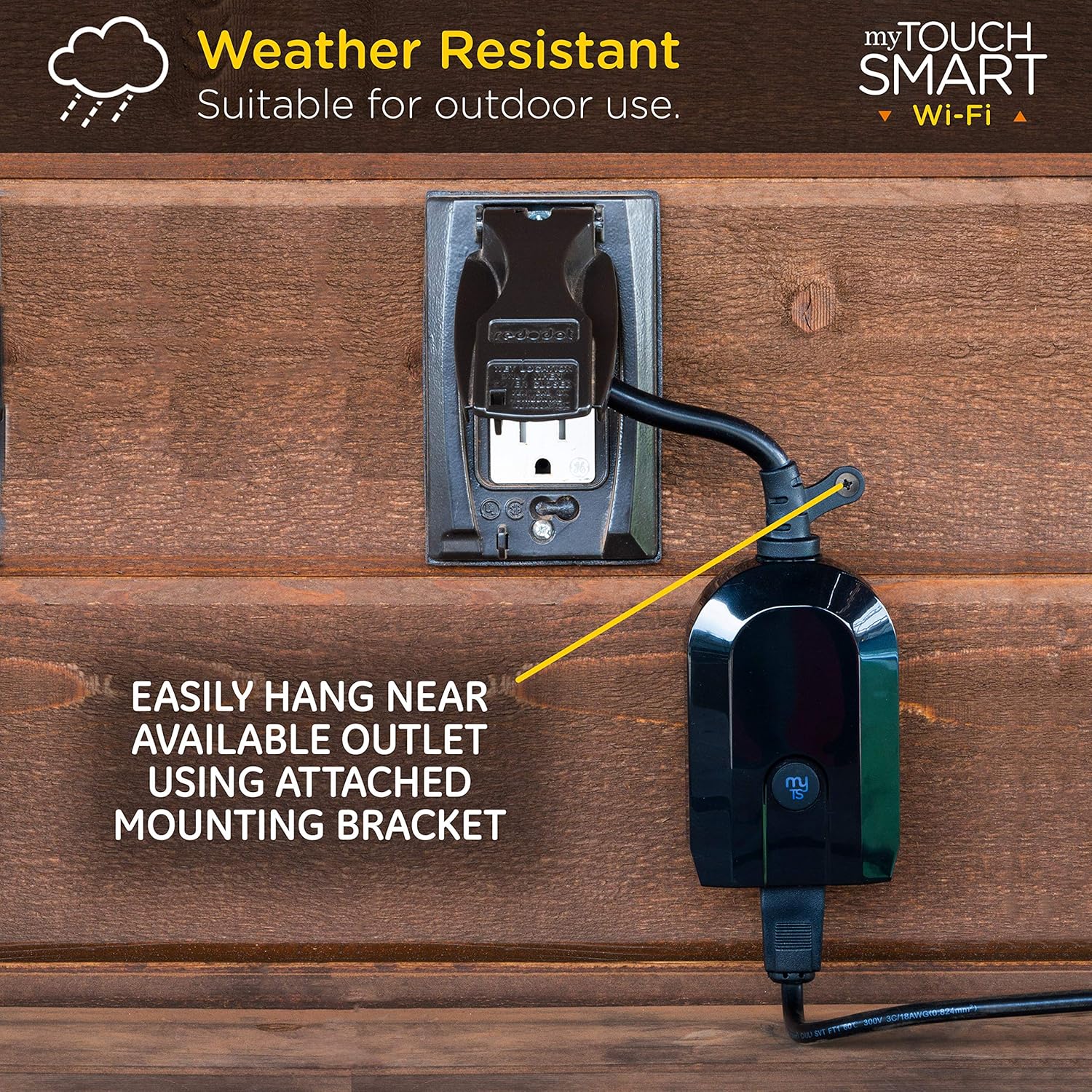
Image: The myTouchSmart Smart Plug mounted on an outdoor wall, demonstrating its weather-resistant design and the use of its integrated mounting bracket for easy installation near an available outlet.
Odstraňování problémů
If you encounter issues with your myTouchSmart 39845, refer to the following common troubleshooting steps:
| Problém | Možná příčina / řešení |
|---|---|
| Zařízení se nepřipojuje k Wi-Fi. |
|
| Device loses connection after a power outage. |
|
| Hlasové příkazy nefungují. |
|
| Schedules are not activating. |
|
Specifikace
| Atribut | Hodnota |
|---|---|
| Značka | myTouchSmart |
| Číslo modelu | 39845 |
| Provozní režim | OFF-NONE-ON |
| Aktuální hodnocení | 15 Amps |
| Provozní svtage | 120 voltů (AC) |
| Typ kontaktu | Plug-in |
| Typ konektoru | Připojit |
| Rozměry položky (D x Š x V) | 2.5 x 5.6 x 8.2 palce |
| Hmotnost položky | 7.2 unce |
| Typ obvodu | 1-cestný |
| Typ montáže | Plug-In Mount |
| Typ pohonu | Plug-in |
| Kontaktní materiál | Nikl |
| Hodnocení mezinárodní ochrany | Not IP Rated (Weather-Resistant for outdoor use) |
| Nižší teplotní hodnocení | 32 stupňů Fahrenheita |
| Hodnocení vyšší teploty | 102 stupňů Fahrenheita |
| Typ ovladače | Asistent Google, Amazon Alexa |
| Kontrolní metoda | Hlas, Aplikace |
| Protokol připojení | Wi-Fi (2.4 GHz) |
| Barva | Černý |
| UPC | 030878398459 |

Image: A diagram illustrating the dimensions of the myTouchSmart Smart Plug, including its length, width, height, and the length of its power cord, along with the location of the mounting bracket and pair/manual control button.
Záruka a podpora
myTouchSmart products are designed for reliability and performance. For specific warranty details, please refer to the warranty information included with your product packaging or visit the official myTouchSmart webmísto.
For further assistance, technical support, or frequently asked questions (FAQ), you can access the "Contact us" and "FAQ" sections within the myTouchSmart app. These resources provide valuable information and direct contact options for support.
- Podpora v aplikaci: Access FAQ, instructions, and contact information directly through the myTouchSmart app.
- Online zdroje: Visit the myTouchSmart official webmísto pro další podporu a informace o produktu.
Ask a question about this manual
Ask about setup, troubleshooting, compatibility, parts, safety, or missing instructions. Manuals+ will review the question and use this page’s manual context to help answer it.