
Zavedení
Thank you for choosing the Calypso K5769/2 Analogue Digital Quartz Watch. This manual provides detailed instructions for setting up, operating, and maintaining your watch to ensure optimal performance and longevity. Please read this manual thoroughly before using your watch.
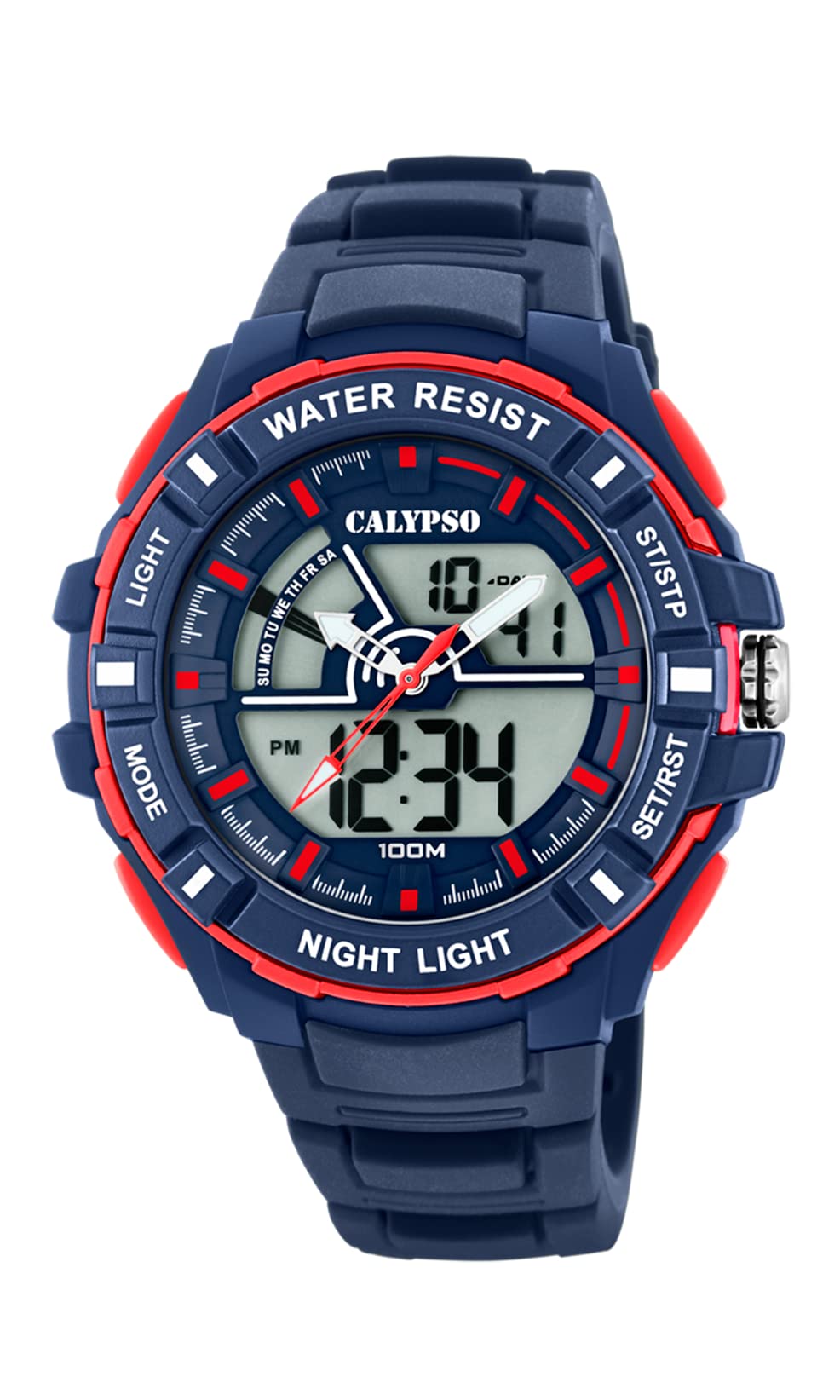
Obrázek: Přední strana view of the Calypso K5769/2 Analogue Digital Quartz Watch, showcasing its blue plastic case and silicone strap.
Nastavení
Počáteční nastavení času a data
Your Calypso K5769/2 watch features both analogue and digital displays. Both need to be set for accurate timekeeping.
- Nastavení digitálního času:
- Stiskněte tlačítko MODE opakovaně stiskněte tlačítko , dokud se nezobrazí režim nastavení času (obvykle indikovaný blikajícími číslicemi).
- Použijte UPRAVIT button to select the digit you wish to change (hours, minutes, seconds).
- Použijte SOUBOR or START/STOP tlačítko pro zvýšení hodnoty.
- Po nastavení stiskněte MODE znovu pro ukončení režimu nastavení.
- Analogue Time Setting:
- Pull the crown (the small knob on the side of the watch case) out to the first or second position (refer to specific watch model for exact crown positions).
- Otáčením korunky nastavte hodinovou a minutovou ručičku na správný čas.
- Zatlačte korunku zpět, abyste zajistili nastavení času.
- Nastavení data:
- In digital time setting mode, after setting the time, continue using the UPRAVIT button to navigate to the date (month, day, year) settings.
- Upravte hodnoty pomocí SOUBOR or START/STOP tlačítko.
- Exit by pressing MODE.

Obrázek: Boční view of the Calypso K5769/2 watch, highlighting the control buttons and the crown used for adjustments.
Návod k obsluze
Your watch is equipped with several functions accessible via the control buttons.
Výběr režimu
Stiskněte tlačítko MODE tlačítko pro procházení dostupných funkcí:
- Time Display (Analogue & Digital)
- Poplach
- Stopky
- Duální časové pásmo
- Zobrazení data
Funkce alarmu
- Stiskněte MODE until the Alarm mode is displayed.
- Stiskněte UPRAVIT pro výběr číslic hodin nebo minut.
- Použití SOUBOR or START/STOP pro nastavení požadovaného času budíku.
- Stiskněte MODE pro potvrzení a ukončení.
- To activate/deactivate the alarm, press a specific button (often UPRAVIT or SOUBOR) while in Alarm mode. An alarm icon will appear when active.
Funkce stopek
- Stiskněte MODE until the Stopwatch mode is displayed (usually showing 00:00:00).
- Stiskněte START/STOP začít měřit čas.
- Stiskněte START/STOP znovu pro pozastavení/obnovení měření času.
- Stiskněte RESETOVAT (often the UPRAVIT button) to clear the stopwatch to zero.
Duální časové pásmo
This feature allows you to display a second time zone simultaneously.
- Stiskněte MODE until the Dual Time Zone mode is displayed.
- Použití UPRAVIT a SOUBOR or START/STOP pro nastavení požadovaného druhého časového pásma.
- Stiskněte MODE pro potvrzení a ukončení.
Funkce rozsvícení
To illuminate the digital display in low-light conditions, press the SVĚTLO button (usually located on the top left of the watch case).
Údržba
Water Resistance (10 ATM / 100 Metres)
Your Calypso K5769/2 watch is water resistant up to 10 ATM (100 meters). This means it is suitable for swimming, snorkeling, and showering. However, it is ne vhodné pro vodní sporty s vysokou zátěží nebo potápění. Do not operate buttons or the crown while the watch is wet or submerged, as this can compromise the water resistance.
Čištění
Hodinky jemně otřete měkkým hadříkem.amp cloth. Avoid using harsh chemicals, solvents, or abrasive cleaners, as these can damage the case and strap materials.
Výměna baterie
The watch is powered by a Quartz (battery) movement. When the display becomes dim or the watch stops functioning, the battery may need replacement. Battery replacement should be performed by a qualified watch technician to ensure proper sealing and maintain water resistance.
Odstraňování problémů
| Problém | Možná příčina | Řešení |
|---|---|---|
| Watch not displaying time/functions. | Slabá nebo vybitá baterie. | Vyměňte baterii (doporučeno odborné servisní služby). |
| Analogue hands not moving. | Crown pulled out; battery issue. | Push crown back in; if still not working, replace battery. |
| Digital display is dim or flickering. | Slabá baterie. | Vyměňte baterii. |
| Voda uvnitř hodinek. | Buttons operated underwater; seal compromised. | Okamžitě odneste hodinky do profesionálního servisu. Nepokoušejte se je sami sušit. |
| Zobrazuje se nesprávný čas/datum. | Settings were not saved or incorrectly set. | Refer to the "Initial Time and Date Setting" section and re-set the watch. |
Specifikace
| Číslo modelu: | K5769/2 |
| Značka: | Calypso |
| Typ displeje: | Analogue-Digital |
| Typ pohybu: | Křemen (baterie) |
| Voděodolnost: | 10 ATM (100 Metres) |
| Materiál pouzdra: | Polykarbonát (plast) |
| Materiál popruhu: | Plast (silikon) |
| Průměr pouzdra: | 53 milimetrů |
| Tloušťka pouzdra: | 19 milimetrů |
| Šířka pásma: | 26 milimetrů |
| Další vlastnosti: | Alarm, Dual Time Zone, Light Up, Stopwatch |
| Hmotnost položky: | 65 gramů |
Informace o záruce
Calypso watches typically come with a manufacturer's warranty covering defects in materials and workmanship for a specified period from the date of purchase. This warranty usually does not cover damage resulting from improper handling, accidents, unauthorized repairs, or normal wear and tear (e.g., battery, strap, crystal). Please retain your proof of purchase for warranty claims. For specific warranty terms and conditions, refer to the warranty card included with your watch or contact Calypso customer support.
Zákaznická podpora
If you encounter any issues or have questions regarding your Calypso K5769/2 watch that are not addressed in this manual, please contact Calypso customer support. You can typically find contact information on the official Calypso webna webu nebo na obalu vašeho produktu.
- Online podpora: Visit the official Calypso Watches website for FAQs and support contact details.
- Servisní střediska: For repairs or battery replacement, locate an authorized Calypso service center.