
1. Úvod
This manual provides essential instructions for the installation, operation, and maintenance of your Xigmatek Vanguard Plus PC Case. This full tower case is designed to accommodate ATX, Micro ATX, and Mini ITX motherboards and comes with a pre-installed 600W 80PLUS Active PFC power supply. It features convenient front panel connectivity including USB 3.0 and USB 2.0 ports, along with audio jacks, and includes LED fans for enhanced cooling and aesthetics.
2. Nastavení a instalace
Before beginning installation, ensure your workspace is clean and static-free. Refer to your motherboard and component manuals for specific installation details.
2.1. Otevření případu
Carefully remove the side panels of the case. Typically, this involves unscrewing thumbscrews at the rear and sliding the panels backward.
2.2. Instalace základní desky
Install the I/O shield provided with your motherboard into the rear opening of the case. Align your ATX, Micro ATX, or Mini ITX motherboard with the standoffs inside the case. Secure the motherboard using the appropriate screws. Ensure all standoffs are correctly aligned to prevent damage.

Obrázek: Interní view of the Xigmatek Vanguard Plus PC case, illustrating the motherboard mounting area and drive bays.
2.3. Napájecí jednotka (PSU)
The 600W 80PLUS Active PFC power supply is pre-installed in the lower section of the case. Connect the necessary power cables to your motherboard, CPU, graphics card, and storage devices. Route cables through the designated cutouts for optimal airflow and a tidy build.
2.4. Instalace úložného disku
Install your 2.5-inch SSDs or 3.5-inch HDDs into the available drive bays. Secure them with screws or tool-less mechanisms if provided. Connect SATA data and power cables.
2.5. Rozšiřující karty
Remove the necessary expansion slot covers at the rear of the case. Insert your graphics card or other expansion cards into the PCIe slots on your motherboard and secure them with screws.
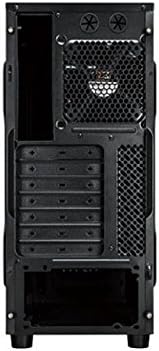
Obrázek: Zadní view of the Xigmatek Vanguard Plus PC case, highlighting the expansion slots and rear fan mounting area.
2.6. Připojení na předním panelu
Připojte kabely předního panelu (USB 3.0, USB 2.0, HD Audio, vypínač, resetovací vypínač, LED dioda napájení, LED dioda HDD) k odpovídajícím konektorům na základní desce. Umístění konektorů naleznete v manuálu k základní desce.

Obrázek: Přední strana view of the Xigmatek Vanguard Plus PC case, showcasing the front panel design and an illuminated LED fan.
3. Návod k obsluze
Once all components are installed and cables are connected, replace the side panels. Connect your monitor, keyboard, mouse, and power cable to the rear of the PC. Press the power button on the front panel to start your system.
3.1. Front Panel Ports
- Porty USB 3.0 (x2): Pro vysokorychlostní přenos dat s kompatibilními zařízeními.
- Port USB 2.0 (x1): Pro standardní USB zařízení.
- Microphone Input (x1): Připojte mikrofon.
- Speaker Output (x1): Připojte sluchátka nebo reproduktory.
3.2. LED Fans
The case includes LED fans that provide cooling and visual effects. These fans typically draw power directly from the power supply or motherboard fan headers and operate automatically based on system temperature or a fixed speed.
4. Údržba
Pravidelná údržba pomáhá zajistit optimální výkon a dlouhou životnost komponent vašeho počítače.
- Prachové filtry: Periodically check and clean any removable dust filters (e.g., on the front, top, or bottom of the case) to maintain good airflow. Use compressed air or a soft brush.
- Čištění interiéru: Every few months, open the case and use compressed air to remove dust buildup from fans, heatsinks, and other components. Hold fan blades gently to prevent over-spinning during cleaning.
- Čištění exteriéru: Vnější povrchy otřete měkkým, damp tkanina. Vyhněte se agresivním chemikáliím.
5. Řešení problémů
Tato část se zabývá běžnými problémy, se kterými se můžete setkat.
- Bez napájení:
- Ujistěte se, že je napájecí kabel bezpečně připojen k napájecímu zdroji i k elektrické zásuvce.
- Zkontrolujte, zda je vypínač na zadní straně zdroje v poloze „ON“.
- Verify all internal power cables (24-pin ATX, 8-pin CPU, GPU power) are correctly seated.
- Zkontrolujte, zda je kabel vypínače na předním panelu správně připojen ke konektoru základní desky.
- Fans Not Spinning / No LED Lights:
- Check fan power connections to the motherboard or PSU.
- Ensure LED cables (if separate) are connected.
- USB/audio na předním panelu nefunguje:
- Verify that the USB 3.0, USB 2.0, and HD Audio cables from the front panel are correctly connected to the corresponding headers on your motherboard.
- Check your motherboard's BIOS/UEFI settings to ensure front panel audio/USB is enabled.
- Problémy s přizpůsobením komponent:
- Ensure all components, especially large graphics cards or CPU coolers, are compatible with the case dimensions.
- Some larger gaming motherboards or specific cooler designs may require careful planning for exhaust fan placement.
6. Specifikace
| Funkce | Detail |
|---|---|
| Značka | Xigmatek |
| Číslo modelu | Vanguard Plus |
| Typ pouzdra | Plná věž |
| Kompatibilita základní desky | ATX, Micro ATX, Mini ITX |
| Včetně napájecího zdroje | 600W 80PLUS Active PFC |
| Porty na předním panelu | 2x USB 3.0, 1x USB 2.0, 1x Microphone, 1x Speaker |
| Způsob chlazení | Air (includes LED fans) |
| Hmotnost produktu | 6.82 kg |
| Země původu | Čína |
7. Informace o záruce
The Xigmatek Vanguard Plus PC Case comes with a 2letá záruka výrobce from the date of purchase. This warranty covers defects in materials and workmanship under normal use. Please retain your proof of purchase for warranty claims. The warranty does not cover damage caused by misuse, accident, modification, or unauthorized repair.
8. Podpora
For technical assistance, troubleshooting beyond this manual, or warranty inquiries, please contact Xigmatek customer support through their official website or the retailer where the product was purchased. Have your product model number (Vanguard Plus) and proof of purchase ready when contacting support.