
Rollerhouse dd2702h
Replacement Remote Control for Motorized Blinds, Shades and Curtains
Značka: Rollerhouse | Model: dd2702h
Konec produktuview
This manual provides comprehensive instructions for the Rollerhouse 14-Channel Hand Held Remote Control, designed for use with motorized blinds, shades, and curtains. This remote offers convenient control over individual or multiple window coverings, enhancing ease of use and child safety.
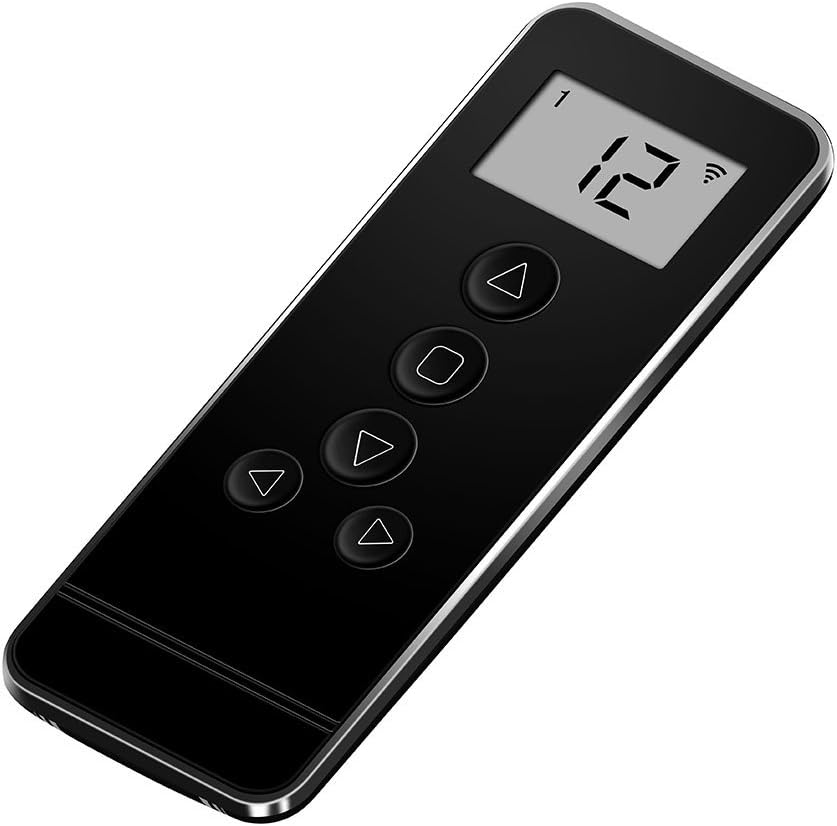
Image: The Rollerhouse 14-Channel Hand Held Remote Control, black in color, featuring a digital display and control buttons.
Informace o kompatibilitě
Důležité: This remote control is specifically designed to be compatible only with Rollerhouse RF blinds shade motors. It will not sync or work with motorized blinds or shades from other brands. Please verify the brand of your existing motor before attempting to pair this remote.

Image: A graphic emphasizing the need to check brand compatibility, stating "Doesn't pair/work with other brands."

Image: A hand holding the remote control with motorized blinds in the background, accompanied by text "Tips before place an order: You need to find out what's the brand motor you used before place an order."
Some brands known to be incompatible include, but are not limited to: Somfy, Hunter Douglas, 3-Day Blinds, Lutron, Bali, Rollease Acmeda, Graber blinds, Levolor, Coulisse CM-13, ac123, dc251, dd2702h (this model number refers to the remote itself, not an incompatible motor), dc306, raextwl25, Tucson DC1602b, Sivoia GS Triathion, SM Automatic, Tuscan Rolling Shutters, Warp & Phil, Kirsch, Makita, SunSetter blinds, Timber Blind, ZStarr blinds, Sony TV, Taylor, Velux, Yoolax.
Pokyny k nastavení a párování
This section outlines the steps to pair your new remote control with your motorized shades and to set the upper and lower limits for optimal operation.
Adding a New Remote or Copying a Channel
A previously programmed remote control (Transmitter A) can be used to add a new remote control (Transmitter B) or to copy an operating channel within the same remote control.
- Na first programmed transmitter (Remote A), stiskněte a podržte "L" button. While holding "L", simultaneously press the "C" button. Release both buttons when the motor jogs (moves slightly up and down) twice.
- Na new transmitter (Remote B), stiskněte tlačítko "C" button. The motor will jog again, indicating that Remote B has been successfully programmed with the motor.

Image: A diagram illustrating the process of adding a new remote (Remote B) using a primary programmed remote (Remote A).
Nastavení horní a dolní meze
To ensure your blinds stop at desired positions, you can set specific upper and lower limits.
- Stiskněte tlačítko "L" button on the back of the remote control to enter Learn mode. The motor will jog once.
- Použijte Tlačítko nahoru on the front of the control to move the blinds to your desired upper limit.
- Once the blinds are at the desired upper position, press the "L" button on the back again. The blinds will jog up and down to confirm the upper limit is set.
- Použijte Tlačítko dolů on the front of the control to move the blinds to your desired lower limit.
- Once the blinds are at the desired lower position, press the "L" button on the back again. The blinds will jog up and down to confirm the lower limit is set.
Your blinds now have defined upper and lower limits and will automatically stop at these points.

Image: A diagram showing the process of setting the upper and lower limits for motorized blinds using the remote's "L" button.
Ovládání vašeho dálkového ovladače
The Rollerhouse 14-channel remote allows for precise control of your motorized blinds. It features dedicated buttons for movement and channel selection.
Funkce tlačítek dálkového ovladače:
- Tlačítko nahoru (▲): Raises the blinds.
- Tlačítko Stop (■): Stops the blinds at their current position.
- Tlačítko dolů (▼): Lowers the blinds.
- Channel Buttons (◄ / ►): Cycles through the 14 available channels. Each channel can control an individual blind or a group of blinds.
- "UL" Channel: This special channel allows you to control all programmed blinds simultaneously.

Obrázek: Podrobný view of the Rollerhouse 14-channel remote control, highlighting the LED screen, Up, Stop, Down, and Channel buttons, along with the Limit and Confirm buttons on the back.

Image: A hand holding the Rollerhouse remote, showing the digital display indicating channel "14", with motorized blinds in the background being adjusted.

Image: Three motorized blinds in a room, with the remote control in the foreground, illustrating its ability to control blinds for both top-down and bottom-up operation across multiple channels.
Technické specifikace
| Funkce | Specifikace |
|---|---|
| Materiál | Plast |
| Rozměry produktu | 4.8 cm D x 1.8 cm Š (1.8 cm Š x 4.8 cm V) |
| Barva | Černý |
| Provozní režim | Automatický |
| Speciální funkce | 433MHz fixed code |
| Zahrnuté komponenty | Remote, Wall mount holder & fixing screws, 3V-CR2450 battery (included) |
| Kompatibilní zařízení | Rollerhouse blinds motor |
| svtage | 3V |
| Frekvence | 433.92 MHz |
| Vysílající výkon | 30 milliwattů |
| Okolní provozní teplota | -10 °C až 50 °C |
| Přenosová vzdálenost | Approx. 65 feet in open space |
| Baterie | 3V-CR2450 |

Image: A visual representation of the remote control with a table overlaying technical specifications such as voltage, frequency, and transmission distance.

Image: A diagram showing the dimensions (4.8" x 1.8") of the 14-channel remote, along with a list of features and package contents.
Odstraňování problémů
Remote Won't Program to My Motor
If you are experiencing issues programming the remote to your motor, please consider the following:
- Kompatibilita: Ensure your motorized blinds or shades are from the Rollerhouse brand. This remote is not compatible with other brands.
- Správný postup: Double-check that you are following the pairing instructions precisely, especially the timing of button presses and motor jogs.
- Baterie: Verify that the 3V-CR2450 battery in the remote is correctly installed and has sufficient charge.
- Motor Reset: Some motors may require a reset before pairing. Refer to your motor's specific instructions for reset procedures.
If problems persist, please contact Rollerhouse customer service for professional assistance. They can recommend suitable replacement remotes or provide technical solutions.

Image: A customer service representative with a headset, indicating 24-hour support for programming issues.
Péče a údržba
To ensure the longevity and proper functioning of your remote control, follow these simple care guidelines:
- Čištění: Use a soft, dry cloth to wipe the remote. For stubborn dirt, a slightly damp Lze použít hadřík, ale dbejte na to, aby se do zařízení nedostala vlhkost. Nepoužívejte abrazivní čisticí prostředky ani rozpouštědla.
- Výměna baterie: When the remote's performance degrades, replace the 3V-CR2450 battery. Refer to the battery compartment for correct polarity.
- Skladování: Dálkový ovladač skladujte na chladném a suchém místě mimo dosah přímého slunečního záření a extrémních teplot.
- Vyhněte se kapkám: Chraňte dálkový ovladač před fyzickým nárazem, mohlo by dojít k poškození vnitřních součástí.
Zákaznická podpora
For further assistance, technical support, or inquiries regarding Rollerhouse products, please visit the official Rollerhouse store or contact their customer service.
Rollerhouse Store: Visit the Rollerhouse Store on Amazon
You can also refer to the official user guides provided by Rollerhouse:
Ask a question about this manual
Ask about setup, troubleshooting, compatibility, parts, safety, or missing instructions. Manuals+ will review the question and use this page’s manual context to help answer it.