
1. Úvod
Thank you for choosing the TecTake Corner Computer Desk, Model 402405. This L-shaped workstation is designed to provide a practical and spacious area for your computer and work essentials. Its modern design, featuring a refined tabletop and stable steel construction, ensures durability and a timeless aesthetic. This manual provides essential information for the safe assembly, operation, and maintenance of your new desk.
Před montáží a použitím si prosím pečlivě přečtěte tento návod a uschovejte si jej pro budoucí použití.
2. Bezpečnostní pokyny
Pro zajištění bezpečného používání a prevenci poškození dodržujte prosím následující bezpečnostní pokyny:
- Shromáždění: Assemble the desk on a soft, clean surface to prevent scratches. Ensure all components are correctly aligned and securely fastened according to the provided assembly instructions.
- Stabilita: Do not overload the desk. The maximum load capacity is 100 kg (220 lbs). Distribute weight evenly across the surface.
- Umístění: Place the desk on a level and stable floor. Avoid placing it near heat sources, direct sunlight, or in excessively humid environments.
- Děti: Udržujte malé části a obalové materiály mimo dosah dětí, abyste předešli nebezpečí udušení.
- Údržba: Regularly check all screws and connections to ensure they remain tight. Tighten if necessary.
- Stěhování: Při přemisťování stolu jej zvedejte, nikoli tahejte, abyste předešli poškození nohou a podlahy.
3. Obsah balení
Before beginning assembly, please verify that all parts are present and undamaged. The package should contain:
- 1x Corner Desk (comprising main tabletop sections and frame components)
- 1x Computer Tower Holder
- 1x Illustrated Assembly Instructions
- All necessary screws, fittings, and tools for assembly (as specified in the assembly instructions)

Figure 1: Assembled TecTake Corner Computer Desk (Dark Wood Finish). This image shows the overall L-shaped design, the spacious work surface, and the integrated keyboard tray.
4. Nastavení a montáž
The TecTake Corner Computer Desk requires assembly. Please follow the detailed, illustrated instructions provided in your package. It is recommended to have two people for assembly to ensure ease and safety.
- Rozbalit: Opatrně vybalte všechny součásti a položte je na čistý, měkký povrch, aby nedošlo k jejich poškození.
- Identifikujte díly: Refer to the parts list in the assembly manual to identify each component.
- Postupujte podle kroků: Proceed step-by-step according to the illustrated assembly guide. Ensure all screws and connectors are tightened securely but do not overtighten.
- Zásobník klávesnice: Install the sliding keyboard tray as indicated in the instructions. Ensure it slides smoothly.
- Computer Tower Holder: Position the included computer tower holder as desired.
- Závěrečná kontrola: Once assembled, gently test the desk's stability and ensure all parts are firmly connected.

Obrázek 2: Shora dolů view of the TecTake Corner Computer Desk (White Finish). This perspective highlights the L-shape and the ample surface area for multiple monitors or work items.
5. Návod k obsluze
Your TecTake Corner Computer Desk is designed for efficient and comfortable use. Here are some operational aspects:
- Pracovní plocha: Utilize the large L-shaped surface for your monitor(s), laptop, documents, and other office supplies. The design provides ample space for multitasking.
- Zásobník klávesnice: The integrated sliding keyboard tray allows you to store your keyboard and mouse neatly under the desk when not in use, freeing up valuable desktop space. Gently pull it out for use and push it back in for storage.
- Computer Tower Holder: The included holder is designed to keep your computer tower off the floor, protecting it from dust and allowing for better airflow. It accommodates towers with a maximum width of 25 cm.
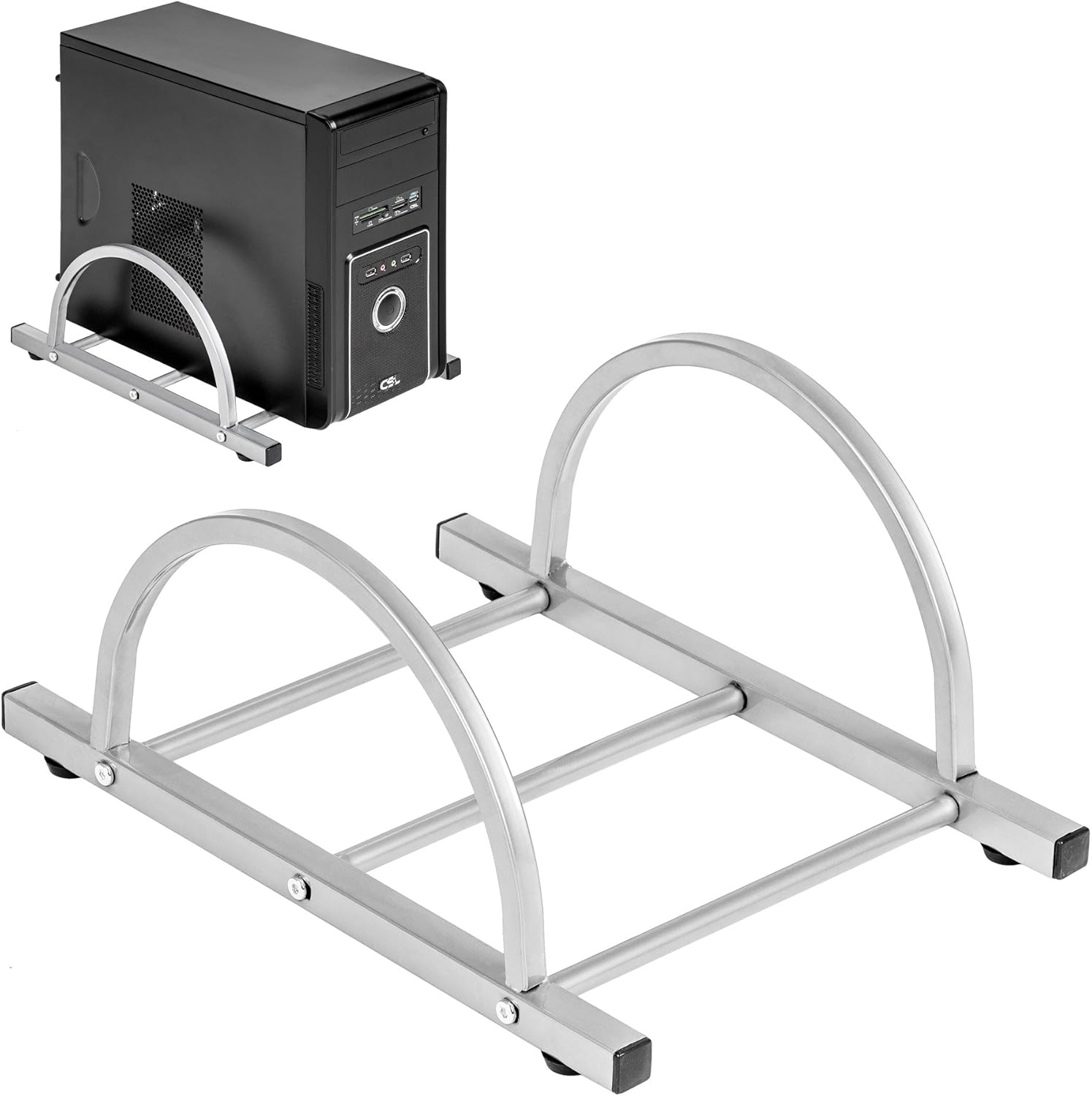
Figure 3: TecTake Computer Tower Holder. This image displays the separate holder designed to keep your PC tower elevated and secure.
6. Údržba
Správná péče prodlouží životnost a vzhled vašeho stolu:
- Čištění: Otřete povrchy měkkým, damp cloth. For stubborn marks, use a mild soap solution and immediately dry with a clean cloth. Avoid abrasive cleaners or harsh chemicals.
- Rozlití: Clean up spills immediately to prevent staining or damage to the MDF surface.
- Železářské zboží: Periodically check all screws and fittings for tightness. Re-tighten as necessary to maintain stability.
- Ochrana: Use coasters for drinks and protective pads under hot items to prevent damage to the tabletop.
7. Řešení problémů
Pokud narazíte na problémy se stolem, zvažte následující běžná řešení:
- Stůl je vratký:
- Ujistěte se, že stůl je na rovném povrchu.
- Zkontrolujte všechny montážní šrouby a matice. Utáhněte všechny uvolněné spoje.
- Verify that all leg caps are properly installed and making full contact with the floor.
- Keyboard Tray Not Sliding Smoothly:
- Check for any obstructions in the sliding mechanism.
- Ensure the rails are correctly installed and aligned.
- Clean the rails if dust or debris is present.
- Chybějící části: If you find any parts missing upon unpacking, please refer to the "Warranty and Support" section to contact customer service.
8. Specifikace
| Funkce | Detail |
|---|---|
| Značka | TecTake |
| Číslo modelu | 402405 |
| Celkové rozměry (D x Š x V) | 170 x 135 x 75 cm (66.9 x 53.1 x 29.5 palce) |
| Výška pracovní desky | 75 cm (29.5 palců) |
| Large Tabletop Section (L x W) | 115 x 55 cm (45.3 x 21.7 palců) |
| Small Tabletop Section (L x W) | 80 x 55 cm (31.5 x 21.7 palců) |
| Rounded Corner Section (L x W) | 55 x 55 cm (21.7 x 21.7 palců) |
| Tloušťka desky stolu | 1.5 cm (0.6 palců) |
| Sliding Keyboard Tray (L x W) | 56.5 x 35 cm (22.2 x 13.8 palců) |
| Steel Tube Dimensions | 3x2 cm; 2x2 cm; 1.5x1.5 cm |
| Computer Tower Holder Width (Max) | 25 cm (9.8 palců) |
| Maximální nosnost | 100 kg (220 lb) |
| Materiál | Veneered MDF surface, powder-coated steel tube frame, plastic feet and end caps |
| Color (as per model) | Bílý |
9. Záruka a podpora
TecTake products are manufactured with quality and durability in mind. For information regarding warranty coverage, please refer to the warranty card included with your product or visit the official TecTake webmísto.
If you have any questions, require assistance with assembly, or need to report missing/damaged parts, please contact TecTake customer service. Contact details can typically be found on the product packaging, the included assembly instructions, or the official TecTake webmísto.
Online podpora: www.tectake.de (Zkontrolujte prosím své regionální website for specific contact information).