
1. Úvod
Děkuji za nákupasing the Homtime D2qi Bluetooth Speaker with Wireless Charging and Alarm Clock. This device is designed to provide a versatile audio experience with convenient features for your daily life. Please read this manual carefully before use to ensure proper operation and to maximize the product's lifespan.
2. Bezpečnostní informace
- Nevystavujte zařízení extrémním teplotám, vlhkosti nebo přímému slunečnímu záření.
- Uchovávejte mimo dosah vody a jiných kapalin.
- Nerozebírejte ani se nepokoušejte o opravu zařízení sami. Veškerý servis svěřte kvalifikovanému personálu.
- Use only the provided or recommended power adapter.
- Zabraňte pádu zařízení nebo jeho vystavení silným nárazům.
3. Obsah balení
Zkontrolujte prosím balení, zda neobsahuje následující položky:
- Homtime D2qi Bluetooth Speaker
- Napájecí adaptér
- Uživatelská příručka
4. Konec produktuview
The Homtime D2qi combines a high-quality Bluetooth speaker with a digital alarm clock and a convenient wireless charging pad. It features intuitive controls for easy operation.

Obrázek 4.1: Přední strana view of the Homtime D2qi speaker with a smartphone placed on its top surface for wireless charging.

Figure 4.2: The Homtime D2qi speaker positioned on a book, showcasing its compact design and the digital clock display.

Figure 4.3: The Homtime D2qi speaker in a home setting, demonstrating wireless charging functionality.
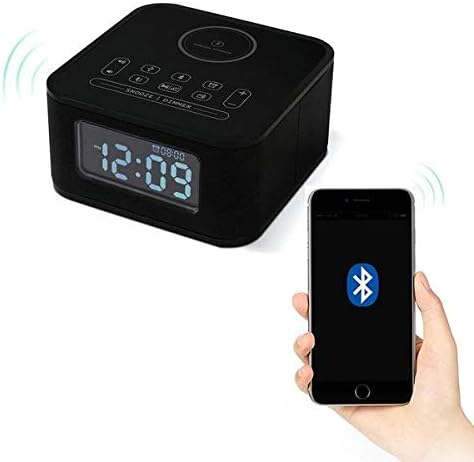
Figure 4.4: The Homtime D2qi speaker connected via Bluetooth to a smartphone.
5. Nastavení
5.1 Připojení napájení
- Connect the provided power adapter to the DC input port on the back of the Homtime D2qi.
- Zapojte napájecí adaptér do standardní zásuvky.
- Displej se rozsvítí, což znamená, že je zařízení zapnuté.
5.2 Počáteční nastavení času
Upon first power-on or after a power outage, you may need to set the time. Refer to the 'Operating Instructions' section for detailed steps on setting the clock.
6. Návod k obsluze
6.1 Připojení Bluetooth
- Stiskněte tlačítko Tlačítko Bluetooth on the top panel to enter Bluetooth pairing mode. The Bluetooth indicator will flash.
- Na smartphonu nebo audio zařízení povolte Bluetooth a vyhledejte dostupná zařízení.
- Select "Homtime D2qi" from the list.
- Po připojení přestane indikátor Bluetooth blikat a zůstane svítit nepřerušovaně. Nyní můžete přehrávat zvuk přes reproduktor.
6.2 Bezdrátové nabíjení
- Place your Qi-compatible smartphone centrally on the wireless charging pad located on the top surface of the speaker.
- Ensure the phone is properly aligned with the charging coil.
- The charging indicator on your phone will show that charging has begun.
6.3 Funkce budíku
- Stiskněte tlačítko Tlačítko alarmu vstoupíte do režimu nastavení budíku.
- Použijte tlačítka +/- pro nastavení hodiny a minuty.
- Stiskněte tlačítko Tlačítko alarmu znovu pro potvrzení každého nastavení.
- Chcete-li aktivovat/deaktivovat budík, stiskněte tlačítko Tlačítko alarmu briefly when not in setting mode.
- Chcete-li odložit budík, stiskněte tlačítko Tlačítko Snooze/Dimmer když zazní budík.
6.4 Funkce rádia
- Stiskněte tlačítko Tlačítko režimu pro přepnutí do režimu FM rádia.
- Stiskněte a podržte Tlačítko Přehrát/Pozastavit to auto-scan and save available stations.
- Použijte Tlačítka Předchozí/Další to navigate through saved stations.
6.5 Přijímání hovorů
Po připojení přes Bluetooth lze reproduktor použít pro handsfree hovory.
- Chcete-li přijmout příchozí hovor, stiskněte tlačítko Tlačítko Přehrát/Pozastavit.
- Chcete-li hovor ukončit, stiskněte tlačítko Tlačítko Přehrát/Pozastavit znovu.
7. Údržba
- Zařízení čistěte měkkým, suchým hadříkem. Nepoužívejte abrazivní čisticí prostředky ani rozpouštědla.
- Keep the charging pad free of dust and debris to ensure efficient wireless charging.
- Pokud zařízení delší dobu nepoužíváte, skladujte jej na chladném a suchém místě.
8. Řešení problémů
| Problém | Možná příčina | Řešení |
|---|---|---|
| Žádná síla | Napájecí adaptér není připojen nebo je zásuvka vadná. | Ensure power adapter is securely plugged into the device and a working wall outlet. |
| Žádný zvuk z reproduktoru | Bluetooth not connected; volume too low; incorrect mode. | Ensure Bluetooth is paired. Increase volume on both the speaker and your device. Check if the speaker is in the correct mode (Bluetooth/Radio). |
| Bezdrátové nabíjení nefunguje | Phone not Qi-compatible; phone not aligned; phone case too thick. | Verify phone supports Qi wireless charging. Realign phone on the charging pad. Remove thick phone cases. |
| Buttons difficult to locate in the dark | Buttons are flush with the surface. | Familiarize yourself with button layout during daylight. Use the dimmer function to adjust display brightness. |
| Bluetooth disconnects automatically | Power saving feature; device out of range. | Reconnect Bluetooth manually. Keep devices within Bluetooth range (approx. 10 meters). |
9. Specifikace
| Funkce | Detail |
|---|---|
| Značka | Homtime |
| Číslo modelu | D2qi |
| Barva | Černý |
| Typ reproduktoru | Bluetooth reproduktory |
| Konektivita | Bezdrátový |
| Kompatibilní zařízení | chytré telefony |
| Výstupní výkon | 5 - 10 wattů |
| Hmotnost produktu | 0.5 kg |
| Rozměry balení | 19.6 x 18.8 x 14.8 cm |
| Hardwarové rozhraní | Audio/Video Port |
10. Záruka a podpora
Homtime products are manufactured to the highest quality standards. For warranty information and customer support, please refer to the warranty card included in your package or visit the official Homtime webwebu. Uschovejte si účtenku jako doklad o koupi.