
1. Úvod
This manual provides essential information for the safe and efficient use of your ZTE Trek 2 HD K88 Tablet. The ZTE Trek 2 HD K88 is an 8-inch tablet featuring an HD display, an Octa-core processor, 2GB RAM, 16GB internal storage (expandable), and a 4600mAh battery. It operates on Android 6.0 Marshmallow and supports Wi-Fi and 4G-LTE connectivity.
Please read this manual thoroughly before operating your device to ensure proper functionality and to understand its features.

Obrázek 1.1: Zadní strana view of the ZTE Trek 2 HD K88 Tablet, showing the AT&T logo and product labels.
2. Nastavení
2.1. Nabíjení baterie
Before first use, fully charge the tablet's battery. Connect the included power adapter to the tablet's charging port and then to a power outlet. The battery indicator on the screen will show charging status.
- Use only the power adapter provided with your device.
- A full charge can take several hours.
2.2. Zapnutí/vypnutí
- Zapnutí: Stiskněte a podržte tlačítko napájení, dokud se nezobrazí logo ZTE.
- Vypnutí: Stiskněte a podržte tlačítko Napájení, dokud se nezobrazí nabídka možností napájení, poté vyberte „Vypnout“.
2.3. Počáteční nastavení
Upon first power-on, follow the on-screen prompts to configure basic settings:
- Vyberte preferovaný jazyk.
- Připojte se k síti Wi-Fi.
- Přihlaste se pomocí svého účtu Google nebo si vytvořte nový.
- Review a přijměte obchodní podmínky.
2.4. Vložení karty MicroSD (volitelné)
The tablet supports expandable memory up to 128GB via a microSD card. Locate the microSD card slot, typically on the side of the device. Carefully insert the card with the gold contacts facing down until it clicks into place.

Obrázek 2.1: Boční strana view of the ZTE Trek 2 HD K88 Tablet, illustrating its thin design. The microSD slot is typically located on one of the side edges.
3. Návod k obsluze
3.1. Základní navigace
The ZTE Trek 2 HD K88 features a responsive touchscreen. Use the following gestures:
- Klepněte na: Výběr položky nebo otevření aplikace.
- Dotkněte se a podržte: Pro přístup k kontextovým nabídkám nebo přesun položek.
- Výpad: Procházení obrazovek nebo seznamů.
- Štípání: To zoom in or out on content like photos or web stránky.
3.2. Home Screen and Apps
The home screen displays your favorite apps, widgets, and notifications. Swipe left or right to access additional home screens. Tap the "Apps" icon to view všechny nainstalované aplikace.

Obrázek 3.1: Přední strana view of the ZTE Trek 2 HD K88 Tablet with the display active, showing the Android home screen with various application icons.
3.3. Připojení k Wi-Fi
- Přejít na Nastavení > Wi-Fi.
- Přepnout Wi-Fi On.
- Vyberte požadovanou síť ze seznamu.
- Pokud se zobrazí výzva, zadejte heslo a poté klepněte na Připojit.
3.4. Použití fotoaparátu
The tablet is equipped with 5 MP front and rear cameras. Open the Camera app to capture photos and videos.
- Klepnutím na tlačítko spouště pořídíte fotografii.
- Přepínejte mezi předním a zadním fotoaparátem pomocí ikony přepínače fotoaparátu.
- Explore various modes and settings within the camera app.
3.5. Zvukové funkce
The ZTE Trek 2 HD K88 features Dolby Audio powered dual front-facing speakers for an enhanced audio experience. Adjust volume using the physical volume buttons on the side of the tablet or through the on-screen volume controls.
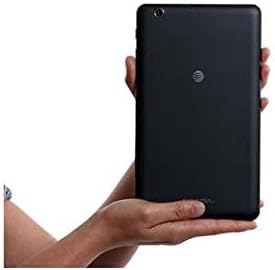
Image 3.2: The ZTE Trek 2 HD K88 Tablet held horizontally in two hands, demonstrating its comfortable and portable 8-inch form factor.
4. Údržba
4.1. Čištění zařízení
K čištění tabletu použijte měkký hadřík, který nepouští vlákna. V případě odolných skvrn lehceamphadřík vodou. Nepoužívejte agresivní chemikálie, abrazivní čisticí prostředky ani aerosolové spreje, protože by mohly poškodit obrazovku a povrchovou úpravu.
4.2. Aktualizace softwaru
Periodically check for software updates to ensure your tablet has the latest features and security patches. Go to Nastavení > O tabletu > Aktualizace systému.
4.3. Správa úložiště
Regularly manage your tablet's storage to maintain optimal performance. Delete unnecessary fileodinstalujte nepoužívané aplikace a přesuňte velká média files to a microSD card or cloud storage. Go to Nastavení > Úložiště a USB na view využití úložiště.
4.4. Péče o baterie
Chcete -li prodloužit životnost baterie:
- Vyhněte se extrémním teplotám.
- Nenechávejte baterii často úplně vybít.
- Jakmile je baterie plně nabitá, odpojte nabíječku.
- Adjust screen brightness and disable unused features like Wi-Fi or Bluetooth when not needed.
5. Řešení problémů
5.1. Běžné problémy a jejich řešení
| Problém | Řešení |
|---|---|
| Tablet se nezapne | Ujistěte se, že je baterie nabitá. Stiskněte a podržte tlačítko napájení po dobu alespoň 10–15 sekund, abyste vynutili restart. |
| Problémy s připojením Wi-Fi | Restartujte tablet a Wi-Fi router. V nastavení Wi-Fi zapomeňte na síť a znovu se připojte. |
| Aplikace padá nebo zamrzávají | Close and reopen the app. Clear the app's cache (Settings > Apps > [App Name] > Storage > Clear cache). Restart the tablet. |
| Pomalý výkon | Zavřete nepoužívané aplikace. Vymažte mezipaměť. Uvolněte úložný prostor. Restartujte tablet. |
5.2. Obnovení továrního nastavení
If issues persist, a factory reset may resolve them. This will erase all data on your tablet, so back up important information first. Go to Nastavení > Zálohovat a resetovat > Obnovení továrních dat.
6. Specifikace
| Funkce | Detail |
|---|---|
| Značka | ZTE |
| Název modelu | K88 |
| Operační systém | Android 6.0 Marshmallow |
| Velikost obrazovky | 8 palce |
| Rozlišení displeje | 1280 x 800 (HD) |
| Procesor | Qualcomm Snapdragon 617 Octa-core (1.5 GHz) |
| Paměť RAM | 2 GB |
| Kapacita úložiště | 16 GB (expandable up to 128 GB with microSD) |
| Zadní kamera | 5 MP |
| Přední kamera | 5 MP |
| Kapacita baterie | 4600 mAh (up to 10 hours average life) |
| Konektivita | Wi-Fi (802.11n), 4G-LTE (AT&T) |
| Zvuk | Dolby Audio, Dual Front-Facing Speakers |
| Hmotnost | 1.3 libry |
| Zahrnuté příslušenství | Napájecí adaptér |
7. Záruka a podpora
7.1. Informace o záruce
This ZTE Trek 2 HD K88 Tablet comes with a 90-day limited warranty. Please refer to your purchase documentation for specific terms and conditions regarding warranty claims.
7.2. Zákaznická podpora
For further assistance, technical support, or warranty inquiries, please contact the retailer or ZTE customer service. You may also visit the official ZTE support webweb s častými dotazy a dalšími zdroji.