
MUSKY DY-28 Plus
MUSKY DY 28 Plus Bluetooth Speaker Night Light User Manual
Model: DY-28 Plus
Zavedení
Děkuji za nákupasing the MUSKY DY 28 Plus Bluetooth Speaker Night Light. This versatile device combines a high-fidelity Bluetooth speaker, a multi-level adjustable LED night light, and an alarm clock function. It is designed for both indoor and outdoor use, offering portable audio and lighting solutions. Please read this manual carefully before use to ensure proper operation and to maximize the product's lifespan.
Bezpečnostní informace
- Nevystavujte zařízení extrémním teplotám, přímému slunečnímu záření nebo vysoké vlhkosti.
- Keep the device away from water and other liquids, despite its waterproof rating, to prevent damage to internal components.
- Nerozebírejte, neopravujte ani neupravujte zařízení sami. Veškerý servis svěřte kvalifikovanému personálu.
- Používejte pouze dodaný nabíjecí kabel nebo jeho certifikovaný ekvivalent.
- Uchovávejte mimo dosah dětí.
Obsah balení
Zkontrolujte prosím balení, zda neobsahuje následující položky:
- MUSKY DY 28 Plus Bluetooth Speaker Night Light
- USB nabíjecí kabel
- 3.5mm audio kabel (AUX kabel)
- Uživatelská příručka
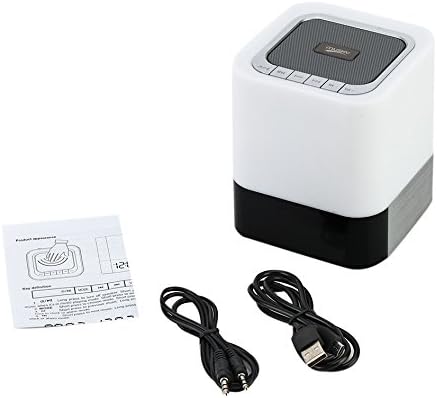
Image: The MUSKY DY 28 Plus speaker, along with its USB charging cable, 3.5mm audio cable, and user manual.
Konec produktuview
Familiarize yourself with the various parts and controls of your MUSKY DY 28 Plus speaker.

Image: A detailed diagram showing the front and top views of the speaker with labels for its buttons, ports, and features, including Power On/Off, Charging Port, Aux input, USB Input, Micro SD Slot, Touch Sensor, Play/Pause, Previous, Volume Down, Mode, Next, and Volume Up buttons.
Ovládací prvky a porty:
- Tlačítko zapnutí / vypnutí: Nachází se na boku, slouží k zapnutí nebo vypnutí zařízení.
- Charging Port (USB DC): Pro připojení nabíjecího kabelu USB.
- Vstup AUX: 3.5mm jack pro kabelové audio připojení.
- USB Input (USB HOST): Pro přehrávání hudby z USB flash disku.
- Slot Micro SD: For playing music from a Micro SD card (TF card).
- Dotykový senzor: Located on the top metal cover, used to adjust light brightness.
- Tlačítko Přehrát/Pozastavit: To control music playback.
- Tlačítko Předchozí/Snížení hlasitosti: Krátké stisknutí pro předchozí skladbu, dlouhé stisknutí pro snížení hlasitosti.
- Tlačítko Další/Zvýšení hlasitosti: Krátké stisknutí pro další skladbu, dlouhé stisknutí pro zvýšení hlasitosti.
- Tlačítko režimu: To switch between Bluetooth, AUX, TF card, and USB modes.
Nastavení
1. Nabíjení zařízení
Before first use, fully charge the speaker. Connect the provided USB charging cable to the USB DC port on the speaker and the other end to a USB power adapter (not included) or a computer's USB port. The charging indicator light will show the charging status.
- A full charge provides approximately 6-8 hours of music playback or 10 hours of lighting time.
2. Zapnutí/vypnutí
- To turn on, slide the Power On/Off switch to the "ON" position.
- To turn off, slide the Power On/Off switch to the "OFF" position.
Návod k obsluze
1. Režim Bluetooth
The speaker uses advanced Bluetooth 4.0 technology for seamless wireless connection.
- Zapněte reproduktor. Automaticky se přepne do režimu párování Bluetooth, což bude signalizováno blikající LED kontrolkou.
- Povolte Bluetooth na svém smartphonu, tabletu nebo jiném zařízení s podporou Bluetooth.
- Hledat "DY 28 Plus" in the list of available devices and select it to pair.
- Po úspěšném spárování reproduktor vydá potvrzovací zvuk a LED kontrolka přestane blikat.
- You can now play music wirelessly from your device.

Image: The MUSKY DY 28 Plus speaker displaying the time, with various smartphones floating above it, illustrating its compatibility with Bluetooth-enabled devices for wireless music playback.
2. MP3 Player Mode (TF Card / U Disk / AUX)
The speaker supports playing music directly from a TF card (Micro SD), U disk (USB flash drive), or via a 3.5mm AUX cable.

Image: A close-up of the MUSKY DY 28 Plus speaker's side panel, highlighting the Micro SD, USB HOST, AUX, and USB DC ports, with a USB stick and a 3.5mm audio cable connected, demonstrating its MP3 player capabilities.
- TF Card / U Disk: Insert a TF card (up to 32GB) or a U disk into the respective slot. The speaker will automatically detect the storage device and begin playing MP3/WAV/WMA format files. Use the "Mode" button to switch to this input if it doesn't auto-detect.
- Vstup AUX: Connect one end of the 3.5mm audio cable to the AUX port on the speaker and the other end to the audio output jack of your device (e.g., smartphone, laptop). The speaker will automatically switch to AUX mode.
3. Light Function (Night Light)
The integrated LED light offers three levels of brightness, controlled by the touch sensor.
- Gently tap the metal cover on the top of the speaker to turn on the light to its dimmest setting.
- Tap again to switch to the intermediate brightness level.
- Tap a third time for the brightest setting.
- Tap a fourth time to turn the light off.
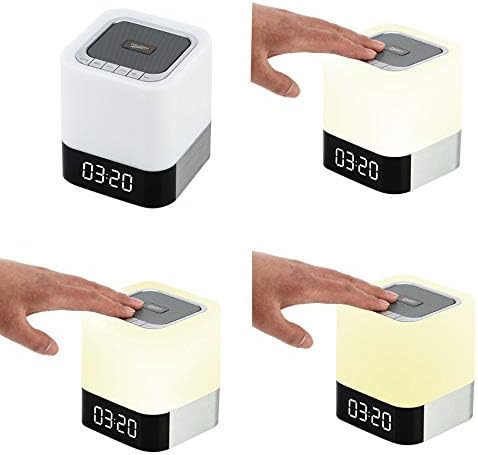
Image: A sequence of four images demonstrating the touch-controlled light function of the MUSKY DY 28 Plus speaker, showing the light off, then progressively increasing in brightness from dim to intermediate to bright with each tap on the top surface.
4. Funkce budíku
Set an alarm and even customize your alarm sound.
- Nastavení budíku: Refer to the specific instructions in the included quick start guide for detailed steps on setting the time and alarm. (Note: Specific button presses for alarm setting are not detailed in the provided product description, so a general reference is made.)
- Custom Alarm Sound: To use your favorite song as an alarm, create a folder named 'ALARM' on your TF card or U disk. Place your desired MP3/WAV/WMA alarm file inside this folder. Insert the TF card or U disk into the speaker, and it will automatically use your custom alarm sound instead of the default.
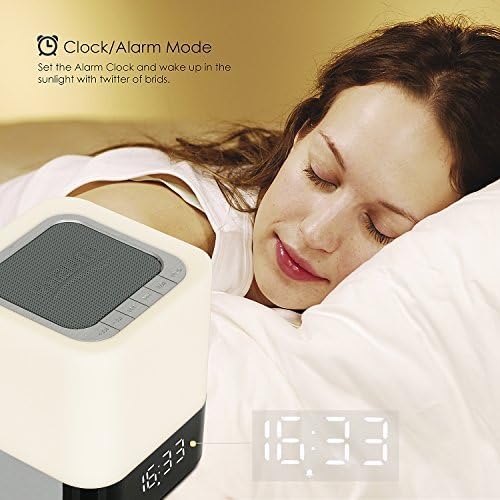
Image: The MUSKY DY 28 Plus speaker displaying the time, positioned on a bedside table next to a person sleeping, illustrating its use as an alarm clock.
5. Volání s volnýma rukama
When connected via Bluetooth, the speaker can be used for hands-free phone calls.
- Přijímání / ukončování hovorů: Press the Play/Pause button to answer an incoming call or to end an ongoing call.
- Odmítání hovorů: Dlouhým stisknutím tlačítka Přehrát/Pozastavit odmítnete příchozí hovor.
Údržba
- Čištění: K čištění povrchu reproduktoru používejte měkký, suchý hadřík. Nepoužívejte abrazivní čisticí prostředky ani rozpouštědla.
- Skladování: Pokud reproduktor delší dobu nepoužíváte, skladujte jej na chladném a suchém místě mimo dosah přímého slunečního záření a extrémních teplot.
- Péče o baterie: Chcete-li prodloužit životnost baterie, vyvarujte se častého úplného vybíjení baterie. Zařízení pravidelně nabíjejte, i když jej nepoužíváte.
Odstraňování problémů
| Problém | Možná příčina | Řešení |
|---|---|---|
| Reproduktor se nezapne. | Baterie je slabá nebo vybitá. | Plně nabijte reproduktor. |
| Nelze spárovat se zařízením Bluetooth. | Speaker is not in pairing mode; device is too far; Bluetooth is off on source device. | Ensure speaker is in pairing mode (flashing LED). Move device closer. Turn on Bluetooth on your source device. Forget "DY 28 Plus" on your device and try pairing again. |
| Z reproduktoru není slyšet žádný zvuk. | Volume is too low; incorrect mode selected; audio cable not fully inserted. | Increase volume on both speaker and source device. Press the "Mode" button to select the correct input (Bluetooth, AUX, TF, USB). Ensure cables are securely connected. |
| Light function not working. | Battery is low; touch sensor not activated correctly. | Charge the speaker. Ensure you are tapping the metal cover on the top of the speaker. |
| Custom alarm not playing. | Incorrect folder name or file format; TF card/U disk not inserted. | Ensure the folder is named 'ALARM' and the file is MP3/WAV/WMA. Verify the TF card or U disk is properly inserted. |
Specifikace
| Funkce | Detail |
|---|---|
| Číslo modelu | DY-28 Plus |
| Značka | PIŽMOVÝ |
| Technologie připojení | Bluetooth 4.0 |
| Bezdrátové Dosah | Až 30 stop (přibližně 9 metrů) |
| Režim zvukového výstupu | Stereo |
| Maximální výstupní výkon reproduktoru | 10 wattů |
| Kapacita baterie | 4000 XNUMX mAh |
| Doba přehrávání hudby | 6-8 hodin (cca) |
| Doba osvětlení | 10 hodin (přibližně) |
| Podporované zvukové formáty | MP3, WAV, WMA |
| Podpora TF karet | Až 32 GB |
| Kompatibilní zařízení | Laptop, Tablet, Smartphone |
| Materiál | Plast |
| Rozměry produktu (D x Š x V) | 10.01 x 10.01 x 11 cm (přibližně 4 x 4 x 4.3 palce) |
| Hmotnost položky | 558 gramů (přibližně 1.23 libry) |
| Vodotěsný | Yes (as per specifications, but general caution advised) |
Záruka a podpora
This product is covered by a standard manufacturer's warranty. For detailed warranty terms and conditions, please refer to the warranty card included with your purchase or contact the retailer. For technical support or customer service inquiries, please reach out to the MUSKY customer support team through the contact information provided on the product packaging or the official MUSKY webmísto.
Ask a question about this manual
Ask about setup, troubleshooting, compatibility, parts, safety, or missing instructions. Manuals+ will review the question and use this page’s manual context to help answer it.