
1. Úvod
This manual provides detailed instructions for the Aluratek AUMC0302F USB Type-C Hub. This versatile 4-in-1 multiport adapter is designed to expand the connectivity of your USB-C enabled devices, offering a comprehensive solution for data transfer, video output, and peripheral connections. Please read this manual thoroughly before using the product to ensure proper operation and to maximize its capabilities.
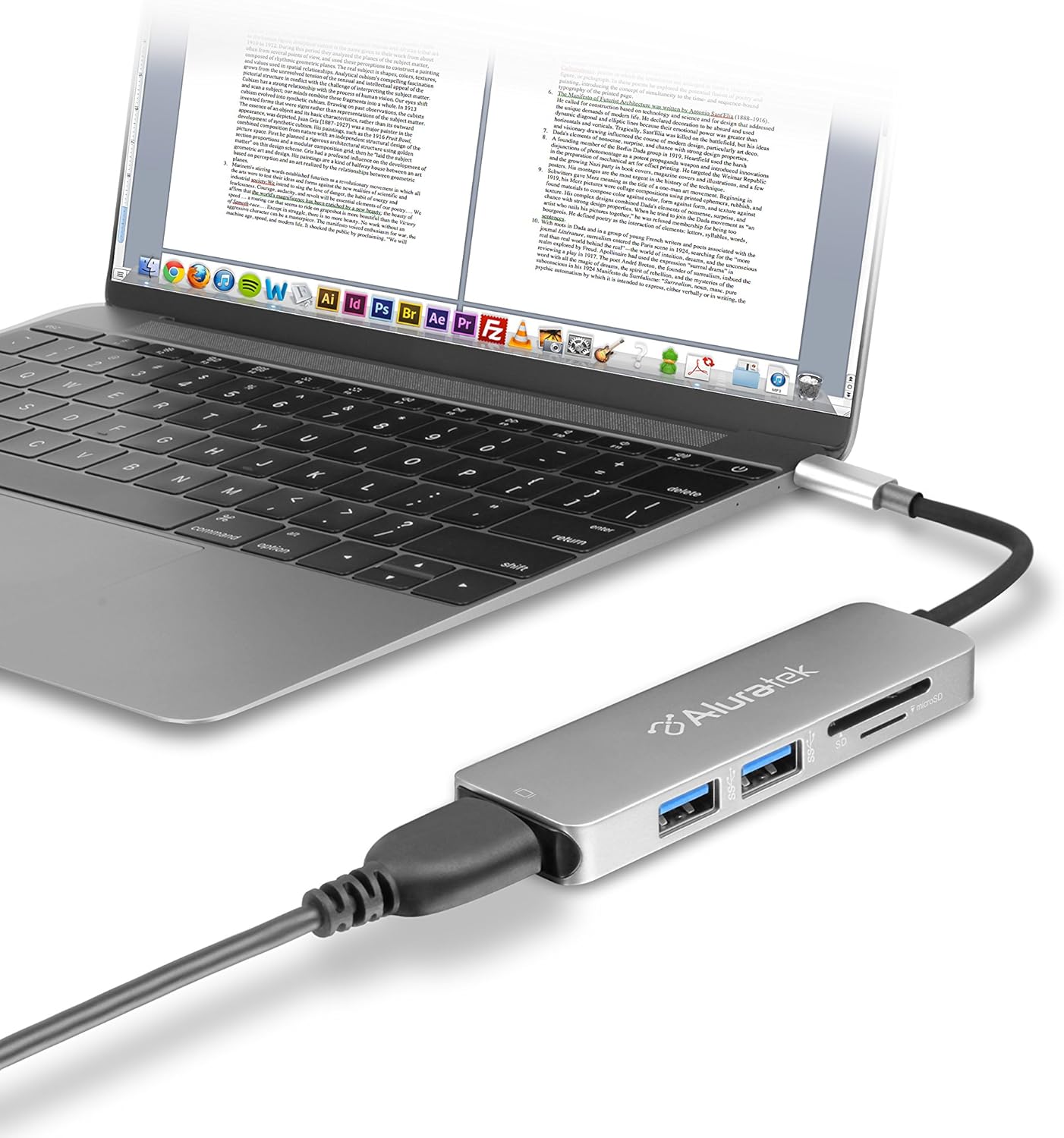
Image 1.1: The Aluratek AUMC0302F USB Type-C Hub connected to a laptop, demonstrating its use with various peripherals.
2. Vlastnosti
- Rozšířená konektivita: Expands a single USB-C port to include 4K HDMI, three USB 3.0 ports, and a Micro/SD card reader.
- Crystal-Clear HDMI Output: Supports 4K HDMI video output, allowing connection to external displays or monitors for high-definition visuals.
- Rychlý přenos dat: Three USB 3.0 ports provide data transfer speeds up to 5Gbps, suitable for connecting peripherals and external storage devices.
- Seamless Card Reader: Integrated SD and MicroSD card reader for quick access and transfer of files z paměťových karet.
- Široká kompatibilita zařízení: Compatible with various USB-C enabled laptops, including MacBook, Dell, HP, and Surface models.

Obrázek 2.1: Podrobný view of the Aluratek AUMC0302F hub, showcasing its USB 3.0, SD, and MicroSD ports.
3. Obsah balení
Ujistěte se prosím, že máte v balení všechny položky:
- Aluratek USB Type-C Hub (AUMC0302F)
- Rychlý průvodce
4. Pokyny k nastavení
The Aluratek AUMC0302F hub is designed for plug-and-play functionality, requiring no additional drivers for most operating systems.
- Připojte Hub: Plug the USB Type-C connector of the Aluratek hub into an available USB Type-C port on your laptop or compatible device.
- Rozpoznávání systému: Your operating system should automatically detect and configure the hub. This process may take a few moments.
- Připraven k použití: Once recognized, the hub's ports are ready for connecting your peripherals and memory cards.
5. Návod k obsluze
Utilize the various ports on your Aluratek AUMC0302F hub as follows:
5.1. Using USB 3.0 Ports
- Connect USB devices such as external hard drives, flash drives, keyboards, mice, or other USB peripherals to the three available USB 3.0 ports.
- Tyto porty podporují rychlost přenosu dat až 5 Gb/s.
5.2. Using the HDMI Port
- Connect an HDMI cable from the hub's HDMI port to an external monitor, TV, or projector.
- The hub supports resolutions up to 4K (3840 x 2160) at 30Hz, providing a clear and vibrant display.
- Configure your display settings (e.g., duplicate, extend) through your computer's operating system.

Image 5.1: The Aluratek AUMC0302F hub facilitating video output from a laptop to an external display.
5.3. Using the SD and MicroSD Card Reader
- Insert your SD or MicroSD card into the corresponding slot on the hub. Ensure the card is inserted correctly with the contacts facing down.
- Your computer will recognize the card as a removable drive, allowing you to access and transfer files.
- Do not insert both an SD and a MicroSD card simultaneously if the hub only supports one at a time (check product specifications if unsure). This model supports both.
6. Řešení problémů
If you encounter issues with your Aluratek AUMC0302F hub, please refer to the following common solutions:
- Zařízení nebylo rozpoznáno:
- Ensure the USB Type-C connector is fully inserted into your computer's port.
- Try connecting the hub to a different USB Type-C port on your computer.
- Restartujte počítač.
- HDMI Display Issues:
- Verify that the HDMI cable is securely connected to both the hub and the external display.
- Check the input source on your external display to ensure it's set to the correct HDMI input.
- Aktualizujte ovladače grafické karty počítače.
- Test with a different HDMI cable or display if possible.
- Nefunkční zařízení USB:
- Ensure the USB device is properly connected to the hub.
- Zkuste připojit zařízení USB k jinému portu na rozbočovači.
- If it's a high-power device, ensure your laptop's USB-C port can provide sufficient power. Some devices may require direct connection or an externally powered hub.
- Karta SD/MicroSD nebyla detekována:
- Ujistěte se, že je karta zcela a správně zasunuta do slotu.
- Test the card in another device to confirm it is functional.
- Check your computer's Disk Management (Windows) or Disk Utility (macOS) to see if the card is recognized but not assigned a drive letter.
7. Specifikace
| Značka | Aluratek |
| Číslo modelu | AUMC0302F |
| Hardwarová platforma | Notebook, PC |
| Kompatibilita operačního systému | Chrome OS, Windows 10, Windows 7 |
| Hmotnost položky | 1 unce |
| Rozměry produktu (DxŠxV) | 4.5 x 1 x 0.45 palce |
| Barva | Stříbro |
| Hardwarové rozhraní | USB Type-C, HDMI, USB 3.0, SD, MicroSD |
| Speciální funkce | Powered (via USB-C host connection) |
| Kompatibilní zařízení | Laptops with USB Type-C ports |
8. Bezpečnostní informace
Pro zajištění bezpečného provozu a prodloužení životnosti vašeho zařízení dodržujte prosím následující:
- Udržujte zařízení mimo dosah vody, vlhkosti a extrémních teplot.
- Nepokoušejte se zařízení rozebírat ani opravovat sami. Veškerý servis svěřte kvalifikovanému personálu.
- Zabraňte pádu zařízení nebo jeho vystavení silným nárazům.
- Use only with compatible USB Type-C devices.
- Disconnect the hub when not in use for extended periods.
9. Záruka a podpora
Aluratek products are backed by a manufacturer's warranty. For specific warranty details, please refer to the warranty card included with your product or visit the official Aluratek website. If you require technical support or have questions about your Aluratek AUMC0302F hub, please contact Aluratek customer service through their official webwebu nebo kontaktních informací uvedených na obalu produktu.
For the latest drivers, FAQs, and product registration, please visit: www.aluratek.com