
symcode MJ-6708L-wired
Symcode Bluetooth 2D Barcode Scanner User Manual
Model: MJ-6708L-wired
Váš komplexní průvodce nastavením, provozem a údržbou.
Zavedení
The Symcode MJ-6706DA Handheld 2D Bluetooth Barcode Scanner is designed for efficient and accurate data capture. This manual provides detailed instructions for its proper use, ensuring optimal performance and longevity.

Image: The Symcode Bluetooth 2D Barcode Scanner, shown in white, accompanied by its USB charging and data cables. This illustrates the primary components included with the device.
Obsah balení
Prosím, ověřte, zda jsou v balení přítomny všechny položky:
- Barcode Scanner (Model: MJ-6706DA-Blue)
- Nabíjecí kabel
- Uživatelská příručka
Nastavení a připojení
Nabíjení skeneru
Before first use, fully charge the scanner. Connect the provided charging cord to the scanner and a compatible USB power source. A full charge takes approximately 2.5 hours and provides up to 30 hours of continuous scanning.
Režimy připojení
The Symcode barcode scanner supports three connection methods:
- Kabelový režim USB: Connect the scanner directly to your computer using the USB cable. The cable serves both for charging and data transmission.
- 2.4G bezdrátový režim: Insert the 2.4G USB dongle into your computer. The scanner will automatically pair. This mode offers a transmission distance of up to 200m in barrier-free environments and 30m in obstacle environments.
- Režim Bluetooth: Pair the scanner with Bluetooth-enabled devices such as smartphones, tablets, or computers. No driver installation is required for Bluetooth connection.

Image: Illustration of the three connection modes: USB wired, Bluetooth, and 2.4G wireless. The wired mode shows the scanner connected to a laptop via USB. The Bluetooth mode shows the scanner next to a smartphone. The 2.4G wireless mode shows the scanner with a USB dongle inserted into a laptop.

Image: A visual representation of the 2.4G wireless transmission mode, indicating the use of a USB dongle, and the USB wired transmission mode, showing the direct cable connection.
Kompatibilita
The scanner is compatible with various operating systems, including Windows 11/10/8/7/XP, Mac OS, iOS, Android, and Linux. It can connect to smartphones, computers, POS systems, iPhones, and iPads.

Image: This graphic highlights the scanner's broad compatibility across major operating systems (iOS, Android, Windows, Mac OS, Linux) and provides its physical dimensions (165mm/6.5in height, 78mm/3.1in width).

Image: A visual comparison of the scanner's wireless transmission range: up to 200m (656ft) in barrier-free environments and 30m (98ft) in environments with obstacles.
Návod k obsluze
Režimy skenování
The scanner offers two primary data upload modes:
- Režim okamžitého nahrávání: Data is transmitted to the connected device immediately after each scan.
- Režim offline úložiště: The scanner can store up to 10,000 codes internally. Data is saved to the scanner's memory and can be uploaded to a computer later by scanning a specific setup code.

Image: This graphic explains the two data upload modes: Instant Upload Mode, where data is sent immediately after scanning, and Offline Storage Mode, which allows storing up to 50,000 codes internally before uploading.
Podporované typy čárových kódů
The Symcode scanner is capable of decoding a wide range of 1D and 2D barcodes, even if they are partially damaged, dirty, or poorly printed. Supported types include:
- 1D čárové kódy: UPC/EAN, UPC/EAN with Supplemental, UCC/EAN 128, Code 39, Code 39 Full ASCII, Trioptic Code 39, Code 128 Full ASCII, Codabar, Interleaved 2 of 5, Discrete 2 of 5, Code 93, MSI, Code 11, RSS variants, Chinese 2 of 5, and extended ASCII support for Code 128 barcodes.
- 2D čárové kódy: PDF417, QR Code, Data Matrix, Aztec, Hanxin.
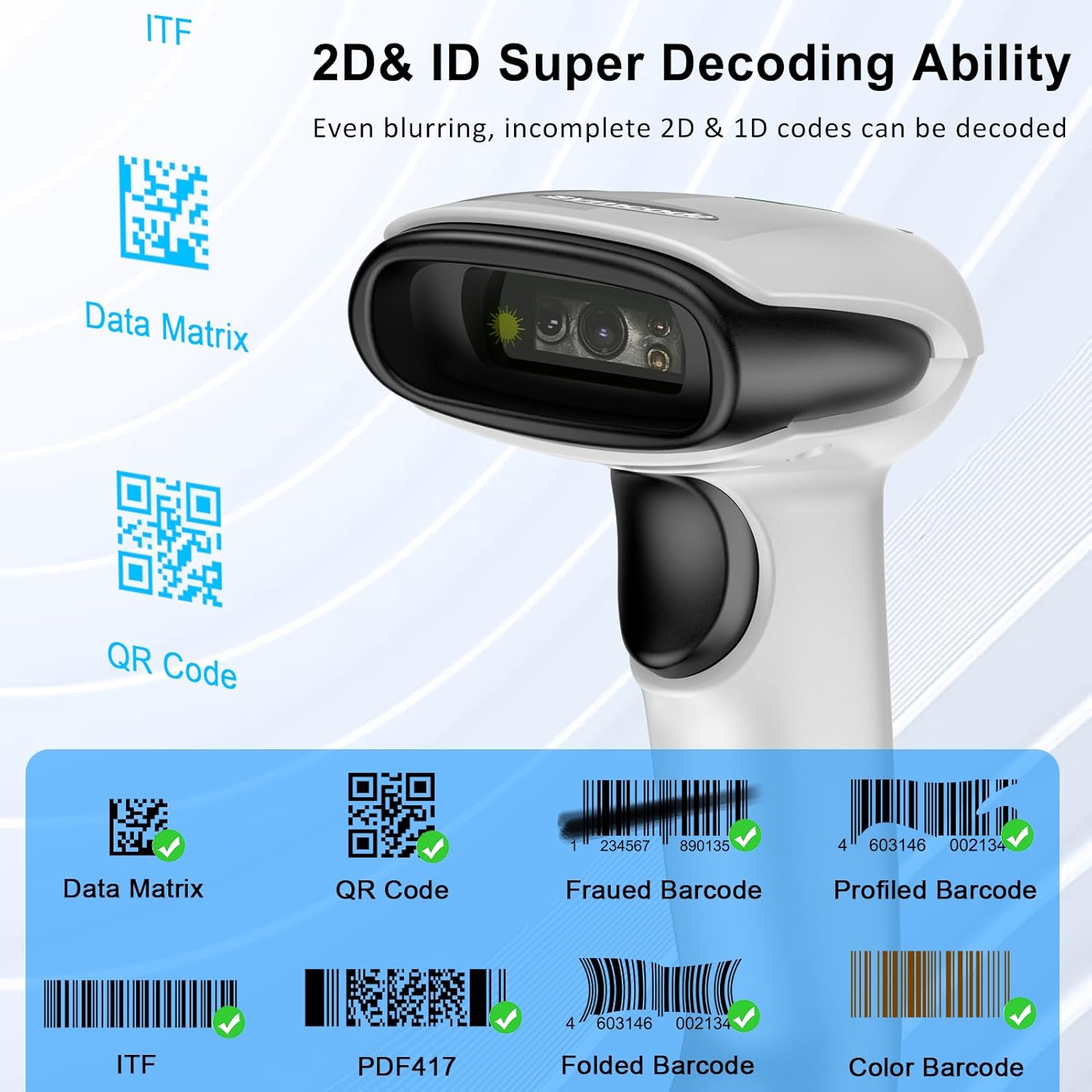
Image: A visual representation of the scanner's decoding capabilities for various 2D and 1D barcodes, including Data Matrix, QR Code, ITF, PDF417, and examples of frauded, profiled, folded, and color barcodes.
Customized Configuration Options
The scanner offers over 180 configuration options to tailor its functionality to your needs. These include:
- Režimy skenování: Hands-free intelligent sensor mode or trigger scan mode.
- Zpětná vazba: Vibration or buzzer settings.
- Nakládání s daty: Data storage or instant upload mode.
- Jazyky klávesnice: Support for multiple keyboard layouts.
- Data Formatting: Adding or hiding prefixes/suffixes, including date and time.
- Emulace klávesnice: Ability to add keyboard keys/combinations to the scanning operation.
Údržba
Čištění
To maintain optimal performance, regularly clean the scanner's lens and exterior. Use a soft, lint-free cloth. For stubborn dirt, slightly dampOmyjte hadřík vodou nebo jemným neabrazivním čisticím prostředkem. Nepoužívejte agresivní chemikálie nebo abrazivní materiály.
Péče o baterie
Skener je vybaven lithium-polymerovou baterií s kapacitou 2000 mAh. Pro prodloužení životnosti baterie:
- Vyhněte se častému úplnému vybíjení baterie.
- Pokud skener delší dobu nepoužíváte, skladujte jej na chladném a suchém místě.
- Recharge the battery promptly when the low battery indicator appears.
Trvanlivost
The Symcode barcode reader is constructed with strong ABS material, providing superior durability. It is designed to withstand drops of up to 8 ft (2.4 m) onto concrete floors. The integrated housing also protects the scanner from heavy dust, making it suitable for various working conditions.
Odstraňování problémů
This section addresses common issues you might encounter with your Symcode barcode scanner.
Scanner Not Responding
- Zkontrolujte baterii: Ensure the scanner is sufficiently charged. Connect it to the charging cable and allow it to charge for at least 15 minutes.
- Cyklus napájení: Turn the scanner off and then on again.
- Spojení: Verify the connection mode. If using wireless, ensure the dongle is properly inserted or Bluetooth is paired. Try reconnecting.
Unable to Scan Barcodes
- Typ čárového kódu: Ujistěte se, že skener podporuje typ čárového kódu.
- Kvalita čárového kódu: Ensure the barcode is clear, not excessively damaged, dirty, or poorly printed.
- Vzdálenost/úhel: Upravte vzdálenost a úhel mezi skenerem a čárovým kódem.
- Osvětlení: Ensure adequate lighting, but avoid direct glare on the barcode.
- Konfigurace: If you have customized settings, ensure they are not interfering with basic scanning. A factory reset (refer to the included user manual for specific barcode) might be necessary if settings are misconfigured.
Problémy s odpojením bezdrátového připojení
- Rozsah: Ensure the scanner is within the effective wireless range (200m barrier-free, 30m with obstacles for 2.4G; typical Bluetooth range).
- Rušení: Minimalizujte rušení od jiných bezdrátových zařízení.
- Opravit: For Bluetooth, try unpairing and re-pairing the device. For 2.4G, remove and reinsert the USB dongle.
Specifikace
| Funkce | Detail |
|---|---|
| Číslo modelu | MJ-6708L-wired |
| Vstupní objemtage | DC5V±0.25v |
| Proud | 25 mA (work); 95 mA (instantaneous) |
| Rychlost dekódování | 100krát / s |
| Bezdrátový dosah (2.4G) | 200m (barrier-free); 30m (obstacles) |
| Doba nabíjení | 2.5 hodiny |
| Životnost baterie | 30 Hours (continuous scanning) |
| Typ baterie | 1 lithium-polymerová baterie (2000 mAh) |
| Rozměry produktu | 5.5 x 3.7 x 2.4 palce (165 mm x 78 mm) |
| Hmotnost položky | 10.2 unce |
| Technologie připojení | Bluetooth 6.0, Wireless 2.4G, USB Cable |
| Dekódovací schopnost | 1D, 2D (QR, DataMatrix, PDF417, Aztec, Hanxin, etc.) |
| CPU | 32 bitů |
Typické aplikace
The Symcode barcode scanner is versatile and suitable for various environments requiring efficient barcode scanning:
- Maloobchodní prodejny
- Supermarkety
- Lékárny
- Warehouses and Inventory Management
- Logistics and Shipping
- Knihovny
- Point-of-Sale (POS) Systems

Obrázek: Přamples of typical usage scenarios for the barcode scanner, including a retail shop, a supermarket, and a pharmacy, demonstrating its adaptability across different business environments.
Záruka a podpora
For any technical assistance, troubleshooting beyond this manual, or warranty inquiries, please contact Symcode customer support. Many users have reported positive experiences with their customer support for configuration and operational queries.
Visit the official Symcode store for more information and resources: Symcode Store
Ask a question about this manual
Ask about setup, troubleshooting, compatibility, parts, safety, or missing instructions. Manuals+ will review the question and use this page’s manual context to help answer it.