
Zavedení
This manual provides detailed instructions for the proper use and care of your Vivitar DVR917HD 4K Action Camera. Please read this manual thoroughly before operating the device to ensure safe and effective use. The Vivitar DVR917HD is designed to capture high-quality video and photos in various environments, including underwater, thanks to its durable waterproof casing and versatile mounting options.
Vlastnosti produktu
- 2palcový barevný LCD displej: For precise image capture, video playback, and photo viewIng.
- Nahrávání 4K videa: Capture stunning video at 4640 x 3480 resolution, along with 1080p and 720p options.
- 16megapixelový CMOS snímač: For high-resolution still photographs.
- Voděodolné pouzdro: Enables use in wet conditions and underwater adventures.
- Vestavěné Wi-Fi: Allows direct streaming of content to compatible smartphones or tablets.
- Širokoúhlý objektiv: Designed for capturing expansive scenes.
- Více rozhraní: Supports microSD, microSDHC, HDMI, and USB 2.0.
- Kompaktní design: Dimensions of 2.6 inches x 2.5 inches x 1.5 inches and a weight of 0.5 pounds.
Obsah balení
Ověřte, zda jsou v balení obsaženy všechny níže uvedené položky:
- Vivitar DVR917HD 4K Action Camera
- Vodotěsné pouzdro
- Bezdrátové dálkové ovládání
- Napájecí adaptér
- USB kabel
- HDMI kabel
- Sada pro montáž na helmu
- Držák na kolo

Image: The Vivitar DVR917HD camera shown with its full set of accessories, including the waterproof case, remote, various mounts, and cables.
Nastavení
1. Vložení karty MicroSD
- Vyhledejte slot pro kartu microSD na boku fotoaparátu.
- Gently insert a compatible microSD or microSDHC card (Class 4 or higher recommended) into the slot until it clicks into place. Ensure the card is oriented correctly.
2. Nabíjení baterie
- Připojte fotoaparát k síťovému adaptéru pomocí dodaného kabelu USB.
- Zapojte napájecí adaptér do zásuvky ve zdi.
- The charging indicator light will illuminate. Charging is complete when the light changes color or turns off.
3. Použití vodotěsného pouzdra
- Open the latch on the waterproof housing.
- Opatrně vložte kameru do pouzdra a ujistěte se, že pevně sedí.
- Close the latch securely. Before first use in water, perform a leak test without the camera inside.
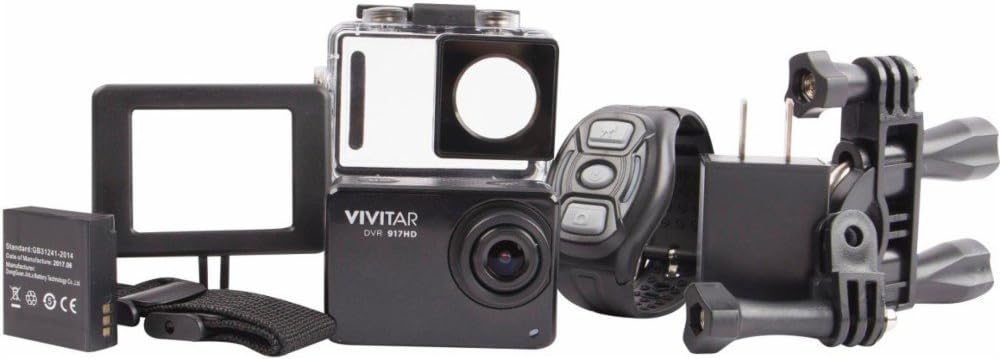
Image: The Vivitar DVR917HD camera positioned within its clear waterproof housing, with the back cover open.
4. Připevnění držáků
The camera comes with a helmet mounting kit and a bicycle mount. Follow the instructions provided with each mount to securely attach the camera for your desired activity.

Image: The Vivitar DVR917HD camera enclosed in its waterproof case, securely attached to a mounting accessory.

Image: A person wearing a ski helmet with the Vivitar DVR917HD action camera visibly mounted on the top, against a snowy mountain backdrop.
Návod k obsluze
1. Zapnutí/vypnutí
- To power on, press and hold the Power/Mode button (usually labeled 'MODE') until the screen illuminates.
- Chcete-li zařízení vypnout, znovu stiskněte a podržte tlačítko Napájení/Režim, dokud se obrazovka nevypne.

Obrázek: Detailní záběr view of the Vivitar DVR917HD action camera, highlighting its front lens and top control buttons.
2. Nahrávání videa
- Ensure the camera is in video recording mode. Use the Mode button to cycle through modes if necessary.
- Press the 'OK' button to start recording. A red indicator light or on-screen icon will typically show recording is active.
- Press the 'OK' button again to stop recording.
3. Fotografování
- Switch the camera to photo mode using the Mode button.
- Komponujte snímek pomocí 2palcového LCD displeje.
- Press the 'OK' button to capture a photo.

Image: The Vivitar DVR917HD camera's rear screen displaying a live view from a first-person perspective of someone riding a bicycle.
4. Wi-Fi připojení
- Enable Wi-Fi on the camera through the settings menu.
- On your smartphone or tablet, search for the camera's Wi-Fi network and connect to it.
- Open the Vivitar app (if available) or a compatible action camera app to stream content or control the camera remotely.
5. Používání bezdrátového dálkového ovladače
The included wireless remote control allows for convenient operation of the camera from a distance. Refer to the remote control's specific instructions for pairing and function details.
Údržba
Cleaning the Camera and Housing
- Use a soft, lint-free cloth to clean the camera body and lens. Avoid abrasive materials.
- For the waterproof housing, rinse with fresh water after use in saltwater and allow to air dry. Ensure the O-ring seal is free of debris.
Péče o baterie
- Před každým použitím baterii plně nabijte.
- Nevystavujte baterii extrémním teplotám.
- Pokud fotoaparát skladujete delší dobu, vyjměte baterii.
Skladování
Store the camera in a cool, dry place away from direct sunlight and excessive humidity. Keep it protected from dust and impacts.
Odstraňování problémů
- Kamera se nezapíná: Ujistěte se, že je baterie nabitá a správně vložená.
- Problémy s nahráváním: Check if a microSD card is inserted and has sufficient free space. Ensure the card is not corrupted.
- Špatná kvalita zvuku: The waterproof housing can significantly muffle sound. For better audio, use the camera outside the housing in dry conditions.
- Problémy s připojením k Wi-Fi: Ensure Wi-Fi is enabled on the camera and your smart device. Try restarting both devices.
- Zamrznutí kamery: Vyjměte a znovu vložte baterii pro resetování fotoaparátu.
Specifikace
| Funkce | Specifikace |
|---|---|
| Název modelu | DVR917HD |
| Číslo modelu položky | 3216565590 |
| Efektivní rozlišení | 16 MP |
| Rozlišení záznamu videa | 4K, 1080p, 720p |
| Formát záznamu videa | MP4 |
| Technologie fotosenzoru | CMOS |
| Velikost obrazovky | 2 palce |
| Technologie připojení | Wi-Fi |
| Typ paměti Flash | Micro SD |
| Speciální funkce | Vodotěsný |
| Typ objektivu | Široký úhel |
| Typ zaměření | Automatické ostření |
| Kontrola expozice | Automatický |
| Hmotnost položky | 717 g |
| Rozměry | 2.6 x 2.5 x 1.5 palce (přibližně) |
Informace o záruce
For detailed warranty information regarding your Vivitar DVR917HD 4K Action Camera, please refer to the warranty card included in your product packaging or visit the official Vivitar webZáruční podmínky se mohou lišit v závislosti na regionu a datu nákupu.
Zákaznická podpora
If you require further assistance, have questions not covered in this manual, or need technical support, please contact Vivitar customer service. Contact details can typically be found on the Vivitar official webwebu nebo na obalu vašeho produktu.