
1. Úvod
Thank you for choosing the ASAKUKI Smart Wi-Fi Essential Oil Diffuser. This device combines aromatherapy with smart technology, allowing you to control it via a mobile application or voice commands. It is designed to humidify and purify the air, creating a relaxing atmosphere in your home or office.
Tato příručka obsahuje podrobné pokyny pro bezpečné a efektivní používání difuzéru. Před použitím si ji prosím pečlivě přečtěte a uschovejte si ji pro budoucí použití.

Image: The ASAKUKI Smart Wi-Fi Essential Oil Diffuser is versatile for various environments, including nurseries, family rooms, bedrooms, yoga studios, and workspaces.
2. Bezpečnostní opatření
Pro zajištění bezpečného provozu a prevenci poškození dodržujte prosím následující:
- Always place the diffuser on a flat, stable surface.
- Nepřekračujte maximální rysku naplnění vodou (500 ml).
- Use only clean tap water or distilled water. Avoid using hot water.
- Add essential oils carefully to avoid spilling on the exterior of the unit.
- Udržujte difuzér mimo dosah dětí a domácích zvířat.
- Do not cover the mist outlet during operation.
- Před čištěním nebo doplňováním baterie odpojte zařízení ze zásuvky.
- Neponořujte jednotku do vody nebo jiných tekutin.
- If the unit is damaged, do not attempt to repair it yourself. Contact customer support.
- The diffuser features an automatic shut-off when water runs out, but it is recommended to monitor water levels.
3. Obsah balení
Ověřte, zda jsou v balení přítomny všechny položky:
- ASAKUKI Smart Wi-Fi Essential Oil Diffuser (Model DF010)
- Napájecí adaptér
- Uživatelská příručka
- Measuring Cup (may be included)
4. Konec produktuview
Familiarize yourself with the main components of your diffuser:

Image: The ASAKUKI Smart Wi-Fi Essential Oil Diffuser, showing its sleek design and the accompanying mobile app for control.
- Víčko: Top cover of the diffuser.
- Vývod mlhy: Kde se uvolňuje mlha.
- Nádrž na vodu: Holds up to 500ml of water.
- Max Water Line: Indicates the maximum fill level.
- Ultrazvuková deska: Located at the bottom of the water tank, responsible for mist generation.
- Vývod vzduchu: Located on the base.
- Drain Side: Indicated for proper water drainage.
- Světelné tlačítko: Controls the LED light functions.
- Mist/Wi-Fi Button: Controls mist output and initiates Wi-Fi pairing.
- Napájecí konektor: Pro připojení napájecího adaptéru.
5. Pokyny k nastavení
Pro počáteční nastavení postupujte takto:
- Umístění difuzéru: Position the diffuser on a flat, stable, and water-resistant surface.
- Odstraňte víko: Gently lift the top lid off the diffuser.
- Přidat vodu: Using a measuring cup, fill the water tank with clean tap water or distilled water up to the maximum water line (500ml). Do not overfill.
- Přidejte esenciální oleje: Add 3-5 drops of your preferred essential oil directly into the water tank. Adjust the amount based on personal preference and room size.
- Vyměňte víko: Securely place the lid back onto the diffuser.
- Připojte napájení: Plug the power adapter into the power jack at the base of the diffuser, then plug the adapter into a wall outlet.
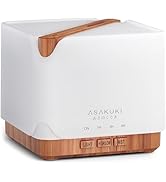
Image: Simple setup guide illustrating connecting power, app pairing, and wireless control.
6. Návod k obsluze
6.1 Ruční ovládání
- Ovládání mlhy: Stiskněte tlačítko Mist/Wi-Fi button once for continuous mist. Press again for intermittent mist (30 seconds on, 30 seconds off). Press a third time to turn off the mist.
- Ovládání světla: Stiskněte tlačítko Světlo button once to turn on the LED light with automatic color cycling. Press again to fix the light to a specific color. Continue pressing to cycle through colors. Press and hold the Light button to turn off the light.
6.2 Smart Wi-Fi and App Control
The diffuser can be controlled remotely using the TuyaSmart app.
- Stáhněte si aplikaci: Hledat "TuyaSmart" in your smartphone's app store (iOS or Android) and download it.
- Registrace/Přihlášení: Otevřete aplikaci a zaregistrujte si nový účet, nebo se přihlaste, pokud již nějaký máte.
- Vstupte do režimu párování: With the diffuser plugged in, press and hold the Mist/Wi-Fi button for 5 seconds until the indicator light flashes rapidly. This indicates the diffuser is in pairing mode.
- Přidat zařízení: In the TuyaSmart app, tap "Add Device" or the "+" icon. Select "Small Home Appliance" > "Diffuser" (Wi-Fi).
- Připojení k Wi-Fi: Follow the in-app instructions to connect the diffuser to your 2.4GHz Wi-Fi network. Ensure your phone is also connected to the same 2.4GHz network during setup.
- Řízení: Once successfully paired, you can control the mist, light, set timers, and create schedules directly from the TuyaSmart app.

Image: The mobile app allows for convenient control of the diffuser's functions.
6.3 Hlasové ovládání pomocí Alexy
The diffuser is compatible with Amazon Alexa for voice control.
- Povolit dovednost: In the Alexa app, search for and enable the "TuyaSmart" skill.
- Propojit účet: Link your TuyaSmart account to your Alexa account.
- Objevte zařízení: Ask Alexa to "Discover devices" or manually discover them in the Alexa app.
- Hlasové příkazy: Jakmile je objeven, můžete použít příkazy jako například:
- "Alexa, turn on the diffuser."
- "Alexa, turn off the diffuser."
- "Alexa, set the diffuser to red."
- "Alexa, set diffuser brightness to 50%."

Image: Voice control with Alexa allows hands-free operation of the diffuser.
7. Údržba
Regular cleaning helps maintain optimal performance and extends the lifespan of your diffuser.
7.1 Čištění
Difuzér čistěte po každých 5–6 použitích nebo každé 3–5 dny, zejména při výměně esenciálních olejů.
- Odpojit: Disconnect the diffuser from the power outlet.
- Prázdná voda: Remove the lid and carefully pour out any remaining water from the drain side of the water tank.
- Otřít: Use a soft cloth or cotton swab with a small amount of mild dish soap to gently wipe the inside of the water tank and the ultrasonic plate.
- Opláchněte: Vypláchněte nádržku na vodu čistou vodou a dávejte pozor, aby se voda nedostala do výstupu vzduchu.
- Schnout: Wipe all parts dry with a clean, soft cloth.
- Deep Clean (Optional): For stubborn residue, add a small amount of white vinegar to the water tank and let it sit for 10-15 minutes before wiping and rinsing.
7.2 Skladování
When not in use for an extended period, ensure the diffuser is clean and completely dry. Store it in a cool, dry place away from direct sunlight.
8. Řešení problémů
Pokud narazíte na problémy, podívejte se na následující běžné problémy a jejich řešení:
| Problém | Možná příčina | Řešení |
|---|---|---|
| Žádná mlha nebo nízký výstup mlhy |
|
|
| Diffuser does not power on |
|
|
| Nelze se připojit k Wi-Fi/aplikaci |
|
|
| Únik vody |
|
|
9. Specifikace
| Funkce | Detail |
|---|---|
| Značka | ASAKUKI |
| Číslo modelu | DF010 |
| Kapacita | 500 mililitrů |
| Rozměry | 6 cm D x 6 cm Š x 7 cm V |
| Materiál | Akrylonitril-butadien-styren (ABS), polypropylen (PP) |
| Zdroj napájení | Elektrický kabel |
| Wattage | 10 wattů |
| Oblast pokrytí | Až 323 XNUMX čtverečních stop |
| Speciální funkce | App Control, Automatic Shut-Off, Multiple Light Settings, Multiple Mist Settings, Voice Control (Alexa) |
| Úroveň hluku | Nižší než 35 dB |
| Runtime (Full Capacity) | Up to 16 hours (on weak mist setting) |
10. Záruka a podpora
The ASAKUKI Smart Wi-Fi Essential Oil Diffuser comes with a 1-year technical support warrantyTato záruka se vztahuje na výrobní vady a problémy vzniklé běžným používáním.
For technical assistance, troubleshooting, or warranty claims, please contact ASAKUKI customer support through the retailer where you purchased the product or visit the official ASAKUKI webstránky pro kontaktní informace.
Please have your model number (DF010) and proof of purchase ready when contacting support.