
Strong REPEATER300V2
STRONG Universal Wi-Fi Repeater 300 V2 Instruction Manual
Model: REPEATER300V2
Konec produktuview
The STRONG Universal Wi-Fi Repeater 300 V2 is designed to extend the coverage and improve the signal strength of your existing Wi-Fi network. It operates at 2.4 GHz and offers data transfer rates up to 300 Mbps. This device is compatible with any standard Wi-Fi modem or router.

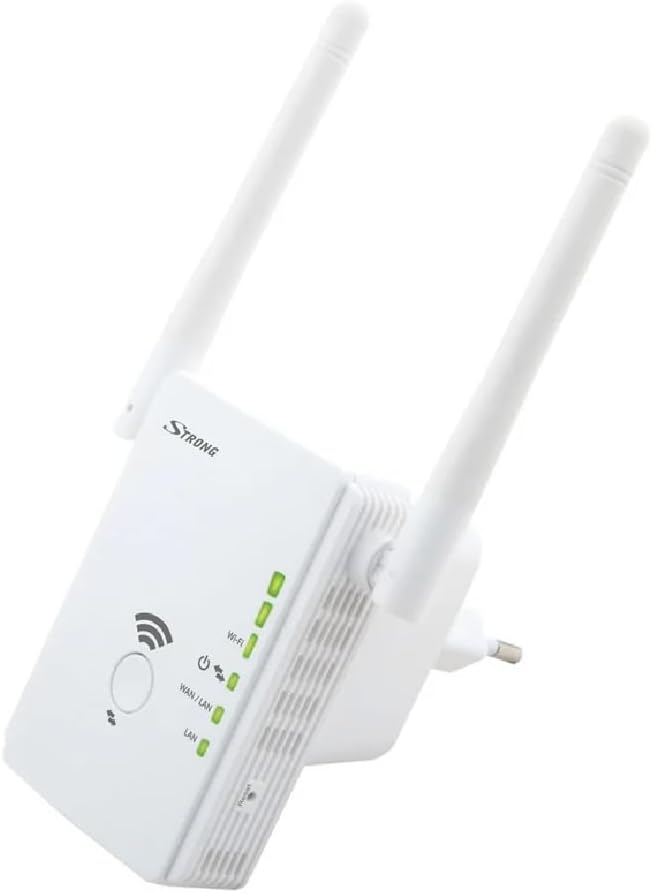
Obrázek: Přední strana view of the Strong Universal Wi-Fi Repeater 300 V2, highlighting its compact white design, two adjustable antennas, and LED indicator lights for Wi-Fi, WAN/LAN, and LAN status.
- Univerzální Wi-Fi opakovač 300
- 300 Mbps @ 2.4 GHz
- 1x LAN port + 1x WAN/LAN port
- 2 adjustable external antennas for improved coverage, reliability, and stability
- Connect and Secure button for easy setup and WPA/WPA2 encryption for Wi-Fi security
Nastavení a instalace
Before beginning installation, ensure you have access to your existing Wi-Fi network name (SSID) and password. A detailed installation manual is included in the product packaging for step-by-step guidance.
Obsah balení:
- STRONG Universal Wi-Fi Repeater 300 V2 unit
- Ethernetový kabel
- Instalační manuál
Basic Setup Steps:
- Zapnutí: Plug the repeater into an electrical outlet within range of your existing Wi-Fi router. Wait for the power indicator light to stabilize.
- Připojení k opakovači: On your computer or mobile device, connect to the repeater's default Wi-Fi network (usually named "STRONG_XXXX" or similar, as indicated in the manual).
- Konfigurace: Otevřete a web browser and enter the default IP address or web address provided in the installation manual (e.g., 192.168.1.1 or strong.repeater). Follow the on-screen instructions to select your existing Wi-Fi network and enter its password.
- Umístění: Once configured, unplug the repeater and move it to a location between your router and the area where you need improved Wi-Fi coverage. Ensure the Wi-Fi signal indicator on the repeater shows a strong connection to your main router.
Obrázek: Boční view of the Strong Universal Wi-Fi Repeater 300 V2, illustrating the power plug and the mode selection switch (Repeater, Access Point).

Image: Visual representation of the repeater plugged into a wall socket, demonstrating its function in extending Wi-Fi signal coverage.
Provozní režimy
The STRONG Universal Wi-Fi Repeater 300 V2 supports multiple operating modes to suit various networking needs:
- Režim opakovače: This is the primary mode, extending your existing Wi-Fi network's coverage. The repeater connects wirelessly to your main router and rebroadcasts the signal.
- Režim přístupového bodu (AP): In this mode, the device connects to your router via an Ethernet cable and creates a new Wi-Fi network. This is useful for adding wireless capability to a wired network or creating a separate Wi-Fi hotspot.
You can switch between modes using the physical switch on the side of the device, as shown in the setup image, or through the web interface during configuration.

Image: Depiction of various devices (laptop, tablet, smartphone) connected, emphasizing the high-speed connection provided by the repeater for all your devices.

Image: The repeater positioned in a home environment, illustrating its role in providing optimal and secure Wi-Fi coverage throughout the house with its adjustable antennas.
Údržba
To ensure optimal performance and longevity of your STRONG Universal Wi-Fi Repeater 300 V2, consider the following maintenance tips:
- Čištění: Jemně otřete zařízení měkkým, suchým hadříkem. Nepoužívejte tekuté čisticí prostředky ani aerosoly.
- Větrání: Ensure the device is placed in a well-ventilated area, away from direct sunlight or heat sources, to prevent overheating.
- Aktualizace firmwaru: Pravidelně kontrolujte informace od výrobce website for any available firmware updates. Updating firmware can improve performance, add new features, and enhance security.
Odstraňování problémů
If you encounter issues with your Wi-Fi Repeater, try the following common troubleshooting steps:
- Bez napájení: Ensure the repeater is securely plugged into a working electrical outlet. Check if the power indicator light is on.
- No Wi-Fi Signal Extension:
- Verify that the repeater is within effective range of your main router.
- Confirm that you have entered the correct Wi-Fi password for your main network during setup.
- Try repositioning the repeater to a more central location between your router and the desired coverage area.
- Pomalé připojení:
- Reduce interference by moving the repeater away from other electronic devices (e.g., microwaves, cordless phones).
- Ensure the repeater's antennas are adjusted for optimal signal reception.
- Nelze přistupovat na stránku nastavení:
- Ensure your device is connected to the repeater's Wi-Fi network.
- Zkuste vymazat mezipaměť prohlížeče nebo použít jiný prohlížeč.
- Refer to the installation manual for the correct default IP address or web adresa.
- Obnovení továrního nastavení: If issues persist, perform a factory reset. Locate the reset button (often a small pinhole) on the device and press and hold it for 5-10 seconds until the lights flash. This will revert the repeater to its default settings, requiring re-configuration.
For more detailed troubleshooting or specific issues, please consult the full installation manual or contact STRONG customer support.
Specifikace
| Funkce | Detail |
|---|---|
| Značka | Silný |
| Číslo modelu | OPAKOVAČ 300V2 |
| Rozměry produktu | 7 x 8.1 x 14.7 cm |
| Hmotnost položky | 130 g |
| Barva | Bílý |
| Bezdrátový typ | 802.11bgn |
| Rychlost přenosu dat | 300 megabajtů za sekundu |
| Třída frekvenčního pásma | Jednopásmový (2.4 GHz) |
| Typ připojení | 802_11_BGN |
| Porty | 1x LAN, 1x WAN/LAN |
| Speciální funkce | Režim přístupového bodu |
Záruka a podpora
STRONG products are designed for reliability and performance. For support and warranty information, please refer to the details below:
- Záruka: This product typically comes with a manufacturer's warranty. Please refer to the warranty card included in your package or visit the official STRONG website for specific warranty terms and duration. (Note: Some promotional materials suggest a 4-year warranty for certain products.)
- Zákaznická podpora: For technical assistance, frequently asked questions (FAQ), or to download the latest drivers and firmware, please visit the official STRONG support page.
- Online zdroje: Další informace a podporu naleznete na Silný obchod na Amazonu.

Image: Illustration of user interaction, representing the ease of setup and access to support resources.
Ask a question about this manual
Ask about setup, troubleshooting, compatibility, parts, safety, or missing instructions. Manuals+ will review the question and use this page’s manual context to help answer it.