
1. Úvod
This manual provides detailed instructions for the operation and maintenance of your FEELWORLD T7PLUS 7-inch DSLR Camera Monitor. Please read this manual thoroughly before using the product to ensure proper function and to prevent damage. Keep this manual for future reference.
2. Konec produktuview
The FEELWORLD T7PLUS is a high-resolution 7-inch camera monitor designed for professional photography and video production. It features a 1920x1200 display, 4K HDMI input/output, and advanced monitoring tools.
2.1 Klíčové vlastnosti
- Displej s vysokým rozlišením: 7-inch screen with 1920 x 1200 resolution, 1200:1 contrast ratio, and Rec.709 color standard for vivid and accurate image reproduction.
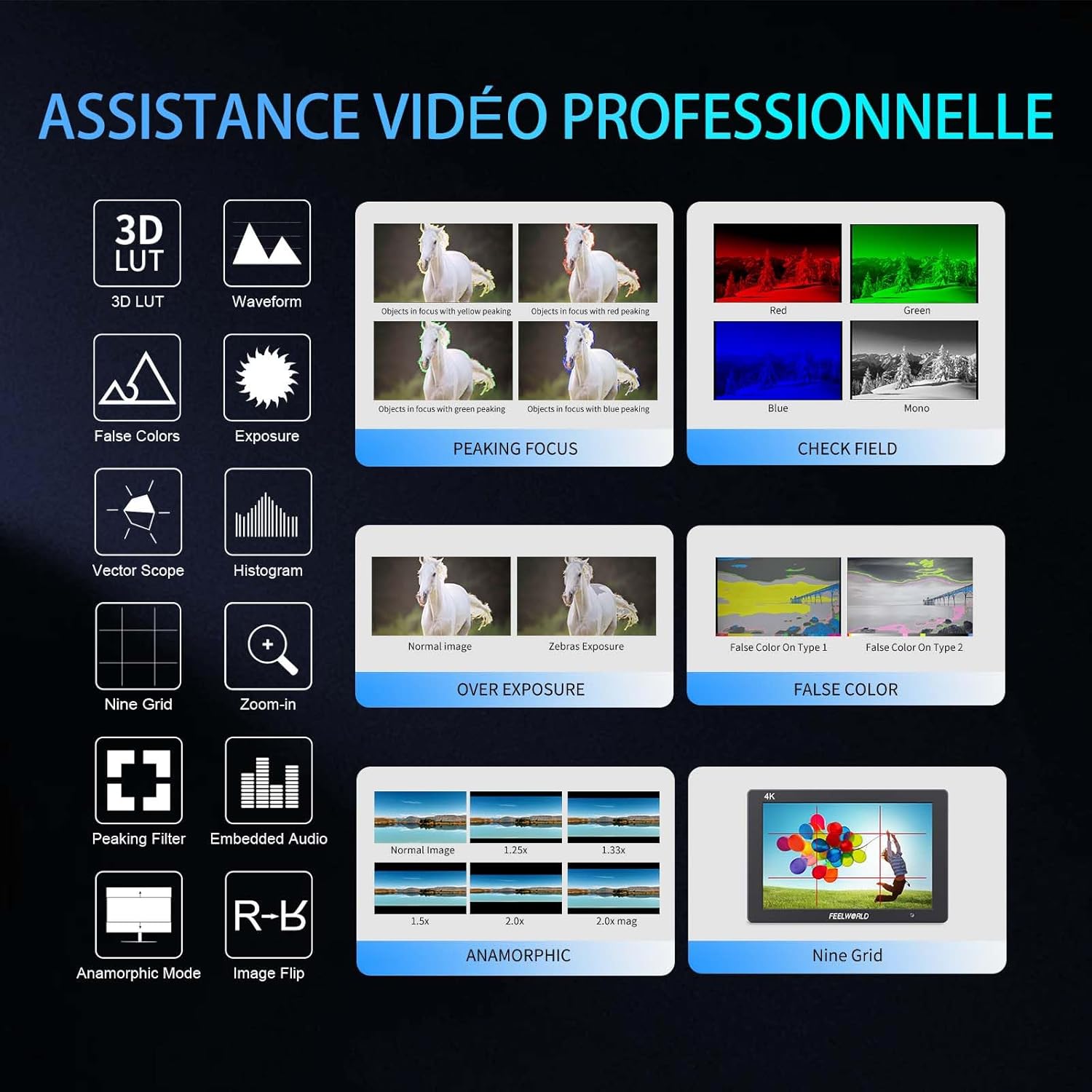
- Advanced Customization Functions: Supports 32 custom 3D LUTs and professional tools including waveform, vector scope, RGB histogram, peaking focus, false color, and more for precise control during shooting.
- Všestranná konektivita: Equipped with 4K HDMI input and output, allowing simultaneous display and transmission of live signals to other monitors without compromising video quality.
- Lehký a odolný design: Slim 18mm aluminum casing, weighing only 320g.
- Flexibilní možnosti napájení: Compatible with F550/F970 series batteries and DC 12V power input.
2.2 Komponenty
Balíček obsahuje následující položky:
- 1 x FEELWORLD T7PLUS Monitor
- 1 x mini HDMI kabel
- 1 x slunečník
- 1 x Warming Boot Holder
- 1 x F970 Battery Plate
- 1 x F550 Battery
- 1 x Uživatelská příručka
- 1 x USB adaptérový kabel
- 1 x taška

Obrázek: Přední strana view of the FEELWORLD T7PLUS monitor, showcasinjeho 7palcový displej.

Image: A visual representation of all items included in the FEELWORLD T7PLUS package, including the monitor, cables, battery, and accessories.
3. Nastavení
3.1 Montáž monitoru
The T7PLUS monitor can be mounted using the included warming boot holder or other compatible mounting solutions. Ensure the monitor is securely attached to your camera rig or stand.

Image: The FEELWORLD T7PLUS monitor shown mounted on top of a DSLR camera, ready for use.
3.2 Připojení napájení
The monitor supports two power input methods:
- Napájení baterie: Attach a compatible F550 or F970 series battery to the F970 battery plate on the back of the monitor.
- Napájení 12V stejnosměrného proudu: Connect a 12V/1.5A DC power adapter to the DC 12V input port on the side of the monitor.

Obrázek: Detail view of the rear of the FEELWORLD T7PLUS monitor, highlighting the battery plate and DC 12V power input port.
3.3 Připojení HDMI
Connect your camera or video source to the HDMI-IN port using the provided Mini HDMI cable. If you need to output the signal to another monitor, use the HDMI-OUT port.
Obrázek: Boční view of the FEELWORLD T7PLUS monitor, showing the HDMI-IN and HDMI-OUT ports, along with the DC 12V input and headphone jack.
4. Návod k obsluze
4.1 Základní ovládací prvky
The monitor features several buttons for navigation and function control:
- Vypínač: Press and hold to turn the monitor on/off.
- Tlačítko MENU: Vstup do hlavní nabídky.
- Šipky (nahoru/dolů/doleva/doprava): Procházejte možnostmi nabídky a upravujte nastavení.
- F1-F4 Function Buttons: Customizable shortcut buttons for quick access to frequently used features.

Image: Close-up of the control buttons on the top edge of the FEELWORLD T7PLUS monitor, including power, menu, navigation, and customizable function buttons (F1-F4).
4.2 Navigace v nabídce
Press the MENU button to open the main menu. Use the arrow buttons to navigate through categories and options. Press the MENU button again or the right arrow to confirm selections. To exit the menu, press the left arrow button repeatedly until the menu closes.
5. Pokročilé funkce
5.1 3D LUT (Look Up Table)
The T7PLUS supports loading up to 32 custom 3D LUTs via a USB drive. This allows you to preview tvůj footage with specific color grades in real-time.
- Save your .cube LUT files to the root directory of a USB drive.
- Connect the USB drive to the monitor's USB port.
- Navigate to the "LUT" menu option.
- Select "Load LUT" and choose your desired LUT file.
- You can switch between loaded LUTs for quick comparison.

Image: The FEELWORLD T7PLUS monitor displaying the 3D LUT menu, showing options for loading and managing custom LUT filez USB disku.
5.2 Waveform, Vector Scope, and Histogram
These tools provide detailed analysis of your video signal, helping you achieve accurate exposure and color balance.
- Křivka: Zobrazuje úrovně jasu a chrominance vašeho video signálu.
- Vektorový rozsah: Shows the color hue and saturation.
- Histogram RGB: Illustrates the distribution of red, green, and blue color channels.
These functions can be activated individually or simultaneously via the menu or assigned to a function button.
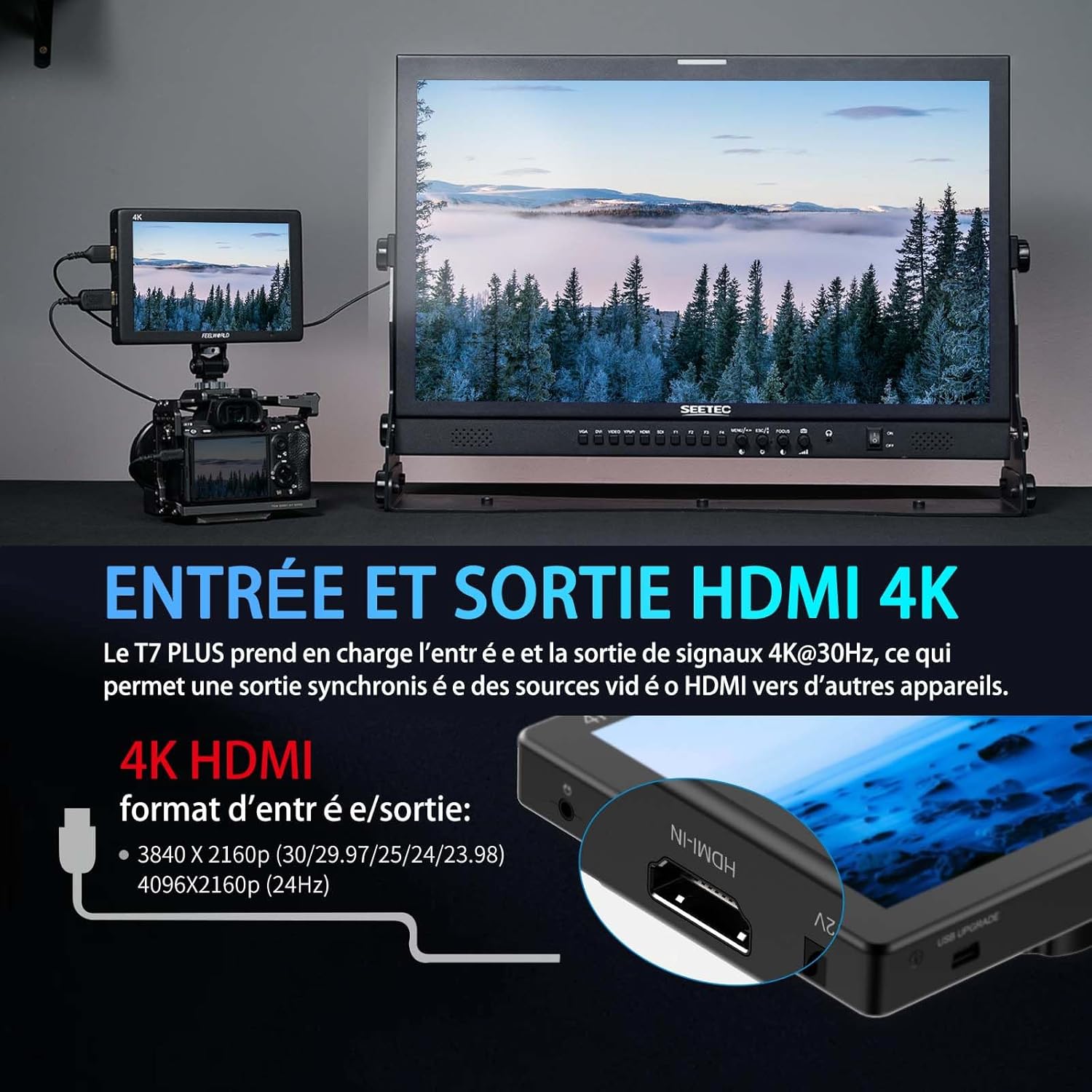
Image: The FEELWORLD T7PLUS monitor displaying a waveform monitor, showing the luminance and chrominance levels of the video input.
5.3 Other Monitoring Tools
- Asistent zaostření Peaking: Highlights sharp edges to aid in achieving precise focus.
- Falešná barva: Zobrazuje úrovně expozice pomocí barevného spektra.
- Expozice (zebry): Indicates overexposed areas with zebra patterns.
- Přiblížit: Zvětší část obrazu pro kritické zaostření.
- Devítidílná mřížka: Overlays a grid for composition assistance.
- Anamorfní režim: Uvolňuje anamorfní footage.
- Převrácení obrázku: Otočí obrázek vodorovně nebo svisle.
- Vestavěný zvuk: Zobrazuje úrovně zvuku ze vstupu HDMI.
6. Specifikace
| Funkce | Specifikace |
|---|---|
| Značka | FEELWORLD |
| Číslo modelu | T7 PLUS |
| Velikost obrazovky | 7 palce |
| Rezoluce | 1920 x 1200 (UXGA Wide) |
| Poměr stran | 16:10 |
| Kontrastní poměr | 1200:1 |
| Jas | 450 nitů |
| Obnovovací frekvence | 60 Hz |
| Viewúhel | 178 stupňů |
| Technologie připojení | HDMI |
| HDMI porty | 1x HDMI-IN, 1x HDMI-OUT (Supports 4K@30Hz) |
| Speciální funkce | Advanced Customization with 3D LUT |
| Kompatibilní zařízení | DSLR Camera, Camcorder, Handheld Stabilizer |
| Hmotnost | 1 Kilogram (approx. 320g for monitor only) |
| Vstup napájení | Deska baterie DC 12V, NP-F |
7. Řešení problémů
- Bez napájení:
- Ensure the battery is fully charged and correctly inserted, or the DC adapter is securely connected to a power source.
- Zkontrolujte, zda tlačítko napájení správně funguje.
- Bez signálu:
- Verify that the HDMI cable is securely connected to both the camera/source and the monitor's HDMI-IN port.
- Confirm the camera's HDMI output settings are correct and active.
- Zkuste jiný HDMI kabel.
- Zkreslení obrazu/nesprávné barvy:
- Check the monitor's color settings and ensure no LUTs are incorrectly applied.
- Verify the camera's video output format is compatible with the monitor.
- Tlačítka nereagují:
- Restart the monitor by turning it off and on again.
- Ujistěte se, že tlačítkům nebrání žádné nečistoty.
8. Údržba
- Čištění: Use a soft, dry cloth to clean the monitor's body. For the screen, use a specialized screen cleaning solution and a microfiber cloth. Avoid harsh chemicals or abrasive materials.
- Skladování: When not in use, store the monitor in a cool, dry place, away from direct sunlight and extreme temperatures. Use the provided bag for protection during transport.
- Péče o baterie: If using batteries, ensure they are charged periodically even when not in use to maintain battery health.
9. Záruka a podpora
The FEELWORLD T7PLUS monitor comes with a 1-letá záruka from the FEELWORLD Official Store. For technical support, service, or warranty claims, please contact FEELWORLD customer service through their official channels or the retailer where the product was purchased.
Pro více informací navštivte FEELWORLD Brand Store.
10. Produktové video
Video: A short product showcase of the FEELWORLD T7PLUS monitor, demonstrating its physical design, various ports (HDMI-IN, HDMI-OUT, DC 12V), and control buttons. This video provides a visual overview of the monitor's external features and connectivity options.