
1. Konec produktuview
The Walfront HA-4004 is a digital Islamic Azan alarm clock designed to provide accurate prayer times for major cities worldwide. It features a clear LCD display, multiple alarm functions, and temperature display.
Klíčové vlastnosti:
- Automatic Azan time calculation for over 1500 cities.
- Five daily Azan times with full Azan sound (volume adjustable) or beep option.
- Daily alarm with optional weekend settings.
- Special Fajr alarm that adjusts relative to Fajr Azan time.
- Qibla direction display relative to North.
- Hijri and Gregorian calendar display.
- Temperature display (Celsius/Fahrenheit switchable).
- Daylight Saving Time (DST) option.
- Snooze function (5 minutes).
- Full screen light for visibility in the dark.

Obrázek 1.1: Přední strana view of the Walfront HA-4004 Islamic Azan Alarm Clock.

Image 1.2: Dimensions of the Walfront HA-4004 Islamic Azan Alarm Clock (approx. 33cm H x 21cm W x 3cm D).
2. Pokyny k nastavení
2.1 Instalace baterie
The clock requires 4 x AA batteries (not included). Locate the battery compartment on the back of the clock, insert the batteries according to the polarity indicators, and close the cover.
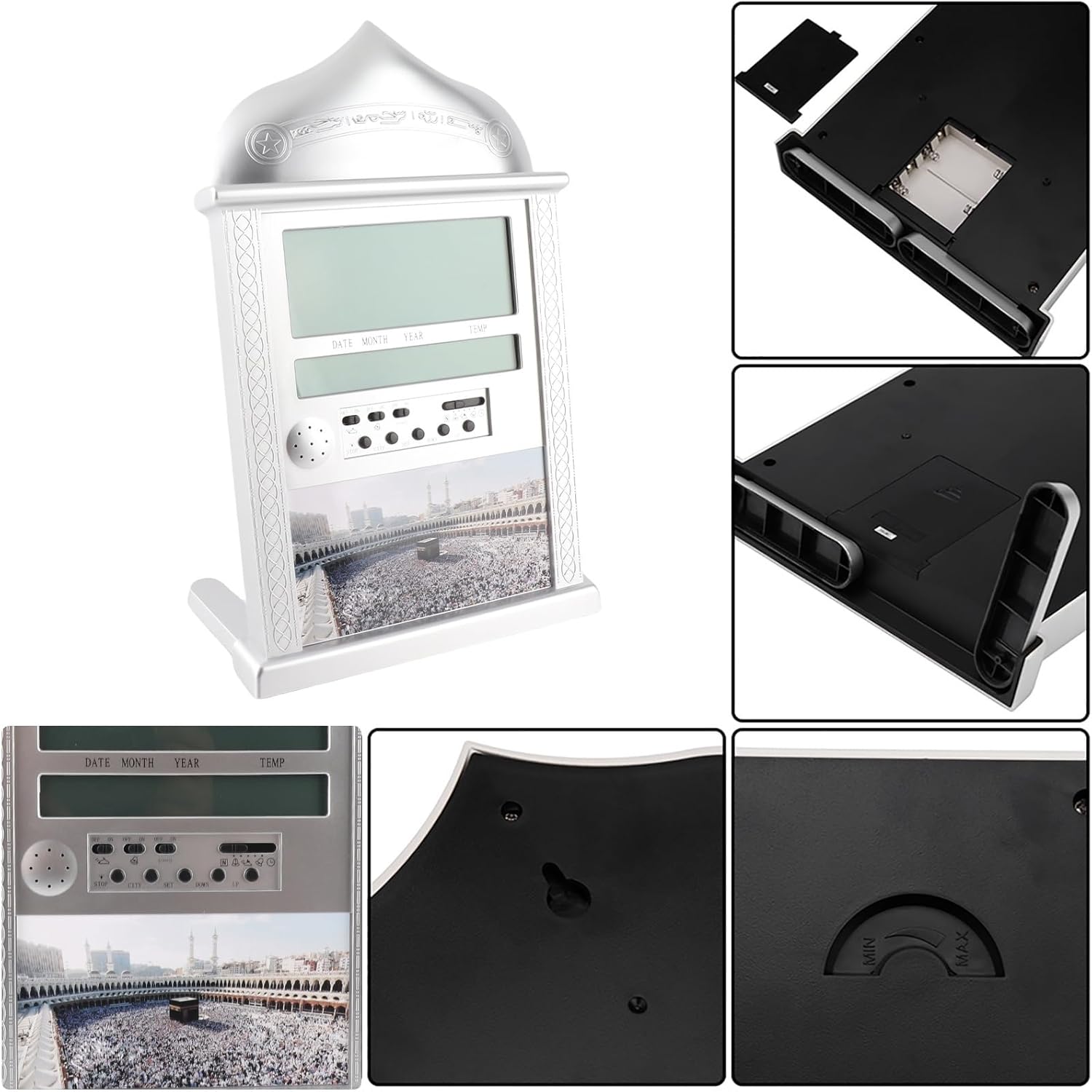
Image 2.1: Detail of the battery compartment and rear controls.
2.2 Počáteční nastavení (čas, datum, město)
Upon first power-on or after battery replacement, you will need to set the current time, date, and your city for accurate Azan times.
Nastavení aktuálního času:
- Move the switch on the back of the clock to the SOUBOR pozice.
- Použijte UP or DOLŮ tlačítka pro nastavení hodin.
- Stiskněte SOUBOR znovu pro přechod na minuty a poté použijte UP or DOLŮ upravit.
- Once time is set, move the switch back to the NORMÁLNÍ pozice.
Setting Gregorian Calendar:
- Přesuňte přepínač do polohy SOUBOR pozice dvakrát.
- Použití UP or DOLŮ upravit rok.
- Stiskněte SOUBOR to move to month, then use UP or DOLŮ.
- Stiskněte SOUBOR to move to day, then use UP or DOLŮ.
- Once date is set, move the switch back to the NORMÁLNÍ pozice.
Note: After setting the Gregorian calendar, the Hijri calendar will be automatically recalculated.
Adding a New City:
The clock has pre-programmed Azan times for 1500 cities. You need to select your city code.
- Stiskněte tlačítko MĚSTO tlačítko.
- Použijte UP or DOLŮ buttons to scroll through city codes until you find your desired city.
- Alternatively, you can select the country code first, then the city code.
- The Qibla direction and angle relative to North will be displayed once a city is selected.
2.3 Letní čas (DST)
To activate or deactivate DST:
- Stiskněte a podržte DST tlačítko na několik sekund.
- The DST icon will appear or disappear on the screen, indicating activation or deactivation.
3. Návod k obsluze
3.1 Setting Daily Alarm
The daily alarm is a regular alarm that rings at the same time every day. Weekends can be optional.
- Přesuňte přepínač do polohy SOUBOR pozice.
- Použijte UP or DOLŮ tlačítka pro nastavení hodin budíku.
- Stiskněte SOUBOR pro přechod na minuty a poté použijte UP or DOLŮ upravit.
- Otočte spínačem budíku ON. The alarm icon will be displayed.
- To stop the alarm when it rings, press the ZASTÁVKA button or turn the alarm switch VYPNUTO.
3.2 Setting Fajr Alarm
This unique feature allows you to wake up at a specific time relative to the Fajr Azan. For example, if you set the alarm for 10 minutes after Fajr Azan, it will automatically adjust daily.
- Přesuňte přepínač do polohy SOUBOR pozice.
- Použijte UP or DOLŮ buttons to adjust the desired offset (e.g., 5:00 for 5 minutes after Fajr).
- Otočte spínačem budíku ON. The alarm icon will be displayed.
Note: If the Fajr alarm is set to ring exactly at the Fajr Azan time, the Azan sound will be disabled for that prayer.
3.3 Setting Special Alarm
This clock includes an extra alarm for special occasions or appointments.
- Přesuňte přepínač do polohy SOUBOR pozice.
- Použijte UP or DOLŮ tlačítka pro nastavení hodin.
- Stiskněte SOUBOR pro přechod na minuty a poté použijte UP or DOLŮ upravit.
- Otočte spínačem budíku ON. The alarm icon will be displayed.
Note: To cancel a special alarm after it has been set, press and hold the ZASTÁVKA tlačítko na několik sekund.
3.4 Azan Sound Control
- The volume of the Azan sound can be controlled using the dial switch located on the side of the clock.
- You can set the clock to beep 3 times instead of playing the full Azan sound.
3.5 Azan Taqweem Systems
The clock calculates Fajr and Isha times based on various Taqweem systems. You can select the system most appropriate for your location.
- Stiskněte a podržte POZICE tlačítko.
- Použijte UP or DOLŮ buttons to select from available Taqweem systems (e.g., Local Taqweem, Muslim League, ISNA, Islamic Scientific University, Egypt Taqweem).
- Uvolněte POZICE tlačítko pro potvrzení.
Note: Re-selecting a city will reset the Taqweem system to the city's default.
4. Údržba
4.1 Výměna baterie
When the display dims or the clock functions become erratic, it is time to replace the batteries. Always use 4 new AA batteries. Ensure correct polarity during installation.
4.2 Čištění
K čištění hodin používejte měkký, suchý hadřík. Nepoužívejte abrazivní čisticí prostředky ani rozpouštědla, protože by mohly poškodit displej neboasing.
5. Řešení problémů
- Hodiny se nezapínají nebo je displej prázdný: Zkontrolujte instalaci baterií a ujistěte se, že jsou nové a správně vložené.
- Incorrect Azan times: Verify that the correct city code, Gregorian calendar date, Daylight Saving Time (DST) setting, and Taqweem system are selected for your location. Refer to Section 2.2 and 3.5 for detailed instructions.
- Azan sound is not playing: Check the volume dial. If a Fajr alarm is set to ring exactly at the Fajr Azan time, the Azan sound for that prayer will be disabled. Also, if any alarm is set at the exact time of an Azan, that specific Azan will be disabled.
- Qibla direction seems inaccurate: Ensure your city code is correctly set. The Qibla direction is calculated based on the selected city.
6. Specifikace
| Funkce | Detail |
|---|---|
| Model | HA-4004 |
| Značka | Walfront |
| Barva | Stříbro |
| Typ zobrazení | Digitální LCD |
| Materiál | Plast a kov |
| Rozměry produktu | Přibližně 33 x 21 x 3 cm (12.99 x 8.26 x 1.18 palce) |
| Hmotnost položky | 0.66 kilogramů (1.45 liber) |
| Zdroj napájení | Napájení z baterie |
| Jsou vyžadovány baterie | 4 x AA baterie (nejsou součástí balení) |
| Typ montáže | Nástěnný držák nebo stolní stojan |
| Speciální funkce | Azan Alarm, Daily Alarm, Fajr Alarm, Qibla Direction, Temperature Display, DST |

Obrázek 6.1: Přední a zadní strana views of the clock, showing wall mount option.
7. Záruka a podpora
7.1 Informace o záruce
This Walfront HA-4004 Islamic Azan Alarm Clock comes with a Lifetime Warranty. For any quality-related issues, please contact the seller or manufacturer for assistance.
7.2 Zákaznická podpora
If you encounter any problems or have questions not covered in this manual, please contact Walfront customer support or the retailer from whom you purchased the product for further assistance.