
Zavedení
Thank you for choosing the iGPSPORT iGS618 GPS Bike Computer. This device is designed to enhance your cycling experience by providing accurate data, navigation, and performance tracking. This manual will guide you through the setup, operation, and maintenance of your new bike computer to ensure optimal performance and longevity.
Konec produktuview
The iGS618 is a high-performance GPS bike computer featuring a 2.2-inch color LED screen, advanced GPS capabilities, and ANT+ sensor compatibility. It offers comprehensive data tracking and navigation functions for various cycling environments.
Klíčové vlastnosti:
- High-sensitivity GPS: Supports GPS, GPS + GLONASS, and GPS + Compass modes for precise and fast positioning.
- Waypoint Navigation: Navigate using historical routes or loaded road maps (GPX or TCX format).
- Kompatibilita senzorů ANT+: Connects with heart rate monitors, speed sensors, cadence sensors, and power meters.
- Více režimů jízdy: Offers Race, Indoor, and Training modes with over 80 data items for analysis.
- Přizpůsobitelné zobrazení dat: Personalize 1-6 display pages with 1-10 data columns per page.
- Dlouhá výdrž baterie: Up to 22 hours of endurance with a 1200 mAh battery.
- Vodotěsný: IPX7 rating for reliable performance in various weather conditions.
- Úložiště dat: 64 MB built-in memory, storing over 3000 hours of cycling data.
- Funkce alarmu: Set alarms for time, distance, heart rate, cadence, and power ranges.
Obsah balení:
- 1 x iGS618 Device
- 1 x Micro USB kabel
- 1 x Standardní držák na kolo
- 1 x Uživatelská příručka

Figure 1: Package contents of the iGS618, showing the device, USB cable, standard bike mount, and quick start manual.
Nastavení
1. Nabíjení zařízení
Before first use, fully charge your iGS618 using the provided Micro USB cable. Connect the cable to the device's charging port and a standard USB power adapter (not included) or a computer USB port. The battery indicator on the screen will show charging status.
2. Montáž zařízení
Attach the standard bike mount to your bicycle's handlebars or stem. Secure it firmly using the provided rubber bands or zip ties. Once the mount is in place, align the iGS618 with the mount and twist it clockwise until it locks securely.

Figure 2: The iGS618 device securely mounted on bicycle handlebars, ready for use.
3. Initial Power On and Language Settings
Press and hold the power button (usually located on the bottom or side) to turn on the device. Follow the on-screen prompts to select your preferred language and initial settings.
4. Pairing ANT+ Sensors
The iGS618 supports ANT+ sensors for heart rate, speed, cadence, and power. To pair a sensor:
- Ensure your sensor is active and within range of the iGS618.
- Navigate to the device's settings menu and select "Sensors" or "ANT+ Devices".
- Initiate a search for new sensors. The device will display a list of available sensors.
- Select your sensor from the list to pair it.
5. Connecting to the iGPSPORT App (Bluetooth)
To synchronize data and manage settings via your smartphone, connect the iGS618 to the iGPSPORT app:
- Download the "iGPSPORT" app from the Google Play Store (for Android) or Apple App Store (for iPhone).
- Povolte na svém smartphonu Bluetooth.
- Open the iGPSPORT app and follow the instructions to add your iGS618 device.
- The device uses Bluetooth 4.0 for app connection; it does not support Bluetooth heart rate or other tools directly.
Návod k obsluze
1. Basic Device Navigation
The iGS618 features several buttons for navigation:
- Vypínač: Press and hold to power on/off. Short press to access menu or confirm selections.
- Tlačítka nahoru/dolů: Navigate through menus and data pages.
- Lap/Back Button: Mark laps during a ride or go back in menus.
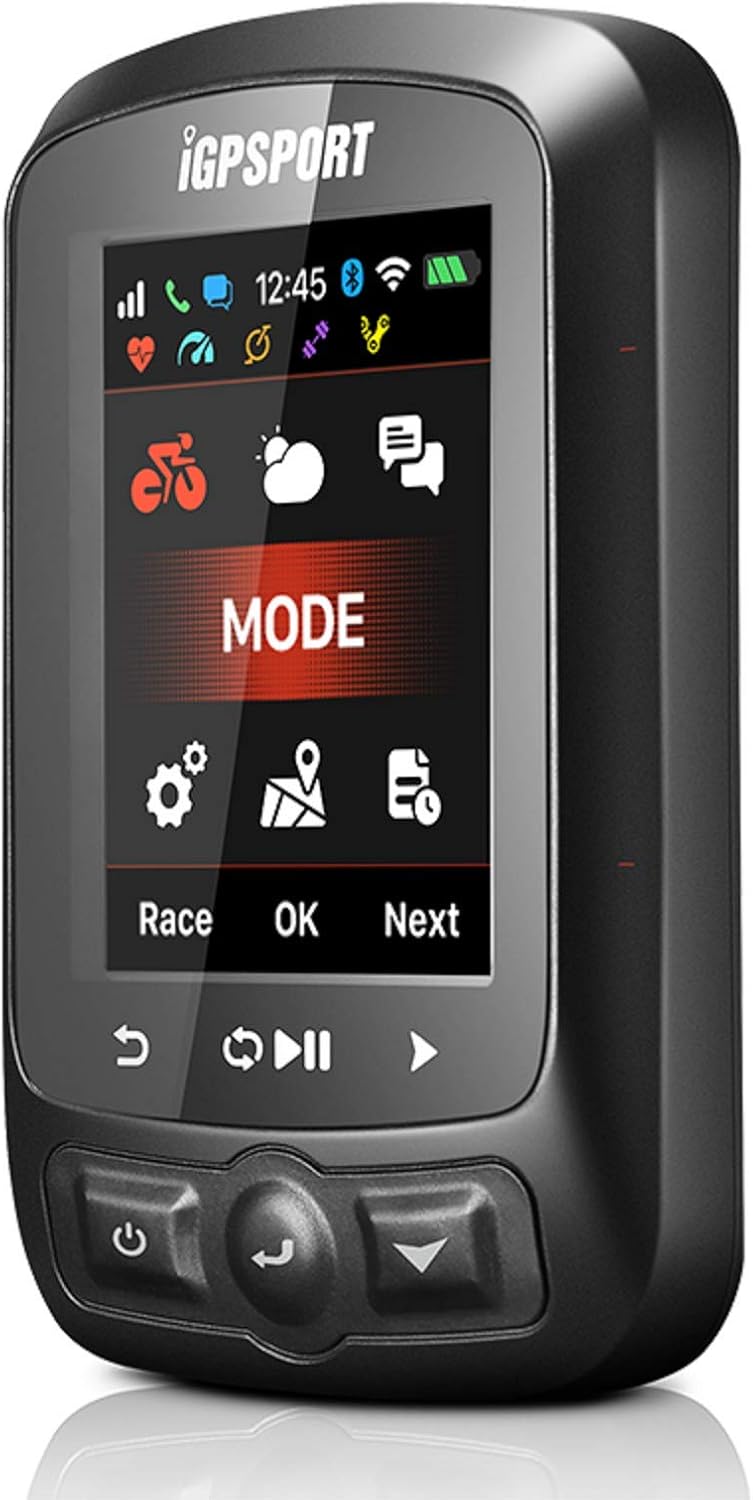
Figure 3: The iGS618 main menu, displaying options like 'MODE' for selecting riding profiles, and icons for settings and navigation.
2. Data Display Customization
You can customize up to 6 data display pages, with each page showing 1 to 10 data items. To customize:
- Přejděte do nabídky nastavení zařízení.
- Select "Data Pages" or "Display Settings".
- Choose a page to edit and select the data fields you wish to display (e.g., speed, cadence, heart rate, power, distance, elevation, time).

Figure 4: A typical data display screen on the iGS618, showing real-time metrics such as power, heart rate, cadence, speed, distance, and elevation.
3. Režimy jízdy
The iGS618 offers three distinct riding modes:
- Režim závodu: Optimized for outdoor racing and performance tracking.
- Vnitřní režim: Suitable for indoor training sessions, often used with smart trainers or stationary bikes.
- Tréninkový režim: General purpose mode for structured workouts and casual rides.
Select the appropriate mode from the main menu to ensure accurate data collection for your activity.
4. Waypoint Navigation
To use waypoint navigation:
- Load a road map in GPX or TCX format onto your device via the iGPSPORT app or direct file převod.
- From the navigation menu, select "Waypoint Navigation" or "Routes".
- Choose a route from your history or a loaded map to begin navigation. The device will provide turn-by-turn directions or a breadcrumb trail.
5. Funkce alarmu
Set alarms to notify you during your ride for various metrics:
- Časový alarm: Notifies after a set duration.
- Distance Alarm: Notifies after a set distance.
- Alarm srdečního tepu: Alerts if your heart rate goes above or below a specified range.
- Cadence Alarm: Alerts if your cadence goes above or below a specified range.
- Alarm napájení: Alerts if your power output goes above or below a specified range.
Configure these alarms in the device's settings menu under "Alarms".
6. Data Upload
After your ride, you can upload your data to popular cycling platforms:
- Via iGPSPORT App: Sync your device with the iGPSPORT app, and the app can automatically upload your activities to connected services like Strava and MapMyRide.
- Manual Upload: Connect the iGS618 to your computer via USB. The device will appear as a mass storage device. You can then manually upload activity files (typically .fit files) to webstránky jako www.strava.com a www.mapmyride.com.
Údržba
1. Čištění
Otřete zařízení měkkým, damp cloth to remove dirt and sweat. Avoid using harsh chemicals or abrasive cleaners, as these can damage the screen or casing.
2. Péče o baterie
- Chcete-li prodloužit životnost baterie, vyhněte se častému úplnému vybíjení zařízení.
- Pokud zařízení nepoužíváte, skladujte jej na chladném a suchém místě.
- Pokud skladujete po delší dobu, nabijte baterii před uskladněním přibližně na 50 %.
3. Voděodolnost (IPX7)
The iGS618 is rated IPX7, meaning it can withstand immersion in water up to 1 meter for 30 minutes. It is resistant to rain, splashes, and accidental submersion. However, it is not recommended for prolonged underwater use or high-pressure water exposure.
Odstraňování problémů
If you encounter issues with your iGS618, try the following steps:
- Zařízení se nezapíná: Ensure the device is fully charged. If it still doesn't turn on, try connecting it to a different USB power source.
- Žádný GPS signál: Ujistěte se, že se nacházíte v otevřeném venkovním prostoru s volným view of the sky. It may take a few minutes to acquire a signal, especially during the first use or after a long period of inactivity.
- Senzor se nepřipojuje: Check that the sensor's battery is not depleted and that it is active and within range. Re-attempt the pairing process from the device's settings.
- Data Not Syncing with App: Ensure Bluetooth is enabled on your phone and the iGS618. Confirm the device is paired correctly within the iGPSPORT app. Try restarting both the device and the app.
- Nepřesné údaje: Ensure all sensors are properly calibrated and securely mounted. For GPS data, ensure a strong signal.
If problems persist, refer to the official iGPSPORT support resources or contact customer service.
Specifikace
| Funkce | Specifikace |
|---|---|
| Velikost produktu | 85 x 53.5 x 18.8 mm |
| Velikost obrazovky | 2.2-inch Color LED |
| Rozlišení obrazovky | 240 x 320 pixelů |
| Čistá hmotnost | 90 g |
| Barometrický výškoměr | Ano |
| Teploměr | Ano |
| Strava Compatible | Ano |
| GPS | GPS+Glonass |
| Hodnocení voděodolnosti | IPX7 |
| Bezdrátový přenos | 2.4 GHz/ANT+ |
| Bluetooth | Bluetooth 4.0 (for app connection only) |
| Životnost baterie | Přibl. 22 hodin |
| Vestavěná paměť | 64 MB (over 3000 hours of data storage) |
| Složení baterie | Lithium-iontová |
| Typ montáže | Držák na řídítka |
Záruka a podpora
The iGS618 comes with a user manual. For specific warranty information, please refer to the documentation included with your product or visit the official iGPSPORT website. For technical support, troubleshooting assistance, or warranty claims, please contact iGPSPORT customer service through their official channels.
Více informací a podpory naleznete na iGPSPORT Brand Store on Amazon.