
Zavedení
Thank you for choosing the MeeTion K9310 Gaming Keyboard. This manual provides detailed instructions for setting up, operating, and maintaining your new keyboard. The K9310 is designed for an enhanced gaming experience with features such as multicolor backlighting, anti-ghosting, and dedicated shortcut keys.
Obsah balení
- MeeTion K9310 Gaming Keyboard
- Uživatelská příručka (tento dokument)
Nastavení
Follow these steps to connect your MeeTion K9310 Gaming Keyboard to your computer:
- Vybalte klávesnici z obalu.
- Vyhledejte v počítači volný port USB.
- Zapojte USB konektor klávesnice do USB portu.
- Your operating system (Windows XP/Vista/7/8/10) will automatically detect and install the necessary drivers. No additional software installation is typically required.
- The keyboard is ready for use once the drivers are installed.

Obrázek: Nahoře view of the MeeTion K9310 Gaming Keyboard with its USB cable, ready for connection.
Návod k obsluze
Klíčové vlastnosti
- Multicolor Key Backlit: The keyboard features vibrant multicolor backlighting for enhanced visibility and aesthetic appeal, especially in low-light conditions.
- Comfortable and Soft Keys: Designed with membrane keys offering tactile feedback, providing a comfortable typing and gaming experience.
- 19 Keys Anti-Ghosting: This feature ensures that up to 19 keys can be pressed simultaneously without any input loss, crucial for complex gaming commands.
- Win Lock Function with LED Indication: Prevents accidental presses of the Windows key during gameplay, which can interrupt your game. An LED indicator shows when this function is active.
- 12 FN Shortcut Buttons: Access various multimedia and system functions quickly using the Function (FN) key in combination with the F1-F12 keys.
Ovládání podsvícení
The K9310 keyboard features a multicolor backlight. Specific key combinations may be used to adjust brightness or switch lighting modes. Refer to the keyboard's markings for dedicated backlight control keys, often indicated by a sun or light bulb icon, or through FN key combinations.
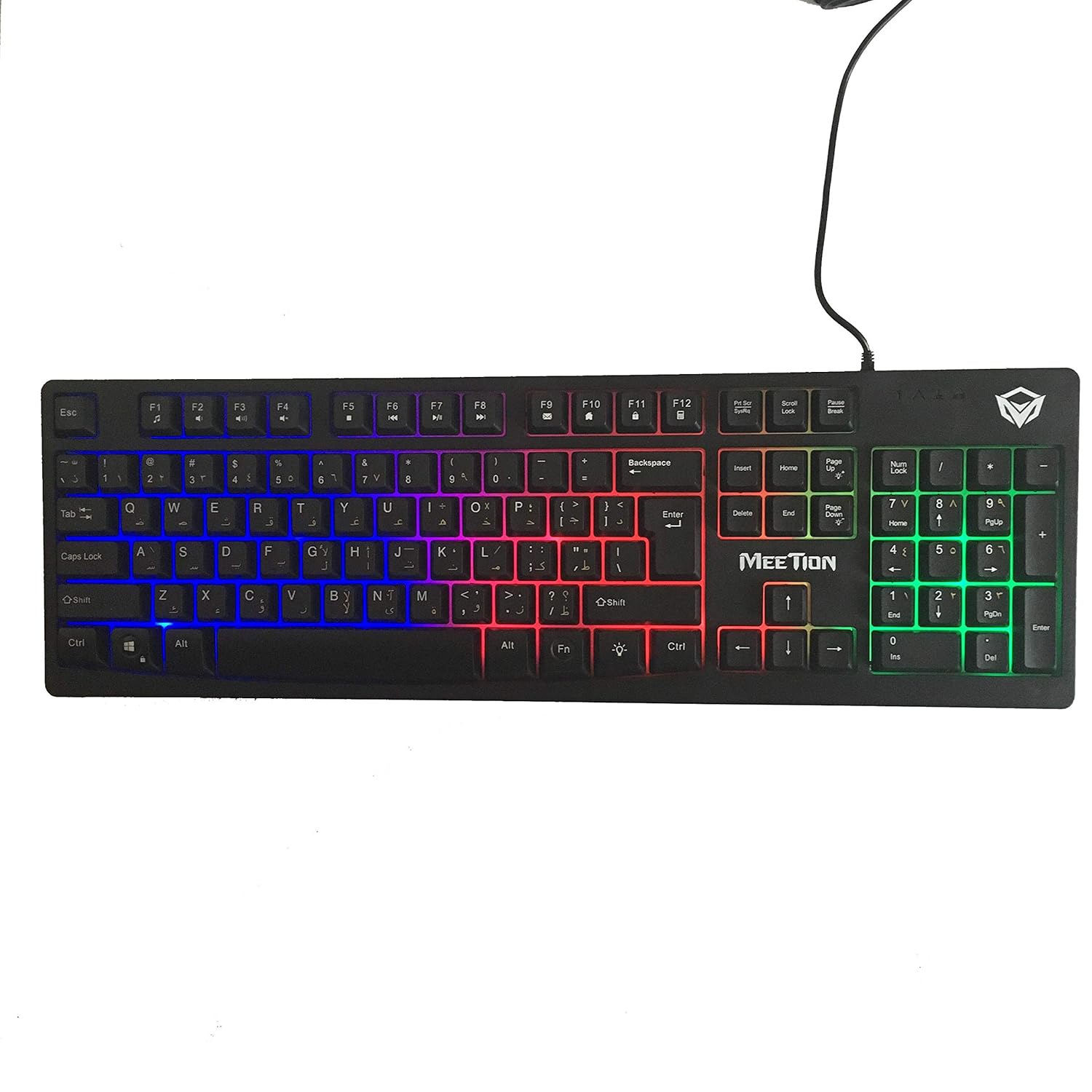
Obrázek: Nahoře view of the MeeTion K9310 Gaming Keyboard with its multicolor backlighting illuminated.
FN Shortcut Functions
The keyboard includes 12 FN (Function) shortcut buttons. To activate these functions, press and hold the FN key, then press the desired F-key (F1-F12).
| Kombinace kláves | Funkce |
|---|---|
| FN + F1 | Přehrávač médií |
| FN + F2 | Snížit hlasitost |
| FN + F3 | Zvýšení hlasitosti |
| FN + F4 | Ztlumit |
| FN + F5 | Zastávka |
| FN + F6 | Předchozí stopa |
| FN + F7 | Přehrát/Pozastavit |
| FN + F8 | Další stopa |
| FN + F9 | |
| FN + F10 | Web Prohlížeč |
| FN + F11 | Můj počítač |
| FN + F12 | Kalkulačka |
Funkce Win Lock
To activate or deactivate the Windows key lock function, press FN + klávesa Win. When active, the Windows key will be disabled, preventing accidental presses during gaming. An LED indicator on the keyboard will typically illuminate to show the Win Lock status.
Údržba
Správná údržba zajistí dlouhou životnost a optimální výkon vaší klávesnice.
- Čištění: K otření povrchu klávesnice použijte měkký, suchý hadřík. Pro důkladnější čištění použijte lehceamp Lze použít hadřík s jemným mýdlem a ujistit se, že se do spínačů ani do vnitřních součástí nedostane žádná tekutina.
- Odstranění prachu: K odstranění prachu a nečistot z prostoru mezi klávesami použijte stlačený vzduch.
- Vyhněte se tekutinám: Do not spill liquids on the keyboard. If a spill occurs, immediately disconnect the keyboard from the computer and allow it to dry completely before reconnecting.
- Skladování: Pokud klávesnici delší dobu nepoužíváte, skladujte ji na chladném a suchém místě mimo dosah přímého slunečního záření a extrémních teplot.

Obrázek: Spodní část view of the MeeTion K9310 Gaming Keyboard, showing the product label and rubber feet.
Odstraňování problémů
If you encounter issues with your MeeTion K9310 Gaming Keyboard, refer to the following troubleshooting steps:
- Klávesnice nereaguje:
- Ujistěte se, že je kabel USB bezpečně zapojený do funkčního portu USB v počítači.
- Zkuste zapojit klávesnici do jiného USB portu.
- Restartujte počítač.
- Otestujte klávesnici na jiném počítači, abyste zjistili, zda je problém s klávesnicí nebo s počítačem.
- Keys Not Working (e.g., 'W' key):
- Check for any debris or foreign objects lodged under the affected key. Use compressed air to clear it.
- If only specific keys are not responding, and the keyboard is otherwise functional, it might indicate a hardware issue.
- Backlight Not Working or Flickering:
- Ujistěte se, že je klávesnice správně připojena.
- Check if the backlight brightness is set to minimum or turned off via FN key combinations.
- If the issue persists, it may indicate a hardware malfunction.
- Win Lock Function Not Working:
- Ensure you are using the correct key combination (FN + Win Key) to toggle the function.
- Check the LED indicator for Win Lock status.
Specifikace
| Funkce | Detail |
|---|---|
| Značka | SETKÁNÍ |
| Model | K9310 |
| Typ klávesnice | Herní klávesnice |
| Klíčový kontakt | Membrane with tactile feedback |
| Rozložení | Cyrillic alphabet layout (Windows Keys) |
| Anti-Ghosting | 19 klíčů |
| Podsvícení | Vícebarevné podsvícení kláves |
| Funkce Win Lock | Ano, s LED indikací |
| FN Shortcut Buttons | 12 |
| Error-Free Running Time | More than 10 million strokes |
| Kompatibilita OS | Windows XP/Vista/7/8/10 |
| Rozměry | 17.5 × 5.5 x 1.5 inches (approximate) |
| Hmotnost | 1.2 libry (přibližně) |
| Kompatibilní zařízení | Laptop (and Desktop PCs) |
Záruka a podpora
For warranty information or technical support, please refer to the documentation provided at the time of purchase or visit the official MEETION webUschovejte si doklad o koupi pro případné reklamace.