
1. Úvod
Děkuji za nákupasing the Sharp HT-SB140MT 2.0 150W Soundbar. This soundbar is designed to enhance your audio experience, providing clear and powerful sound for your television, music, and other media. With its sleek design and versatile connectivity options, including Bluetooth, HDMI ARC/CEC, Optical, and Auxiliary inputs, it integrates seamlessly into any home entertainment setup. This manual provides essential information for safe and effective use, including setup, operation, maintenance, and troubleshooting.
2. Bezpečnostní informace
- Zdroj napájení: Zajistěte napájení objtage matches the requirements specified on the soundbar. Use only the provided power cable.
- Větrání: Do not block any ventilation openings. Maintain adequate space around the soundbar for proper airflow.
- Voda a vlhkost: Do not expose the soundbar to dripping or splashing water. Do not place objects filled with liquids, such as vases, on the apparatus.
- Teplo: Do not place the soundbar near heat sources such as radiators, heat registers, stoves, or other apparatus (including amplifikátory), které produkují teplo.
- Čištění: Unplug the soundbar from the power outlet before cleaning. Use a dry, soft cloth for cleaning. Do not use liquid cleaners or aerosol cleaners.
- Servis: Nepokoušejte se tento výrobek opravit sami. Veškerý servis svěřte kvalifikovanému servisnímu personálu.
- Baterie: The remote control uses a CR2 battery. Ensure correct polarity when inserting batteries. Do not mix old and new batteries.
3. Obsah balení
Zkontrolujte prosím, zda jsou v balení přítomny všechny položky:
- Sharp HT-SB140MT Soundbar
- Dálkové ovládání
- Napájecí kabel
- Uživatelská příručka (tento dokument)
4. Konec produktuview

Obrázek 4.1: Přední strana View
The front of the soundbar features the Sharp logo and LED indicators for source selection and status. Control buttons for power, input, and volume are located on the top panel.
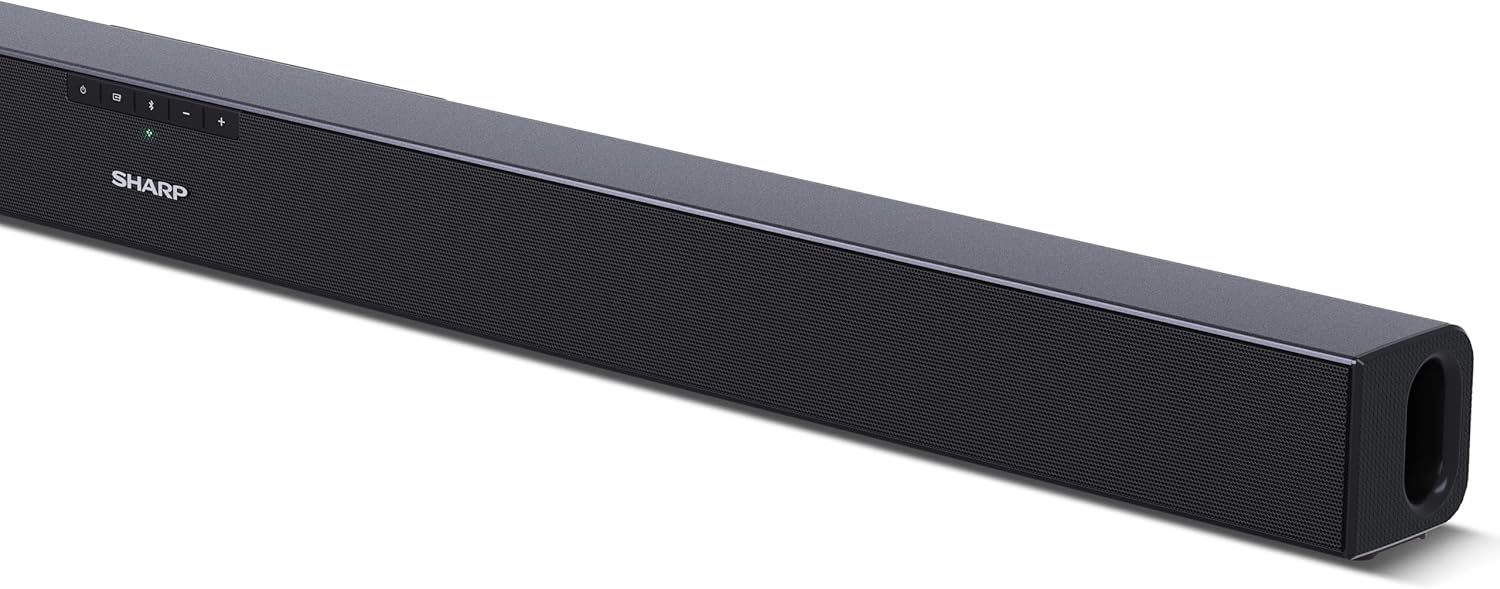
Obrázek 4.2: Zadní View (Připojení)
The rear panel provides all necessary connection ports: HDMI ARC, Optical (S/PDIF), and Auxiliary (3.5mm) input, along with the power input.

Obrázek 4.3: Dálkové ovládání
The included remote control allows for convenient operation of the soundbar, including power, input selection, volume, bass, and treble adjustments.
5. Nastavení
5.1 Umístění
The Sharp HT-SB140MT Soundbar can be placed on a flat surface, such as a TV stand, or wall-mounted. Its slim profile of 6 cm allows it to fit easily under most TV screens without obstructing the view.

Figure 5.1: Soundbar Placement
The soundbar is ideally positioned directly in front of your television for optimal sound projection.
5.2 Připojení k televizoru
Vyberte jeden z následujících způsobů připojení:
- HDMI ARC/CEC (doporučeno): Connect an HDMI cable (not included) from the HDMI ARC port on your TV to the HDMI ARC port on the soundbar. This allows your TV remote to control the soundbar's volume and power. Ensure HDMI ARC/CEC is enabled in your TV's settings.
- Digital Optical Audio (S/PDIF): Connect an optical cable (not included) from the Optical Out port on your TV to the OPTICAL IN port on the soundbar. Select the Optical input on the soundbar.
- Pomocný (AUX): Connect a 3.5mm audio cable (not included) from the headphone jack or AUX Out port on your TV to the AUX IN port on the soundbar. Select the AUX input on the soundbar.
5.3 Připojení napájení
After connecting the audio cable, plug the power cable into the soundbar's power input and then into a wall outlet (220-240V / 50Hz).
6. Návod k obsluze
6.1 Zapnutí/vypnutí
Stisknutím tlačítka napájení na soundbaru nebo na dálkovém ovladači zapnete nebo vypnete zařízení.
6.2 Výběr zdroje
Press the Input button on the soundbar or the remote control repeatedly to cycle through the available input sources: HDMI ARC, Optical, AUX, and Bluetooth. The LED indicator on the soundbar will change to reflect the selected source.
6.3 Nastavení hlasitosti
Use the Volume Up (+) and Volume Down (-) buttons on the soundbar or the remote control to adjust the sound level.
6.4 Párování Bluetooth
Chcete-li připojit zařízení Bluetooth:
- Select Bluetooth input on the soundbar. The Bluetooth LED indicator will flash, indicating pairing mode.
- Na svém chytrém zařízení (chytrém telefonu, tabletu atd.) povolte Bluetooth a vyhledejte dostupná zařízení.
- Select "SHARP HT-SB140MT" from the list of devices.
- Once connected, the Bluetooth LED indicator will stop flashing and remain solid. You can now stream audio wirelessly to the soundbar.
6.5 Zvukové režimy (ekvalizér)
The soundbar features an equalizer with different sound modes to optimize audio for various content types. Use the EQ button on the remote control to cycle through these modes (e.g., Movie, Music, News). You can also adjust Bass and Treble levels using dedicated buttons on the remote.
7. Údržba
7.1 Čištění
To clean the soundbar, unplug it from the power outlet. Use a soft, dry, lint-free cloth to wipe down the surfaces. Do not use abrasive cleaners, waxes, or solvents as they may damage the finish.
7.2 Skladování
If you plan to store the soundbar for an extended period, disconnect it from the power supply and store it in a cool, dry place, away from direct sunlight and extreme temperatures.
8. Řešení problémů
Pokud se se soundbarem setkáte s problémy, podívejte se na následující běžné problémy a jejich řešení:
| Problém | Možná příčina | Řešení |
|---|---|---|
| Žádný zvuk ze soundbaru. | Soundbar je vypnutý nebo ztlumený. Vybrán nesprávný vstupní zdroj. Kabely nejsou správně připojeny. Nastavení zvukového výstupu televizoru je nesprávné. | Ujistěte se, že je soundbar zapnutý a není ztlumený. Select the correct input source (HDMI ARC, Optical, AUX). Zkontrolujte všechna kabelová připojení (HDMI, optický, AUX). Verify your TV's audio output settings are set to external speakers or the correct digital output. |
| Zařízení Bluetooth se nemůže připojit. | Soundbar není v režimu párování. Zařízení je mimo dosah. Rušení od jiných zařízení. | Ensure the soundbar is in Bluetooth input mode and the LED is flashing. Move your Bluetooth device closer to the soundbar (within 10 meters). Turn off other Bluetooth devices nearby. Try unpairing and re-pairing. |
| Dálkové ovládání nefunguje. | Battery is low or inserted incorrectly. Překážka mezi dálkovým ovladačem a soundbarem. Dálkové ovládání je vadné. | Replace the CR2 battery and ensure correct polarity. Remove any obstructions between the remote and the soundbar's sensor. Pokud problémy přetrvávají, kontaktujte zákaznickou podporu. |
9. Specifikace
| Název modelu | HT-SB140(MT) |
| Typ reproduktoru | Soundbar |
| Konfigurace kanálů prostorového zvuku | 2.0 |
| Maximální výstupní výkon reproduktoru | 150 wattů |
| Frekvenční odezva | 60 Hz |
| Technologie připojení | Bluetooth, HDMI ARC/CEC, Digital Optical Audio (S/PDIF), 3.5mm Auxiliary (AUX) |
| Technologie bezdrátové komunikace | Bluetooth |
| Maximální dosah (Bluetooth) | 10 metrů |
| Kontrolní metoda | Dálkové ovládání |
| Zdroj napájení | AC (síť) |
| Vstupní objemtage | 220-240 voltů |
| Barva | Černý |
| Materiál | Plast, kov |
| Typ montáže | Držák na stěnu, Stolní |
| Rozměry produktu (D x Š x V) | 95 x 6 x 6 cm |
| Hmotnost položky | 1.5 kg |
| Zahrnuté komponenty | Dálkové ovládání |
| Je vyžadována baterie | 1 baterie CR2 |
| Vodotěsný | Žádný |
| Dostupnost náhradních dílů | 5 roky |
| Aktualizace softwaru zaručeny do | Informace nejsou k dispozici |
10. Záruka a podpora
The Sharp HT-SB140MT Soundbar comes with a Limited Warranty. Please refer to the warranty card included in your package for specific terms and conditions. Spare parts are available for up to 5 years from the date of purchase.
For technical support, service, or warranty claims, please contact Sharp customer service through their official website or the contact information provided in your product documentation. When contacting support, please have your product model number (HT-SB140(MT)) and purchase details ready.