
1. Konec produktuview
The Sharp EL-531TG-GY is a scientific calculator designed for students and professionals requiring advanced mathematical functions. It features a 2-line display and Multi-Line Playback, facilitating the input and review of complex equations. This model is suitable for general math, algebra, geometry, trigonometry, statistics, biology, chemistry, and general science applications.
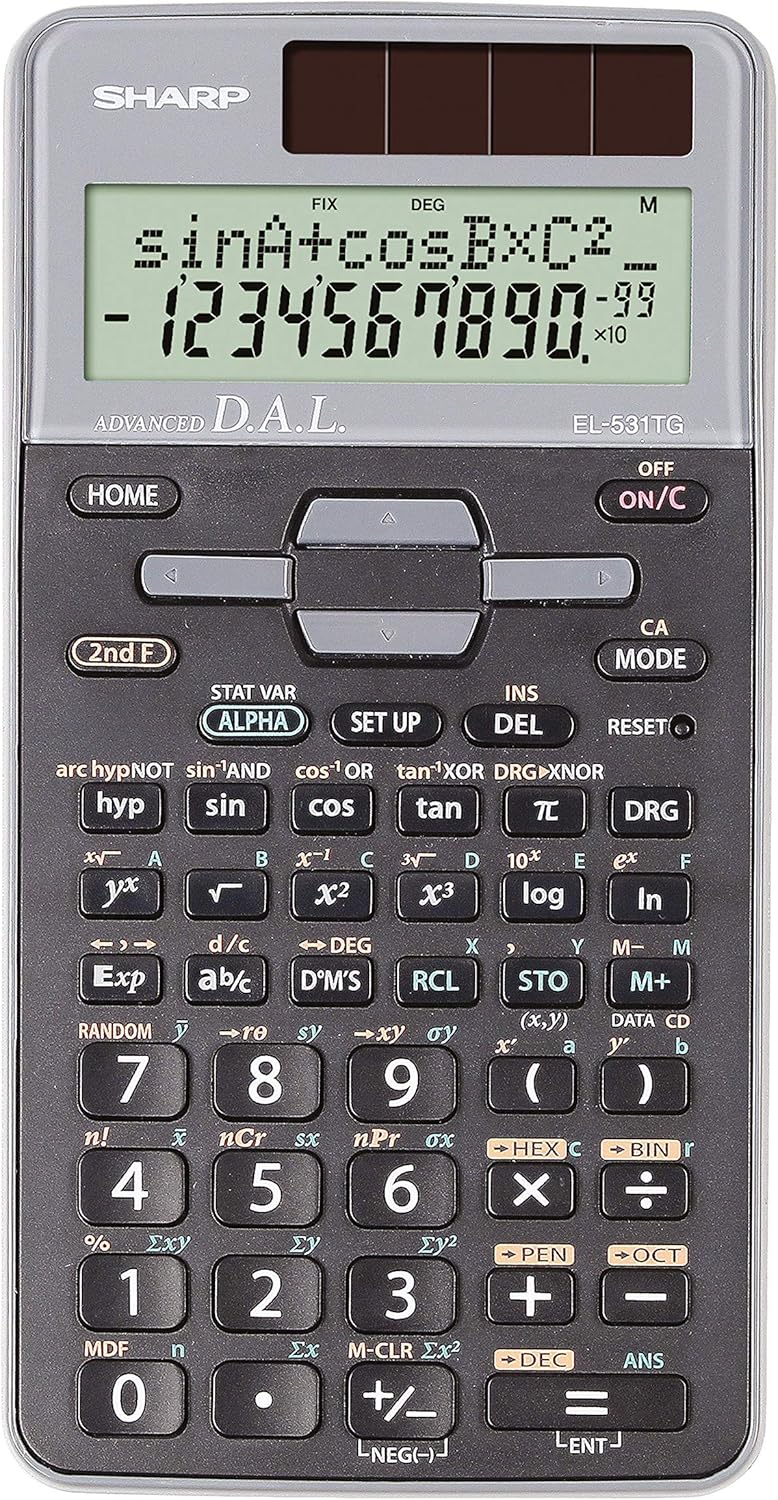
Obrázek 1: Přední strana view of the Sharp EL-531TG-GY Scientific Calculator, showing the display, keypad, and solar panel.
2. Nastavení a první použití
2.1 Zdroj napájení
The EL-531TG-GY calculator operates using both solar power and a single LR44 button cell battery. The solar panel provides power in well-lit environments, while the battery ensures operation in low-light conditions or when solar power is insufficient. An LR44 battery is included with the calculator.
2.2 Zapnutí/vypnutí
- Zapnutí kalkulačky ON, stiskněte tlačítko ON/C klíč.
- Zapnutí kalkulačky VYPNUTO, stiskněte tlačítko 2. F klíč následovaný klávesou VYPNUTO key (which is typically the same as ON/C).
2.3 Initial Display Settings
Upon first use or after a reset, the calculator will typically default to certain settings (e.g., DEG for angle units). Refer to Section 3.3 for details on changing mode settings.
3. Návod k obsluze
3.1 Základní aritmetické operace
Zadejte čísla pomocí numerické klávesnice. Použijte +, -, ×a ÷ klávesy pro sčítání, odčítání, násobení a dělení. Stiskněte = to obtain the result.
3.2 Vědecké funkce
The calculator performs over 273 advanced scientific functions. Many functions are accessed by pressing the 2. F key before the desired function key.
- Goniometrické funkce: Použití hřích, cos, opálení. Inverse functions (hřích⁻¹, cos⁻¹, opálení⁻¹) are accessed via 2. F.
- Logaritmické funkce: Použití log (základ 10) a ln (přirozený logaritmus).
- Síly a kořeny: Použití x², √, x³, ³√.
- zlomky: Použijte d/c klávesa pro zadávání a převod zlomků.
3.3 Mode Settings (DEG/RAD/GRAD)
To change the angle unit mode (Degrees, Radians, Gradians):
- Stiskněte tlačítko DRG klíč.
- Opakovaně stiskněte DRG to cycle through DEG (Degrees), RAD (Radians), and GRAD (Gradians). The current mode is indicated on the display.
3.4 Funkce paměti
The calculator includes memory functions for storing and recalling values.
- STO (Obchod): Stiskněte STO followed by a variable key (e.g., A, B) to store the displayed value.
- RCL (Odvolání): Stiskněte RCL followed by the variable key to recall the stored value.
- M+ (Memory Plus): Přičte zobrazenou hodnotu do nezávislé paměti.
- M- (minus paměti): Odečte zobrazenou hodnotu od nezávislé paměti.
3.5 Multi-Line Playback
The 2-line display allows for Multi-Line Playback, enabling users to review previous calculations and expressions. Use the directional arrow keys (up/down) to scroll through past entries and results. This feature is useful for checking work or re-using parts of previous calculations.
4. Údržba
4.1 Čištění
To clean the calculator, wipe the surface gently with a soft, dry cloth. Do not use abrasive cleaners, solvents, or excessive moisture, as these can damage the display or internal components.
4.2 Výměna baterie
The calculator uses one LR44 button cell battery. If the display becomes dim or erratic in low-light conditions, the battery may need replacement. To replace the battery:
- Ujistěte se, že je kalkulačka vypnutá.
- Vyhledejte přihrádku na baterie na zadní straně kalkulačky.
- Opatrně otevřete kryt přihrádky.
- Remove the old LR44 battery and insert a new one, ensuring correct polarity (+/-).
- Bezpečně zavřete kryt bateriového prostoru.
4.3 Skladování
When not in use, store the calculator in a cool, dry place away from direct sunlight and extreme temperatures. The hard cover included with the calculator provides protection from scratches and minor impacts.
5. Řešení problémů
5.1 Problémy se zobrazením
- Prázdný nebo tmavý displej: Ensure sufficient light for the solar panel. If the issue persists, replace the LR44 battery.
- Erratic Display: This may indicate a low battery. Replace the LR44 battery.
5.2 Incorrect Results
- Check Mode Settings: Verify that the angle unit (DEG, RAD, GRAD) is set correctly for trigonometric calculations.
- Chyba vstupu: Review your input using the Multi-Line Playback feature to ensure the expression was entered correctly.
- Memory Contents: If using memory functions, ensure the stored values are correct.
5.3 Kalkulačka nereaguje
If the calculator becomes unresponsive, try performing a reset. Locate the RESETOVAT button (often a small recessed button requiring a thin object like a paperclip to press). Pressing this button will clear all memory and return the calculator to its factory default settings.
6. Specifikace

Obrázek 2: Přední strana view of the Sharp EL-531TG-GY Scientific Calculator, illustrating its dimensions.
| Funkce | Popis |
|---|---|
| Číslo modelu | SH-EL531TGGY |
| Typ zobrazení | 2-line LCD with Multi-Line Playback |
| Funkce | Více než 273 pokročilých vědeckých funkcí |
| Zdroj napájení | Solar and 1 x LR44 battery (included) |
| Materiál | Plast |
| Rozměry (D x Š x V) | 16.1 x 8 x 1.5 cm (přibližně) |
| Hmotnost | 100 g (cca) |

Obrázek 3: Strana view of the Sharp EL-531TG-GY Scientific Calculator, showing its slim profile.
7. Záruka a podpora
7.1 Informace o záruce
This product is covered by a manufacturer's warranty. Please refer to the warranty card included with your purchase or visit the official Sharp webPodrobné záruční podmínky platné pro váš region naleznete na webových stránkách.
7.2 Zákaznická podpora
For technical assistance, troubleshooting not covered in this manual, or service inquiries, please contact Sharp customer support. Contact information can typically be found on the Sharp official webmístě nebo na obalu produktu.