
1. Úvod
The Vonyx VMM-F701 is a versatile 7-channel mixer designed for various audio applications, including live performances and studio recording. It features multiple input options, an integrated effect processor, USB playback, and +48V phantom power for condenser microphones. This manual provides essential information for the safe and effective use of your VMM-F701 mixer.
2. Bezpečnostní pokyny
- Always read these instructions carefully before using the device. Keep this manual for future reference.
- Ujistěte se, že napájecí zdroj odpovídá objtage uvedeno na zařízení.
- Nevystavujte zařízení dešti nebo vlhkosti.
- Během bouřek nebo pokud přístroj delší dobu nepoužíváte, odpojte napájecí kabel.
- To reduce the risk of electric shock, do not remove the cover. There are no user-serviceable parts inside. Refer all servicing to qualified service personnel.
3. Konec produktuview
The Vonyx VMM-F701 mixer offers a comprehensive set of features for audio mixing. It includes 5 mono microphone/line inputs (XLR/6.3mm Jack combo), 1 stereo line input (6.3mm Jack), and an integrated USB player. Each channel provides Hi, Mid, and Low equalization controls, along with FX, Pan, and AUX adjustments. The mixer also features a built-in effect processor with delay and repeat functions, +48V phantom power for condenser microphones, a balanced stereo main output, and a headphone output.
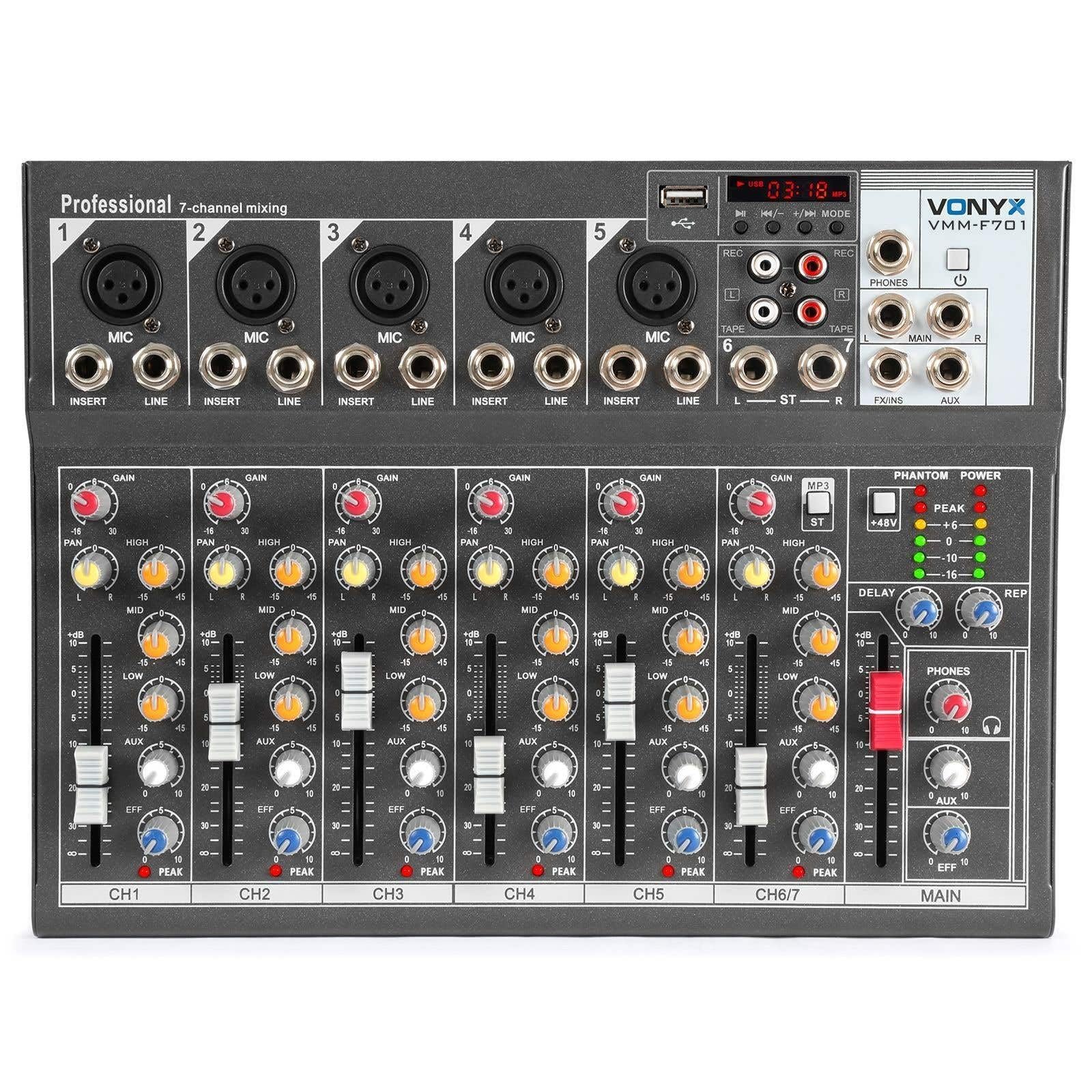
Celkově view of the Vonyx VMM-F701 7-channel mixer, showcasinjeho kompaktní design a uspořádání ovládacích prvků.

Shora dolů view of the Vonyx VMM-F701 mixer, highlighting the input channels, faders, and equalization knobs.

Close-up of the USB input and media player controls on the Vonyx VMM-F701 mixer, with a USB drive inserted.

Rear panel of the Vonyx VMM-F701 mixer, showing the power input and USB port for external power.
4. Nastavení
- Připojení napájení: Connect the mixer to a 230Vac/50Hz power source using the provided power cable. The mixer can also be powered via USB (5V/1A) for certain functions.
- Vstupní připojení:
- For microphones, use XLR or 6.3mm jack cables to connect to channels 1-5. Activate +48V phantom power for condenser microphones.
- For line-level instruments or devices, use 6.3mm jack cables to connect to channels 1-5 (line inputs) or the stereo line input (channels 6/7).
- Výstupní připojení: Připojte hlavní reproduktory nebo amplifier to the balanced stereo main output (6.3mm Jack).
- Sluchátka: Connect headphones to the dedicated headphone output for monitoring.

Detailní view of the mains power input and a wiring diagram for microphone/line inputs on the Vonyx VMM-F701 mixer.
5. Návod k obsluze
- Gain Control: Adjust the input sensitivity for each channel using the GAIN knob.
- Ekvalizace (EQ): Use the HI, MID, and LOW knobs to adjust the treble, midrange, and bass frequencies for each channel.
- Ovládání posunu: Adjust the stereo positioning of each channel using the PAN knob.
- Odeslat FX: Use the FX knob to send a portion of the channel's signal to the internal effect processor.
- AUX odeslání: Use the AUX knob to send a portion of the channel's signal to an external effect unit or monitor mix (via FX Send/Return).
- Fadery kanálu: Adjust the volume level for each individual channel.
- Hlavní fader: Ovládejte celkovou výstupní hlasitost mixážního pultu.
- Effect Processor: Adjust the DELAY and REP (Repeat) knobs to control the characteristics of the built-in delay effect.
- USB přehrávač: Vložte USB disk do USB portu pro přehrávání zvuku files. Use the media player controls (play/pause, skip, mode) to navigate and control playback.
- Fantomová síla: Press the +48V PHANTOM POWER button to supply power to condenser microphones. Ensure microphones are connected before activating.
6. Údržba
- Čištění: K čištění povrchu mixéru používejte měkký, suchý hadřík. Nepoužívejte tekuté čisticí prostředky ani rozpouštědla.
- Skladování: Mixér skladujte na chladném a suchém místě mimo dosah přímého slunečního záření a extrémních teplot.
- Větrání: Zajistěte správné větrání kolem mixéru, abyste zabránili přehřátí.
7. Řešení problémů
| Problém | Možná příčina | Řešení |
|---|---|---|
| Žádný zvukový výstup | Power off; cables disconnected; faders down; incorrect input selection. | Check power connection; ensure all cables are securely connected; raise channel and main faders; verify correct input source. |
| Zkreslený zvuk | Příliš vysoké vstupní zesílení; příliš vysoká výstupní úroveň; vadný kabel. | Reduce GAIN knob; lower main fader; try a different cable. |
| Mikrofon nefunguje | Phantom power off (for condenser mics); mic not connected; faulty mic. | Activate +48V PHANTOM POWER; check mic connection; test with another microphone. |
| USB player not working | USB drive not recognized; unsupported file formát. | Ensure USB drive is properly inserted; try a different USB drive; check file formáty (např. MP3). |
8. Specifikace
| Funkce | Specifikace |
|---|---|
| Číslo modelu | VMM-F701 |
| Počet kanálů | 7 |
| Frekvenční rozsah | 20 Hz - 20 kHz |
| THD (Total Harmonic Distortion) | <0.01 % |
| Odstup signálu od šumu | > 110 dB |
| Výstupní úroveň | ±1V |
| Citlivost linkového vstupu | ±150 mV |
| Citlivost vstupu mikrofonu | ±1.5 mV |
| Připojení Voltage | 230Vac / 50Hz (USB 5V/1A) |
| Rozměry (D x Š x V) | 230 x 312 x 45 mm (9.06 x 12.28 x 1.77 palce) |
| Hmotnost | 2.25 kg (4.96 lb) |
| Technologie připojení | USB |
| Zvukový vstup | XLR, 1/4 inch (6.3 mm) jack |
| Typ výstupního konektoru | TRS 1/4" (balanced) |
9. Záruka a podpora
Záruka: This product comes with a 2-year warranty on spare parts. For warranty claims, please retain your proof of purchase.
Podpora: For technical assistance, troubleshooting, or service inquiries, please contact your local Vonyx dealer or visit the official Vonyx webmísto pro zdroje podpory.