
Zavedení
This manual provides detailed instructions for the assembly, operation, and maintenance of your FLEXISPOT E2B-B Height Adjustable Desk Frame. This electric sit-stand desk frame is designed to offer a flexible and ergonomic workspace, allowing seamless transitions between sitting and standing positions. Please read this manual thoroughly before assembly and use to ensure proper function and safety.

Image: The FLEXISPOT E2B-B Height Adjustable Desk Frame in black, shown with a black desktop and two monitors, illustrating a typical setup.
Bezpečnostní informace
Pro zajištění bezpečného provozu a prevenci poškození dodržujte prosím následující bezpečnostní pokyny:
- Ensure all cables are properly connected and not pinched during movement.
- Keep hands and fingers clear of moving parts, especially during height adjustments.
- Nepřetěžujte stůl. Maximální nosnost je 100 kg.
- Neseďte ani nestojte na rámu stolu.
- Only use the desk frame indoors in a dry environment.
- Před čištěním nebo prováděním jakékoli údržby odpojte napájecí kabel.
- Children should not operate the desk without adult supervision.
Obsah balení
Před zahájením montáže se prosím ujistěte, že jsou přítomny všechny komponenty:
- 1 x Height Adjustable Desk Frame (Black)
- 1 x Desktop (Black, 55"x 27.5")
- Veškerý potřebný hardware pro montáž
- 1 x Digital Display Handset
Nastavení a montáž
Assembly of the FLEXISPOT E2B-B desk frame is required. Please follow the instructions provided in the separate assembly guide included with your package. Ensure you have adequate space and the necessary tools before starting.
Key assembly considerations:
- The frame width is adjustable from 42" to 63" to accommodate various desktop sizes.
- The desk frame supports desktops ranging from 47.25" to 70.9" in width and 23.6" to 31.5" in depth.
- Ensure all screws are tightened securely after assembly.

Image: An illustration showing various components of the desk frame, including the legs, crossbar, and feet, indicating the assembly process.
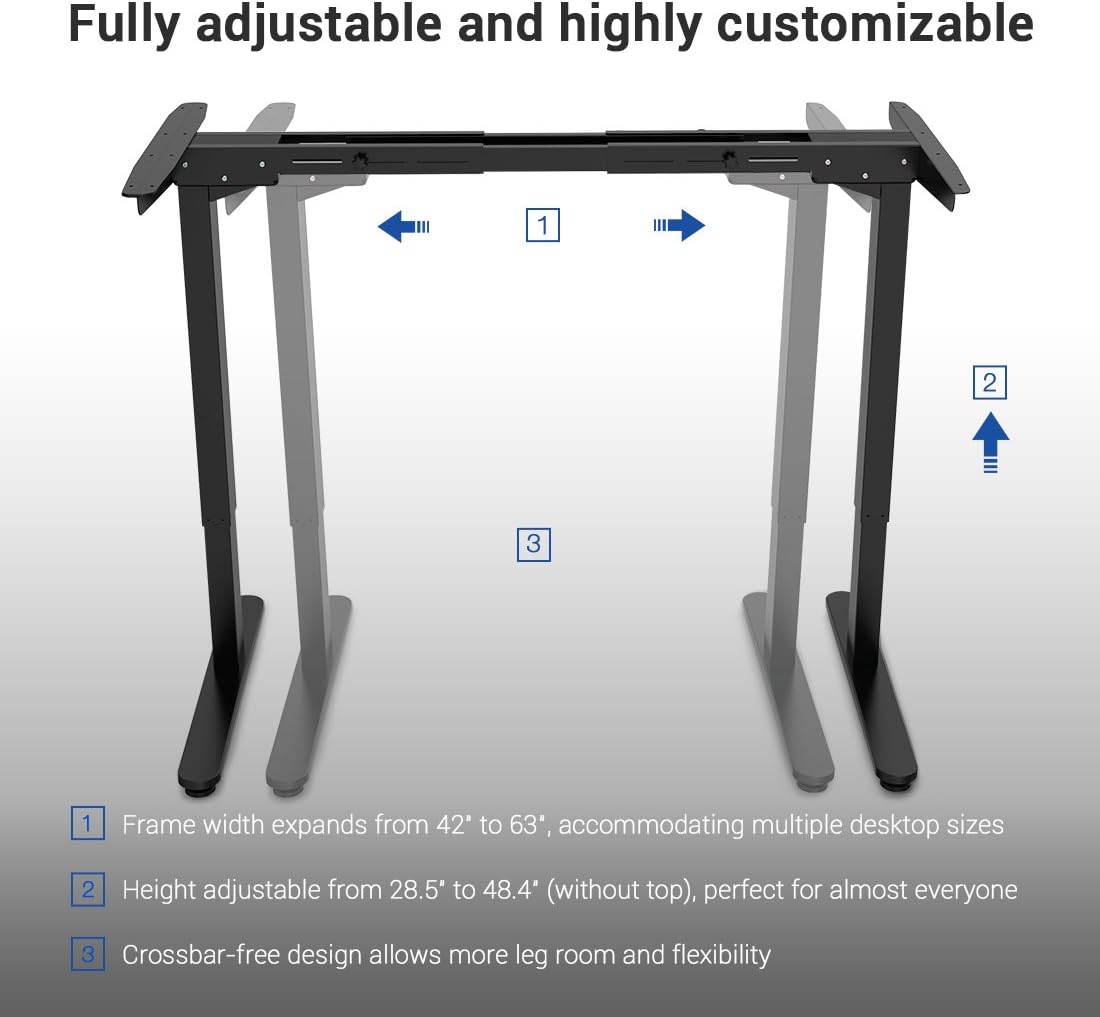
Image: A diagram illustrating the adjustable frame width (42" to 63") and height (28.5" to 48.4") of the FLEXISPOT desk frame, highlighting its customizable nature.
Návod k obsluze
The FLEXISPOT E2B-B desk frame features a 7-button digital display handset for easy height adjustment and memory presets.
- Nastavení výšky: Use the up and down arrows on the handset to smoothly adjust the desk height. The desk moves at approximately 0.87 inches per second.
- Předvolby paměti: The handset includes 3 customizable height preset options (buttons 1, 2, 3). To save a height, adjust the desk to your desired position, then press and hold one of the preset buttons until the display confirms the setting.
- Sit/Stand Reminder: A dedicated button allows you to set a reminder to switch between sitting and standing positions, promoting healthier work habits.
- Digitální displej: The display shows the current height of the desk in inches.

Obrázek: Detailní záběr view of the FLEXISPOT digital control panel, showing the up/down arrows, memory preset buttons (1, 2, 3), and other function buttons.
Údržba
Pravidelná údržba pomáhá zajistit dlouhou životnost a bezproblémový provoz rámu vašeho stolu.
- Čištění: Wipe the desk frame and desktop with a soft, damp hadříkem. Nepoužívejte abrazivní čisticí prostředky ani rozpouštědla.
- Správa kabelů: Periodically check that all cables are securely connected and not tangled or pinched.
- Kontrola upevňovacích prvků: Každých několik měsíců zkontrolujte všechny šrouby a vruty, zda jsou pevně utažené. V případě potřeby je dotáhněte.
Odstraňování problémů
If you encounter issues with your desk frame, refer to the following common troubleshooting steps:
| Problém | Možná příčina | Řešení |
|---|---|---|
| Stůl se nehýbe. | Odpojený napájecí kabel; Přetížení; Chyba motoru. | Check power connection; Reduce weight on desk; Unplug for 10 seconds and plug back in to reset. |
| Nerovnoměrný pohyb. | Unbalanced load; Loose fasteners. | Distribute weight evenly; Check and tighten all assembly fasteners. |
| Chybový kód na displeji. | Specifická systémová chyba. | Refer to the full troubleshooting guide in your assembly manual or contact customer support. |
Specifikace
Detailed specifications for the FLEXISPOT E2B-B Height Adjustable Desk Frame:
| Funkce | Detail |
|---|---|
| Značka | FLEXISPOT |
| Model | E2B-B |
| Height Adjustment Range (without top) | 28.5" až 47.4" |
| Frame Width Expansion | 42" až 63" |
| Compatible Desktop Sizes | 47.25" to 70.9" (width), 23.6" to 31.5" (depth) |
| Hmotnostní kapacita | Až 220 liber (100 kg) |
| Typ motoru | Dual Motor Lift Mechanism |
| Úroveň hluku | Under 50 dBs |
| Materiál pro stolní počítače | MDF (Medium Density Fiberboard) with scratch-resistant high-pressure laminate |
| Desktop Dimensions (Included) | 55" (W) x 27.5" (D) x 1" (Thickness) |
| Ovládací panel | 7-button digital display handset with 3 memory presets and sit/stand reminder |
| Montáž Vyžadována | Ano |
| Barva | Black Frame + Black Top |
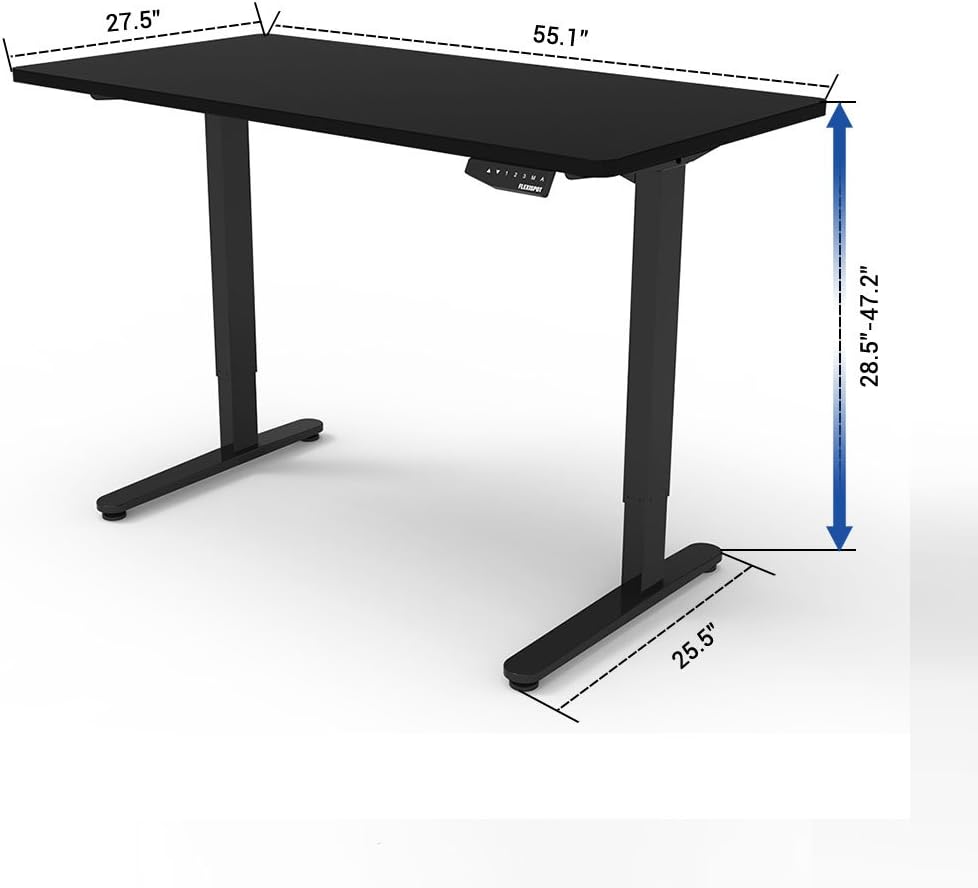
Image: A diagram illustrating the key dimensions of the FLEXISPOT desk, including desktop width (55.1"), depth (27.5"), and height adjustment range (28.5" to 47.2").
Záruka a podpora
The FLEXISPOT E2B-B Height Adjustable Desk Frame comes with a comprehensive warranty:
- Desk Frame: 5-letá záruka
- Motor: 3-letá záruka
For technical support, warranty claims, or any inquiries, please contact FLEXISPOT customer service. Refer to the contact information provided on the product packaging or the official FLEXISPOT webmísto.
Certifikace
The FLEXISPOT E2B-B desk frame meets various industry standards for quality and safety.
Image: Logos for FCC, UL, and BIFMA International certifications, indicating compliance with relevant standards for electronic devices, safety, and office furniture.