
Zavedení
This manual provides detailed instructions for the installation, operation, and maintenance of your BONTEC MFS001 Gas Spring Single Monitor Mount. Designed for screens ranging from 13 to 36 inches and supporting weights up to 12 kg (26.5 lbs), this monitor arm offers ergonomic adjustments to enhance your viewing comfort and optimize desk space. Please read this manual thoroughly before installation and use to ensure proper setup and safe operation.
Bezpečnostní informace
- Před montáží se ujistěte, že jsou všechny součásti přítomny a nepoškozené. Nepoužívejte, pokud některé součásti chybí nebo jsou vadné.
- Verify that your monitor's weight and VESA pattern are within the specified limits of this mount.
- Always follow the installation steps carefully. Improper installation can result in equipment damage or personal injury.
- Nepřetahujte šrouby, mohlo by dojít k poškození.
- Keep children away from the assembly area. Small parts may be a choking hazard.
- Adjust the gas spring tension only after the monitor is mounted to prevent the arm from springing up or down unexpectedly.
Obsah balení
Before proceeding with installation, please ensure all the following components are present:
- Sestava ramene monitoru
- C-Clamp Báze
- Základní komponenty průchodek
- Deska VESA
- Hardware Kit (screws, washers, spacers)
- Allen Keys (for adjustments)
- Návod k použití
Specifikace
| Funkce | Specifikace |
|---|---|
| Číslo modelu | MFS001 |
| Kompatibilní velikost obrazovky | 13 - 36 palce |
| Hmotnostní kapacita | Do 12 kg (26.5 liber) |
| Kompatibilita VESA | 75x75mm, 100x100mm |
| Rozsah náklonu | +85° až -50° |
| Otočný rozsah | ±90° |
| Otáčení | 360° (z portrétu na krajinu) |
| Nastavení výšky | 7.1" až 19.1" (180 mm až 485 mm) |
| Maximální prodloužení | 23.3" (588 mm) |
| Tloušťka desky (C-Clamp) | 10 mm - 80 mm (0.39" - 3.15") |
| Tloušťka desky (průchodka) | 10 mm - 70 mm (0.39" - 2.76") |
| Průměr otvoru průchodky | 10 mm - 60 mm (0.39" - 2.36") |
| Materiál | High-grade Zinc Alloy, Metal |
Nastavení a instalace
The BONTEC MFS001 monitor arm offers two installation methods: C-Clamp and Grommet Base. Choose the method best suited for your desk.
1. C-Clamp Montáž
- Připojte C-clamp base to the edge of your desk. Ensure the desk thickness is between 10mm and 80mm.
- Utáhněte C-clamp screw firmly until the base is stable and secure.
- Slide the main arm pole onto the C-clamp základnu a zajistěte ji dodaným šroubem.
2. Montáž průchodky
- Ensure your desk has a grommet hole with a diameter between 10mm and 60mm, and the desk thickness is between 10mm and 70mm.
- Vložte šroub s průchodkou otvorem ve stole.
- Secure the grommet base plate and nut from underneath the desk, tightening until stable.
- Slide the main arm pole onto the grommet base and secure it with the provided screw.
3. Připojení monitoru
- Attach the VESA plate to the back of your monitor using the appropriate screws and spacers from the hardware kit. Ensure the VESA pattern is 75x75mm or 100x100mm.
- Slide the VESA plate with the attached monitor onto the arm's mounting head. Ensure it clicks securely into place.
- Tighten any security screws on the VESA plate to prevent accidental detachment.

Image: Illustration of C-Clamp and Grommet mounting options, showing desk thickness and hole diameter requirements.

Image: A user working at a desk with a monitor mounted on the BONTEC arm, highlighting its compatibility with various screen sizes and VESA standards.
Provoz a seřízení
The BONTEC MFS001 monitor arm provides full motion adjustability for optimal ergonomic positioning.
1. Nastavení výšky
The gas spring arm allows for smooth vertical movement. Gently push or pull the monitor to the desired height. The arm supports a height range from 7.1 inches to 19.1 inches.
2. Nastavení sklonu
The monitor can be tilted +85° upwards and -50° downwards. Loosen the tilt screw slightly with the provided Allen key, adjust the monitor to your preferred angle, and then retighten the screw to secure it.
3. Nastavení otočení
The arm allows for a ±90° swivel movement. You can rotate the monitor horizontally to share your screen or adjust your viewúhel.
4. Nastavení rotace
The VESA plate allows for a full 360° rotation, enabling you to switch your monitor between landscape and portrait orientations without removing it.
5. Nastavení napětí plynové pružiny
If the monitor arm does not hold its position or is difficult to move, you may need to adjust the gas spring tension. Use the provided Allen key to turn the adjustment screw located on the arm. Turn clockwise to increase tension for heavier monitors, and counter-clockwise to decrease tension for lighter monitors. Adjust only after the monitor is mounted.
6. Správa kabelů
Utilize the integrated cable management clips along the arm to route and conceal your power, HDMI, and other cables for a tidy workspace.
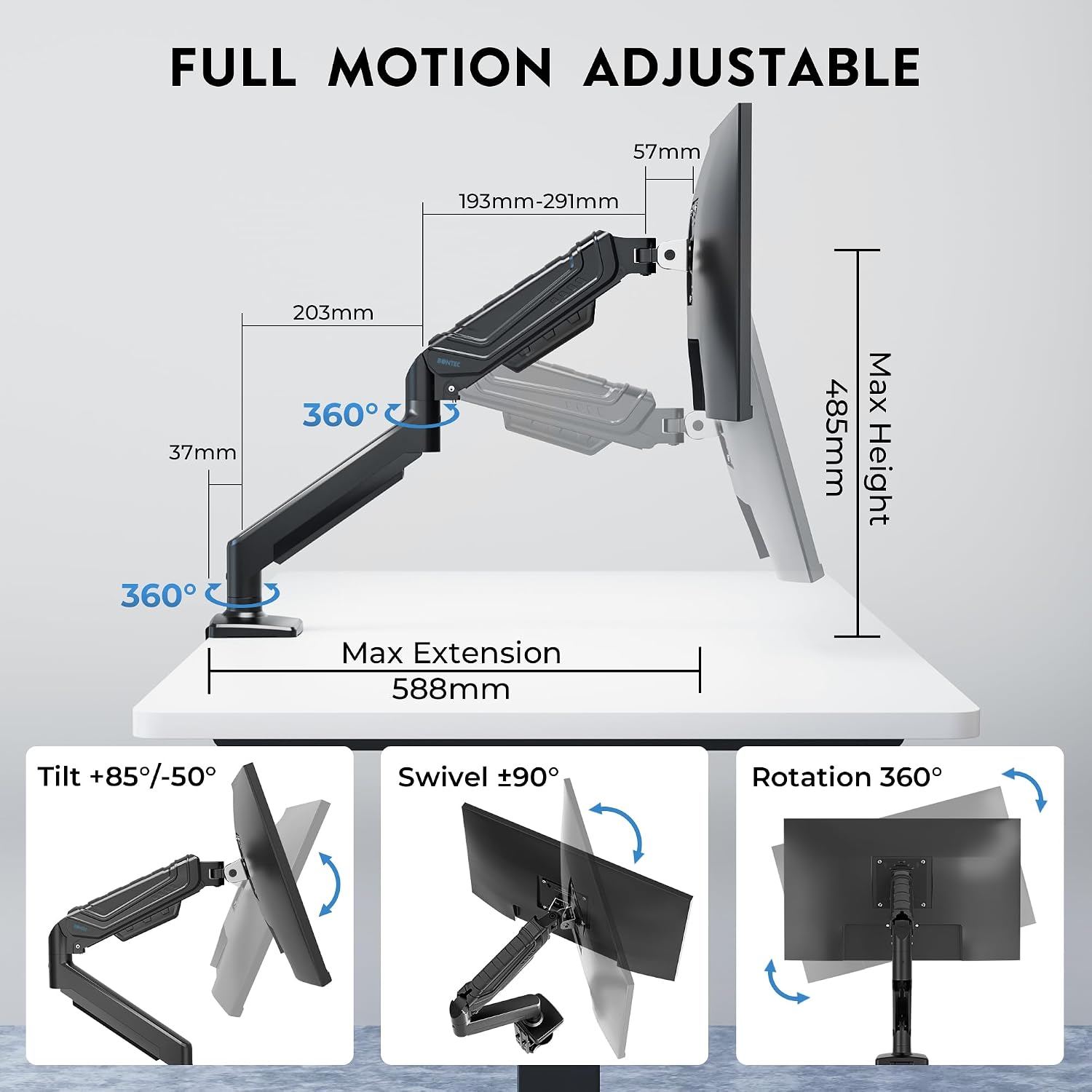
Image: Detailed illustration of the monitor arm's full motion capabilities, including tilt, swivel, rotation, and maximum extension and height.

Image: Visual representation of key features such as smooth rotation, adjustable swivel resistance, weight capacity, cable management, and the multi-position C-clamp.
Údržba
- Čištění: Otřete rameno monitoru měkkým hadříkemamp hadříkem. Nepoužívejte abrazivní čisticí prostředky nebo rozpouštědla, která by mohla poškodit povrchovou úpravu.
- Pravidelné kontroly: Pravidelně kontrolujte všechny šrouby a spoje, zda jsou pevně utažené a bezpečné. V případě potřeby je dotáhněte.
- Plynová pružina: The gas spring is designed for long-lasting performance. No specific lubrication is required. If adjustments become difficult, refer to the 'Gas Spring Tension Adjustment' section.
Odstraňování problémů
- Problem: Monitor arm sags or does not stay at the desired height.
- Řešení: The gas spring tension may be too low for your monitor's weight. Increase the gas spring tension by turning the adjustment screw clockwise with the provided Allen key. Ensure the monitor is mounted before adjusting.
- Problem: Monitor arm is difficult to move or too stiff.
- Řešení: The gas spring tension may be too high. Decrease the gas spring tension by turning the adjustment screw counter-clockwise with the provided Allen key. Ensure the monitor is mounted before adjusting.
- Problem: Monitor wobbles or feels unstable.
- Řešení: Check all mounting screws for the C-clamp or grommet base, and the VESA plate attachment to the monitor. Ensure they are securely tightened. Also, verify that your desk surface is stable.
- Problem: Monitor does not fit the VESA plate.
- Řešení: Confirm your monitor's VESA pattern is either 75x75mm or 100x100mm. If it differs, your monitor is not compatible with this mount. Ensure you are using the correct screws and spacers from the hardware kit.
Záruka
The BONTEC MFS001 Monitor Arm comes with a 2-letá záruka from the date of purchase. This warranty covers manufacturing defects and material flaws under normal use. It does not cover damage caused by improper installation, misuse, accidents, modifications, or unauthorized repairs. Please retain your proof of purchase for warranty claims.
Zákaznická podpora
If you have any questions, require assistance with installation, or encounter any issues not covered in this manual, please contact BONTEC customer support. Refer to the product packaging or the official BONTEC webstránky pro kontaktní údaje.