
1. Úvod
This manual provides instructions for the installation, operation, and maintenance of the Fortinet FortiSwitch FS-108E-FPOE. The FS-108E-FPOE is a manageable Ethernet switch designed for network environments requiring reliable connectivity and Power over Ethernet (PoE) capabilities. It features 8 Gigabit Ethernet network ports and 2 Gigabit Ethernet expansion slots, supporting both twisted pair and optical fiber connections. This device is compliant with IEEE 802.3af/802.3at PoE standards, providing power to connected devices.
2. Bezpečnostní informace
Please read all safety instructions carefully before installing or operating the FortiSwitch FS-108E-FPOE.
- Zdroj napájení: Use only the power adapter supplied with the device or a Fortinet-approved replacement. Ensure the power source meets the device's voltage a aktuální požadavky.
- Větrání: Ensure proper ventilation around the switch. Do not block ventilation openings. Maintain adequate clearance for airflow.
- Prostředí: Install the switch in a dry, well-ventilated area, away from direct sunlight, heat sources, and excessive moisture. The device has an IP00 rating, meaning it is not protected against ingress of solids or liquids.
- Montáž: If rack-mounting, ensure the rack is stable and can support the device's weight. Follow standard rack-mounting procedures.
- Servis: Nepokoušejte se opravit zařízení sami. Veškerý servis svěřte kvalifikovanému personálu.
3. Obsah balení
Ověřte, zda váš balíček obsahuje následující položky:
- FortiSwitch FS-108E-FPOE unit
- Power Adapter/Cable (region specific)
- Sada pro montáž do racku (pokud je k dispozici)
- Rychlý průvodce
Pokud některé položky chybí nebo jsou poškozené, kontaktujte prosím svého dodavatele nebo podporu Fortinet.
4. Fyzický popis
The FortiSwitch FS-108E-FPOE features a robust metal casing designed for durability and efficient heat dissipation. Below is an image of the device, highlighting its key components.
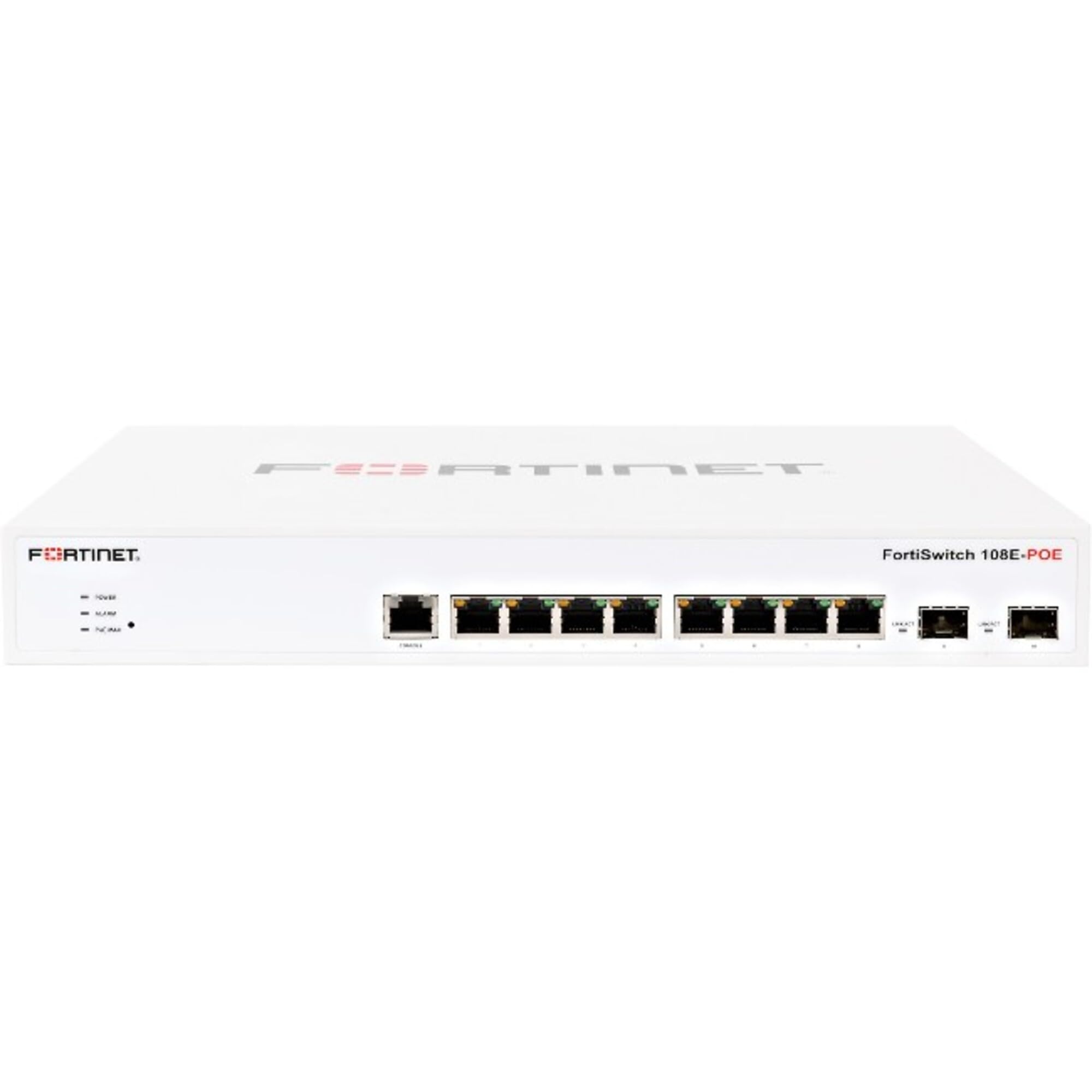
Obrázek 4.1: Přední strana view of the Fortinet FortiSwitch FS-108E-FPOE. This image shows the network ports, including 8 Gigabit Ethernet ports and 2 Gigabit Ethernet expansion slots, along with status indicator LEDs. The device is housed in a metal chassis.
4.1 Přední panel
- Ethernetové porty (1-8): 8 x Gigabit Ethernet ports, supporting PoE (IEEE 802.3af/at). These ports are used for connecting network devices such as computers, IP phones, and wireless access points.
- SFP/Expansion Slots (9-10): 2 x Gigabit Ethernet expansion slots, typically used for SFP modules to provide optical fiber uplinks or additional copper connections.
- LED indikátory: Various LEDs indicate power status, system activity, and port link/activity/PoE status. Refer to the Quick Start Guide for detailed LED behavior.
4.2 Zadní panel
- Příkon: Konektor pro připojení externího napájecího adaptéru.
- Konzolový port (RJ45): Used for local management and initial configuration via a serial connection.
- Zemnící šroub: For connecting an earth ground cable (recommended for safety).
5. Nastavení
5.1 Montáž do racku (volitelné)
If your FortiSwitch came with a rack-mount kit, follow these steps to install it in a standard 19-inch equipment rack:
- Attach the rack-mount brackets to the sides of the FortiSwitch using the provided screws.
- Secure the FortiSwitch into the rack using appropriate rack screws.
- Ensure there is adequate space for ventilation around the unit.
5.2 Připojení napájení
- Connect the power adapter to the power input on the rear panel of the FortiSwitch.
- Zapojte druhý konec napájecího adaptéru do vhodné elektrické zásuvky.
- The FortiSwitch will power on automatically. Observe the power LED indicator.
5.3 Síťová připojení
- Connect your network devices (e.g., computers, servers, access points) to the Gigabit Ethernet ports (1-8) using standard RJ45 Ethernet cables.
- For uplink connections to your core network or other switches, use the SFP/Expansion Slots (9-10) with appropriate SFP modules and fiber optic or copper cables.
- If connecting PoE-compatible devices, ensure they are within the switch's PoE budget (130 watts total).
5.4 Počáteční konfigurace
The FortiSwitch FS-108E-FPOE is a manageable switch. Initial configuration can typically be performed via:
- Port konzoly: Connect a serial cable from your computer to the switch's console port. Use a terminal emulator (e.g., PuTTY) with settings: 9600 baud, 8 data bits, no parity, 1 stop bit, no flow control.
- Webmanagement založený na: Once the switch obtains an IP address (via DHCP or static configuration), you can access its web-based management interface from a web browser. Refer to the Quick Start Guide for default IP addresses or discovery methods.
- FortiGate Integration: For seamless management, the FortiSwitch can be integrated and managed directly from a FortiGate firewall.
6. Provoz
Once powered on and configured, the FortiSwitch FS-108E-FPOE operates automatically to forward network traffic. Management tasks involve monitoring status, configuring VLANs, QoS, security policies, and PoE settings.
- Sledování: Použijte web interface or CLI to monitor port status, traffic statistics, and PoE consumption.
- Konfigurace: Access the management interface to customize network settings, create VLANs for network segmentation, configure Quality of Service (QoS) for traffic prioritization, and manage PoE power allocation per port.
- Funkce PoE: The switch automatically detects and powers IEEE 802.3af/at compliant devices connected to its PoE ports. You can configure PoE settings, such as power priority and maximum power per port, through the management interface.
7. Údržba
7.1 aktualizací firmwaru
Pravidelně kontrolujte podporu Fortinetu website for the latest firmware updates. Updating the firmware ensures optimal performance, security, and access to new features. Follow the instructions provided with the firmware release notes for the update process, typically performed via the web management interface or CLI.
7.2 Čištění
To clean the exterior of the switch, use a soft, dry cloth. Do not use liquid or aerosol cleaners, as they may damage the device. Ensure ventilation openings are free from dust and obstructions.
7.3 Konfigurace zálohování
It is recommended to regularly back up your switch's configuration. This allows for quick restoration of settings in case of a device reset or replacement. Configuration backups can typically be performed through the web management interface or CLI.
8. Řešení problémů
This section provides solutions to common issues you might encounter with your FortiSwitch FS-108E-FPOE.
| Problém | Možná příčina | Řešení |
|---|---|---|
| Žádná síla | Power cable disconnected; faulty power adapter; power outlet issue. | Check power cable connections. Ensure power adapter is functional. Test the power outlet. |
| Žádné spojení na portu | Incorrect cable type; faulty cable; device not powered on; port disabled. | Verify cable type (RJ45 for Ethernet, SFP for expansion slots). Test with a known good cable. Ensure connected device is powered on. Check port status in management interface. |
| Zařízení PoE se nezapíná | Device not PoE compliant; cable issue; switch PoE budget exceeded; port PoE disabled. | Ensure device is IEEE 802.3af/at compliant. Check cable. Verify total PoE consumption. Enable PoE on the specific port via management interface. |
| Nelze přistupovat k rozhraní pro správu | Nesprávná IP adresa; problém s připojením k síti; firewall blokuje přístup. | Verify the switch's IP address. Ensure your computer is on the same network segment. Check local firewall settings. Try console access. |
Pro další pomoc se obraťte na podporu Fortinet. webwebu nebo kontaktujte technickou podporu.
9. Specifikace
| Funkce | Popis |
|---|---|
| Model | FS-108E-FPOE |
| Značka | FORTINET |
| Porty | 8 x Gigabit Ethernet Network, 2 x Gigabit Ethernet Expansion Slot (SFP) |
| Protokol připojení | Ethernet |
| Shoda s PoE | IEEE 802.3af / 802.3at |
| Total PoE Wattage | 130 wattů |
| Řízení | Manageable (Web-based GUI, CLI, FortiGate integration) |
| Typ montáže | Rack Mount |
| Materiál | Kov |
| Hodnocení mezinárodní ochrany | IP00 |
10. Záruka a podpora
Fortinet products typically come with a limited hardware warranty and technical support. For detailed warranty information, including terms and conditions, please refer to the official Fortinet webwebu nebo v záručním listu dodaném s vaším produktem.
Technická podpora: For technical assistance, product documentation, firmware downloads, and knowledge base articles, visit the official Fortinet support portal: https://support.fortinet.com
When contacting support, please have your product model (FS-108E-FPOE) and serial number ready.


