
Zavedení
This manual provides comprehensive instructions for the setup, operation, maintenance, and troubleshooting of your Summer Infant Panorama Digital Color Video Monitor. Please read this manual thoroughly before using the product to ensure safe and optimal performance.
Konec produktuview
The Summer Infant Panorama Digital Color Video Monitor offers advanced features for monitoring your baby, including a 5-inch high-resolution color LCD display, remote-controlled pan/tilt camera, two-way talk-back, digital zoom, and automatic night vision.
Klíčové vlastnosti
- 5" full color digital flat screen display
- Remote control pan and tilt camera
- Two-way talk-back to baby
- Digital zoom functionality
- Built-in 2-color soft-glow nursery nightlight
- Automatic black & white night vision
- Zvukově aktivované LED kontrolky
- Dosah až 800 stop
- Power save button
- Low battery and out of range indicators
- Expandable system, up to 4 cameras
- Tabletop or wall mount camera option
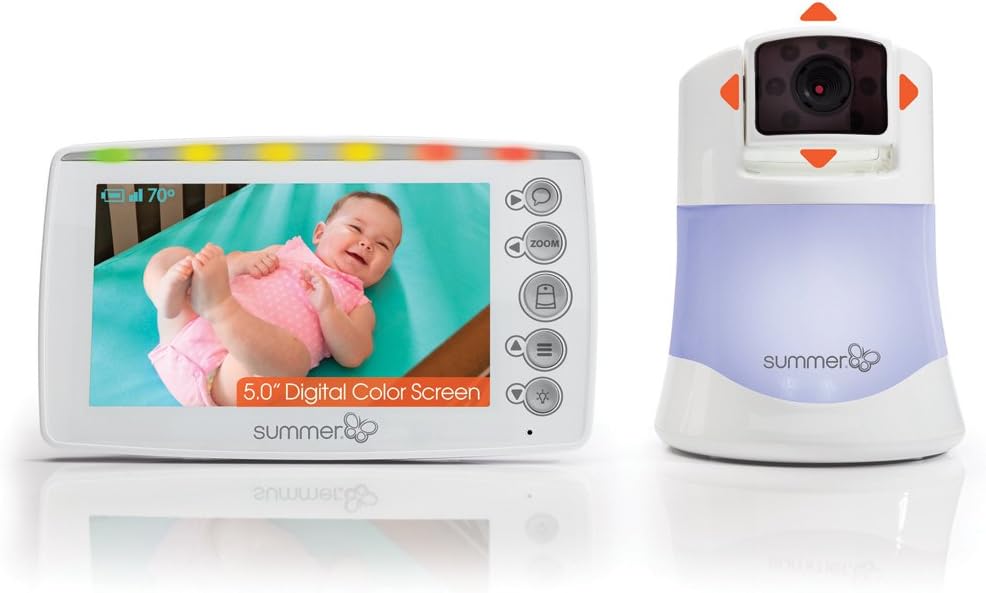
Obrázek 1: Summer Infant Panorama Digital Color Video Monitor, showing the parent unit and camera.
Nastavení
Obsah balení
Ujistěte se, že jsou přítomny všechny komponenty:
- rodičovská jednotka (monitor)
- Dětská jednotka (kamera)
- AC Adapters (2)
- Wall mounting hardware (screws, anchors, cable clips)
Nabíjení rodičovské jednotky
- Connect one AC adapter to the Parent Unit and plug it into a standard electrical outlet.
- Charge the Parent Unit for at least 8 hours before first use to ensure optimal battery performance.
- Indikátor baterie na obrazovce bude zobrazovat stav nabíjení.
Positioning the Baby Unit (Camera)
- Place the Baby Unit on a flat surface, such as a dresser or shelf, at least 3 feet (1 meter) away from the baby's crib.
- Ensure the camera has a clear line of sight to the baby.
- For wall mounting, use the provided hardware. Secure the camera to the wall at a height that provides a good view of the crib, ensuring the power cord is out of reach of children.
- Connect the second AC adapter to the Baby Unit and plug it into a standard electrical outlet.

Obrázek 2: Proper placement of the camera and parent unit for optimal monitoring.
Počáteční párování
The Parent Unit and Baby Unit are pre-paired at the factory. If re-pairing is needed or additional cameras are added:
- Turn on both the Parent Unit and Baby Unit.
- On the Parent Unit, navigate to the menu and select the "Pairing" option.
- Postupujte podle pokynů na obrazovce a spusťte párování.
- Press the pairing button on the Baby Unit (refer to the camera diagram for location).
- The units will automatically connect.
Návod k obsluze
Ovládání rodičovské jednotky
The Parent Unit features a 5-inch display and various control buttons:
- Vypínač: Zapíná/vypíná jednotku.
- Tlačítka hlasitosti: Upravuje hlasitost poslechu.
- Ovládání jasu: Upravuje jas obrazovky.
- Tlačítko přiblížení: Activates digital zoom.
- Talk-Back Button: Press and hold to speak to your baby through the camera.
- Tlačítko nabídky: Přístup k nastavením a možnostem.
- Navigační tlačítka: Used to pan/tilt the camera and navigate menus.

Obrázek 3: The 5.0" handheld parent unit in use.
Camera Control (Pan & Tilt)
Use the navigation buttons on the Parent Unit to remotely adjust the camera's view:
- Stiskněte tlačítko Nahoru/dolů šipkami nakloňte kameru svisle.
- Stiskněte tlačítko Vlevo/vpravo šipky pro horizontální posouvání kamery.

Obrázek 4: The camera unit demonstrating pan and tilt capabilities.
Digitální zoom
Stiskněte tlačítko Přiblížení button on the Parent Unit to digitally zoom in on the image. Press again to zoom out.
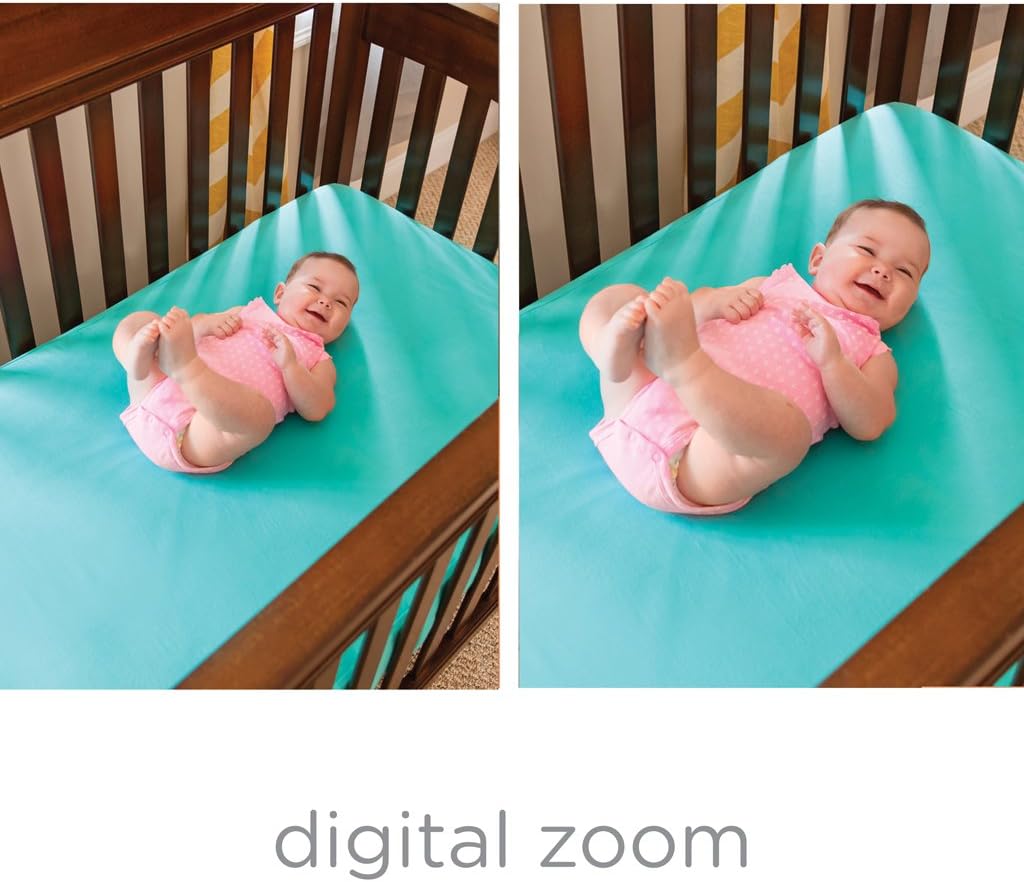
Obrázek 5: Comparison of normal view a digitální zoom.
Noční vidění
The monitor automatically switches to black and white night vision in low light conditions, providing a clear view of your baby without disturbing them.

Obrázek 6: Noční vidění view of a baby in a crib.
Two-Way Talk-Back
Press and hold the talk-back button on the Parent Unit to speak to your baby. Release the button to hear your baby.
Noční světlo
The Baby Unit includes a soft-glow nightlight. Access the menu on the Parent Unit to turn the nightlight on/off or change its color.
Údržba
Čištění
- Wipe the Parent Unit and Baby Unit with a dry, soft cloth.
- Nepoužívejte čisticí spreje ani tekuté čisticí prostředky.
Péče o baterie
- To preserve battery life, fully charge the Parent Unit before each use.
- If the unit will not be used for an extended period, remove the battery.
Odstraňování problémů
| Problém | Řešení |
|---|---|
| Žádný obraz/zvuk na rodičovské jednotce | Ensure both units are plugged in and turned on. Check battery level of Parent Unit. Ensure units are within range. |
| "Out of Range" indicator | Move the Parent Unit closer to the Baby Unit. Reduce obstacles between units. |
| Špatná kvalita obrazu | Adjust the camera angle. Ensure adequate lighting for color vision or check night vision activation. |
| Statické nebo rušení | Move units away from other electronic devices (cordless phones, Wi-Fi routers). |
| Baterie rodičovské jednotky se rychle vybíjí | Ensure the unit is fully charged before use. Reduce screen brightness. Use power save mode if available. |
Specifikace
- Číslo modelu: 29593
- Velikost obrazovky: 5 palce
- Technologie bezdrátové komunikace: Wi-Fi
- Technologie připojení: Bezdrátový
- Speciální funkce: Noční vidění
- Zdroj napájení: Battery Powered (AC adapter included)
- Životnost baterie: Up to 10 Hours (Parent Unit)
- Rozsah: Až 800 stop
- Rozměry (D x Š x V): 22.2 x 30.5 x 11.7 centimetrů
- Hmotnost položky: 793 g
- Typ montáže: Držák na stěnu, Stolní
Záruka a podpora
For warranty information and customer support, please refer to the official Summer Infant webnebo kontaktujte jejich zákaznický servis. Uschovejte si účtenku jako doklad o koupi.
Výrobce: Letní nemluvně
Místo podnikání: Mississauga, ON L4Y 3Y4, CA
Datum první dostupnosti: 30. září 2018
Důležité bezpečnostní informace
- Keep all cords out of reach of children (at least 3 feet / 1 meter away).
- Never place the camera or cords inside the crib or playpen.
- Tento produkt nenahrazuje dohled dospělé osoby.
- Nepoužívejte v blízkosti vody.
- Používejte pouze dodané AC adaptéry.
Související videa
No official product videos from the seller are available for direct embedding in this manual based on the provided criteria.