
1. Úvod
The AIRTHEREAL CA300 is an advanced air purification system designed to improve indoor air quality. It combines ozone generation, True HEPA filtration, and ionization to address various air contaminants, including odors, allergens, and airborne particles. This manual provides essential information for the safe and effective operation and maintenance of your device.
2. Bezpečnostní pokyny
- Přečtěte si všechny pokyny před provozem spotřebiče.
- Ozonová bezpečnost: When using the ozone generation function, ensure the area is unoccupied by humans, pets, or plants. Ventilate the treated area thoroughly before re-entry.
- Elektrická bezpečnost: Always plug the unit into a grounded outlet. Do not operate with a damaged cord or plug. Keep the power cord away from heated surfaces.
- Umístění: Place the unit on a stable, level surface. Do not block air inlets or outlets. Maintain adequate clearance around the unit for proper airflow.
- vlhkost: Nepoužívejte jednotku ve vlhkém neboamp environments. Keep away from water and other liquids.
- Údržba: Před čištěním nebo prováděním jakékoli údržby odpojte jednotku ze zásuvky.
- Děti a domácí mazlíčci: Udržujte spotřebič mimo dosah dětí a domácích zvířat.
3. Konec produktuview
The AIRTHEREAL CA300 features a robust design with multiple purification stages and user-friendly controls.
3.1 Komponenty
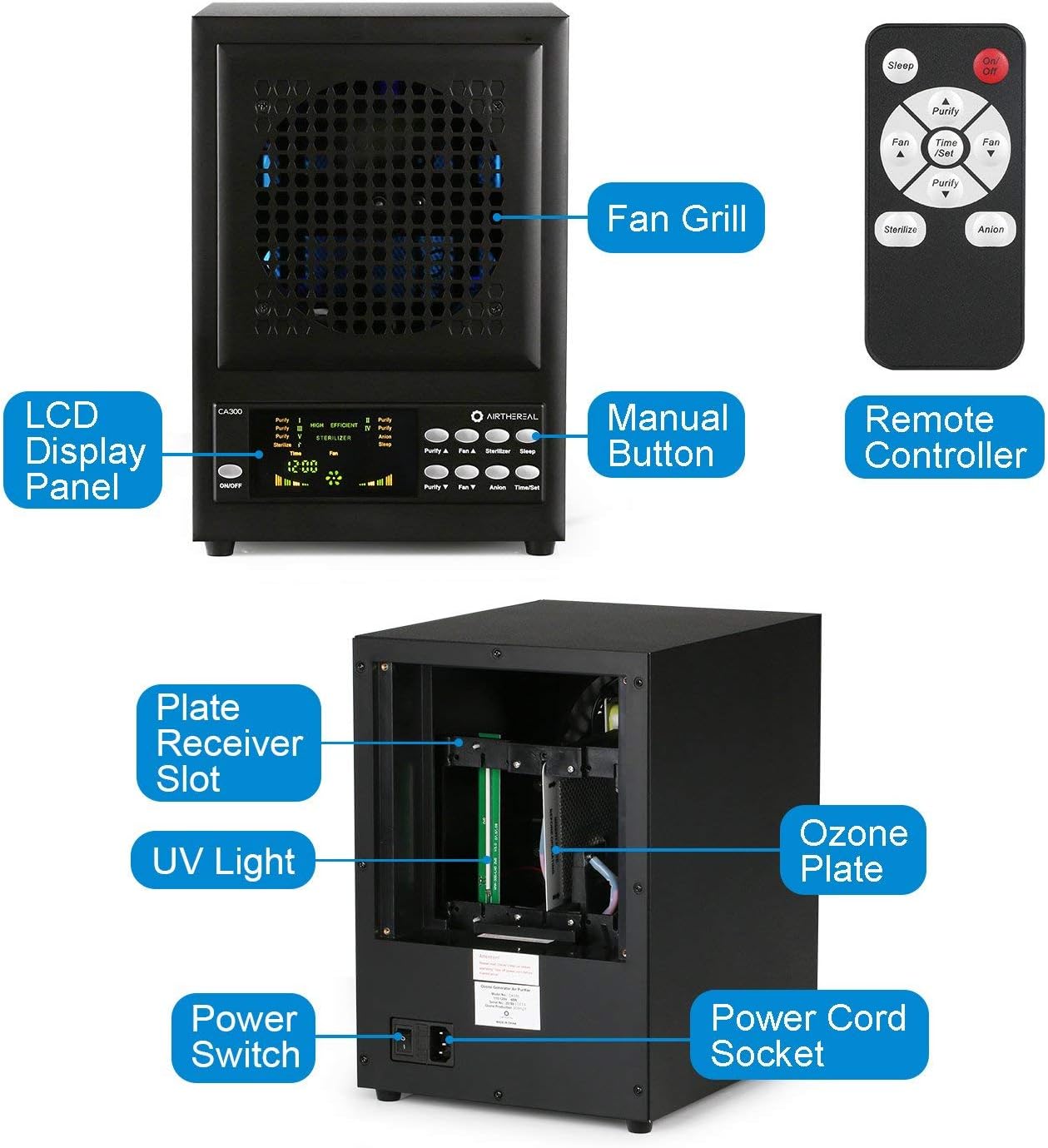
Obrázek 1: Key components of the AIRTHEREAL CA300 unit, including the LCD display, control buttons, fan grill, and internal parts like the ozone plate and UV light.
- LCD zobrazovací panel: Shows current settings and operational status.
- Manuální tlačítka: For direct control of functions on the unit.
- Dálkový ovladač: Provides convenient control from a distance.
- Ventilátorový gril: Protects the internal fan and directs airflow.
- Plate Receiver Slot: Area for inserting the ozone plate.
- UV světlo: Utilized for sterilization.
- Ozone Plate: Generates ozone for powerful odor removal and sterilization.
- Vypínač: Hlavní ovládání napájení jednotky.
- Zásuvka napájecího kabelu: Connection point for the power cord.
3.2 4-Stage Filtrační systém

Obrázek 2: Illustration of the multi-stage air filtration process within the unit.
- Předfiltr: Captures large particles like dust, lint, and pet dander, extending the life of subsequent filters.
- HEPA filtr: Traps fine particles, including pollen, dust mites, and other allergens.
- Filtr s aktivním uhlím: Absorbs odors from cooking, pets, smoke, and other volatile organic compounds (VOCs).
- TiO2 Photo-catalytic Filter: Works with UV light to break down pollutants at a molecular level.
4. Nastavení
Follow these steps to prepare your AIRTHEREAL CA300 for first use or after filter maintenance.

Obrázek 3: Step-by-step guide for filter and ozone plate installation.
- Unscrew four nails: Locate and remove the four screws securing the back panel.
- Remove four filter covers: Carefully detach the filter covers to access the filter compartments.
- Insert one ozone plate: Slide the ozone plate into its designated slot.
- Ensure the trigger is placed correctly as above: Verify that the ozone plate's trigger mechanism is properly aligned.
- Place the filters in sequence: Install the pre-filter, HEPA filter, activated carbon filter, and TiO2 photo-catalytic filter in the correct order. Refer to Figure 2 for the sequence.
- Use a secure socket or power strip, turn on the power switch: Connect the power cord to a suitable electrical outlet and then flip the main power switch on the unit.
5. Návod k obsluze
The AIRTHEREAL CA300 can be operated using the manual buttons on the unit or the provided remote control.

Obrázek 4: Control panel and function descriptions.
5.1 Zapnutí/vypnutí
- Stiskněte tlačítko ON/OFF button on the unit or the remote control to power the device on or off.
5.2 Funkční režimy
- Purity (Ozone Generation): Adjusts the level of activated oxygen (ozone). Use the 'Purify A' and 'Purify V' buttons to increase or decrease ozone output. Caution: Ensure no occupants are present during ozone generation.
- Rychlost ventilátoru: Controls the airflow speed. Use the 'Fan A' and 'Fan V' buttons to adjust.
- Sterilizer (UV Lamp & Photo-catalytic Filter): Activates the UV lamps and photo-catalytic filter for enhanced sterilization. Press the 'Sterilizer' button to toggle.
- Anion: Controls the dispersal of negative ions, which help to clump airborne particles for easier filtration. Press the 'Anion' button to toggle.
- Režim spánku: Dims the LCD panel and maintains current settings while operating quietly. Press the 'Sleep' button to activate.
- Time/Set (Timer Function): Sets the start and shut-off times for operation. Use the 'Time/Set' button to configure the timer.
6. Údržba
Regular maintenance ensures optimal performance and longevity of your AIRTHEREAL CA300.
6.1 Výměna filtru
Multi-stage filters should be checked and replaced periodically based on usage and air quality. Refer to the setup section (Figure 3) for instructions on accessing and replacing filters.
- Předfiltr: Clean every 2-4 weeks, replace every 6-12 months.
- HEPA & Activated Carbon Filter: Vyměňujte každé 6–12 měsíce.
- TiO2 Photo-catalytic Filter: Vyměňujte každé 12–24 měsíce.
6.2 Ozone Plate Cleaning/Replacement
The ozone plate may require cleaning or replacement if ozone output decreases. Unplug the unit, remove the ozone plate as shown in Figure 3, and clean with a dry cloth or replace if necessary.
6.3 Obecné čištění
Vnější povrch jednotky otřete měkkým, suchým hadříkem. Nepoužívejte abrazivní čisticí prostředky ani rozpouštědla. Před čištěním se ujistěte, že je jednotka odpojena od sítě.
7. Řešení problémů
If you encounter issues with your AIRTHEREAL CA300, refer to the following common problems and solutions.
| Problém | Možná příčina | Řešení |
|---|---|---|
| Jednotka se nezapne. | No power supply; Power cord not connected; Power switch off. | Check power outlet; Ensure power cord is securely plugged in; Turn on the main power switch. |
| Slabé proudění vzduchu. | Filters are clogged; Fan speed is too low. | Clean or replace filters; Increase fan speed using 'Fan A' button. |
| Unusual odor (not ozone). | New unit smell; Filters need replacement. | Allow unit to run in a well-ventilated area for a few hours; Replace activated carbon filter. |
| Ozone function not working. | Ozone plate is dirty or damaged; Purity mode not activated. | Clean or replace ozone plate; Ensure 'Purity' mode is selected and level is set. |
8. Specifikace
- Značka: AIRTHEREAL
- Číslo modelu: CA300
- Zdroj napájení: Elektrický kabel
- Hmotnost položky: 15 libry
- Způsob ovládání: Remote, Manual Buttons
- Typ filtru: HEPA
- Typ ovladače: Dálkové ovládání
9. Záruka a podpora
AIRTHEREAL products are designed for reliability and performance. For warranty information, technical support, or to purchase replacement parts, please refer to the official AIRTHEREAL webnebo se obraťte přímo na jejich zákaznický servis. Uschovejte si doklad o koupi pro případ reklamace.