
1. Úvod
Thank you for choosing the Feelworld FW703 7-inch IPS On-Camera Field Monitor. This manual provides essential information for the proper setup, operation, and maintenance of your device. Please read this manual thoroughly before using the monitor to ensure optimal performance and to prevent damage.
2. Konec produktuview
The Feelworld FW703 is a high-resolution 7-inch IPS monitor designed for professional camera and video camera applications. It offers a range of features to enhance your shooting experience.
Klíčové vlastnosti:
- Displej s vysokým rozlišením: The FW703 features a Full HD 1920x1200 resolution, a 1200:1 contrast ratio, and a pixel density of 323 PPI, ensuring smooth and clear display of images and videos. With a brightness of 450cd/m², the screen is clearly visible. The 160° viewing angle provides consistent image quality from various perspectives.
- Rec.709 HD Color Standard: Reproduces colors naturally and beautifully. Utilizing ITU standards and HD video Rec.709 calibration technology, images appear sharp. Includes fine color adjustment functions.
- 3G-SDI/4K HDMI Connectivity: Supports 3G-SDI and 4K HDMI input and output. SDI input supports SD, HD, and 3G formats up to 1080p 60Hz. HDMI input supports formats up to 4K 2160p 30Hz, supporting almost all signal formats. Suitable for DSLR HDMI cameras and professional broadcast SDI signals. It can simultaneously display live images on multiple displays while maintaining original video quality.
- Multi-functional Professional Auxiliary Functions: Professional auxiliary functions assist users in accurately monitoring video shooting, creation, and playback. Features include: Brightness Histogram; Embedded Audio Monitoring; Peaking Focus Assist; False Color; Zebra Exposure; Camera Mode; Image Flip; Check Field; Anamorphic Mode (1.3x, 2.0x, 2.0x mag); Safe Area (80%, 85%, 90%, 93%, 96%, 2.35:1); Color Temperature Adjustment. Also includes 9 Grid for 4K, Image Magnification (4X, 9X, 16X), and Zoom (U/D, L/R).
- Thin, Lightweight, and Portable Design: Designed for portability and functionality, with a depth of 22mm and a weight of 320g, allowing for free use anywhere. Enjoy clear images regardless of location.
- Flexibilní napájení: Supports 12V/1.5A power adapter and can also be powered by compatible batteries (e.g., Sony NP-F series via F970 battery plate).
- Všestranné možnosti montáže: Features a standard 1/4 inch screw hole for easy attachment to camera rigs, heads, or magic arms. Includes a 360° swivel mount.
- Vlastní klávesové zkratky: F1 and F2 custom shortcut function keys allow users to set functions according to personal habits.
- New UI Menu: Adopts a new UI menu for more convenient and quick operation of functions.

Image: Feelworld FW703 7-inch FHD Screen with key display specifications.

Image: IPS Ultra-wide Viewing Angle of the FW703 monitor.
3. Obsah balení
Po obdržení zkontrolujte obsah balení, abyste se ujistili, že jsou přítomny všechny položky:
- Feelworld FW703 Monitor
- Mini HDMI kabel
- Kabel adaptéru USB
- Slunečník
- Hot Shoe Mount
- Deska baterie F970
- Uživatelská příručka

Image: Package Contents of the FW703 Monitor.
4. Nastavení
4.1 Napájení monitoru
The FW703 monitor can be powered in two ways:
- Napájecí adaptér: Connect a 12V/1.5A AC power adapter (not included) to the DC IN port on the monitor.
- Napájení baterie: Attach a compatible Sony NP-F series battery (e.g., F970, F960, F950, F770, F750, F730, F570, F550, F530 series) to the F970 battery plate on the back of the monitor. Ensure the battery is securely locked into place.

Image: Flexible Power Supply options for the FW703 monitor.
4.2 Připojení k fotoaparátu
Connect your camera or video source to the monitor using either an HDMI or SDI cable.
- Připojení HDMI: Use the provided Mini HDMI cable to connect your camera's HDMI output to the HDMI IN port on the FW703.
- SDI připojení: Connect your camera's SDI output to the SDI IN port on the FW703 using an SDI cable.
The monitor also features HDMI OUT and SDI OUT ports for looping through the signal to another display or device.

Image: 3G-SDI and 4K HDMI Input/Output Ports.
4.3 Montáž monitoru
Use the included hot shoe mount to attach the monitor to your camera's hot shoe or a compatible rig. The monitor features a standard 1/4 inch screw hole on the bottom for versatile mounting options.
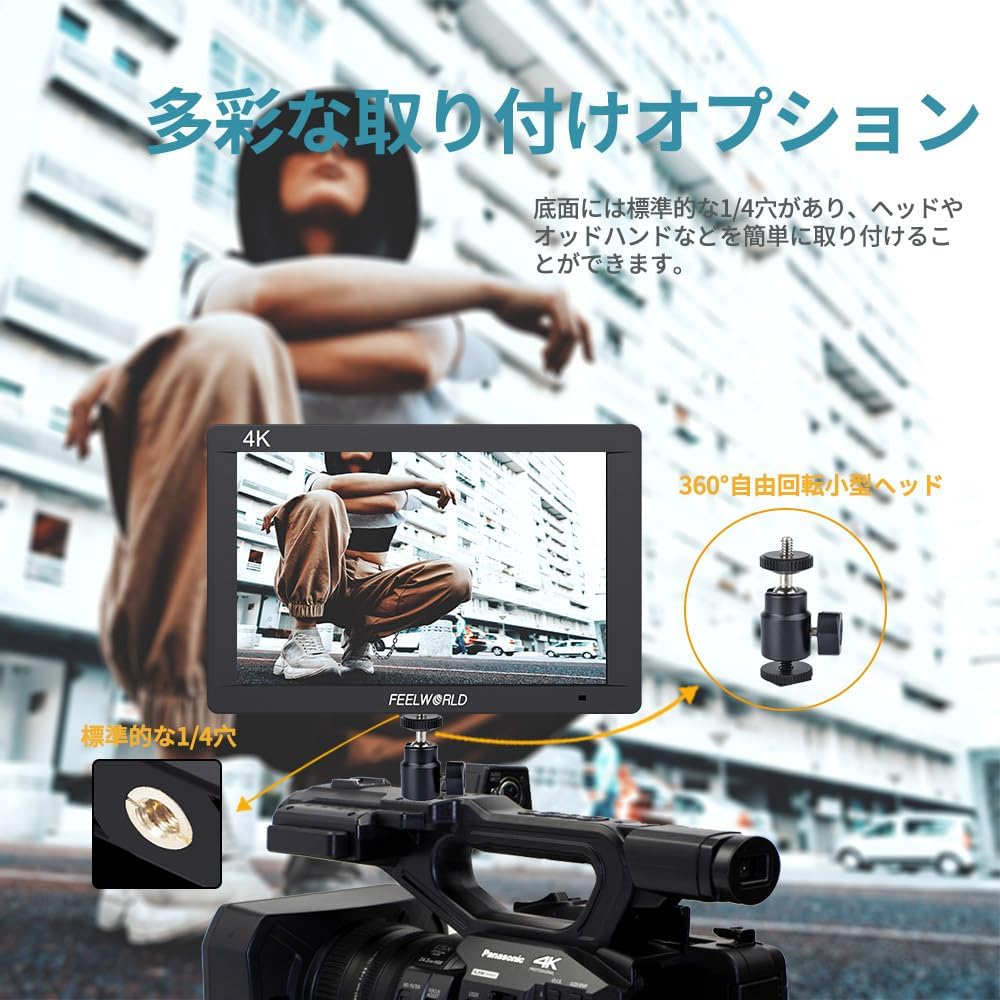
Image: Diverse Mounting Options for the FW703 monitor.
5. Návod k obsluze
5.1 Základní obsluha
- Zapnutí/vypnutí: Press and hold the power button to turn the monitor on or off.
- Navigace v nabídce: Use the MENU button to access the main menu. Use the arrow buttons (or rotary dial, if present) to navigate through options and the SELECT button to confirm.
- Výběr vstupu: The monitor will automatically detect the input signal. If multiple inputs are connected, you may need to manually select the desired input from the menu.
5.2 Using Auxiliary Functions
The FW703 includes various professional auxiliary functions to assist with accurate monitoring. These can be accessed via the menu or assigned to the F1/F2 shortcut keys.

Image: Assist Shooting Functions available on the FW703.
- Asistent zaostření Peaking: Highlights sharp edges in red, green, or blue to indicate in-focus areas.
- Falešná barva: Displays exposure levels as a spectrum of colors, helping to identify overexposed or underexposed areas.
- Expozice zebry: Overlays zebra stripes on areas exceeding a set exposure threshold.
- histogram: Provides a graphical representation of the tonal distribution of the image.
- Vestavěný zvuk: Displays audio levels on the screen.
- Anamorfní režim: Uvolňuje anamorfní footage za správné viewing (1.3x, 2.0x, 2.0x mag options).
- Bezpečná oblast: Displays guides for various aspect ratios and safe zones (80%, 85%, 90%, 93%, 96%, 2.35:1).
- Převrácení obrázku: Otočí obrázek vodorovně nebo svisle.
- Lupa: Zvětší část obrazu pro detailní prohlídku.
5.3 Custom Shortcut Keys (F1, F2)
The F1 and F2 buttons can be customized to quickly access frequently used functions. To assign a function:
- Přejděte do hlavní nabídky.
- Navigate to the 'Function Key Settings' or similar option.
- Select F1 or F2 and choose the desired function from the list.

Image: New UI Menu and Custom Shortcut Keys.
5.4 Nastavení jazyka
The monitor supports multiple languages, including Japanese. To change the language:
- Vstupte do hlavní nabídky.
- Navigate to 'System Settings' or 'Language'.
- Vyberte preferovaný jazyk.
6. Údržba
Proper maintenance ensures the longevity and optimal performance of your Feelworld FW703 monitor.
- Čištění: Use a soft, dry cloth to clean the monitor's exterior. For the screen, use a specialized screen cleaning solution and a microfiber cloth. Do not use abrasive cleaners or solvents.
- Skladování: When not in use, store the monitor in a cool, dry place, away from direct sunlight and extreme temperatures. Use the included sunshade for protection during storage or transport.
- Péče o baterie: If using batteries, ensure they are charged regularly and stored properly. Remove batteries if the monitor will not be used for an extended period.
7. Řešení problémů
If you encounter issues with your FW703 monitor, refer to the following common troubleshooting steps:
| Problém | Možná příčina | Řešení |
|---|---|---|
| Na obrazovce není žádný obraz | No power; Incorrect input selected; Loose cable connection; Camera not outputting signal. | Check power connection/battery; Select correct input source; Ensure cables are securely connected; Verify camera's video output settings. |
| Obrázek je zkreslený nebo zbarvený | Incorrect display settings; Faulty cable; Signal incompatibility. | Reset display settings to default; Try a different HDMI/SDI cable; Ensure camera output resolution/frame rate is supported by the monitor. |
| Monitor se nezapíná | No power; Dead battery. | Check AC adapter connection; Ensure battery is charged and properly installed. |
| Tlačítka nereagují | Dočasná softwarová závada. | Vypněte monitor, počkejte několik sekund a poté jej znovu zapněte. |
Pokud problém přetrvává i po vyzkoušení těchto řešení, kontaktujte zákaznickou podporu.
8. Specifikace
| Funkce | Detail |
|---|---|
| Číslo modelu | FW703 |
| Velikost obrazovky | 7 palců |
| Rezoluce | 1920x1200 |
| Kontrastní poměr | 1200:1 |
| Jas | 450 cd/m² |
| Hustota pixelů | 323 PPI |
| Viewúhel | 160° (IPS) |
| Vstupní porty | 1x 3G-SDI, 1x 4K HDMI |
| Výstupní porty | 1x 3G-SDI, 1x 4K HDMI |
| Vstup napájení | DC 12V/1.5A |
| Kompatibilita baterie | Sony NP-F series (via F970 plate) |
| Rozměry (zabalené) | 22.6 x 16.2 x 8 cm |
| Hmotnost (baleno) | 900 g |
| Další funkce | Anti-glare screen, Frame, Professional auxiliary functions |
9. Záruka a podpora
The Feelworld FW703 monitor comes with a jednoletá záruka od data nákupu. Tato záruka se vztahuje na výrobní vady a poruchy při běžném používání.
For technical support, warranty claims, or service inquiries, please contact your retailer or Feelworld customer service. Keep your proof of purchase for warranty validation.