
Zavedení
This manual provides comprehensive instructions for the setup, operation, and maintenance of your Nokta Digital HD-10 Mini / 6110 / 1461 Remote Control. Please read this guide carefully to ensure proper use and to maximize the performance of your device. Keep this manual for future reference.
Konec produktuview
The Nokta Digital HD-10 Mini / 6110 / 1461 Remote Control is designed to provide intuitive control over compatible television sets using infrared technology. Its ergonomic design and clearly labeled buttons ensure ease of use for various functions.
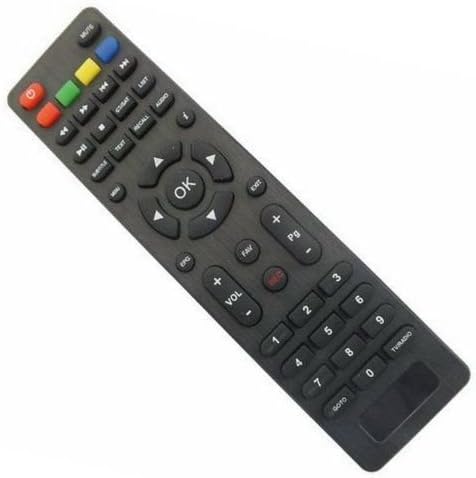
An image showing the Nokta Digital HD-10 Mini / 6110 / 1461 Remote Control. The remote is dark gray with various black buttons, including a central 'OK' button surrounded by directional arrows, number keys, volume controls, channel controls, and function buttons like 'MUTE', 'EPG', 'FAV', 'REC', 'EXIT', and colored function keys (red, green, yellow, blue).
Nastavení
1. Vložení baterií
- Najděte kryt prostoru pro baterie na zadní straně dálkového ovladače.
- Posuňte kryt dolů nebo stiskněte západku pro jeho otevření.
- Insert two AAA batteries (not included), ensuring the positive (+) and negative (-) terminals align with the indicators inside the compartment.
- Nasaďte zpět kryt přihrádky na baterie a ujistěte se, že bezpečně zacvakne na místo.
2. Pairing with Your Television
This remote control operates using infrared (IR) technology. For most compatible televisions, no special pairing procedure is required. Simply point the remote control towards your television and press a button (e.g., Power) to test its functionality. If the television responds, the remote is ready for use.
Návod k obsluze
Základní funkce
- Tlačítko napájení (červené): Zapíná nebo vypíná televizi.
- ZTLUMIT: Ztlumí nebo zapne zvuk televizoru.
- VOL +/-: Increases or decreases the volume level.
- CH +/-: Přepíná televizní kanál nahoru nebo dolů.
- Číselné klávesy (0-9): Directly input channel numbers.
- Tlačítko OK: Potvrzuje výběry v nabídkách.
- Směrové šipky (nahoru, dolů, vlevo, vpravo): Procházení nabídek a možností.
- EXIT: Exits the current menu or screen.
Pokročilé funkce
- EPG: Přístup k elektronickému programovému průvodci.
- FAV: Opens the list of favorite channels.
- REC (Red Circle): Initiates recording (if supported by the television/device).
- TEXT: Displays teletext.
- SUBTITLE: Zapíná nebo vypíná titulky.
- AUDIO: Vybírá zvukové stopy nebo režimy.
- ODVOLÁNÍ: Switches to the previously viewed kanál.
- GOTO: Jumps to a specific time in media playback.
- TV / ROZHLAS: Přepíná mezi režimy TV a Rádio.
- Barevná tlačítka (červená, zelená, žlutá, modrá): Perform specific functions as indicated on-screen by the television.
- Pg +/-: Navigates through pages or lists.
Údržba
- Čištění: Use a soft, dry cloth to clean the remote control. Do not use liquid cleaners or abrasive materials.
- Výměna baterie: Vyměňte baterie, když dálkový ovladač reaguje pomalu nebo přestane fungovat. Vždy vyměňte obě baterie současně za nové stejného typu.
- Skladování: If the remote control will not be used for an extended period, remove the batteries to prevent leakage and damage. Store in a cool, dry place.
Odstraňování problémů
- Dálkový ovladač nereaguje: Ensure batteries are inserted correctly with correct polarity. Replace old batteries with new ones. Ensure there are no obstructions between the remote and the television's IR receiver.
- Špatná odezva: Check battery levels. Ensure you are within the effective range (up to 10 meters) and pointing the remote directly at the television.
- Nefunkční konkrétní tlačítka: This may indicate a compatibility issue with your television model for that specific function, or a fault with the remote.
Specifikace
- Značka: Nokta
- Čísla modelů: HD-10 Mini / 6110 / 1461
- Technologie připojení: Infračervené
- Kompatibilní zařízení: Televize
- Maximální dosah: 10 metrů
- ASIN: B078W9KQ49
- UPC: 674386416726 XNUMX XNUMX
Informace o záruce
This product is covered by a standard manufacturer's warranty. For specific details regarding warranty duration and terms, please refer to the documentation provided at the time of purchase or contact your retailer. Keep your proof of purchase for any warranty claims.
Podpora
For further assistance, technical support, or inquiries not covered in this manual, please contact the retailer where you purchased the product or visit the official Nokta webstránky s kontaktními informacemi zákaznického servisu.