
Edifier XM2BT
Edifier XM2BT Bluetooth 2.1 Multimedia Speaker System User Manual
Model: XM2BT
1. Úvod
Děkuji za nákupasing the Edifier XM2BT Bluetooth 2.1 Multimedia Speaker System. This manual provides essential information for the safe and efficient use of your new speaker system. Please read it thoroughly before operation and retain it for future reference.
2. Důležité bezpečnostní pokyny
- Přečtěte si pozorně tyto pokyny.
- Uschovejte si tyto pokyny pro budoucí použití.
- Dbejte všech varování.
- Dodržujte všechny pokyny.
- Nepoužívejte toto zařízení v blízkosti vody.
- Čistěte pouze suchým hadříkem.
- Nezakrývejte žádné větrací otvory. Nainstalujte v souladu s pokyny výrobce.
- Neinstalujte v blízkosti zdrojů tepla, jako jsou radiátory, tepelné regulátory, kamna nebo jiná zařízení (včetně amplifikátory), které produkují teplo.
- Chraňte napájecí kabel před šlapáním nebo přiskřípnutím, zejména u zástrček, zásuvek a v místě, kde vychází z přístroje.
- Používejte pouze nástavce/příslušenství určené výrobcem.
- Odpojte toto zařízení během bouřky s blesky nebo když se delší dobu nepoužívá.
- Veškeré opravy svěřte kvalifikovanému servisnímu personálu. Servis je nutný, pokud bylo zařízení jakýmkoli způsobem poškozeno, například je poškozen napájecí kabel nebo zástrčka, pokud do zařízení vnikla tekutina nebo do něj spadly předměty, zařízení bylo vystaveno dešti nebo vlhkosti, nefunguje normálně. , nebo byla vypuštěna.
3. Obsah balení
Ujistěte se prosím, že balení obsahuje všechny položky:
- Subwooferová jednotka
- Satellite speakers (2 units)
- Audio input cable (3.5mm to 3.5mm AUX)
- Dálkové ovládání
- Uživatelská příručka
4. Konec produktuview
The Edifier XM2BT system consists of a subwoofer and two satellite speakers, designed to deliver a balanced audio experience. The subwoofer houses the main controls and connectivity ports.

Obrázek 4.1: Zadní view of the Edifier XM2BT subwoofer, showing input ports, power switch, and control knobs.
- 1. Bass Control Knob: Nastavuje úroveň basů.
- 2. Speaker Out (L/R): Connects to the satellite speakers.
- 3. Vstup AUX: 3.5mm stereo vstup pro externí audio zařízení.
- 4. USB port: Pro přehrávání z USB flash disku.
- 5. SD Card Slot: Pro přehrávání z SD karty.
- 6. Vypínač: Zapíná nebo vypíná systém.
- 7. Napájecí kabel: Connects to AC power outlet.
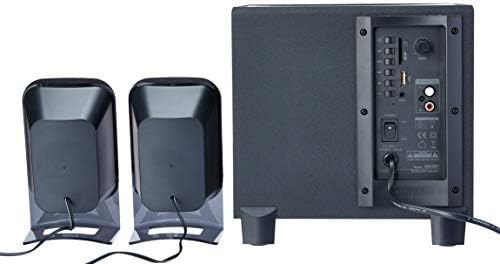
Obrázek 4.2: Complete Edifier XM2BT 2.1 speaker system from the rear, illustrating connections between subwoofer and satellite speakers.
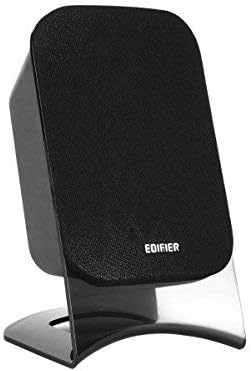
Obrázek 4.3: Close-up of a single Edifier XM2BT satellite speaker.
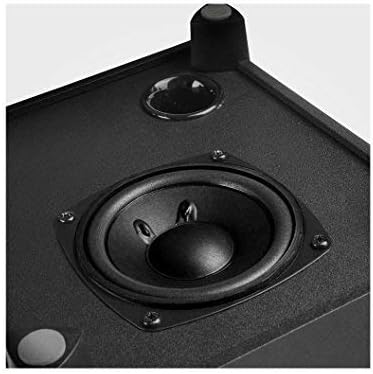
Obrázek 4.4: Detailní záběr view of the subwoofer driver, located on the side of the main unit.
5. Pokyny k nastavení
- Umístění reproduktorů: Place the subwoofer on a stable surface, preferably on the floor for optimal bass. Position the satellite speakers on either side of your listening area, facing towards you.
- Připojení satelitních reproduktorů: Connect the cables from the two satellite speakers to the "Speaker Out" (L/R) ports on the rear panel of the subwoofer. Ensure correct polarity if applicable (usually indicated by color or markings).
- Připojení zdroje zvuku:
- Vstup AUX: Use the provided 3.5mm audio cable to connect your audio device (e.g., smartphone, computer) to the "AUX" input port on the subwoofer.
- USB/SD karta: Vložte USB flash disk nebo SD kartu se zvukovým souborem files into the respective port/slot. The system will automatically switch to USB/SD mode if detected.
- Bluetooth: For Bluetooth connection, proceed to the "Operating Instructions" section for pairing details.
- Připojte napájení: Plug the power cord into a standard AC power outlet.
- Zapnutí: Flip the "Power" switch on the rear panel of the subwoofer to the "ON" position. The system is now ready for operation.
6. Návod k obsluze
6.1 Zapnutí/vypnutí
To power on the system, switch the power button on the rear panel to the "ON" position. To power off, switch it to "OFF".
6.2 Výběr režimu
The XM2BT supports multiple input modes. Use the "MODE" button on the remote control or the main unit to cycle through the available inputs: Bluetooth, AUX, USB, and SD card.
6.3 Volume and Bass Control
- Objem: Adjust the master volume using the main volume knob on the subwoofer or the volume buttons on the remote control.
- Bas: Adjust the bass level using the "BASS" control knob on the rear panel of the subwoofer.
6.4 Párování Bluetooth
- Switch the speaker system to Bluetooth mode. The indicator light will flash, indicating it is in pairing mode.
- On your audio device (e.g., smartphone, tablet), enable Bluetooth and search for available devices.
- Select "EDIFIER XM2BT" from the list of found devices.
- Once paired, the indicator light on the speaker system will become solid, and you will hear a confirmation tone.
- You can now play audio from your device through the XM2BT speakers.
6.5 Přehrávání z USB/SD karty
- Insert a USB flash drive or SD card into the corresponding slot on the subwoofer.
- The system will automatically detect the media and begin playback. If not, switch to USB or SD mode using the "MODE" button.
- Use the playback controls (Play/Pause, Next/Previous Track) on the remote control or main unit to manage your music.
7. Údržba
- Čištění: Use a soft, dry cloth to clean the surfaces of the speakers. Do not use liquid cleaners, aerosols, or abrasive materials.
- Skladování: Pokud systém skladujete delší dobu, odpojte jej ze zásuvky a uložte jej na chladném a suchém místě mimo dosah přímého slunečního záření a extrémních teplot.
- Větrání: Ensure that the ventilation openings on the subwoofer are not blocked to prevent overheating.
8. Řešení problémů
| Problém | Možná příčina | Řešení |
|---|---|---|
| Žádný zvuk |
|
|
| Problémy s připojením Bluetooth |
|
|
| USB/SD karta se nepřehrává |
|
|
9. Specifikace
| Funkce | Detail |
|---|---|
| Značka | Edifier |
| Číslo modelu | XM2BT |
| Typ reproduktoru | 2.1 Multimediální reproduktorový systém |
| Technologie připojení | Kabelové, Bluetooth |
| Speciální funkce | Bluetooth, USB, SD karta, AUX vstup |
| Zdroj napájení | Elektrický kabel |
| Maximální výstupní výkon reproduktoru | 21 wattů |
| Rozměry produktu | 32.3 x 31 x 27.7 cm (přibližně 12.7 x 12.2 x 10.9 palce) |
| Hmotnost položky | 3.55 kg (cca 7.8 lb) |
| Kompatibilní zařízení | Tablet, Laptop, Smartphone |
| Barva | Černý |
10. Záruka a podpora
Edifier products are designed with quality and reliability in mind. For detailed warranty information, please refer to the warranty card included with your product or visit the official Edifier website. For technical support, product inquiries, or service, please contact Edifier customer service or visit the Edifier Brand Store.
Ask a question about this manual
Ask about setup, troubleshooting, compatibility, parts, safety, or missing instructions. Manuals+ will review the question and use this page’s manual context to help answer it.