1. Úvod
This manual provides detailed instructions for the operation and maintenance of your EVISTR L150 Digital Voice Recorder. Please read this manual thoroughly before using the device to ensure proper functionality and to maximize your user experience.
2. Konec produktuview
2.1 Klíčové vlastnosti
- High-quality audio recording at 1536kbps stereo.
- Noise reduction and Automatic Gain Control (AGC) for clear voice capture.
- 8GB internal storage, supporting up to 560 hours of recording at 32kbps.
- Voice Activated Recording (VOR/AVR) to record only when sound is detected.
- Multiple recording settings: MP3/WAV.
- A-B Repeat and variable playback speed for review.
- 7 preset recording scenes: Normal, Interview, Meeting, Outdoor, Bar, Concert, Meeting Hall.
- Additional functions: Auto Record, Telephone Recording, MP3 Player, Calendar, Alarm Clock, Stopwatch.
- Metal aluminum alloy construction.
2.2 Obsah balení
Ověřte, zda jsou v balení přítomny všechny položky:
- EVISTR L150 Digital Voice Recorder Device
- USB kabel
- Sluchátka
- Line-in kabel
- Telephone Recording Adapter Kits
- Uživatelská příručka (tento dokument)
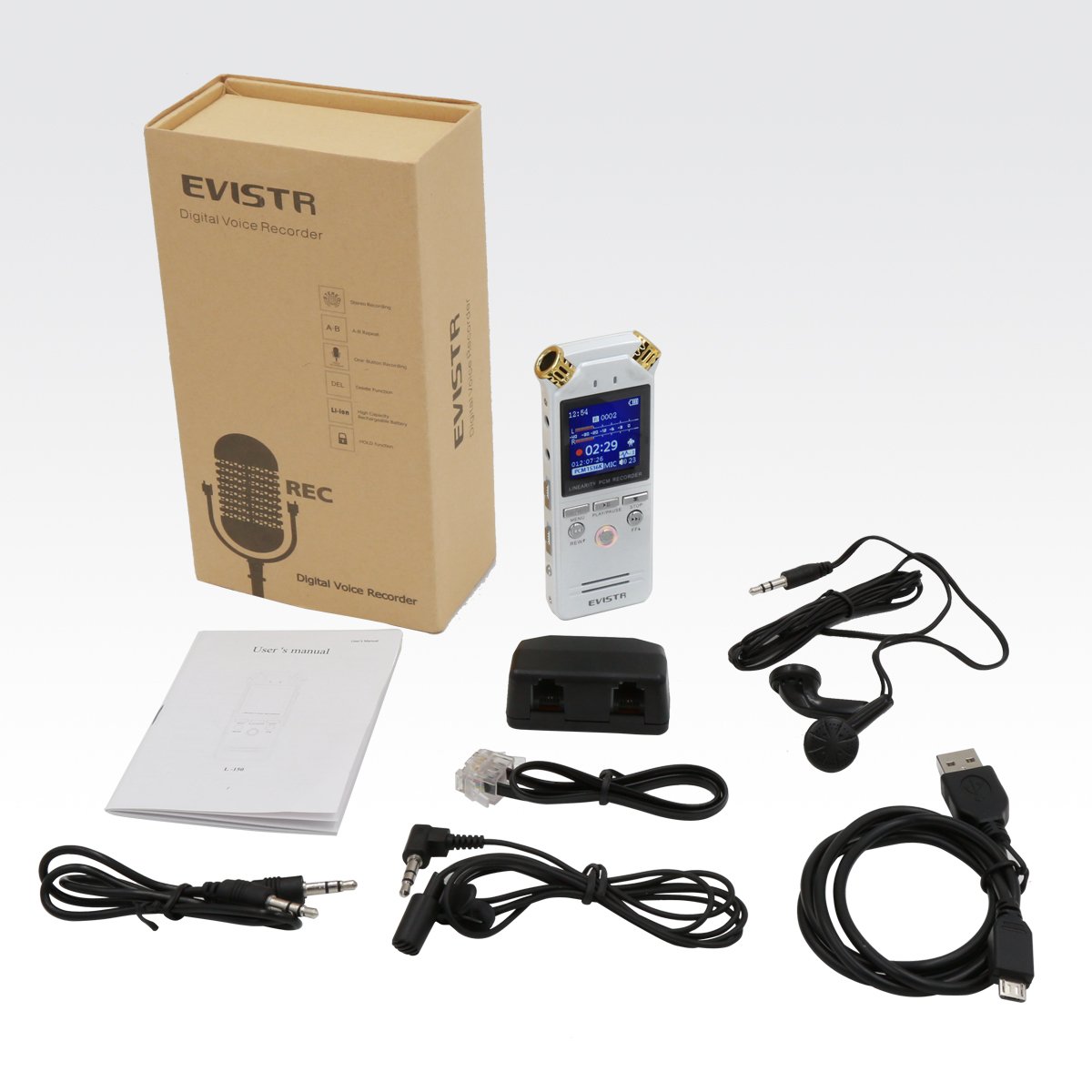
Image: Contents of the EVISTR L150 Digital Voice Recorder package, including the recorder, USB cable, earphones, line-in cable, telephone recording adapter, and user manual.
2.3 Rozložení zařízení

Obrázek: Přední strana view of the EVISTR L150 Digital Voice Recorder, showing the display screen, built-in microphones, and control buttons (MENU, PLAY/PAUSE, STOP, REW, REC, FF).

Obrázek: Boční view of the EVISTR L150 Digital Voice Recorder, highlighting the MIC/LINE input, TEL LINE input, volume controls, ERASE button, USB port, HOLD switch, and A-B repeat button.

Obrázek: Zpět view of the EVISTR L150 Digital Voice Recorder, showing the model number, capacity, input voltage, and regulatory marks.
3. Nastavení
3.1 Nabíjení zařízení
Before first use, fully charge the device. Connect the supplied USB cable to the recorder's USB port and to a computer or a USB power adapter (not included). The battery indicator on the display will show charging status.

Image: The EVISTR L150 Digital Voice Recorder connected via USB cable to a laptop, illustrating the charging and data transfer process.
3.2 Zapnutí/vypnutí
- Pro zapnutí stiskněte a podržte PLAY/PAUSE tlačítko.
- Chcete-li přístroj vypnout, stiskněte a podržte tlačítko ZASTÁVKA tlačítko.
- The device features an auto-off function after 3 minutes of inactivity.
3.3 Počáteční nastavení
Vstupte do nabídky stisknutím tlačítka MENU tlačítko. Použijte REW a FF tlačítka pro navigaci a PLAY/PAUSE to confirm. Set the date and time for accurate file timestamps.
4. Návod k obsluze
4.1 Základní nahrávání
- To start recording, slide the switch to REC nebo stiskněte REC button. The recording indicator will illuminate.
- Chcete-li nahrávání pozastavit, stiskněte tlačítko PLAY/PAUSE button during recording. Press again to resume.
- Chcete-li zastavit nahrávání a uložit file, stiskněte tlačítko ZASTÁVKA tlačítko.

Image: A hand pressing the red REC button on the EVISTR L150 Digital Voice Recorder, with instructions for PLAY, REC, STOP, and rebooting the device.
4.2 Přehrávání
- To play a recording, navigate to the desired file pomocí REW a FF tlačítka a poté stiskněte PLAY/PAUSE.
- Upravte hlasitost pomocí HLASITOST + / - knoflíky na boku.
- Opakování AB: Během přehrávání stiskněte tlačítko AB button once to set point A. Press again to set point B. The device will loop playback between A and B. Press a third time to cancel.
- Variabilní rychlost přehrávání: Access this function through the menu during playback to adjust the speed.
4.3 Voice Activated Recording (VOR/AVR)
This feature allows the recorder to start recording automatically when sound is detected and pause when silence occurs, conserving memory and battery. Enable VOR/AVR in the device's menu settings.
4.4 Recording Scenes
The device offers 7 preset recording scenes to optimize audio capture for different environments. Select the appropriate scene from the menu:
- Normální
- Meziview
- Zasedání
- Venkovní
- Bar
- Koncert
- Meeting Hall

Image: The EVISTR L150 Digital Voice Recorder depicted in various usage scenarios, including a classroom, interview, meeting, outdoor music event, and speech, illustrating its versatility.

Image: The EVISTR L150 Digital Voice Recorder being held in a meeting room, demonstrating its use for capturing discussions with dynamic noise reduction.
4.5 File Řízení
Chcete-li odstranit a file, vyberte file during playback or in the file list, then press the VYMAZAT tlačítko. Po zobrazení výzvy potvrďte smazání.
4.6 Připojení k počítači
Connect the recorder to your computer using the supplied USB cable. The device will appear as a removable disk. You can transfer recorded files to your computer or use the recorder as a portable storage device.
4.7 Telephone Recording
Use the provided telephone recording adapter kits and line-in cable to record telephone conversations. Refer to the specific instructions included with the adapter for detailed setup.
4.8 MP3 Player Function
The device can also function as an MP3 player. Transfer MP3 files to the device's internal storage via USB. Switch between recording files a hudba files pomocí DVR/MUSIC přepínač.
5. Údržba
- Uchovávejte zařízení v suchu a mimo dosah extrémních teplot.
- Zařízení čistěte měkkým, suchým hadříkem. Nepoužívejte tekuté čisticí prostředky ani rozpouštědla.
- Zabraňte pádu zařízení nebo jeho vystavení silným nárazům.
- Pravidelně baterii nabíjejte, i když ji nepoužíváte, abyste ji udrželi v dobrém stavu.
6. Řešení problémů
- Device is unresponsive/frozen: If the device becomes unresponsive, press and hold the PLAY/PAUSE button for approximately 15 seconds to perform a reboot.
- No recording sound: Check microphone settings, ensure VOR/AVR is not set too high for ambient noise, and verify battery level.
- Nelze přenést files do počítače: Ensure the USB cable is securely connected and the device is recognized by the computer. Try a different USB port or cable.
- Klávesy nereagují: Zkontrolujte, zda DRŽET switch on the side of the device is engaged. Disengage it to unlock the keys.
7. Specifikace
| Funkce | Specifikace |
|---|---|
| Značka | EVISTR |
| Model | L150 |
| Kapacita paměti | 8 GB |
| Kvalita záznamu | Up to 1536kbps PCM Stereo |
| Nahrávací formáty | MP3, WAV |
| Max Recording Time (32kbps) | 560 hodiny |
| Hardwarové rozhraní | USB |
| Kompatibilní zařízení | MP3 přehrávač |
| Technologie displeje | LCD |
| Formát mikrofonu | Vestavěný |
| Zdroj napájení | Napájení baterií (Lithium Ion) |
| Průměrná životnost baterie | 560 Hours (recording) |
| Rozměry produktu | 11 x 1.19 x 3.61 cm |
| Hmotnost položky | 295 g |
8. Záruka a podpora
EVISTR offers comprehensive customer support for its products. For assistance, troubleshooting, or warranty inquiries, please refer to the contact information provided with your purchase or visit the official EVISTR webmísto.