
Jeřáb EE-5622
Crane EE-5622 Digital LED Display Tower Fan User Manual
Model: EE-5622
Zavedení
This manual provides detailed instructions for the safe and efficient use of your Crane EE-5622 Digital LED Display Tower Fan. Please read all instructions carefully before operation and retain this manual for future reference.

Image: Crane EE-5622 Tower Fan with its packaging, highlighting key features like digital LED display, 12-hour timer, 70-degree oscillation, and 3 adjustable speed settings.
Důležité bezpečnostní pokyny
- Always place the fan on a firm, level surface.
- Neprovozujte ventilátor s poškozeným kabelem nebo zástrčkou.
- Chraňte ventilátor před vodou nebo jinými kapalinami.
- Ensure the fan is unplugged before cleaning or maintenance.
- Nevkládejte prsty ani cizí předměty do žádných otvorů.
- Tento ventilátor je určen pouze pro použití v interiéru.
- Dohlížejte na děti, když je ventilátor používán.
Obsah balení
Ověřte, zda jsou v balení přítomny všechny položky:
- 1 x Crane EE-5622 Tower Fan
- 1 x Wireless Remote Control (batteries included)
- 1 x Uživatelská příručka (tento dokument)
Nastavení
- Rozbalení: Opatrně vyjměte ventilátor a veškeré příslušenství z obalu.
- Umístění: Place the fan on a stable, flat surface, ensuring there is adequate space around it for air circulation. Avoid placing it near curtains or objects that could obstruct airflow.
- Připojení napájení: Zapojte napájecí kabel do standardní elektrické zásuvky.

Obrázek: Plný view of the Crane EE-5622 Tower Fan, showing its base and power cord connection point.
Návod k obsluze
The Crane EE-5622 Tower Fan can be operated using the control panel on top of the unit or the wireless remote control.
Ovládací panel
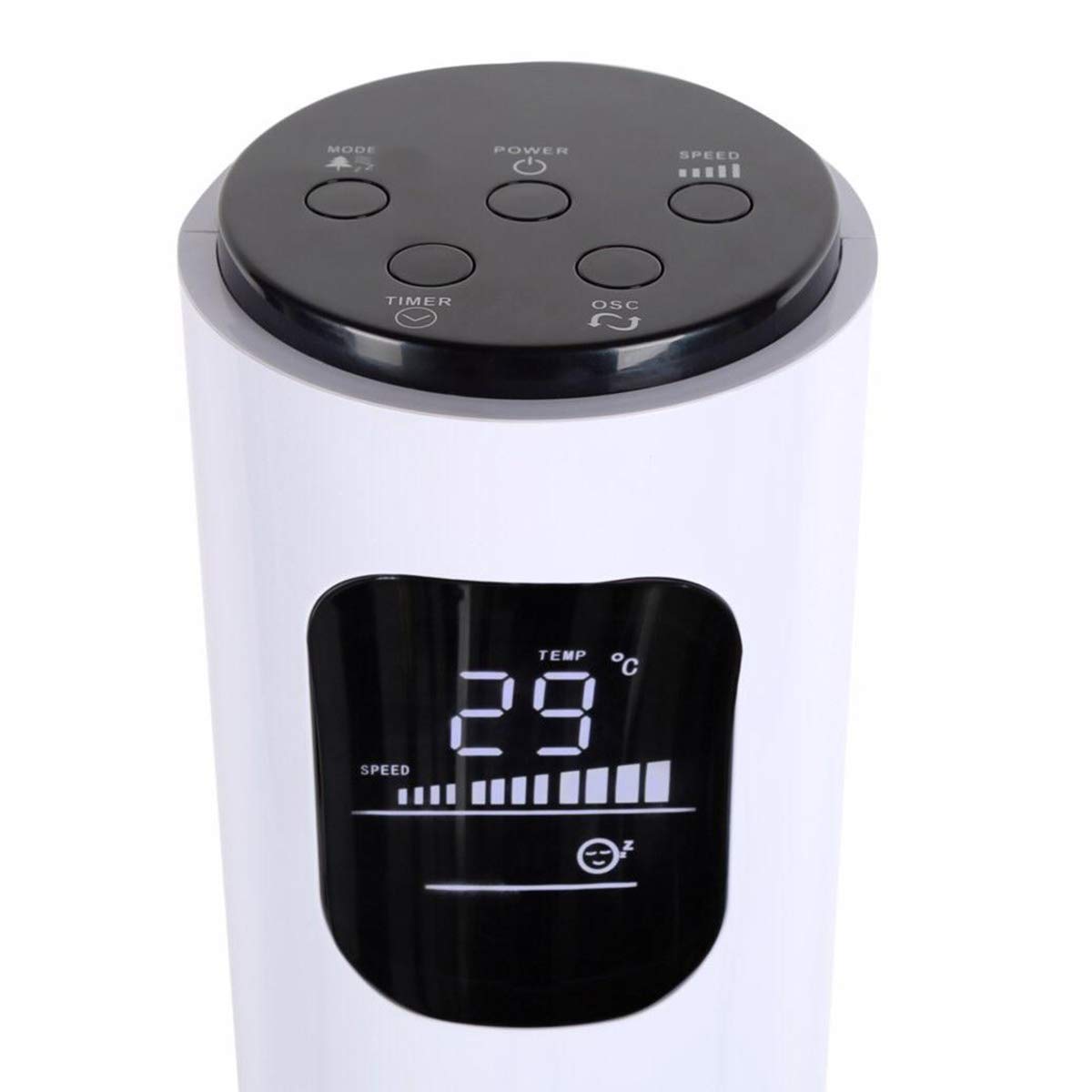
Image: Close-up of the fan's top control panel and digital LED display, showing buttons for Power, Speed, Oscillation, Timer, and Mode.
- Tlačítko napájení (⏻): Stisknutím zapnete nebo vypnete ventilátor.
- Tlačítko rychlosti (█████): Press to cycle through 3 speed settings (Low, Medium, High). The current speed is indicated on the LED display.
- Tlačítko oscilace (↻): Press to activate or deactivate the 70° oscillation function.
- Tlačítko časovače (⏱): Press to set the auto-off timer from 1 to 12 hours. Each press increases the timer by one hour.
- Tlačítko režimu (☼): Press to cycle through different operating modes:
- Normální režim: Konstantní proudění vzduchu při zvolené rychlosti.
- Režim přirozeného vánku: Simuluje přirozený vítr změnou rychlosti ventilátoru.
- Režim spánku: Gradually reduces fan speed over time for quiet operation during sleep.
Bezdrátové dálkové ovládání
The remote control provides convenient operation from a distance. Ensure the remote is pointed towards the fan's receiver.
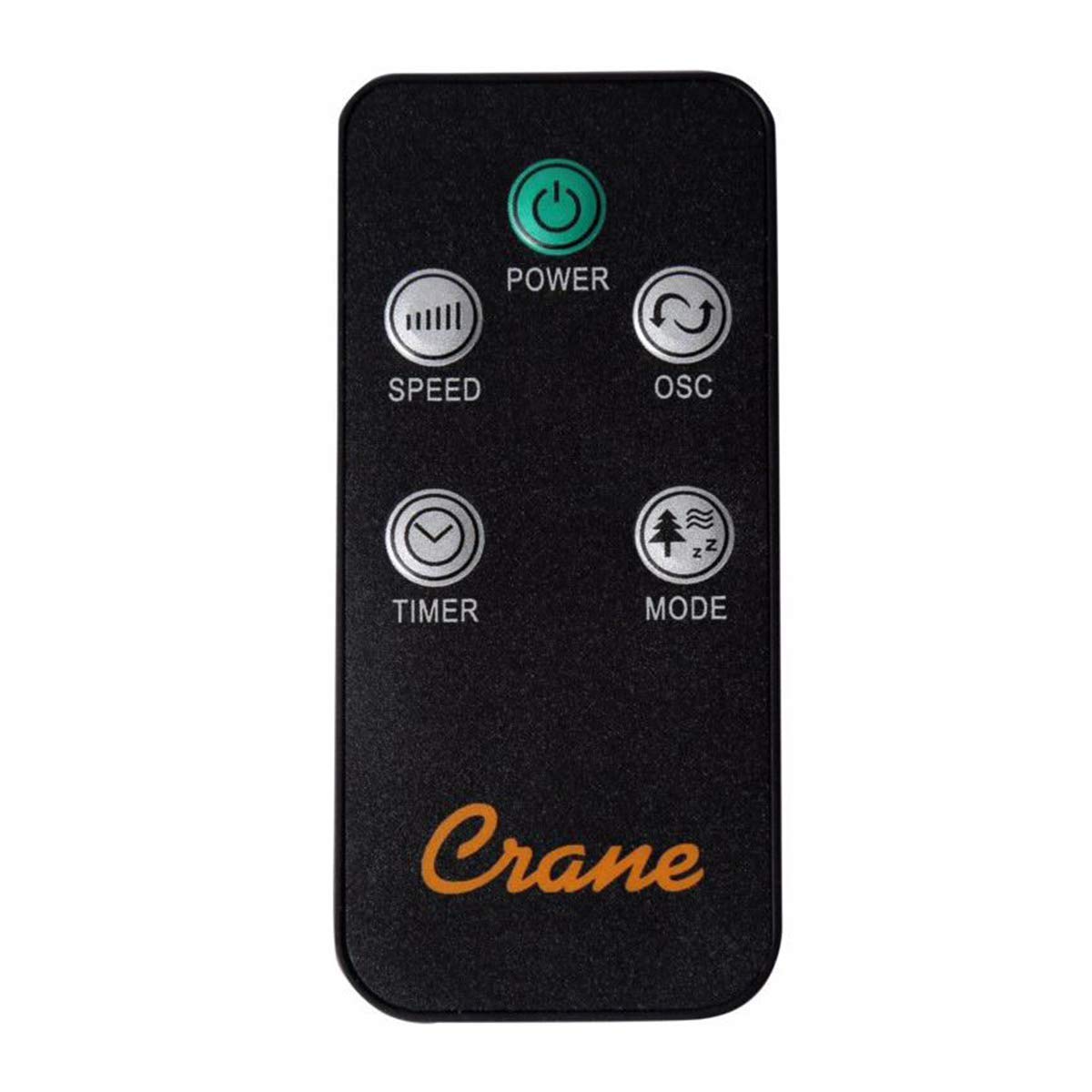
Image: The wireless remote control for the Crane EE-5622 Tower Fan, showing buttons for Power, Speed, Oscillation, Timer, and Mode.
The remote control features the same buttons as the control panel for Power, Speed, Oscillation, Timer, and Mode. It requires batteries (included).

Obrázek: Nahoře view of the Crane EE-5622 Tower Fan, illustrating the integrated slot for storing the remote control.
Údržba
Pravidelná údržba zajistí optimální výkon a dlouhou životnost vašeho ventilátoru.
- Čištění: Před čištěním vždy odpojte ventilátor ze zásuvky. Použijte měkký,amp cloth to wipe the exterior surfaces. Do not use abrasive cleaners or allow water to drip into the fan's interior.
- Odstranění prachu: Use a vacuum cleaner with a brush attachment or compressed air to remove dust from the air intake and exhaust grilles.
- Skladování: If storing the fan for an extended period, clean it thoroughly, place it back in its original packaging, and store it in a cool, dry place.
Odstraňování problémů
| Problém | Možná příčina | Řešení |
|---|---|---|
| Ventilátor se nezapne. | Chybí napájení; Napájecí kabel není zapojen; Tlačítko napájení není stisknuto. | Zkontrolujte zásuvku; Ujistěte se, že je napájecí kabel bezpečně zapojený; Stiskněte tlačítko napájení. |
| Slabé proudění vzduchu. | Fan speed set too low; Air intake/exhaust blocked; Dust accumulation. | Increase fan speed; Clear any obstructions; Clean the fan grilles. |
| Ventilátor je hlučný. | Fan not on a level surface; Foreign object inside; Dust accumulation. | Place fan on a flat, stable surface; Unplug and check for obstructions; Clean the fan. |
| Dálkové ovládání nefunguje. | Batteries depleted; Obstruction between remote and fan; Remote not pointed correctly. | Replace remote control batteries; Remove obstructions; Point remote directly at the fan's receiver. |
Specifikace
| Značka | Jeřáb |
| Číslo modelu | EE-5622 |
| Zdroj napájení | AC Powered (Remote Control: Battery Powered) |
| Wattage | 45 wattů |
| Počet rychlostí | 3 |
| Úhel oscilace | 70° |
| Časovač | 1 až 12 hodin |
| Výška | Přibližně 115 cm (44 palce) |
| Hmotnost položky | 5.1 libry |
| Kontrolní metoda | Remote Control, On-unit Buttons |
| Speciální funkce | Digital LED Display, Room Temperature Display, Natural Breeze Mode, Sleep Mode, Auto Shut-off |
| Materiál | Acrylonitrile Butadiene Styrene (ABS), Plastic Blades |
| Vnitřní/venkovní použití | Pouze pro vnitřní použití |
Záruka a podpora
For warranty information or technical support, please refer to the warranty card included with your product or contact Crane customer service directly. Contact details are typically available on the manufacturer's official webmísto nebo obal produktu.
Poznámka: Zákazníkviews indicate potential challenges with service support. It is recommended to retain your purchase receipt for warranty claims.
Ask a question about this manual
Ask about setup, troubleshooting, compatibility, parts, safety, or missing instructions. Manuals+ will review the question and use this page’s manual context to help answer it.