
Walfront HA-4012
Walfront Islamic Azan Alarm Clock User Manual
Model: HA-4012
Zavedení
The Walfront Islamic Azan Alarm Clock is a digital prayer clock designed to assist Muslims with daily prayer times. It features automatic Azan time calculation for various cities, multiple alarm functions including a special Fajr alarm, temperature display, and a full-screen light for visibility in the dark. This manual provides instructions for setting up, operating, and maintaining your clock.

Obrázek: Přední strana view of the Walfront Islamic Azan Alarm Clock, displaying time, date, and prayer times.
Klíčové vlastnosti
- Automatic Azan Times: Pre-programmed Azan times for over 1500 cities worldwide, with five daily prayer times.
- Special Fajr Alarm: A unique alarm that adjusts daily relative to the Fajr Azan time, ensuring you wake up consistently after Fajr.
- Funkce odložení buzení na 5 minut: Allows for a brief delay before the alarm sounds again.
- Full Screen Light: Poskytuje osvětlení pro snadné viewza zhoršených světelných podmínek.
- Multi-Display: Shows current time, date, week, and daylight saving time status.
- Zobrazení teploty: Zobrazuje teplotu ve stupních Celsia nebo Fahrenheita.
- Nastavitelná hlasitost: Azan volume can be controlled via a dial switch or set to a beep sound.
- Makkah Music: Includes Makkah music for prayer.
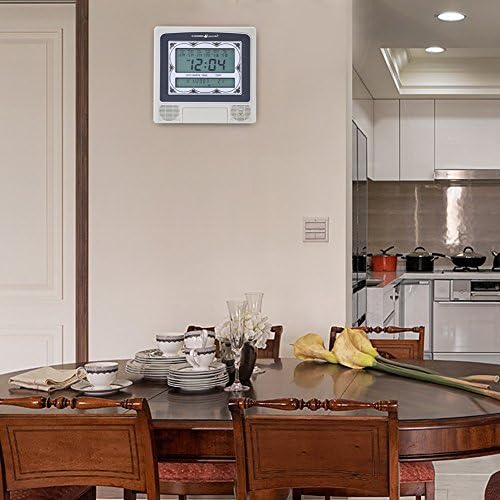
Image: The Walfront Islamic Azan Alarm Clock mounted on a wall, highlighting its function as a Muslim prayer clock.
Nastavení
Before using your clock, ensure it is powered correctly. The clock operates on battery power (batteries not included) or via a DC 6V 300mA power adapter (if applicable, check product packaging for power adapter inclusion).
1. Počáteční zapnutí a základní nastavení
- Insert batteries into the designated compartment or connect the power adapter.
- The clock display should illuminate.
- Vyhledejte SOUBOR button, typically on the back or side of the unit.
- Stiskněte SOUBOR pro vstup do režimu nastavení.
- Použijte UP (▲) a DOLŮ (▼) buttons to adjust values (e.g., hour, minute, year, month, day).
- Stiskněte SOUBOR again to confirm each setting and move to the next parameter.
2. Setting Your City for Azan Times
The clock has pre-programmed Azan times for 1500 cities. You need to select your current city for accurate prayer times.
- In setting mode, navigate to the city selection option (this may be indicated by a city code or name on the display).
- Použijte UP a DOLŮ buttons to scroll through the available city codes or names until you find your location. Refer to the included city code list if provided with your product.
- Once your city is selected, press SOUBOR to confirm. The clock will automatically calculate the Azan times for your chosen city.
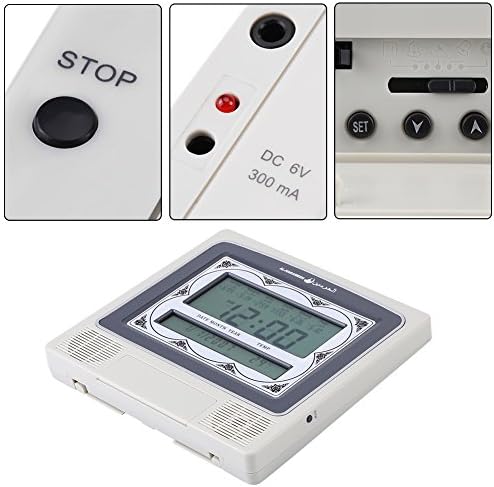
Obrázek: Podrobný view of the clock's control buttons (STOP, SET, Y, A) and the DC 6V 300mA power input port.
Návod k obsluze
1. Daily Alarm and Fajr Alarm
- The clock provides five daily Azan times automatically based on your selected city.
- To set a specific daily alarm (non-Azan related), navigate to the alarm setting mode using the SOUBOR button. Adjust the desired alarm time using the UP a DOLŮ tlačítka.
- The special Fajr alarm function allows you to set an alarm relative to the Fajr Azan. For example, if you set it for "5 minutes after Fajr," the alarm time will automatically adjust each day to maintain this interval.
2. Funkce odložení buzení
Když zazní alarm, stiskněte tlačítko ZASTÁVKA button (or a designated snooze button if available) to activate the 5-minute snooze function. The alarm will sound again after 5 minutes.
3. Ovládání hlasitosti
The Azan volume can be adjusted using the dial switch, typically located on the side or back of the clock. You can also set the clock to beep 3 times instead of playing the full Azan by adjusting this setting in the menu or via the dial.
4. Zobrazení teploty
The clock displays the current room temperature. You can switch between Celsius and Fahrenheit units through the settings menu (refer to the setup section for navigating settings).
5. Full Screen Light
The full screen light activates to improve visibility of the display in dark environments. This feature is typically automatic or can be toggled via a dedicated button.
Údržba
- Čištění: Hodiny otřete měkkým, suchým hadříkem. Nepoužívejte abrazivní čisticí prostředky ani rozpouštědla, protože by mohly poškodit displej neboasing.
- Výměna baterie: If the display dims or functions become erratic, replace the batteries. Ensure correct polarity when inserting new batteries.
- Umístění: Place the clock on a stable surface or mount it securely on a wall. Avoid direct sunlight, extreme temperatures, or high humidity.
Odstraňování problémů
| Problém | Možná příčina | Řešení |
|---|---|---|
| Displej je prázdný nebo tmavý. | Low or dead batteries; power adapter not connected or faulty. | Replace batteries or ensure power adapter is securely connected and functional. |
| Azan times are incorrect. | Incorrect city selected; incorrect date/time set. | Verify and re-select your city. Ensure the current date and time are set accurately. |
| Alarm se nespustí. | Alarm is turned off; volume is too low or muted. | Check alarm settings to ensure it is enabled. Adjust the volume dial. |
| Tlačítka nereagují. | Dočasná softwarová závada; slabá baterie. | Remove and re-insert batteries (power cycle). Replace batteries if low. |
Specifikace
| Značka | Walfront |
| Model | HA-4012 |
| Typ zobrazení | Digitální |
| Barva | Šedá, bílá |
| Rozměry produktu | 8.8 cm Š x 8.4 cm V |
| Hmotnost položky | 1.25 liber (0.57 kilogramů) |
| Zdroj napájení | Napájeno bateriemi (baterie nejsou součástí balení) |
| Materiál | Plast |
| Typ montáže | Držák na zeď |
| Speciální funkce | Alarm, Daylight Saving, Temperature Display |
| UPC | 663862629408 |
Záruka a podpora
This Walfront product is protected by a Doživotní záruka. Walfront is committed to customer satisfaction. If you encounter any issues with the product quality or functionality, please contact Walfront customer support for assistance.
For support, please refer to the contact information provided with your product packaging or visit the official Walfront webmísto.
Ask a question about this manual
Ask about setup, troubleshooting, compatibility, parts, safety, or missing instructions. Manuals+ will review the question and use this page’s manual context to help answer it.